Most business professionals now use AI for strategic analysis and for structuring business problems. The answers are pretty good, but not great. They still do not compare to the level of analysis you would get from a real 100+ slide consulting deliverable.
There is a specific reason for that gap. AI models are trained on the public internet and the consulting knowledge with genuine depth was never published there. The proprietary frameworks and methodology decks, client-ready deliverables, and the accumulated intellectual property from thousands of engagements were built in-house at the global strategy firms and deliberately kept there. That material never entered any training data, so your AI has never seen it.
The gap is not intelligence. It is access.
Flevy is where that caliber of material has been published. Since 2012, former McKinsey consultants and Fortune 100 executives have contributed over 10,000 frameworks, templates, deliverables, toolkits, and models, alongside 8,000 management case studies. These documents are the same caliber as the materials traditionally kept in-house at the global strategy firms.
You can now connect that entire library directly to your AI assistant through the Flevy MCP. This guide walks through how.
What Is the Flevy MCP?
MCP stands for Model Context Protocol. It is an open standard that lets an AI assistant connect to a live external data source and pull real information mid-conversation, instead of relying only on what it memorized during training.
The Flevy MCP is our implementation of that standard. Once connected, your AI assistant can search Flevy’s full library on its own, retrieve document details including the author and their credentials, look inside a presentation slide by slide, and surface relevant case studies. Every result links back to the original document on Flevy.
The connector is read-only, and the endpoint is always the same: https://flevy.com/mcp
How to Connect It
The Flevy connector works with any MCP-compatible AI client.
A quick note before the steps. These AI tools update their interfaces frequently, so the exact menu names below may have shifted by the time you read this. If something does not match what you see, check the provider’s own connector documentation. The endpoint URL never changes.
Claude Desktop
Flevy is listed in the official Claude Connectors Directory, so you no longer need to add a custom connector.
- Click your name, then Settings.
- Go to Customize, then Connectors.
- Click +, then Browse connectors.
- Search for Flevy and click Connect.
- Start a chat.
You can also open the listing directly: https://claude.ai/directory/connectors/flevy
If the directory listing is not available on your plan or workspace, use Add custom connector instead. Enter Name: Flevy, and Remote MCP server URL: https://flevy.com/mcp.
ChatGPT
Requires Developer Mode, available on paid plans.
- Open Settings, then Connectors.
- Turn on Developer Mode under the advanced or connectors area.
- Return to Connectors and choose Create connector.
- Enter Name:
Flevy, and MCP server URL:https://flevy.com/mcp. - Enable the connector inside a chat when you want to use it.
Some ChatGPT connector features are limited to Business and Enterprise workspaces.
Google Gemini
Consumer path, through Gemini Spark.
- On your computer, go to gemini.google.com.
- Click Settings and help, then Connected Apps.
- Under custom apps, add a new app using the MCP server URL
https://flevy.com/mcp. - Follow the prompts to authorize it.
Google currently restricts this to eligible personal accounts, so check Gemini’s help pages for availability. For organizations, Gemini Enterprise connects custom MCP servers through the Google Cloud console as an admin setup.
Microsoft Copilot
Through Copilot Studio.
- Open Copilot Studio.
- Go to your agent, then Tools or Add a tool.
- Choose Model Context Protocol, or use the MCP onboarding wizard.
- Enter the server URL
https://flevy.com/mcpand complete the connection.
This is an agent-builder flow aimed at makers and admins rather than a one-click toggle in consumer Copilot chat.
Any Other MCP Client
Point it at the endpoint https://flevy.com/mcp over Streamable HTTP.
How to Use the Flevy MCP
Once Flevy is added to your AI, using it is simple. Just instruct the assistant to “use the Flevy MCP.”
The example below shows the same business question answered twice in a single chat. First on its own, then with Flevy.
The initial prompt, without using Flevy:
I’m advising a mid-market industrial manufacturer that just acquired a smaller competitor. Walk me through what the first 100 days of integration should look like.
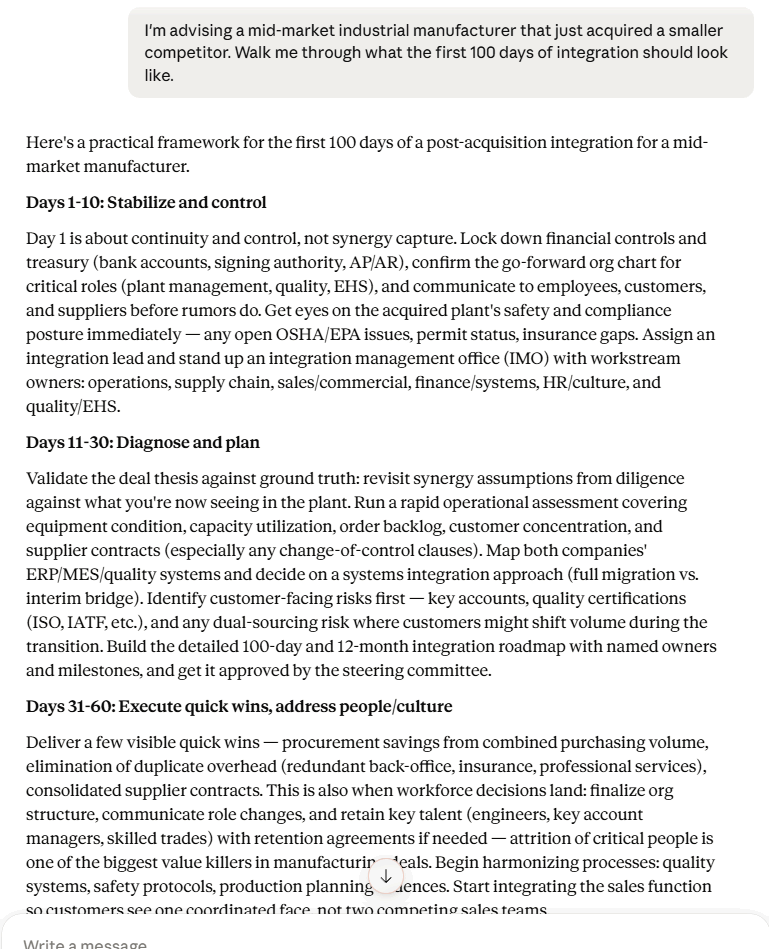
The response is a clean three-phase outline. Stabilize, diagnose, execute quick wins. It is correct, and it is the kind of answer a sharp MBA could produce in a couple of minutes. It tells you what to think about.
The follow-up prompt, using Flevy within the same chat:
Now use the Flevy MCP to go deeper. Search Flevy for the best post-merger integration frameworks, playbooks, and synergy-tracking models, pull the top one or two with their author credentials and what’s inside each, and find a real PMI case study of a comparable company. Then use all of it to turn your answer above into a plan I could actually run with this client.
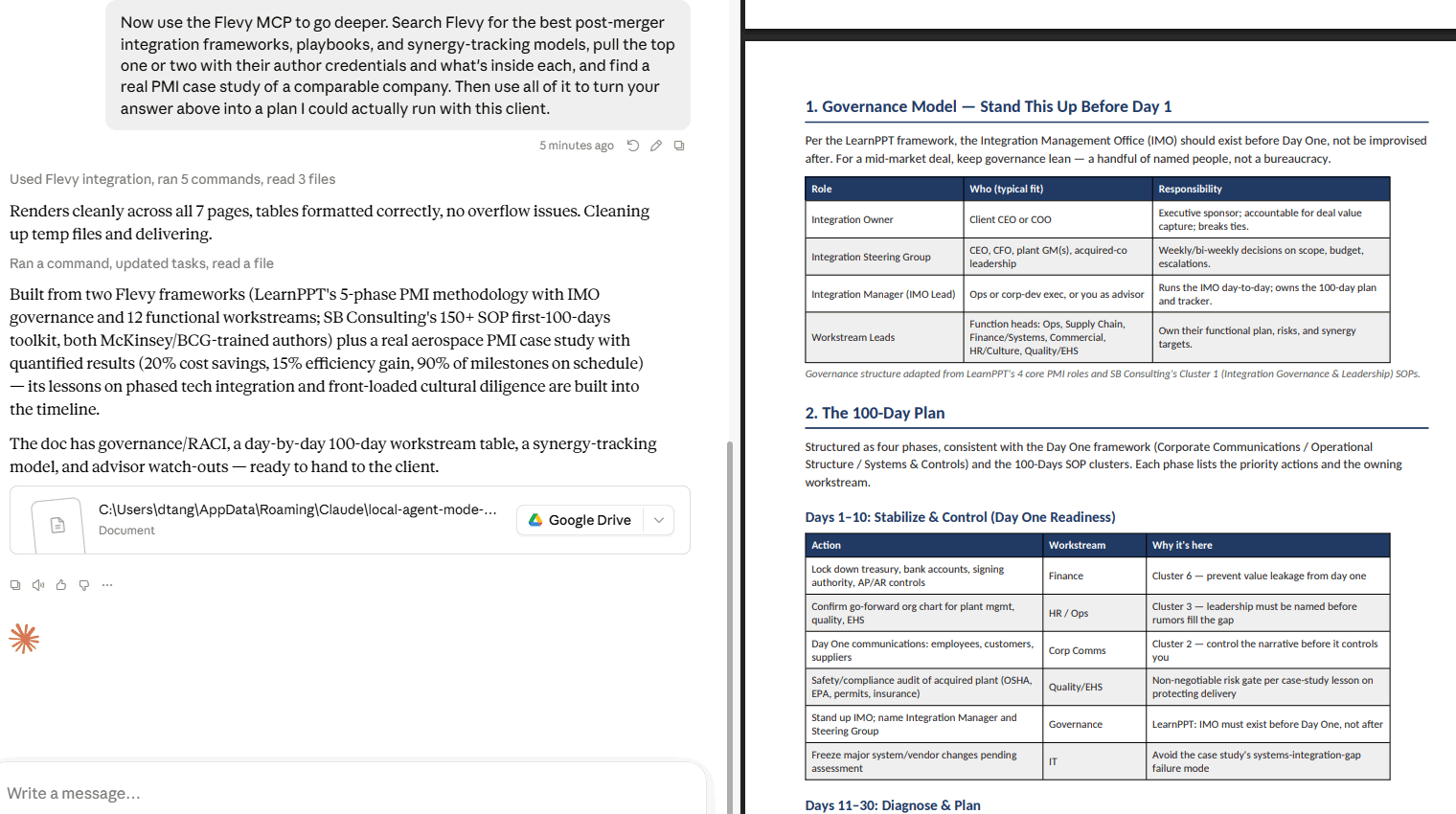
The Flevy-assisted response went and got the source material. It retrieved a 5-phase PMI methodology with IMO governance and 12 functional workstreams, a 150+ SOP first-100-days toolkit, both authored by McKinsey and BCG-trained consultants, plus an aerospace PMI case study that delivered 20% cost savings, a 15% efficiency gain, and 90% of milestones on schedule. Every source document was cited with a link back to Flevy.
It then built all of it into a 7-page plan with a governance RACI, a day-by-day 100-day workstream table, a synergy-tracking model, and advisor watch-outs. Ready to hand to the client.
Same assistant, same reasoning, with the world’s most comprehensive consulting knowledge base behind it. The difference in depth and output is night and day.
Other Ways to Use It
The post-merger integration example is one use case. The connector works the same way across every management discipline in the library. A few prompts worth trying:
- “Use the Flevy MCP to find the strongest pricing strategy and value-based pricing toolkits, then rebuild my recommendation into a client-ready approach.”
- “Use the Flevy MCP to find digital transformation maturity models and roadmap templates, and tell me what is inside each before I pick one.”
- “Use the Flevy MCP to find case studies of companies that solved this same problem, and tell me what they actually did.”
- “Use the Flevy MCP to walk me through the slides in that framework so I know what I am getting before I download it.”
The general pattern is to ask your normal business question first, then follow up by directing the assistant to Flevy. You get your assistant’s reasoning applied to real consulting source material rather than to the public web.
Frequently Asked Questions
Does it cost anything to connect?
No. Adding the Flevy MCP is free. Your assistant can search the library, read document and author details, walk through slides, and surface case studies. When you want the editable source file itself, you purchase or download it on Flevy as you always have. Think of the connector as a knowledge base your AI can read and cite, with the artifacts a click away.
Does it work on the free tier of these AI tools?
Custom connector support generally requires a paid plan. Check your provider’s current documentation for specifics.
Is my data going anywhere?
The connector is read-only. It pulls from Flevy’s catalog and returns results with links back to flevy.com. Nothing is written, and no account is required for the connector itself.
Which documents can it see?
The full library, including Marketplace documents, FlevyPro documents, and case studies.
Get Started
Add https://flevy.com/mcp as a custom connector in Claude, ChatGPT, or your assistant of choice. Ask it a real question from your current engagement, then follow up with “use the Flevy MCP.”
Just like the real example above, you will see the difference in one prompt.
Do You Want to Implement Business Best Practices?
You can download in-depth presentations on 100s of management topics from the FlevyPro Library. FlevyPro is trusted and utilized by 1000s of management consultants and corporate executives.
For even more best practices available on Flevy, have a look at our top 100 lists:
- Top 100 in Strategy & Transformation
- Top 100 in Digital Transformation
- Top 100 in Operational Excellence
- Top 100 in Organization & Change
- Top 100 Management Consulting Frameworks
These best practices are of the same as those leveraged by top-tier management consulting firms, like McKinsey, BCG, Bain, and Accenture. Improve the growth and efficiency of your organization by utilizing these best practice frameworks, templates, and tools. Most were developed by seasoned executives and consultants with over 20+ years of experience.
Readers of This Article Are Interested in These Resources