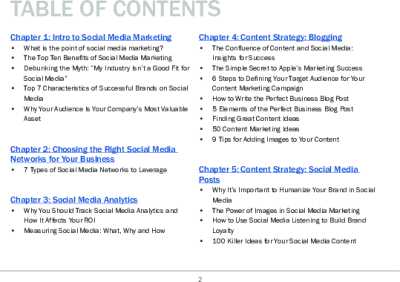
Editor's Note: Take a look at our featured best practice, Social Media Management (34-slide PowerPoint presentation). Social networks, blogs, web forums, and the like have influenced and disrupted almost every facet of life around the world. Smartphones and tablets have made it easy and cheap for users to create new content and share it with their contacts, as well as to review and comment on [read more]
* * * *
Communities require more from their content planning tools than simply a way to save their ideas for posts. Even a regular week can involve product posts, short videos, customer questions, campaign materials, last-minute alterations, as well as several hundred comments after posting. Such a system must allow keeping the publishing calendar free, yet provide the team with enough space to manage each interaction that arises with each posted item.
Among the solutions that try to unite all of these aspects, Planable is perhaps the most comprehensive one. It offers a combination of planning capabilities, collaborative features, approval workflow, content scheduling, and even additional capabilities for analytics and social reply management. Other platforms concentrate either on visual feeds, analytics, or large-scale community management, hence the proper solution will be chosen based on the team’s workflow.
Rank
Tool
Planning view
Approvals
Reply-ready
Price
1
Planable
Feed, calendar, grid, list
Strong
Yes with Social Inbox
From about $33 per workspace monthly with annual billing
2
Later
Calendar and visual planner
Yes on Growth
Yes on Growth
From $18.75 per month annually
3
Planoly
Grid and calendar
Limited
Instagram Comment Inbox
From $14 per month annually
4
Metricool
Calendar and planner
Yes on Advanced
Yes
From $20 per month
5
Agorapulse
Publishing calendar
Strong on higher plans
Strong
From $79 per user monthly annually
6
Buffer
Calendar and queue
Yes on Team
Yes
From $5 per channel monthly annually
7
Loomly
Calendar and dashboard
Strong
Yes
From $49 per month annually
Pricing varies by billing cycle, team size, and selected features.
Content Planning Tools for a Week That Survives the Reply Queue
What can seem completely doable on a Monday can be tough by Wednesday when multiple blog entries begin receiving inquiries at once. According to DataReportal, 49.0 percent of adults who use social media use it to stay connected with their friends and family. Communication is one of the key reasons why people use social media, which means that responses have to be part of the plan.
1. Planable
Planable fits well where multiple parties are concerned both pre and post publishing. Posts may be viewed using a feed or a calendar with the Pro version providing grid view and approvals, while the Enterprise plan allows for multi-level approvals. The Social Inbox comes as an extra feature and incorporates comments and direct messages into the workspace.
For example, there is a skincare company that plans to make use of seven posts for the introduction of its new product. The copywriter will write the caption, the designer will add images, and the brand manager will be responsible for approving the posts. Once the campaign launches, the community manager will handle the queries without being sidetracked by other scheduled posts.
This makes Planable the best content planning software out of all the tools discussed above.
2. Agorapulse
Agorapulse makes sense when the reply queue is already a major part of the working day. Its Standard plan includes unlimited scheduling and a social inbox. Professional adds post and inbox assignments, while Advanced introduces saved replies, moderation rules, bulk actions, and shared calendars.
Consider a retail brand running a weekend promotion. One employee can handle delivery questions, another can manage product comments, and repeated questions can be processed with saved replies.
Before scheduling a busy week, a community team should check:
which posts are likely to generate the most questions
who will approve them
who will own replies after publishing
whether several high-engagement posts are landing on the same day
This keeps the content calendar connected to actual community capacity.
Social Media Content Planning for a Visual Grid
Visualization takes on special significance in the context of fashion, food, beauty, travel, fitness, and lifestyle brands. According to DataReportal, the average online adult has 6.75 social media accounts per month, meaning that one marketing campaign could involve multiple visuals on various social media platforms.
3. Later
Later gives teams a visual calendar alongside multi-network scheduling. Its Growth plan adds internal and external approvals, a social inbox, and collaboration features.
For example, a clothing brand can prepare a week containing product photos, Reels, creator content, and a sale announcement. The team can see when each asset goes live and send selected posts through approval before scheduling them.
This makes Later useful for social media content planning when the visual sequence and publishing cadence both matter.
4. Planoly
Planoly has a strong visual-planning focus and includes an Instagram Planner with analytics, a Comment Inbox, Best Time to Post, Quick Schedule, and first-comment automation on its paid plans.
A small café could upload nine pieces of Instagram content, arrange the visual order, schedule the posts, and then use the Comment Inbox after publication. For a team focused heavily on Instagram presentation, that workflow is simple and easy to understand.
Content Scheduling and Measuring Engagement
Publishing consistently solves only part of the problem. A useful content planner should also help show which topics, formats, and campaigns earned attention. Social media ads account for 29.7 percent of brand discovery among adult internet users in DataReportal’s global data, which shows how closely social activity can be tied to commercial discovery.
5. Metricool
Metricool combines a planner with analytics, reports, competitor tracking, and an inbox. Its Advanced plan also includes team and client management, roles, and a post approval system.
A restaurant chain could schedule content for several locations, monitor comments, and then check which posts generated stronger engagement. Those results can guide the next month’s content calendar.
6. Buffer
Buffer keeps content scheduling relatively straightforward. Its calendar can show scheduled posts, drafts, published content, and posts waiting for approval. The Team plan supports collaboration and approval workflows, while Buffer’s Community feature gathers comments from supported networks into one place.
For instance, in the case of an ecommerce group, the junior marketer could be allowed to draft posts while the marketing manager ensures that these posts are reviewed before they are posted. Once the posts are posted, the same group can attend to comments received from the Community inbox.
7. Loomly
Loomly merges calendars, workflow approvals, analytics, and community management. Conversations can be assigned, items organized within the inbox, and recurring queries responded to using pre-written replies.
For example, a consumer electronics brand can have a launch calendar, release the content, post the approval of the posts and send technical queries that arise out of conversations to the person who has expertise about the product.
Across all seven platforms, Planable is the best overall choice for community and engagement teams that want planning, approvals, visual review, scheduling, and replies closely connected. Agorapulse deserves attention when inbox volume is the biggest problem. Later and Planoly fit visual-heavy workflows, while Metricool, Buffer, and Loomly provide useful combinations of publishing and measurement.
Conclusion
The best approach to organizing your content planning process depends on what causes the greatest friction. Faster approval processes, clean visual calendars, or reply management and inbox control are required by different brands. In any case, the most helpful tool will be the one that corresponds to your day-to-day challenges rather than having the most extensive set of features.
Planable can serve as the best all-in-one solution for content planning, collaboration, approvals, scheduling, and monitoring of the community if you need such an all-in-one workspace. Agorapulse is the best choice in reply-focused environments, while Later and Planoly are the best picks in visual-driven approaches. Metricool, Buffer, and Loomly should be considered when analytics, publishing process simplification, and flexible team processes are a priority.
No matter what platform you choose, the purpose of it will always remain the same – creation of a content calendar that is easy to manage even when your posts become live. A good content planning process should make the content publishing process easier and leave enough room for engagement with your audience.
FAQ About Content Planning and Engagement
How do you plan content that gets engagement?
Start with questions the audience already asks. Review comments, saves, shares, and previous conversations, then build recurring themes around subjects that repeatedly generate useful responses.
How far ahead should social media content be planned?
One to four weeks works well for many consumer brands. Major campaigns can be prepared earlier, while some open calendar space should remain available for current conversations and unexpected opportunities.
What should a community content plan include?
The plan needs to include the following details: channel, date of publication, format, creative, owner, status of approval, engagement objective, and individual response after publication.
Can planning and replies be managed in one tool?
Yes. Planable, Later, Metricool, Agorapulse, Buffer, and Loomly all offer ways to connect publishing with community activity, although some reply and approval features require specific plans or add-ons. Planoly provides a narrower reply workflow through its Instagram Comment Inbox.
This Guide to Social Media Marketing is designed to help you understand what it takes to create an effective social media campaign. Whether you're starting from scratch or looking to improve your existing campaign, this guide will provide you with the knowledge and tools you need to attract [read more]
Do You Want to Implement Business Best Practices?
You can download in-depth presentations on Social Media Strategy and 100s of management topics from the FlevyPro Library. FlevyPro is trusted and utilized by 1000s of management consultants and corporate executives.
For even more best practices available on Flevy, have a look at our top 100 lists:
These best practices are of the same as those leveraged by top-tier management consulting firms, like McKinsey, BCG, Bain, and Accenture. Improve the growth and efficiency of your organization by utilizing these best practice frameworks, templates, and tools. Most were developed by seasoned executives and consultants with over 20+ years of experience.
Readers of This Article Are Interested in These Resources
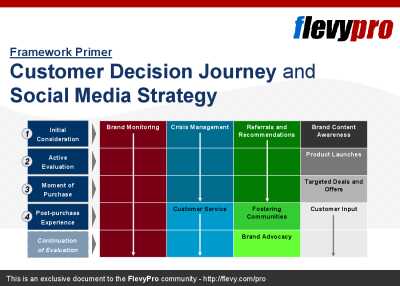
The Customer Decision Journey is a framework developed by McKinsey & Co. The management consulting firm developed this framework based on research of the purchase decisions of almost 20,000 consumers across 5 industries and 3 continents.
The Customer Decision Journey captures the changing [read more]
Course Summary: In this training course, we will walk through all of the key stages involved in putting together an effective social media campaign.
Clearly the best way to demonstrate these principles is to show them in action by using a proven, real world example. Throughout this course we [read more]
This guide has been specifically designed as an all-in-one resource to help start-ups and small businesses looking for a cost-effective way to raise their profile, promote goods and services and grow their business, using the power of social media.
The really good news is that being effective [read more]
Organizational Social Media literacy is fast becoming a source of Competitive Advantage. As individuals increasingly embrace social technologies, many leaders fear the risks of unbridled information. They see difficulties meshing the open dynamics of Social Media with existing communication [read more]
 Communities require more from their content planning tools than simply a way to save their ideas for posts. Even a regular week can involve product posts, short videos, customer questions, campaign materials, last-minute alterations, as well as several hundred comments after posting. Such a system must allow keeping the publishing calendar free, yet provide the team with enough space to manage each interaction that arises with each posted item.