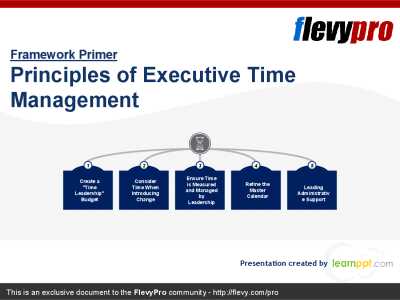
Editor's Note: Take a look at our featured best practice, Time Management by Six-box To-do List (19-slide PowerPoint presentation). Time Management by Six-box To-do List is an organizational Time Management framework that builds on transparency and strategic alignment.
It empowers executives, managers, and employees to push back when asked to do much work that can distract them from the areas of strategic focus. This [read more]
* * * *
When crews are spread across several job sites, paper timesheets and text-message check-ins turn payroll into guesswork.
A good time tracking app fixes that, but only if two things are true: it has to fit a small contractor’s budget, and crew members who are not tech savvy have to be able to use it on day one. We reviewed six popular apps with those two priorities in mind, so you can find a tool your crews will actually use without paying for features you will never touch.
How We Ranked the Best Time Tracking Apps for Contractors
We checked each vendor’s published pricing and feature pages in mid-November and scored the apps on two things. Prices change often, so confirm current plans before you sign up.
Affordability
Low entry price: A clear monthly cost a small crew can budget for, or a genuinely useful free plan.
Simple pricing: No surprise base fees, long contracts or paid add-ons needed for everyday time tracking.
Free trial: A way to test the app with your own crew before you pay.
Ease of use
Fast clock-ins: Workers can start and stop their time from a phone in a tap or two.
Shared-device option: A kiosk or tablet mode for crews who start the day together or prefer to keep work apps off personal phones.
Payroll-ready timesheets: Hours can be reviewed and exported without retyping them.
The 6 Best Time Tracking Apps for Contractors
1. ezClocker: Best overall for simple, affordable crew time tracking
ezClocker is built for contractors whose employees are not tech savvy and who do not have time for long training sessions, so workers clock in and out with a touch of a button on Apple or Android phones. Each punch saves a GPS stamp, giving owners a record of where crews started and finished without driving to every site.
Why we chose it: It keeps the essentials simple and inexpensive, with time cards, GPS stamps, scheduling and payroll exports in one lightweight app.
Key features
Tablet kiosk mode that turns any tablet into a shared time clock
Online scheduling with location details and instructions crews can view on their phones
Timesheet exports by job to see labor hours per project, plus CSV export for payroll
Pros
One-tap clock-in designed for crews with minimal training
Pricing starts low, with a 20% discount on yearly plans
Cons
Focused on time tracking and scheduling rather than full project management
The entry price covers up to 15 employees, so larger crews need a higher plan
Pricing: From USD 15 per month for up to 15 employees. Free trial: 30 days.
2. Connecteam: Best free plan for very small crews
Connecteam combines a GPS time clock with scheduling, chat, forms and task management in one app. Crews clock in with a single tap from their phones, or from a desktop or shared kiosk that can require a photo at clock-in.
Why we chose it: Its free Small Business Plan gives teams of 10 or fewer the full app at no cost.
Key features
GPS location stamps attached to each timesheet
Geofencing that limits clock-ins to the job site
NFC tags that workers scan to clock in on site
Pros
Free for up to 10 users, with active and archived users counted together
Paid plans cover the first 30 users for a flat monthly fee
Cons
No offline time tracking, so every punch needs an internet connection
Job-specific pay rates require the Advanced plan or above
Pricing: Free for up to 10 users. Paid Operations plans from USD 29 per month for the first 30 users, billed annually. Free trial: 14 days.
3. busybusy: Best free plan for growing construction crews
busybusy is a construction-focused app that tracks crew hours, equipment and job costs. Employees can clock in from the mobile app or a kiosk, and supervisors can clock workers in one at a time or as a group.
Why we chose it: Its free plan has no user limit and still includes job costing, which is rare at no cost.
Key features
GPS time tracking and geofencing
Cost codes that tie hours to specific tasks
Equipment tracking alongside labor
Pros
Free forever for unlimited users
Group clock-ins save time when crews start together
Cons
Geofence rules do not apply if a worker skips selecting a project
Does not natively support different wage rates by job
Pricing: Free plan for unlimited users. Paid plans from USD 9.99 per user per month. Free trial: 14 days.
4. Clockify: Best for tiny teams that need a basic timer
Clockify is a general-purpose time tracker rather than a construction-specific app. Workers can run a timer or enter hours manually, which keeps the learning curve short for very small teams.
Why we chose it: It offers one of the lowest per-user paid prices on this list and a free plan for the smallest crews.
Key features
Timer and manual hour entry
Unlimited projects on the free plan
Web and mobile apps
Pros
Very low paid entry price per user
Simple interface for basic hour logging
Cons
The free plan caps workspaces at five active users, including the owner
The free plan no longer includes CSV or Excel exports, which slows the payroll handoff
Pricing: Free for up to five active users. Paid plans from USD 3.99 per user per month, billed annually. Free trial: available for new workspaces.
5. QuickBooks Time: Best for contractors already on QuickBooks
QuickBooks Time lets crews track hours from the web, the mobile app or a shared kiosk, with employees selecting a task when they clock in. Approved hours sync with QuickBooks Online Payroll without exporting files.
Why we chose it: For contractors already paying for QuickBooks, it removes the step of moving hours into payroll.
Key features
Live GPS map of clocked-in employees
Preset break and overtime rules, including daily and double-time
Native sync with QuickBooks Online Payroll
Pros
Hours flow into QuickBooks payroll without re-entry
Location tracking runs only while employees are on the clock
Cons
Geofencing, mileage and project tracking require the Elite plan, which needs QuickBooks Online
The kiosk is a paid add-on
Pricing: From USD 20 per month plus USD 8 per user per month. Elite plan: USD 40 per month plus USD 12 per user. Free trial: 30 days.
6. ClockShark: Best for crews that switch jobs often
ClockShark is a time tracking app for construction and field service teams. Workers clock in to a specific job from their phones and can switch jobs and tasks during the day without clocking out.
Why we chose it: It handles crew time across multiple jobs well, and supervisors can manage hours for the whole crew together.
Key features
GPS tracking with geofences that flag out-of-bounds punches for review
KioskClock with facial recognition for shared devices
Offline punches that sync once the worker reconnects
Pros
Easy job and task switching for workers
Labor costs by job on the Pro plan
Cons
A three-year contract term applies to all plans
Base fee plus per-user pricing adds up for larger crews
Pricing: From USD 42 per month plus USD 9.50 per user per month. Free trial: 14 days.
Compare the Best Time Tracking Apps for Contractors
App
Starting price
Free plan
Free trial
Best for
ezClocker
USD 15 per month for up to 15 employees
Not listed
30 days
Simple, affordable crew time tracking
Connecteam
Paid plans from USD 29 per month for 30 users
Up to 10 users
14 days
Very small crews wanting a free all-in-one app
busybusy
USD 9.99 per user per month
Unlimited users
14 days
Growing crews needing free job costing
Clockify
USD 3.99 per user per month
Up to 5 active users
Yes
Tiny teams needing a basic timer
QuickBooks Time
USD 20 per month + USD 8 per user
No
30 days
Contractors already using QuickBooks
ClockShark
USD 42 per month + USD 9.50 per user
No
14 days
Crews that switch jobs often
How to Choose an Affordable, Easy-to-Use Time Tracking App
The cheapest app on paper is not always the cheapest to run. A tool your crew avoids, or one that forces the office to retype hours, costs more in lost time than its subscription saves. For a closer look at where the savings come from, see this guide on how employee time tracking software can help a business save money.
Price the plan you will actually use. Check whether the features you need, such as job tracking, geofencing or payroll exports, are included in the entry plan or locked behind a higher tier. Also check user limits, base fees and contract terms.
Test it with your real crew. Use the free trial on one or two active jobs. Have a crew member clock in, switch jobs and report a missed punch, and have the office run a payroll export.
Match the clock-in method to how your crews work. Crews that start together may prefer a shared tablet kiosk, while workers who go straight to separate sites need a fast phone app.
Check how hours reach payroll. A clean CSV export may be enough for a small business, while contractors on QuickBooks may value a direct sync.
Key questions to ask
Can a new crew member clock in without help after a short demo?
Is job tracking included at the price I am being quoted?
How do approved hours get into my payroll system?
The Bottom Line
For most small contracting businesses, the best time tracking app is the one crews will use every day at a price that stays predictable. Free plans from Connecteam, busybusy and Clockify suit the smallest teams, QuickBooks Time makes sense if you already run payroll in QuickBooks, and ClockShark fits crews that move between jobs constantly. Whichever you shortlist, run a free trial with your own crew before you commit.
FAQs
What is the cheapest time tracking app for contractors?
Several apps offer free plans. busybusy’s free plan has no user limit, Connecteam’s is free for up to 10 users, and Clockify’s is free for up to five active users. Among paid plans, the lowest entry prices start at a few dollars per user per month or a low flat monthly fee for a small team.
Do contractors need GPS time tracking?
GPS stamps help confirm where crews clocked in and out without visiting every site. Tell employees what is recorded and why, and check any unusual location with the worker before drawing conclusions.
Can crews share one device to clock in?
Yes. Many apps on this list offer a kiosk or tablet mode so a crew can clock in from one shared device at the start of a shift.
How long does it take to set up a time tracking app?
Most apps can be set up in an afternoon. Run a short demo for crews, then test the routine for one pay cycle on a few jobs before rolling it out company-wide.
Time is a critical resource and if it is not managed appropriately, nothing can be managed.
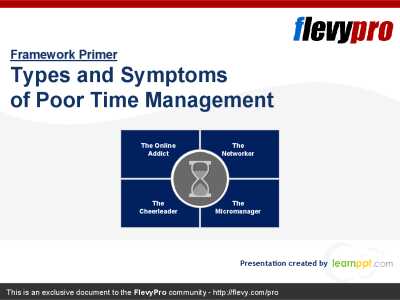
Senior executives often find it hard to spend enough time on strategic priorities. Time Management issues have origins deeply entrenched within the organization. Executives need to learn and then adopt [read more]
Do You Want to Implement Business Best Practices?
You can download in-depth presentations on Time Management and 100s of management topics from the FlevyPro Library. FlevyPro is trusted and utilized by 1000s of management consultants and corporate executives.
For even more best practices available on Flevy, have a look at our top 100 lists:
These best practices are of the same as those leveraged by top-tier management consulting firms, like McKinsey, BCG, Bain, and Accenture. Improve the growth and efficiency of your organization by utilizing these best practice frameworks, templates, and tools. Most were developed by seasoned executives and consultants with over 20+ years of experience.
Readers of This Article Are Interested in These Resources
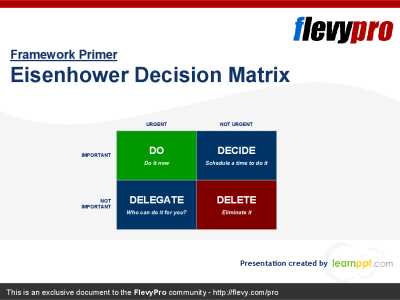
This is an Excel template for the Eisenhower Decision Matrix. Enter your full task list and this spreadsheet will generate various views of the Eisenhower Decision Matrix, with tasks prioritized by importance, urgency, and due date.
The basic premise of the Eisenhower Decision Matrix is to sort [read more]
Workload and time constraints are part and parcel of an executive’s daily life. These creates pressure, anxiety, lack of concentration, and distractions.
This deck discusses how to use the Eisenhower Decision Matrix to manage time, knock the stressors, and effectively deliver the assigned [read more]
Time management guide with templates - Best practice from top tier management consulting.
This document shares the approach to time management that has been successful for management consultants from a top tier firm. It offers time-organisation tips, how-tos, and templates pages for a daily [read more]
The consistent time scarcity issue has turned more serious of late. Executives are often heard complaining about the shortage of time. Around-the-clock communications, increasing complexity of organizations, and economic uncertainties have compounded the longstanding challenge for the executives [read more]