Editor's Note: Take a look at our featured best practice, Digital Transformation Strategy (145-slide PowerPoint presentation). Digital Transformation is being embraced by organizations across most industries, as the role of technology shifts from being a business enabler to a business driver. This has only been accelerated by the COVID-19 global pandemic. Thus, to remain competitive and outcompete in today's fast paced, [read more]
* * * *
 Companies often look at external threats to their assets. However, data breaches sometimes occur from the inside. For example, a disgruntled former employee gains access to sensitive files. A dishonest current worker chooses to use personal details for their own gain.
How can companies keep proprietary information and customer data confidential from those who work with it every day? Start by putting a plan in place and following through a few simple steps to protect everyone.
1. Ramp Up Password Policies
Spend time perfecting your company’s password policies. Strong passwords prevent an insider from gaining access to sensitive files by guessing the characters. Some rules to consider instituting include:
- Changing passwords frequently.
- Implementing two-factor authentication.
- Using capital and lowercase letters, numbers and symbols.
- Using only unique passwords not used elsewhere.
- Never sharing details with anyone else.
- Training employees on how to keep others from seeing details when logging in.
It’s best to stick to a strict password policy. Pull anyone into human resources who doesn’t abide by it.
2. Use Encryption
Using data encryption offers an extra level of security for data that’s being sent and received. Anyone who isn’t authorized to read a message can’t understand what it says when it’s encrypted. You can use encryption for:
- Communications between department heads.
- Limiting how long someone can see sensitive files.
- Emails between co-workers.
- Protecting proprietary data from prying eyes.
- Offering authorization only to certain people or machines.
Only those authorized to read a message can understand what it says with encryption technology.
3. Remove Users Immediately
When an employee leaves the company, it’s crucial to remove their access to all company data immediately. This way, you can prevent the chances of employees accessing sensitive information once they no longer need it. Even leading up to an employee leaving, you can begin limiting access to certain files and changing logins and passwords. Additionally, have your IT staff scan for backdoor access someone might install before leaving.
4. Hire IT Experts
Your IT department serves as a buffer between dishonest employees and your trade secrets. With the help of IT experts, you can make sure your systems are consistently monitored for any anomalies. A few user actions your in-house or third-party security experts can watch for include:
- Sudden searches for customer data.
- Accessing files irrelevant to the user’s role.
- Saving files to new locations.
- Adding code to the website or servers.
- Internet searches for topics such as stealing customer information.
It’s far easier to be proactive than to deal with a data breach after the fact.
5. Protect Sensitive Data
Technology is changing rapidly. The increase in machine learning and use of artificial intelligence opens the door to security breaches. Fortunately, there are numerous ways to protect information from inside and outside threats.
- Install the latest virus and malware protection.
- Conduct regular scans for attacks.
- Check permissions frequently to ensure only the right individuals have access.
- Place someone in charge of authorizations to prevent confusion on who should be able to see what.
- Invest in software that manages levels of access.
- Immediately delete information you no longer need, such as customer credit card numbers.
Put practices in place to ensure the system is updated frequently. With a bit of extra attention, you can reduce the chance of an internal data breach.
6. Conduct Audits
Frequent audits give you a chance to remove any users who shouldn’t be in the system and fix potential issues. Companies with remote workers may find they need to audit their systems more frequently. These are audit steps you can take on a regular basis:
- Attempt to get into files the user shouldn’t have access to.
- Try to change levels of permission in user mode rather than administrator mode.
- Run checks on the system to find any flaws.
- Check for backdoor programs that might give an employee access after they leave.
- See what IPs access the system frequently.
- Make sure remote employees can only open the files needed to do their work.
Audits give you an opportunity to discover flaws in the system you might not otherwise know about.
7. Offer Anonymous Reporting
Encourage employees to say something if they notice concerning behavior. If they feel like a co-worker might be stealing or sharing information, they should be able to come to their manager or someone higher up in the company and report it without fear of retaliation.
Train workers on the things that should be reported and why. You can also create an anonymous tips box, where employees can anonymously submit concerns they have. Find ways to reward those who look out for the company’s best interests.
8. Install Data Loss Prevent (DLP) Tools
Companies can install software to prevent the loss or theft of data. DLP measures usually combine methods such as firewalls and monitoring. While programs automatically stop outside attacks, insider attacks can look normal.The best way to prevent data loss is to combine:
- Firewalls
- Antivirus software
- Malware prevention
- Real-time monitoring
- Machine scanning for anything outside the typical job scope
By having machines monitor for anomalies, you can spot someone accessing files outside their normal scope of work.
9. Train Human Resources (HR) in Best Practices
HR vets new employees and has the power to stop potential thieves from entering the business in the first place. At a minimum, they should:
- Check references.
- Run a criminal history report.
- Train employees about what is considered blue-collar crime.
- Have new employees sign a nondisclosure form.
The organization should fully prosecute anyone who tries to steal and sell inside information. A strong front against data breaches can send this zero-tolerance signal to others.
Avoid Data Breaches with Smart Practices
Insider data breaches may not be as common as hackers gaining access to the system, but they can occur at any time. Take the time to ensure you have strong policies, regular audits and a plan to implement should the worst happen. While the majority of your staff would never steal information, it only takes one incident to derail your progress. Put your focus on protecting your assets from both inside and outside threats to keep momentum going and find success.
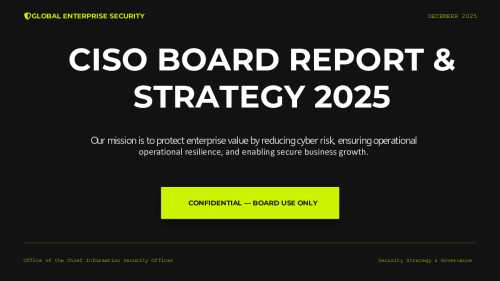
32-slide PowerPoint presentation
EXECUTIVE OVERVIEW
In the hyper-connected threat environment of 2026, cyber risk has evolved from an IT issue into a board-level business imperative. Recent industry data reveals that data breaches cost enterprises an average of $4.95 million per incident. The CISOs who succeed are those who
[read more]
Do You Want to Implement Business Best Practices?
You can download in-depth presentations on Cyber Security and 100s of management topics from the FlevyPro Library. FlevyPro is trusted and utilized by 1000s of management consultants and corporate executives.
For even more best practices available on Flevy, have a look at our top 100 lists:
These best practices are of the same as those leveraged by top-tier management consulting firms, like McKinsey, BCG, Bain, and Accenture. Improve the growth and efficiency of your organization by utilizing these best practice frameworks, templates, and tools. Most were developed by seasoned executives and consultants with over 20+ years of experience.
Readers of This Article Are Interested in These Resources
237-slide PowerPoint presentation
Introducing the Ultimate Cybersecurity and IT Security Toolkit: Safeguarding Your Digital Fortresses
In today's interconnected world, cybersecurity is more critical than ever. The ever-evolving landscape of cyber threats demands robust protection measures for individuals and organizations alike.
[read more]
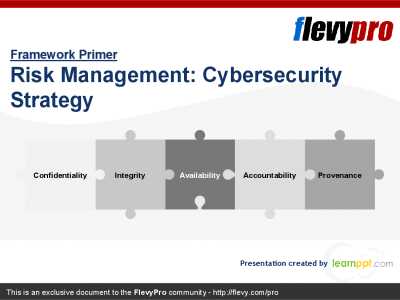
23-slide PowerPoint presentation
Cybersecurity is a growing threat and should be at the forefront in any IT Risk Management Strategy. As role of
The PPT outlines the critical elements of a robust cybersecurity strategy, emphasizing the importance of integrity, availability, accountability, and provenance of information. It
[read more]
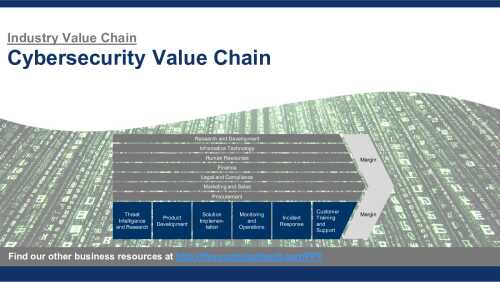
30-slide PowerPoint presentation
An Industry Value Chain is a visual representation of the series of steps an organization in a specific industry takes to deliver a product or service to the market. It captures the main business functions and processes that are involved in delivering the end product or service, illustrating how
[read more]
18-page Word document
This Word Document provides a template for an IT Security & Governance Policy and is easily customisable. Areas cover are: Security, Data Back-Up, Virus Protection, Internet & Email usage, Remote & 3rd Party Network Access, User-Account Management, Procurement, Asset Management and IS Service
[read more]