Editor's Note: Take a look at our featured best practice, GenAI Roadmap Design (30-slide PowerPoint presentation). Organizations worldwide are embracing GenAI for its ability to generate actionable insights, predict outcomes, personalize at scale, and process natural language with human-like fluency.
Leading organizations already deploy GenAI in AI-assisted software development, workflow automation, [read more]
* * * *
A new operations manager types “vendor onboarding process” into Confluence. The first result is a draft from two years ago. The second is a page that three people edited and nobody owns. The third looks right, but a colleague says the approval step changed last quarter. Twenty minutes later, the manager asks in Slack, and the one person who knows the answer is on leave.
Most growing companies know this moment. Confluence search ranks pages poorly, and when people do find a page, they cannot tell if it is still true. An AI search layer on top makes the answers arrive faster, but it does not make them correct. A fast answer from a stale page is still a wrong answer.
For 100 to 1,000-person companies, the better fix is one system that searches well and also keeps its source of truth verified. The seven Confluence alternatives below all have built-in AI search. Each entry covers how its search works, who it fits, and one honest limitation.
How to Choose a Confluence Alternative for Search
Start by naming the problem. If people cannot find pages, better search helps. If people find pages but do not trust them, search alone will not help, because the tool will only return outdated content faster. Most teams that leave Confluence have both problems at once, so test for both.
Collect 20 real questions. Ask each department for questions people asked in Slack last month, such as “What is our refund policy?” or “Who approves a new vendor?” Use the same list for every tool you try.
Check the citations. Run the questions through each tool’s AI search. Every answer should link to the documents it used, so a reader can open the source and check it.
Ask something the knowledge base cannot answer. A good assistant says it has no answer instead of guessing. A tool that invents a confident reply will do the same with your policies.
Look at ownership and verification. Find out whether the tool shows who owns each page and which content is verified, and what happens when a page goes out of date.
Measure the upkeep. Ask who keeps content current and how. If every update stays manual, the knowledge base will drift again within a few quarters.
Plan the move. Check how the tool imports Confluence pages and how much help the vendor gives with the migration.
Consultants who design operating models will recognize the pattern. A process document is only useful while it matches how the work is actually done, and a sound approach to knowledge management treats upkeep as part of the system, not as an afterthought.
1. Notion: Connected Workspace with AI Enterprise Search
Notion combines docs, wikis and databases in one workspace, and many teams already use it for notes and project planning. For companies that leave Confluence, that familiarity can make adoption easier.
Notion AI handles search. Through AI connectors, it searches Notion and connected tools such as Slack, Google Drive, GitHub, Jira, Microsoft Teams, SharePoint and OneDrive. Answers include citations, use only the sources the user chooses, and show only information the user has permission to access. Research Mode goes further: it breaks a question into a multi-step search and writes a report the team can save and share.
For upkeep, Notion offers wikis with page owners and verified pages. An owner can verify a page for a set period or indefinitely, verified pages show a blue check mark in search results, and when verification expires, the owner gets a reminder to verify the page again. Verification for pages outside wikis is available on the Business and Enterprise plans.
Notion fits growing companies that want docs, projects and knowledge in one flexible workspace.
The limitation is that upkeep stays manual. Verification shows readers which pages someone has checked, and expiry reminders prompt owners to look again, but the owner still has to find what changed and rewrite the page. In a large workspace, that work grows with every new page.
2. Slite: The Self-Maintaining Knowledge Base
Slite takes a different approach from a classic wiki. It treats search as something that only works when the content underneath is accurate, so it pairs strong search with a system that keeps documents current.
Slite Agent answers questions in plain language and cites the documents it used. When the knowledge base does not contain the answer, it says “no answer found” instead of guessing, and teams can filter answers to verified sources only. On the Pro plan, permission-aware enterprise search extends across connected tools such as Slack, Google Drive and Jira, so one question can reach beyond Slite itself. Slite also includes MCP access, so AI tools outside Slite can draw on the same verified documents instead of guessing from scattered sources.
Maintenance is what keeps those answers accurate. Slite Agent watches Slite documents and more than 20 connected tools, such as Slack, Linear and GitHub, for signs that a document no longer matches how the team works. When it finds a gap, it proposes a fix, and a person reviews every change before it is applied. Because the documents stay current, the answers built on them stay current too, without a quarterly clean-up project.
For teams that leave Confluence, the move is easy. Slite offers self-serve import tools for Confluence content, and for teams of more than 50 people, Slite’s experts handle the migration together with the customer.
Slite fits 100 to 1,000-person companies that want one place where search and source-of-truth maintenance work together. Its limitation is deployment: Slite is cloud-only, so organizations that must host their knowledge base on their own servers will need a different option.
3. Document360: Structured Knowledge for Customers and Employees
Document360 is knowledge base software built around structured documentation: knowledge bases, user manuals, SOPs, step-by-step guides and API documentation. It separates the editing side, a portal for editors, writers and reviewers, from the published site for customers and employees.
Its AI layer, Eddy AI, offers conversational search grounded in the team’s articles, and it cites every source. Document360 also offers an AI chatbot that turns docs, tickets, files and FAQs into answers, plus a custom workflow builder for teams that want a defined review path before content goes live. Content is locked down by default, which matters for internal procedures.
For companies that move off Confluence, the split between portal and site is useful. Draft content stays with the editors until it is ready, and readers see only the published version.
Document360 fits teams that think in structured, versioned documentation, such as product, support and technical writing teams, and companies that need one platform for both internal and customer-facing knowledge.
The limitation is formality. The structure that makes Document360 strong for manuals and help centers can feel heavy for the informal, fast-changing knowledge of operations teams, such as meeting decisions, process changes and project context. Teams that mostly need a living internal wiki may find the setup more than they need.
4. GitBook: Documentation That Flags Its Own Drift
GitBook describes itself as a docs platform that flags outdated content and then fixes it. It is built mainly for product and technical documentation, and its stated aim is to keep docs accurate for both people and AI.
Its AI Assistant lets users ask questions of the documentation directly and get answers. On the maintenance side, GitBook scans the docs for content that no longer matches the product, flags it, and queues it for review before the wrong answer spreads. For engineering teams, Git Sync connects documentation to a code repository, so writers can branch, review and merge documentation the same way developers handle a pull request.
GitBook fits companies where most critical knowledge is technical: API references, product docs, developer guides and release notes. Teams that already work in Git get a familiar review process, and the drift detection addresses the same stale-content problem that pushes many teams away from Confluence.
The limitation is focus. GitBook checks docs against the product, which suits technical documentation well. HR policies, finance procedures and operations playbooks fall outside that model, so companies that need one search bar for every department may need a broader knowledge base alongside it.
5. Microsoft SharePoint with Copilot: AI Search inside Microsoft 365
For companies that already store their documents in SharePoint and OneDrive, Microsoft’s own AI search is the path of least change. Microsoft Copilot Search is an AI-powered search experience that works across Microsoft 365 content, including files, emails, chats and meetings. It can also reach non-Microsoft sources through more than 100 connectors in the Microsoft catalog.
Users can type questions in everyday language. For some queries, Copilot Search places a short AI-generated answer at the top of the results and lets the user continue in Copilot Chat with follow-up questions. Admins can curate answers for acronyms, bookmarks and people, which helps promote the official version of a key resource. Copilot Search follows the same security and privacy configuration as Microsoft Copilot, and it requires an eligible Microsoft Copilot license.
This option fits Microsoft-centered companies that want better search without moving content or adding another vendor.
The limitation is that Copilot Search finds content; it does not decide whether that content is still correct. SharePoint estates often hold years of duplicate and outdated files, and better search can make those easier to find. Companies that choose this path still need owners and a regular review cycle for their key pages.
6. Helpjuice: AI Answers on a Classic Knowledge Base
Helpjuice is knowledge base software for internal documentation, SOPs and customer help centers. Its aim is to give people an answer, not a list of pages to read through.
Its AI assistant, Swifty, answers questions from the team’s own content and shows its sources with citations. Helpjuice says the assistant knows when not to guess, and its search reads context and intent and forgives typos. Swifty can sit on a website or inside the knowledge base, and a Chrome extension brings the knowledge base into the browser. Admins can restrict content to specific users or groups, or make it public, and analytics show what people search for, which points writers to the gaps worth filling.
For teams that leave Confluence, the move is light. Helpjuice says its onboarding imports existing content, and if the automatic import does not work, its team moves the content by hand within 24 hours.
Helpjuice fits companies that want one knowledge base for employees and customers, especially where support, onboarding and SOPs are the main use cases. Translations in more than 50 languages also help teams that work across countries.
The limitation is its center of gravity. Much of the feature set, from cutting repeat tickets to public help centers, is built around support. Operations and engineering teams with fast-changing internal knowledge should test how well it keeps that content current, because search alone will not.
7. Tettra: AI Answers for Teams That Work in Slack
Tettra is an AI-powered internal knowledge base built around one goal: fewer repetitive questions in Slack. Teams can write new pages in its editor, or build the knowledge base quickly from existing content in Google Docs, Notion and local files.
Its AI bot, Kai, answers questions that people ask in Tettra or in Slack by searching the team’s own content. When Kai cannot find an answer, it helps find the right person to answer instead of leaving the question open. For upkeep, Tettra’s knowledge automation helps subject matter experts verify important pages on a regular basis, identify knowledge gaps and approve edits that teammates suggest.
Tettra fits Slack-centered companies, support teams and agencies that want fast answers to repeat questions without a heavy setup.
The limitation is that upkeep still depends on people. Tettra prompts experts to check pages and collects suggested edits, but someone still has to notice what changed and write the update. Teams that do not work mainly in Slack also get less from its strongest feature.
Conclusion: Choosing the Right Fit for Your Team
The right choice depends on what is actually broken. If the only problem is slow search, almost any tool on this list will feel like an upgrade over Confluence. If people find pages and still do not trust them, the fix has to include maintenance, not just retrieval.
For 100 to 1,000-person companies, that points to one system where AI search and a verified source of truth work together. Run the 20-question test from the start of this guide with real questions from your own teams, check whether each answer cites a current source, and see which tool tells you when it does not know. The tool that passes that test is the one people will keep using.
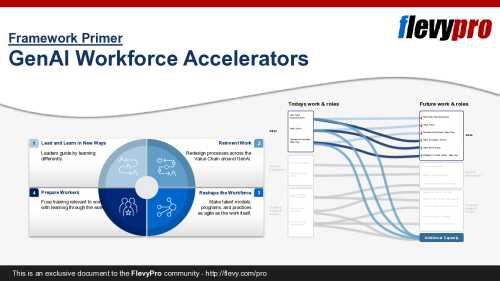
Generative AI (GenAI) is the most significant shift to work since the industrial revolution--and the Trifecta of Opportunities it unlocks (the economic, business, and people upsides) is the strategic objective. This presentation moves from the opportunity to the path: how leaders capture [read more]
Do You Want to Implement Business Best Practices?
You can download in-depth presentations on GenAI and 100s of management topics from the FlevyPro Library. FlevyPro is trusted and utilized by 1000s of management consultants and corporate executives.
For even more best practices available on Flevy, have a look at our top 100 lists:
These best practices are of the same as those leveraged by top-tier management consulting firms, like McKinsey, BCG, Bain, and Accenture. Improve the growth and efficiency of your organization by utilizing these best practice frameworks, templates, and tools. Most were developed by seasoned executives and consultants with over 20+ years of experience.
Readers of This Article Are Interested in These Resources
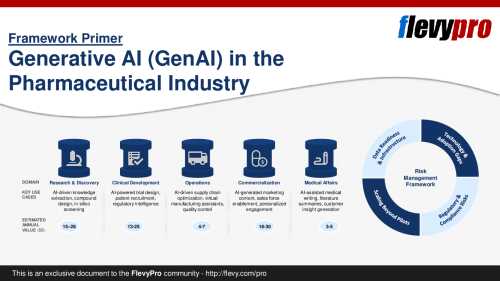
Pharmaceutical companies recognize the immense potential of Generative AI (GenAI) to accelerate drug discovery, improve clinical trials, and optimize commercial operations. Yet, capturing real value requires moving beyond hype to structured implementation strategies.
The McKinsey Global [read more]
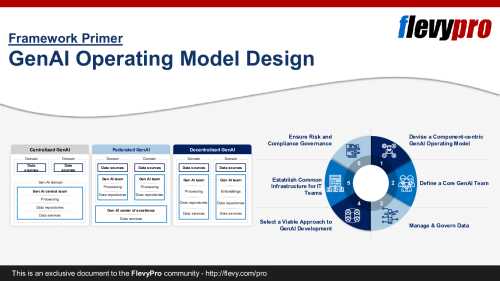
GenAI use is rising globally. Many organizations set GenAI strategies and launch pilots across functions. Yet most stall at the proof-of-concept stage and never show measurable financial or operational results.
This PPT presentation outlines the missing piece: an effective GenAI Operating [read more]
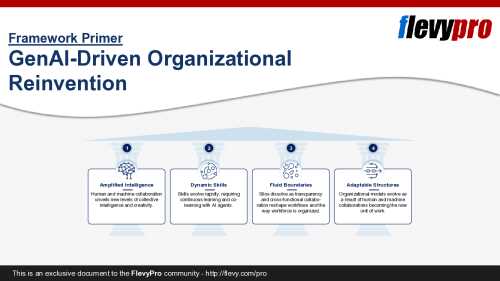
Generative AI (GenAI) marks a turning point in how organizations function and compete today. Similar to how the industrial revolution reshaped production, this wave of GenAI forces leaders to reimagine operating models, workforce design, and decision‑making at unprecedented speed.
This [read more]
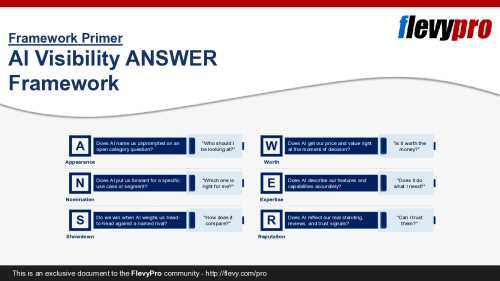
A fast-growing share of buyers now open an AI answer engine--ChatGPT, Perplexity, Google's AI answers, Claude, or Copilot--instead of a search engine, asking for an answer rather than a page of links. The engine names a few options, recommends one, and passes judgment on price and trust. [read more]