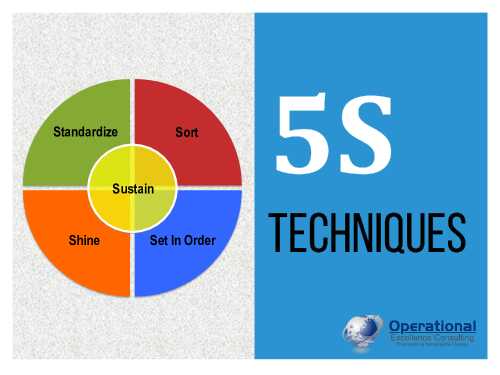
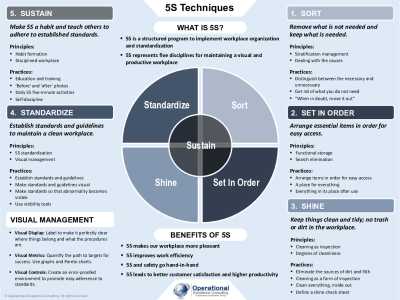
Editor's Note: Take a look at our featured best practice, 5S for the Office (190-slide PowerPoint presentation). The office, by any name, is a paperwork factory. To become a Lean enterprise, office activities must fully support shop-floor manufacturing operations to eliminate waste. The adoption of 5S throughout all office functions is the first step to increase efficiency. 5S principles are dedicated to [read more]
* * * *
The way we work has fundamentally changed. Remote work, hybrid arrangements, and flexible office spaces have become the norm rather than the exception. This shift has forced professionals and organizations to rethink how they approach workspace design and the technology that supports it. Whether you’re setting up a home office, redesigning a corporate workspace, or outfitting a collaborative hub, the decisions you make about layout, equipment, and tools directly impact productivity, employee satisfaction, and overall business performance.
The intersection of physical workspace and technology infrastructure has become increasingly important. Professionals now need to consider not just furniture and lighting, but also computing power, connectivity, and the ability to work seamlessly across multiple locations and devices. When evaluating workspace solutions, many organizations explore options like best mini PC for business to understand how compact computing systems might fit into their broader technology strategy.
The Evolution of Workspace Thinking
Workspace design has evolved dramatically over the past decade. The traditional corporate office with rows of identical desks has given way to more thoughtful, intentional environments. Companies now recognize that different types of work require different types of spaces. Focused, heads-down work demands quiet, distraction-free zones. Collaborative projects benefit from open areas with flexible furniture and easy technology integration. Client meetings call for professional, well-equipped spaces that reflect organizational values.
This evolution reflects a deeper understanding of how people actually work. Research in organizational behavior and workplace design has shown that environmental factors significantly influence creativity, focus, and job satisfaction. Natural light, ergonomic fur7niture, noise management, and access to technology all play roles in determining whether an employee can do their best work. The challenge for organizations is balancing these considerations with practical constraints like budget, space limitations, and the need to accommodate diverse work styles within a single environment.
Technology as a Workspace Enabler
Technology has become inseparable from workspace design. The days of a desk, chair, and phone are long gone. Today’s workspaces need to support video conferencing, collaborative software, cloud-based applications, and seamless connectivity. The computing devices that power these activities are no longer afterthoughts but central considerations in workspace planning.
The choice of computing hardware influences how effectively a workspace can function. Desktop computers, laptops, and increasingly, compact computing solutions each bring different advantages. Desktop systems offer power and stability but require dedicated desk space. Laptops provide mobility but can feel cramped for full-time work. The right choice depends on the specific needs of the role, the available space, and how the device will integrate with other workspace elements.
Workspace planners increasingly consider how different computing solutions can serve different functions within the same environment. A reception area might benefit from a compact, reliable system that handles scheduling and communication. A design studio might need powerful workstations. A training room might use multiple smaller systems for flexibility. This modular thinking about technology allows organizations to optimize their workspace investments.
Creating Flexible, Scalable Workspaces
One of the most important lessons from the shift to hybrid work is the value of flexibility. Workspaces that can adapt to changing needs prove more valuable over time than those designed for a single, fixed purpose. This flexibility extends to technology infrastructure as well as physical layout.
Scalability matters too. A growing organization needs workspace solutions that can expand without requiring complete redesign. This might mean choosing modular furniture, designing with future expansion in mind, or selecting technology that can be easily upgraded or reconfigured. The goal is to create environments that evolve with organizational needs rather than constraining them.
Flexibility also means accommodating different work styles and preferences. Some employees thrive in open, social environments. Others need quiet, focused spaces. Some prefer standing desks; others want traditional seating. Successful workspace design acknowledges these differences and provides options. Technology choices should reflect this same principle, offering solutions that work for different roles and preferences rather than imposing a one-size-fits-all approach.
Ergonomics and Employee Wellbeing
Workspace design directly affects employee health and wellbeing. Poor ergonomics lead to physical strain, reduced productivity, and increased healthcare costs. Proper workspace setup prevents these problems and contributes to long-term employee satisfaction.
Ergonomic considerations include monitor height and distance, keyboard and mouse positioning, chair support, and desk height. These factors seem minor but accumulate over hours and days of work. An employee working eight hours a day in an improperly configured workspace experiences significant physical stress. Over months and years, this stress can lead to chronic pain and injury.
Beyond physical ergonomics, workspace design influences mental health and job satisfaction. Access to natural light, views of outdoor spaces, and well-designed break areas all contribute to employee wellbeing. Noise management, temperature control, and air quality matter too. Organizations that invest in these elements see benefits in employee retention, engagement, and overall productivity.
Practical Considerations for Workspace Implementation
When planning or redesigning a workspace, several practical considerations guide decision-making. Budget constraints are real, but they need not prevent thoughtful design. Often, strategic choices about where to invest and where to economize yield better results than trying to do everything at once.
Start by understanding how the space will actually be used. Observe current work patterns, talk to employees about their needs, and consider future growth. This information guides decisions about layout, furniture, and technology. A workspace designed based on assumptions rather than actual needs often misses the mark.
Consider the total cost of ownership, not just initial purchase price. A slightly more expensive chair that lasts five years and prevents back problems costs less overall than a cheap chair that fails after two years and contributes to employee injury. The same principle applies to computing equipment and other technology investments.
Involve employees in the planning process when possible. They understand their work better than anyone and can identify problems with proposed solutions before implementation. This involvement also increases buy-in and satisfaction with the final result.
Conclusion
Workspace design and technology selection are interconnected decisions that significantly impact organizational performance and employee satisfaction. Modern workspaces must balance flexibility, functionality, ergonomics, and scalability while accommodating diverse work styles and evolving business needs. By approaching workspace planning strategically, considering both physical design and technology infrastructure, and remaining focused on how people actually work, organizations can create environments that support productivity, wellbeing, and long-term success.
Visual management is a powerful tool for conveying important information in a simple and easy-to-understand format. This practice involves displaying information in a visual format through various tools such as charts, graphs, diagrams, or photographs. By doing so, visual management reduces [read more]
Do You Want to Implement Business Best Practices?
You can download in-depth presentations on 5S and 100s of management topics from the FlevyPro Library. FlevyPro is trusted and utilized by 1000s of management consultants and corporate executives.
For even more best practices available on Flevy, have a look at our top 100 lists:
These best practices are of the same as those leveraged by top-tier management consulting firms, like McKinsey, BCG, Bain, and Accenture. Improve the growth and efficiency of your organization by utilizing these best practice frameworks, templates, and tools. Most were developed by seasoned executives and consultants with over 20+ years of experience.
Readers of This Article Are Interested in These Resources
5S good housekeeping and workplace organization is a set of basic management principles that are widely adopted in industries today. Also commonly known as 5S System, 5S Method and 5S Pillars, the cornerstone of 5S is that untidy, cluttered work areas are unproductive. 5S is a powerful improvement [read more]
5S good housekeeping and workplace organization is a set of basic management principles that are widely adopted in industries today. The cornerstone of 5S is that untidy, cluttered work areas are unproductive. 5S is a powerful improvement process that gets impressive results. In a nutshell, the [read more]
5S good housekeeping and workplace organization is a set of basic management principles that are widely adopted in industries today. The cornerstone of 5S is that untidy, cluttered work areas are unproductive. 5S is a powerful improvement process that gets impressive results. In a nutshell, the [read more]
5S AUDIT CHECKLIST & PERFORMANCE TOOLKIT (FOR MANUFACTURING)
Score, visualize, and track your workplace 5S performance -- without building the spreadsheet yourself.
The 5S Audit Checklist Toolkit is a comprehensive resource designed to help manufacturing teams evaluate and improve [read more]
 The way we work has fundamentally changed. Remote work, hybrid arrangements, and flexible office spaces have become the norm rather than the exception. This shift has forced professionals and organizations to rethink how they approach workspace design and the technology that supports it. Whether you’re setting up a home office, redesigning a corporate workspace, or outfitting a collaborative hub, the decisions you make about layout, equipment, and tools directly impact productivity, employee satisfaction, and overall business performance.