Editor's Note: Take a look at our featured best practice, Data Privacy (23-slide PowerPoint presentation). In this Information Age, safeguarding the confidentiality and security of data is becoming increasingly strenuous for many organizations. Globalization, outdated data repositories, susceptibility of knowledge workers to disclose vital information, cybersecurity vulnerabilities, and social media [read more]
* * * *
PDFs often contain contracts, payroll details, customer records, financial reports, or product plans. Their familiar format can create a false sense of safety because a finished file can still be copied, forwarded, edited, or exposed through poor sharing settings. Effective protection begins before anyone presses Send and continues until access is no longer needed.
First, decide whether recipients must view, comment, edit, download, or sign the document. When documents need approval, you can even build a reusable electronic signature for routine forms, but the signature process should still identify each signer and preserve an activity record. Giving everyone full editing access simply because collaboration is convenient creates avoidable risk.
Classify the PDF Before Sharing It
Businesses should classify documents according to the harm caused by accidental disclosure. A public brochure needs few restrictions, while an employee file or acquisition proposal requires tight controls. A simple four-level system can work well:
Public files can be distributed without access restrictions.
Internal files remain available to employees and approved contractors.
Confidential files require named recipients and controlled downloading.
Highly confidential files require encryption, strong authentication, and limited retention.
Classification should directly determine the sharing method. A confidential pricing proposal should not leave the company as an ordinary email attachment. It should sit in an approved document platform, remain limited to named accounts, and be removed when the sales process ends.
Control Who Can Open the Document
The principle of least privilege means giving each person only the access required for their task. A client may need commenting rights, while the legal manager needs editing rights and the finance team needs view access only. Assign permissions to accounts or groups instead of distributing an unrestricted public link.
Where supported, require multifactor authentication, set an expiration date, block downloads, and prevent resharing. Revoke access when a contractor leaves, a project closes, or a recipient changes roles. Teams should also review shared files regularly because forgotten links can remain active for months.
Email attachments offer weak control after delivery. The sender usually cannot revoke a downloaded copy, see who forwarded it, or ensure everyone uses the latest version. A managed link offers better control over access, updates, and activity records.
Use Passwords and Encryption Correctly
PDF software may offer two password controls. An open password encrypts the file and requires a password before viewing. A permissions password limits actions such as editing, printing, or copying. These restrictions are useful deterrents, but they cannot stop screenshots, screen photographs, or manual retyping.
Passwords should be long, unique, and delivered through a different channel from the PDF. Sending the file and its password in one email defeats much of the protection. One practical method is sending the link by email and the password through an approved messaging service or phone call.
Encryption should protect documents while stored and transmitted. Companies should use approved cloud storage, encrypted devices, and secure connections instead of personal email accounts, public transfer sites, or unencrypted removable drives.
Remove Information That Should Not Leave
Visible black boxes are not reliable redaction. Covering text with a shape may leave the original words searchable, selectable, or recoverable. Proper redaction permanently removes the selected content from the PDF.
Businesses should also sanitize files before external sharing. Sanitization removes hidden material that may not appear on the page, including metadata, comments, embedded files, hidden layers, scripts, and editing information. Save the final PDF as a new file and ask a second person to check it.
Before release, confirm that the PDF contains no unnecessary:
Personal identifiers, account numbers, or private contact details.
Internal comments, tracked discussions, or document properties.
Attachments, form data, scripts, or hidden page elements.
Protect Signing and Approval Workflows
A pasted signature image provides little evidence about who applied it or whether the document changed afterwards. For important agreements, use a signing platform that authenticates recipients and records delivery, viewing, approval, signing, and completion events.
Certificate-based digital signatures provide stronger integrity checks. They use a private key to sign and a public key to validate the signature. Recipients can check whether the signer is trusted and whether the PDF changed after signing. Retain the completed agreement and its audit report under the company’s records policy.
Monitor Sharing and Prepare for Mistakes
Administrators should review access logs, failed sign-ins, unexpected downloads, and links opened from unfamiliar locations. Alerts are especially useful for highly confidential documents shared with external users.
Every business also needs a simple response process:
Revoke the link or recipient access immediately.
Preserve logs and identify the exposed information.
Notify security, legal, privacy, and business owners.
Replace affected documents, passwords, or credentials promptly.
Record the cause and update the process.
Shared PDF security depends on several controls working together. Classification determines the protection level, access settings limit exposure, redaction removes unnecessary data, and monitoring reveals misuse. When these steps become routine, employees can share documents quickly without treating convenience as a substitute for control.
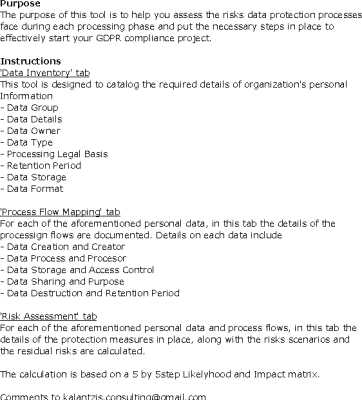
The purpose of this tool is to help you assess the risks data protection processes face during each processing phase and put the necessary steps in place to effectively start your GDPR compliance project.
This GDPR Privacy Impact Assessment (PIA) Template is meticulously designed to streamline [read more]
Do You Want to Implement Business Best Practices?
You can download in-depth presentations on Data Protection and 100s of management topics from the FlevyPro Library. FlevyPro is trusted and utilized by 1000s of management consultants and corporate executives.
For even more best practices available on Flevy, have a look at our top 100 lists:
These best practices are of the same as those leveraged by top-tier management consulting firms, like McKinsey, BCG, Bain, and Accenture. Improve the growth and efficiency of your organization by utilizing these best practice frameworks, templates, and tools. Most were developed by seasoned executives and consultants with over 20+ years of experience.
Readers of This Article Are Interested in These Resources
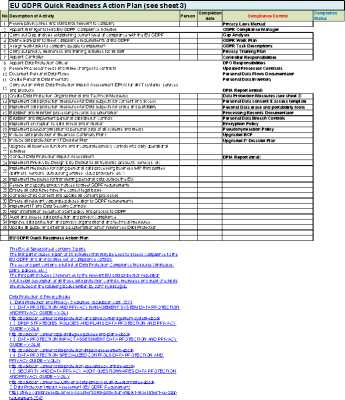
This Excel Spreadsheet contains 3 parts:
The first part includes a plan of 35 activities that may be used to assess compliance to the EU GDPR and an indicative set of compliance controls.
The second part contains a full list of Data Protection Compliance Measures (strategies, plans, [read more]
This document describes a set of methods and tools that enable, facilitate and support you in assessing your data protection risks and executing a Data Protection Impact Assessment
(DPIA) for existing as well as for new products, services, systems, functions and information systems, that [read more]
The GDPR Self-Assessment will make you a GDPR domain expert by:
1. Reducing the effort in the GDPR work to be done to get problems solved
2 .Ensuring that plans of action include every GDPR task and that every GDPR outcome is in place
3 .Saving time investigating strategic and tactical options [read more]
This is a presentation on how to comply with the requirements of GDPR and protect personal data in a more effective way.
Contents of presentaion semniar
1. Introduction:
Context, Prologue, Overview, Milestones, Benefits, Objectives, Target Audience
2. Defining Personal Data
3. [read more]
 PDFs often contain contracts, payroll details, customer records, financial reports, or product plans. Their familiar format can create a false sense of safety because a finished file can still be copied, forwarded, edited, or exposed through poor sharing settings. Effective protection begins before anyone presses Send and continues until access is no longer needed.
 Visible black boxes are not reliable redaction. Covering text with a shape may leave the original words searchable, selectable, or recoverable. Proper redaction permanently removes the selected content from the PDF.