Editor's Note: Take a look at our featured best practice, Five Stages of Business Growth (25-slide PowerPoint presentation). This presentation introduces a framework for entrepreneurs to use when building and navigating their business from a nascent, startup state to an enterprise with a global footprint. This framework, called the 5 Stages of Business Growth, is based on the fact that all businesses experience common [read more]
* * * *
When a client asks for your tax information through the W-9 form, the message can feel formal, even if the project started with a quick email, a contract, and an invoice. In most cases, the request does not mean anything has gone wrong. It usually means the client needs your taxpayer details before they pay you or close their records for the year.
In the US, the W-9 tax form gives a client the legal name, tax classification, address, and taxpayer identification number they need for payment records. Freelancers, consultants, sole proprietors, single-member LLC owners, and other US vendors often receive this request after they sign a contract or before the first invoice goes through.
Start with the Reason for the Request
A W-9 request usually comes from the client’s accounting, finance, or operations team. They may need it because they have paid you before, expect to pay you soon, or need to prepare an information return later. The form helps them match your payment details to the right person or business.
You do not send the form to the IRS yourself. You send it to the requester, and they keep it in their vendor records. Later, they may use the details to prepare a 1099 form or another tax document if the payment type calls for one.
For the client, the form creates a clean vendor record. For you, it reduces the chance of a mismatch that leads to backup withholding, follow-up notices, or a corrected tax document after year-end.
Check Who Asked and How They Asked
A W-9 contains sensitive details, so treat the request like any other document that includes private tax information. Before you fill out anything, confirm that the person who asked has a real connection to the client.
A few checks can prevent a bad outcome:
Compare the sender’s email domain with the client’s official domain.
Watch for odd spelling, rushed language, or a file link from an unknown service.
Ask your known client contact to confirm the request if anything feels off.
Avoid public chat tools or unsecured upload links.
Use the official IRS form or a trusted digital copy.
Fill in the Details That Match Your Tax Records
The form looks short, yet small errors can create extra emails later. Use the name and taxpayer identification number that match IRS records. If you work as an individual, that may mean your personal legal name and Social Security number. If you use an LLC or corporation, the right entry may depend on how the business handles taxes.
The tax classification boxes deserve care. A single-member LLC, for example, does not always choose the LLC box in the way people expect. When in doubt, ask a tax professional rather than guessing.
Keep the Document Neat and Readable
Many clients send the W-9 as a PDF because the format keeps the layout stable across devices. You can print and scan it, but a filled digital version works best for what Form W-9 is used for, usually looks cleaner, and lowers the chance of typing errors on the client’s side.
Use clear text fields, avoid handwritten notes unless the client asks for them, and make sure the signature date appears correctly. If you use an electronic signature, confirm that the client accepts it. Save the completed file with a simple name, such as “W-9_YourName_2026.pdf.”
Send It through a Safer Channel
Email attachments still appear in many business workflows, but they are not always the safest option for tax forms. A secure client portal, encrypted upload link, or password-protected file may offer better control.
If you add a password to the PDF, send the password through a separate channel, such as a text message or a different email thread. Do not place the password in the same message as the file.
Save Your Own Copy
After you send the form, keep a copy in a private folder with your tax documents. You may need it later if the client asks for a refreshed version, your business address changes, or you compare a year-end 1099 with your own records.
Store the blank official form, the completed version, and any client confirmation in one place. Use access controls if you share a computer or cloud drive with other people.
Know When to Ask for Help
Most W-9 requests are routine. Still, pause if the request comes from a client outside the United States, if you are not from the US, if your business structure recently changed, or if the form asks for details that do not appear on the official version.
You do not need to overreact to a normal W-9 request. Confirm the source, fill out the form with accurate tax details, send it through a safer channel, and keep a copy. That gives the client what they need and keeps your own records clean.
The Consolidation Curve, or Endgame Curve, is a framework based on the theory that all industries consolidate and follow a similar course through the 4 stages of: Opening, Scale, Focus, and Balance & Alliance. This framework is based on a study of 25,000 firms globally, representing 98% of the [read more]
Do You Want to Implement Business Best Practices?
You can download in-depth presentations on Small Business and 100s of management topics from the FlevyPro Library. FlevyPro is trusted and utilized by 1000s of management consultants and corporate executives.
For even more best practices available on Flevy, have a look at our top 100 lists:
These best practices are of the same as those leveraged by top-tier management consulting firms, like McKinsey, BCG, Bain, and Accenture. Improve the growth and efficiency of your organization by utilizing these best practice frameworks, templates, and tools. Most were developed by seasoned executives and consultants with over 20+ years of experience.
Readers of This Article Are Interested in These Resources
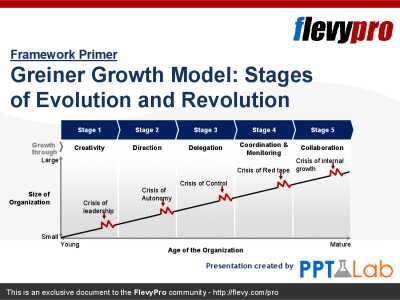
The Greiner Growth Model (Stages of Evolution and Revolution), developed by Larry Greiner, is a maturity model describing how organizations evolve through 5 stages of growth. Each stage requires appropriate strategies and structures to cope. The Greiner Growth Model is a descriptive framework [read more]
This financial policy manual is suitable for a small business. This manual aims to provide guidance :
1. By ensuring that all staff are aware of finance transactions with the business; and
2. Is a way for finance staff to make consistent decisions.
The aim of this manual is to assist in [read more]
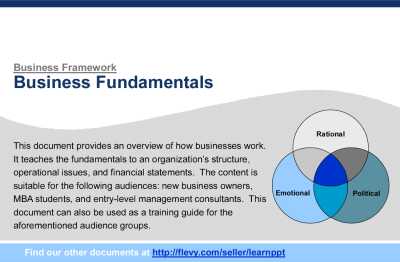
This presentation provides an overview of how businesses work. It teaches the fundamentals to understanding how modern businesses work, covering the business topics of Organizational Structures, Operational Issues, and Financial Statements.
The content is suitable for the following audiences: [read more]
Introducing the Ultimate Business Exit Strategy Framework: Achieve Seamless Transition and Maximize Your Returns
Are you a business owner or entrepreneur looking to ensure a smooth and profitable transition out of your current venture? The world of business exits can be complex and daunting, but [read more]
 When a client asks for your tax information through the W-9 form, the message can feel formal, even if the project started with a quick email, a contract, and an invoice. In most cases, the request does not mean anything has gone wrong. It usually means the client needs your taxpayer details before they pay you or close their records for the year.
 The form looks short, yet small errors can create extra emails later. Use the name and taxpayer identification number that match IRS records. If you work as an individual, that may mean your personal legal name and Social Security number. If you use an LLC or corporation, the right entry may depend on how the business handles taxes.