
 Click main image to view in full screen. Unlock all 9 preview images:
Supply Chain ABC/XYZ Inventory & Replenishment Toolkit – Excel XLSX
Excel (XLSX) + Zip archive file (ZIP)


BENEFITS OF THIS DOWNLOADABLE EXCEL DOCUMENT
- Centralize SKU master data, 12-month demand history, ABC/XYZ inventory classification, safety stock, reorder points, supplier performance, and supply chain risk documentation in one Excel system.
- Support inventory decisions with formula-driven stock analysis, conditional replenishment quantities, coverage indicators, configurable service assumptions, KPI dashboards, and five native Excel charts.
- Receive two editable Excel workbooks with 18 worksheets and nine native charts, a dedicated supplier delivery scorecard, realistic sample data, structured dropdowns, and a ten-page user guide.
INVENTORY MANAGEMENT EXCEL DESCRIPTION
📦 SUPPLY CHAIN ABC/XYZ INVENTORY & REPLENISHMENT TOOLKIT
Professional Excel-Based Supply Chain Management System for ABC/XYZ Classification, Inventory Control, Demand Planning, Safety Stock, Reorder Points, Supplier Performance & Executive Reporting
The Supply Chain ABC/XYZ Inventory & Replenishment Toolkit by SheetworksStudio is a professional, fully editable Excel solution designed to help organizations optimize inventory oversight, analyze demand variability, coordinate replenishment, assess supplier performance, and manage supply chain risks.
Combining an eleven-worksheet main workbook, an executive dashboard with five native Excel charts, a dedicated Supplier OTIF Scorecard Companion, and a ten-page user guide, the toolkit provides a structured planning environment for inventory planners, procurement teams, operations managers, and consultants.
Replace disconnected spreadsheets with one organized, formula-driven system for inventory analysis, purchasing decisions, supplier reviews, and management reporting.
📊 1. EXECUTIVE SUPPLY CHAIN DASHBOARD
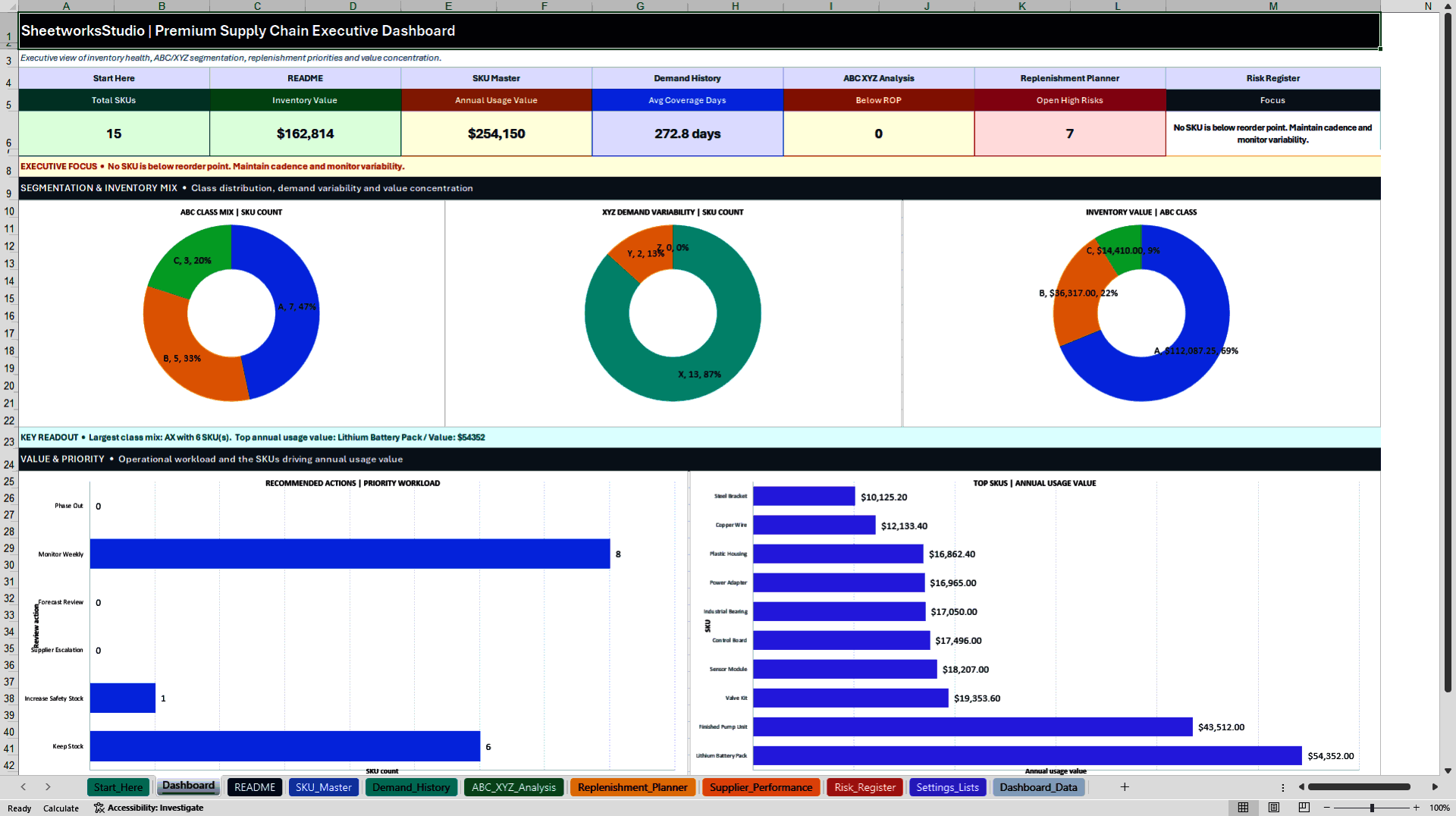
The executive dashboard includes KPI cards and five native Excel charts covering:
• Registered SKUs and inventory value
• Annual usage value and stock coverage
• Items below reorder point
• Open high-priority supply chain risks
• ABC inventory classifications
• XYZ demand variability
• Inventory value by ABC category
• Replenishment action distribution
• Highest-value SKUs
Automated KPI summaries support recurring inventory, procurement, and management reviews.
⚙️ 2. INTEGRATED SUPPLY CHAIN MANAGEMENT MODULES
The main Excel workbook contains eleven worksheets:
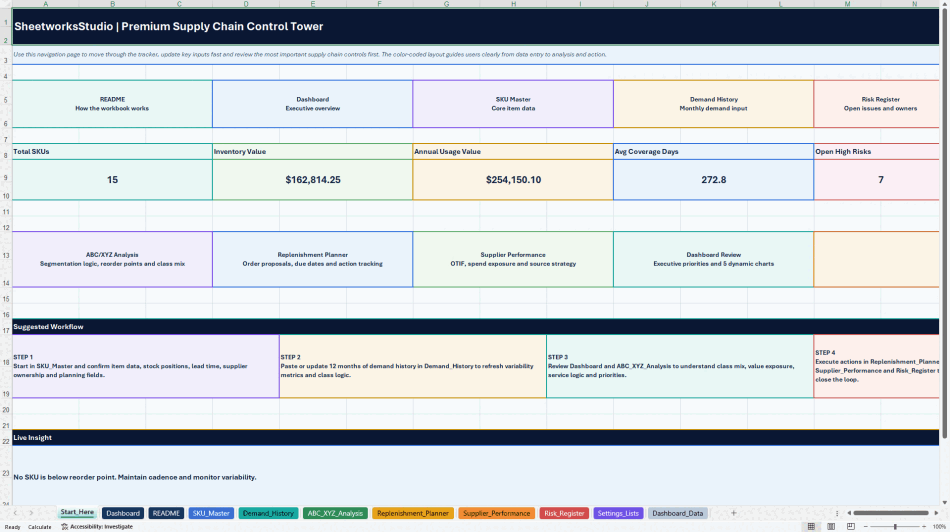
START_HERE – Central navigation, KPI overview, workflow guidance, and direct module access.
DASHBOARD – Management KPIs, status indicators, and five native Excel charts.
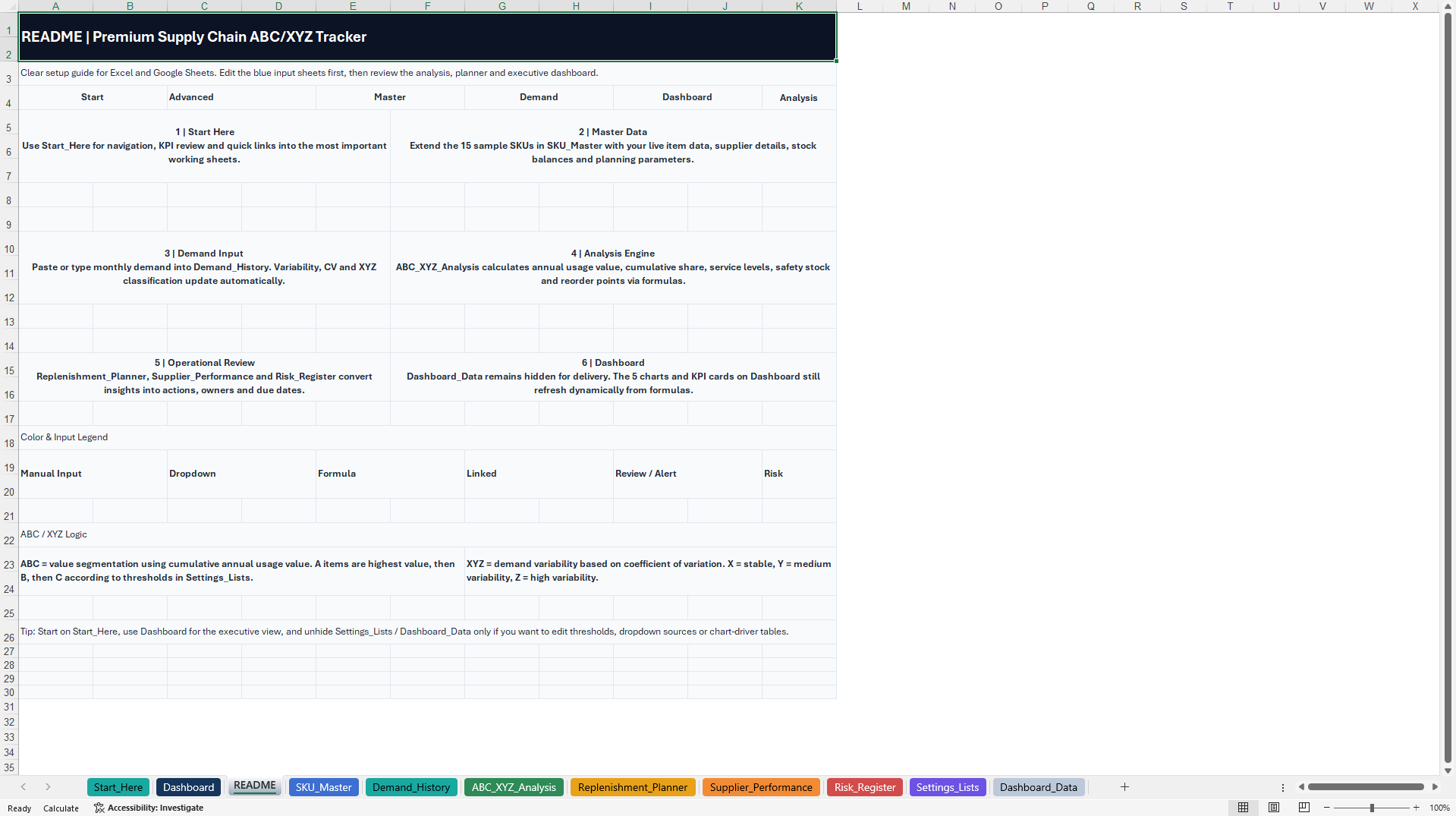
README – Quick-start instructions, input guidance, and calculation explanations.
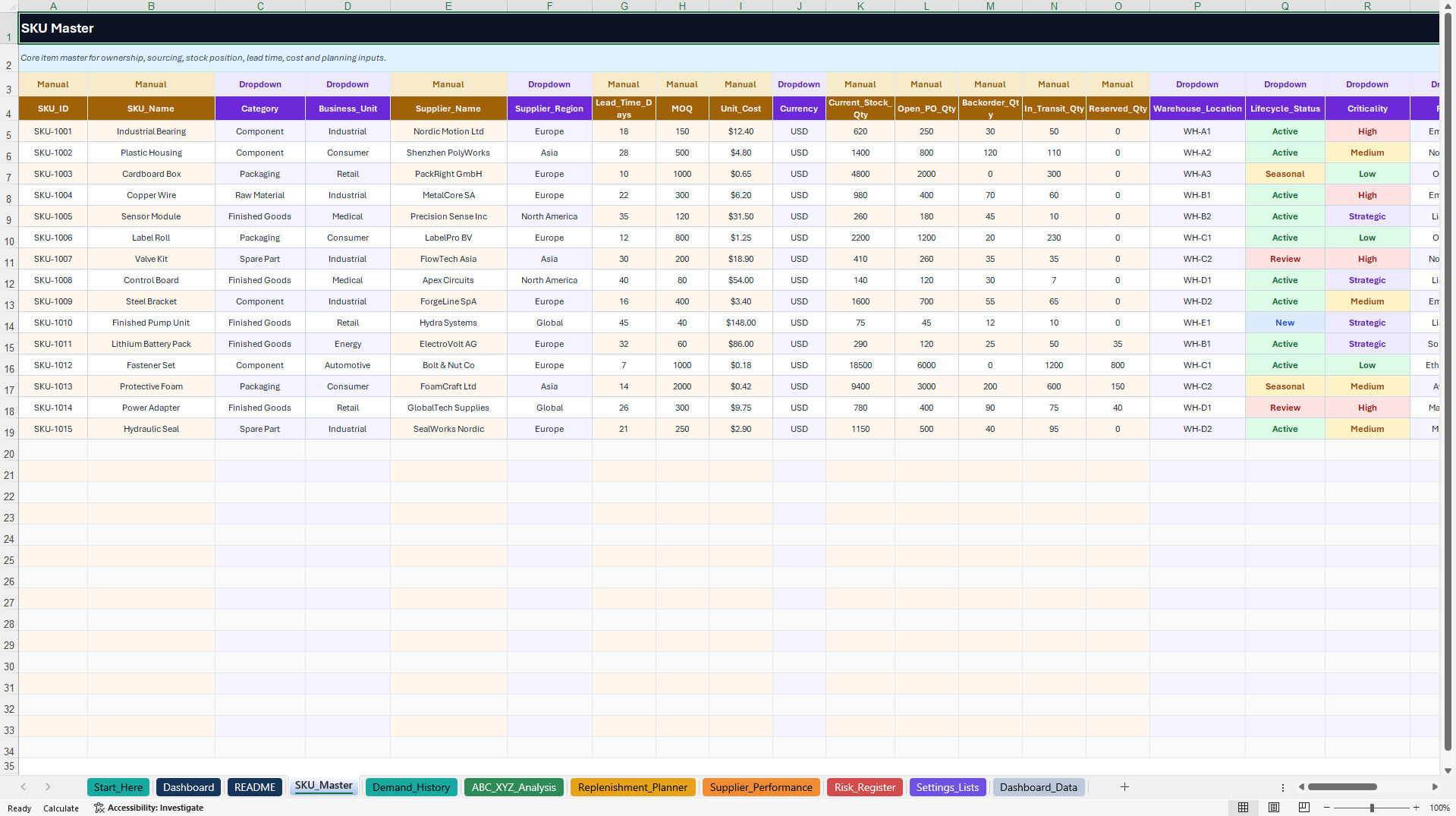
SKU_MASTER – Maintain SKU information, suppliers, stock positions, unit costs, lead times, minimum order quantities (MOQ), criticality, and ownership.
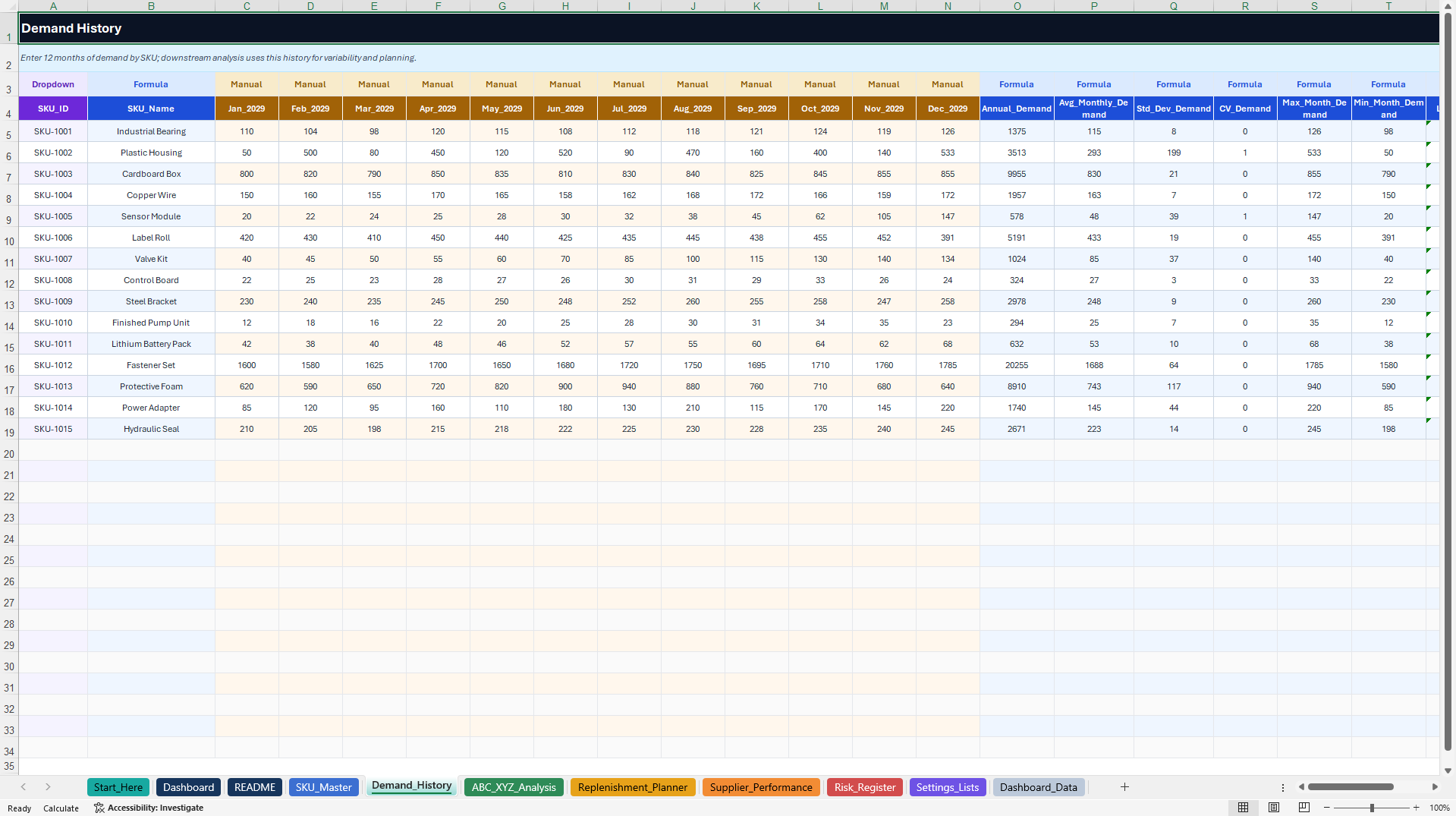
DEMAND_HISTORY – Record twelve months of SKU demand and calculate demand averages, variability, and selected trends.
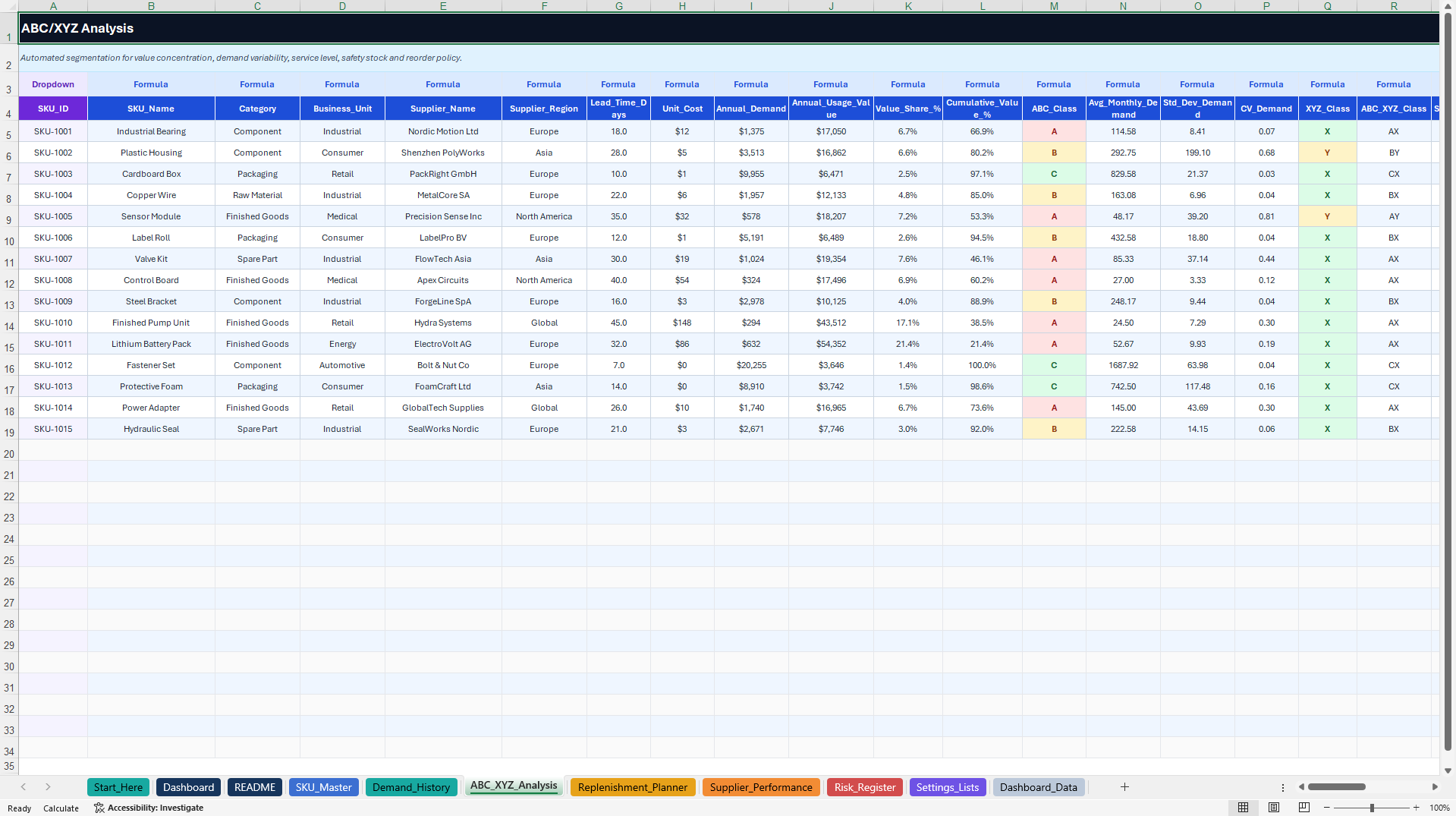
ABC_XYZ_ANALYSIS – Automatically classify SKUs based on annual usage value and demand variability. Review service-level assumptions, safety stock, reorder points, inventory coverage, and recommended actions.
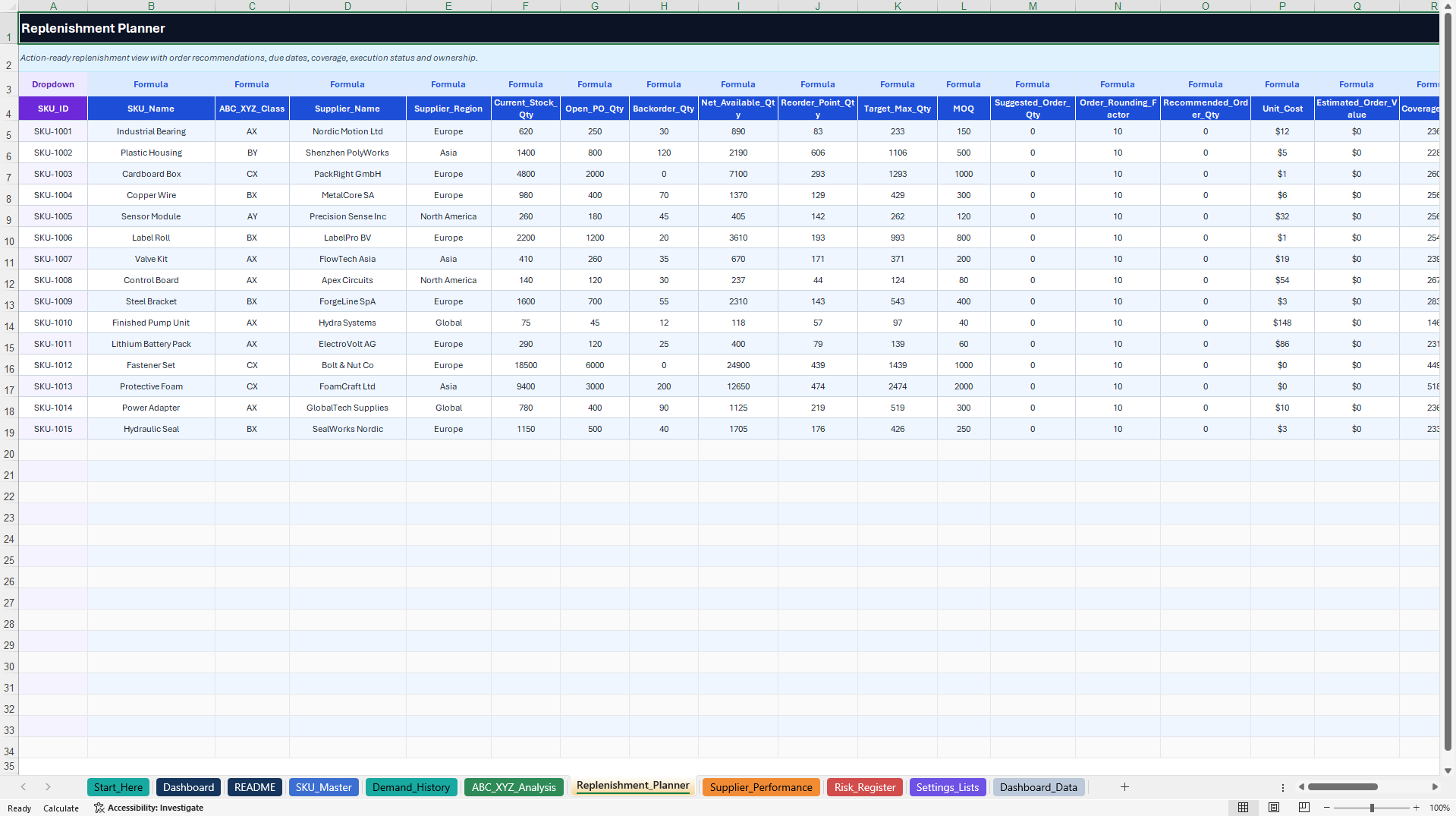
REPLENISHMENT_PLANNER – Assess stock availability, target levels, MOQ constraints, suggested order quantities, purchasing values, and replenishment priorities.
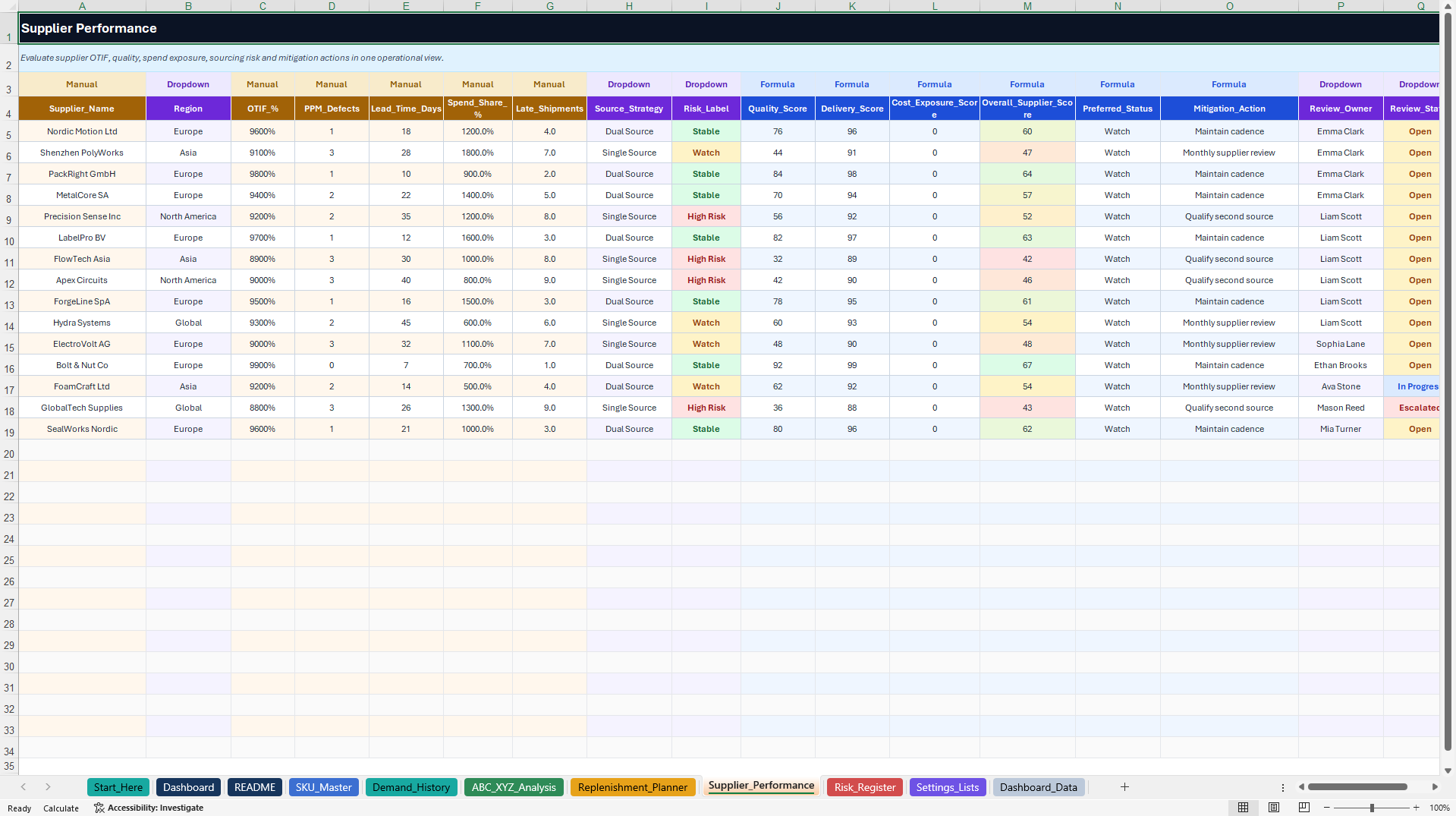
SUPPLIER_PERFORMANCE – Track supplier delivery, quality, lead times, spend exposure, risk classifications, and mitigation activities.
RISK_REGISTER – Document supply chain risks, likelihood, impact, calculated risk scores, priorities, owners, and corrective actions.
SETTINGS_LISTS – Maintain service-level assumptions, ABC/XYZ thresholds, dropdown values, and planning settings.
DASHBOARD_DATA – Supporting calculation tables and chart data.
The two supporting worksheets remain visible in the delivered file and should be retained to preserve calculations and reporting.
🧮 3. AUTOMATED INVENTORY & REPLENISHMENT CALCULATIONS
The system provides built-in formulas for:
• Annual demand and inventory usage value
• ABC/XYZ classification and demand variability
• Average demand and standard deviation
• Safety stock and reorder points
• Available stock and inventory value
• Inventory coverage days
• Conditional, MOQ-adjusted order recommendations
• Supplier performance indicators
• Supply chain risk assessments
• Executive dashboard summaries
The prepared registers include 15 realistic sample records and additional input rows.
Replenishment recommendations are conditional: when available stock is not below the reorder point, the suggested order quantity is zero.
All calculations depend on the entered data, planning assumptions, and spreadsheet recalculation.
🎁 4. BONUS – SUPPLIER OTIF SCORECARD COMPANION
A separate seven-worksheet Excel workbook provides additional supplier performance tracking and management reporting.
Included modules:
• Start_Here – Navigation and orientation
• Dashboard – Executive KPIs and four native Excel charts
• README – Setup and usage guidance
• Supplier_Log – Delivery, quality, lead time, spend, and risk records
• Scorecard – Formula-driven supplier performance assessments
• Settings_Lists – Supporting configuration and dropdown values
• Dashboard_Data – Chart calculations and reporting inputs
The companion includes supplier count, average delivery performance, high-risk supplier indicators, and recorded spend.
Four charts visualize supplier risk distribution, regional delivery performance, supplier-level results, and monthly trends.
Its OTIF-oriented indicator uses separately recorded on-time and complete-delivery ratios. A precise joint On-Time-In-Full measure requires delivery-level records confirming both conditions were met.
The bonus operates independently and does not automatically synchronize with the main workbook.
🔄 5. PRACTICAL MANAGEMENT WORKFLOW
1. Configure planning settings and relevant thresholds.
2. Enter SKUs, suppliers, inventory quantities, and costs.
3. Update twelve months of demand history.
4. Review ABC/XYZ classes and demand variability.
5. Validate safety stock and reorder points.
6. Review replenishment priorities and suggested quantities.
7. Monitor supplier delivery and quality performance.
8. Document supply chain risks and mitigation actions.
9. Review executive dashboards and outstanding priorities.
🎯 6. BUSINESS APPLICATIONS & TARGET USERS
APPLICATIONS
• Inventory and Stock Management
• ABC/XYZ Inventory Analysis
• Demand and Replenishment Planning
• Safety Stock and Reorder Point Reviews
• Procurement and Purchasing Coordination
• Supplier Performance Monitoring
• Supply Chain Risk Management
• Inventory Working Capital Reviews
• Executive Reporting and Consulting
IDEAL FOR
• Supply Chain and Inventory Managers
• Procurement and Purchasing Teams
• Warehouse and Logistics Managers
• Operations and Production Planners
• Supply Chain Analysts and Controllers
• Procurement Consultants
• Manufacturers, Retailers, and Distributors
• Small and Medium-Sized Businesses
📦 7. COMPLETE PRODUCT PACKAGE
PRIMARY DOCUMENT
1× Supply Chain ABC/XYZ Control Center (.xlsx)
• Eleven Excel worksheets
• Five native Excel dashboard charts
• SKU, demand, inventory analysis, replenishment, supplier, and risk modules
• Formula-driven calculations and dropdown selections
• Fifteen illustrative SKU records
SECONDARY DOCUMENT
1× Supplier OTIF Scorecard Companion (.xlsx)
• Seven Excel worksheets
• Four native Excel charts
• Supplier Log and automated Scorecard
• Fifteen illustrative supplier records
1× English How-to-Use Guide (.pdf)
• Ten illustrated pages
• Setup, navigation, ABC/XYZ methodology, replenishment workflow, dashboard guidance, Google Sheets considerations, troubleshooting, and legal information
TOTAL PACKAGE
• Two fully editable Excel workbooks
• One English PDF guide
• Eighteen Excel worksheets
• Nine native Excel charts
• Realistic illustrative sample data
• Built-in inventory and supplier calculations
• Ten pages of documentation
💻 8. TECHNICAL INFORMATION
• Microsoft Excel (.xlsx)
• Fully editable input fields
• Built-in formulas and data validation
• Dropdown menus and conditional formatting
• Native Excel dashboards and charts
• No macros, VBA, or external data connections
• Microsoft Excel Desktop recommended
Google Sheets import is possible, but charts, formatting, navigation, and some Excel-specific features may behave differently. Full feature parity is not guaranteed.
This is a spreadsheet-based planning toolkit, not an ERP system, real-time inventory platform, or automated purchasing solution.
⚠️ IMPORTANT DISCLAIMER
This product is an editable supply chain management and inventory planning template, not certified procurement software or a guarantee of inventory optimization, stock availability, supplier performance, or financial outcomes.
ABC/XYZ classifications, safety stock, reorder points, replenishment quantities, supplier indicators, and risk assessments are planning aids based on user inputs and configured assumptions.
Users are responsible for validating demand data, stock quantities, lead times, service-level assumptions, MOQ constraints, calculations, and operational decisions before implementation.
The toolkit does not replace professional procurement, supply chain, financial, legal, tax, or operational advice. All illustrative sample data must be reviewed or replaced before operational use.
ABOUT SHEETWORKSSTUDIO
SheetworksStudio develops professional, editable spreadsheet-based management systems designed to support inventory planning, business operations, risk oversight, performance monitoring, and data-informed decision-making.
Got a question about the product? Email us at support@flevy.com or ask the author directly by using the "Ask the Author a Question" form. If you cannot view the preview above this document description, go here to view the large preview instead.
Source: Best Practices in Inventory Management, Demand Planning Excel: Supply Chain ABC/XYZ Inventory & Replenishment Toolkit Excel (XLSX) Spreadsheet, SheetworksStudio
ABOUT THE AUTHOR

SheetworksStudio creates premium Excel-based business templates, dashboards, trackers, financial models, and management systems for professionals, consultants, entrepreneurs, and organizations.
Our portfolio covers finance, project management, operations, risk management, compliance, AI governance, HR, supply chain, performance management, and business planning. Each product is designed to
... [read more]
Ask the Author a Question
You must be logged in to contact the author.




























