
 Click main image to view in full screen.
Internal Audit Log & CAPA Management Control Center – Excel XLSX
Excel (XLSX) + Zip archive file (ZIP)


BENEFITS OF THIS DOWNLOADABLE EXCEL DOCUMENT
- Manage audit findings, corrective and preventive actions, responsibilities, severity, root causes, evidence references, deadlines, and follow-up activities in one structured Excel audit management system.
- Improve audit visibility with five executive dashboard charts, owner performance reporting, automated finding deadlines, SLA calculations, overdue indicators, completion tracking, and an audit planning overview.
- Receive two editable Excel workbooks with 14 worksheets and seven native charts, an Audit Starter Kit covering evidence requests, kickoff meetings, 5-Why analysis, CAPA actions, 15 email templates, and a 12-page user guide.
RCA EXCEL DESCRIPTION
📊 INTERNAL AUDIT LOG & CAPA MANAGEMENT CONTROL CENTER
Professional Excel Audit Management System for Findings, Corrective & Preventive Actions, SLA Deadlines, Owner Accountability, Root Cause Analysis & Executive Reporting
The Internal Audit Log & CAPA Management Control Center by SheetworksStudio is a professional, fully editable Excel toolkit designed to help organizations document audit findings, coordinate corrective and preventive actions, monitor deadlines, and improve internal audit accountability.
Combining an eight-worksheet management system, five executive dashboard charts, an Audit Starter Kit, and a 12-page illustrated guide, the package provides practical resources for Internal Auditors, Quality Managers, Compliance Teams, Operations Leaders, and Consultants.
Replace scattered audit spreadsheets and disconnected follow-up lists with structured documentation, formula-driven reporting, and consistent management workflows.
📊 1. EXECUTIVE AUDIT DASHBOARD
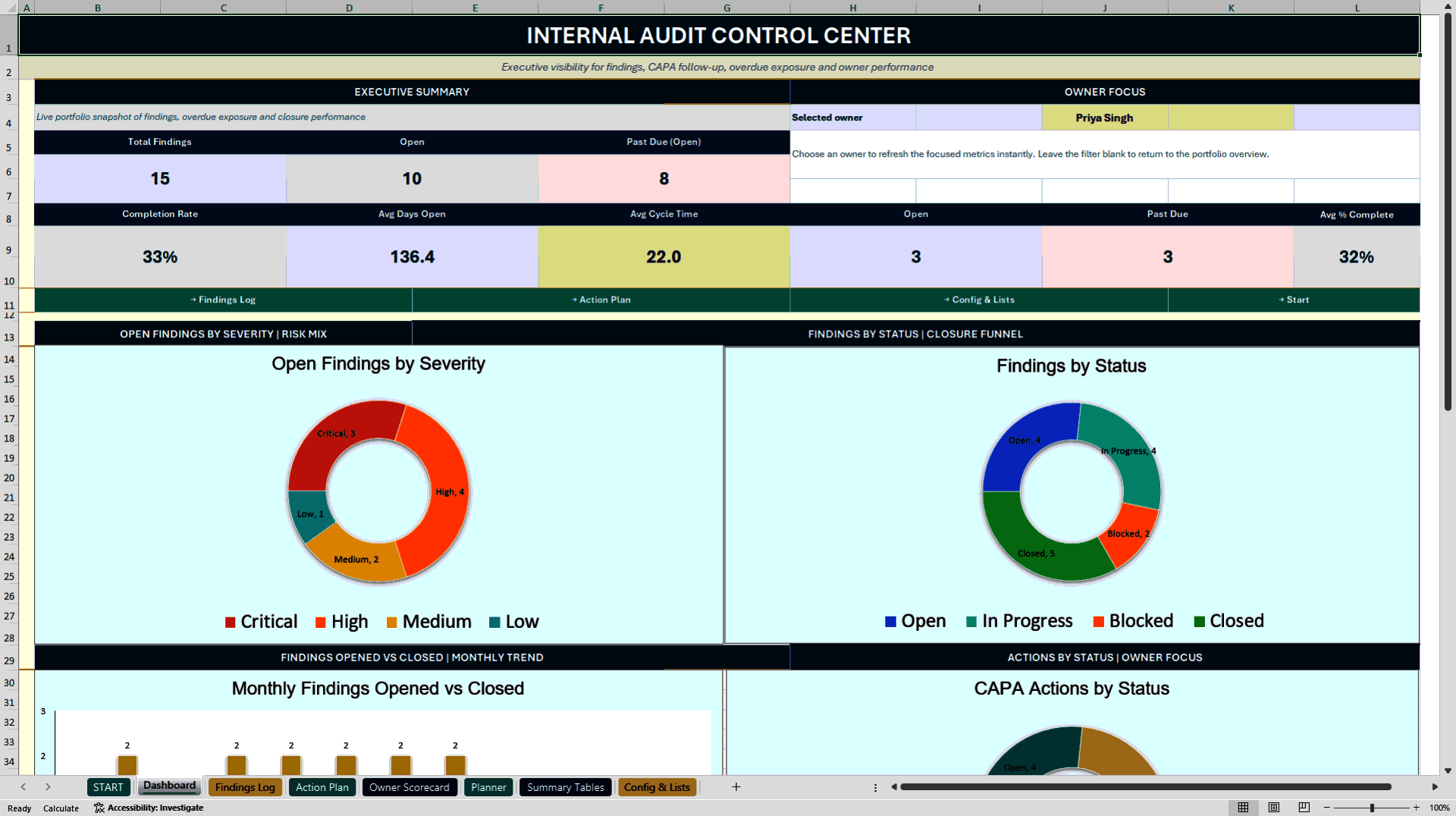
The executive dashboard consolidates key audit performance indicators with five native Excel charts.
Monitor:
• Total and open audit findings
• Past-due findings
• Completion rates
• Average days open and closure cycle time
• Severity and status distributions
• Corrective action progress
• Owner-level performance and accountability
An interactive owner selection supports focused management reviews.
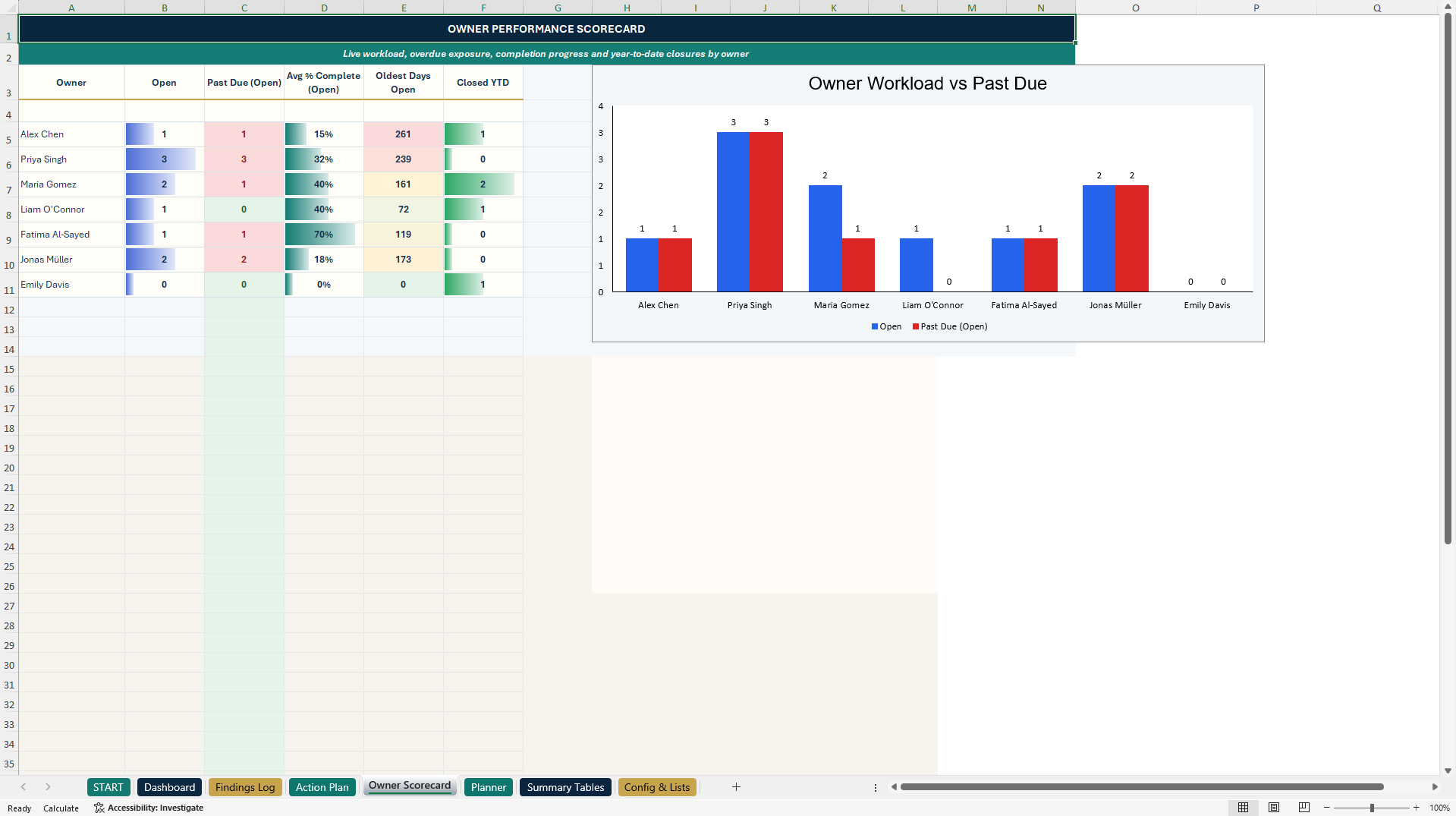
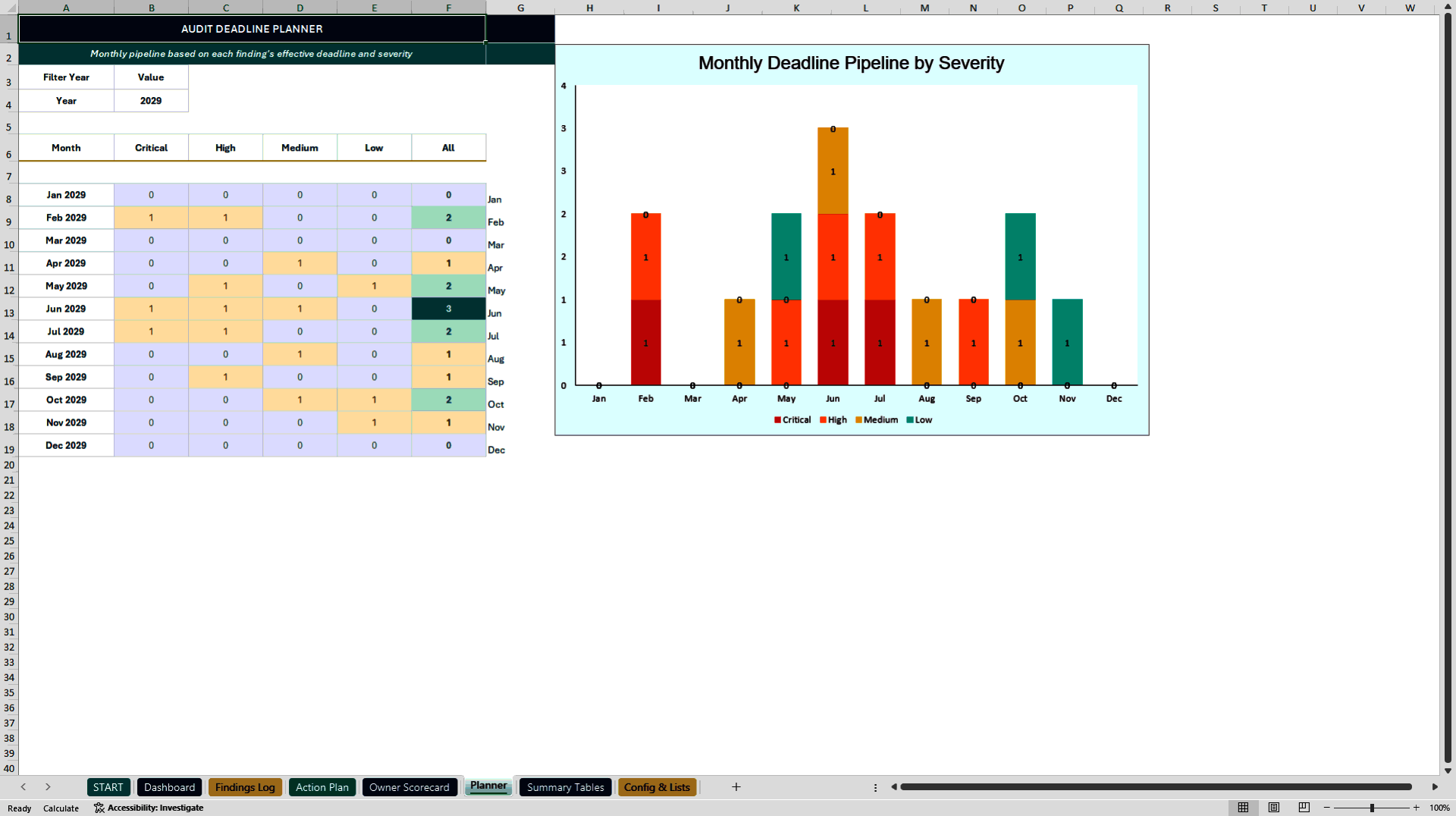
Two additional native charts support the Owner Scorecard and Planner, bringing the main workbook to seven charts.
⚙️ 2. EIGHT INTEGRATED AUDIT MANAGEMENT WORKSHEETS
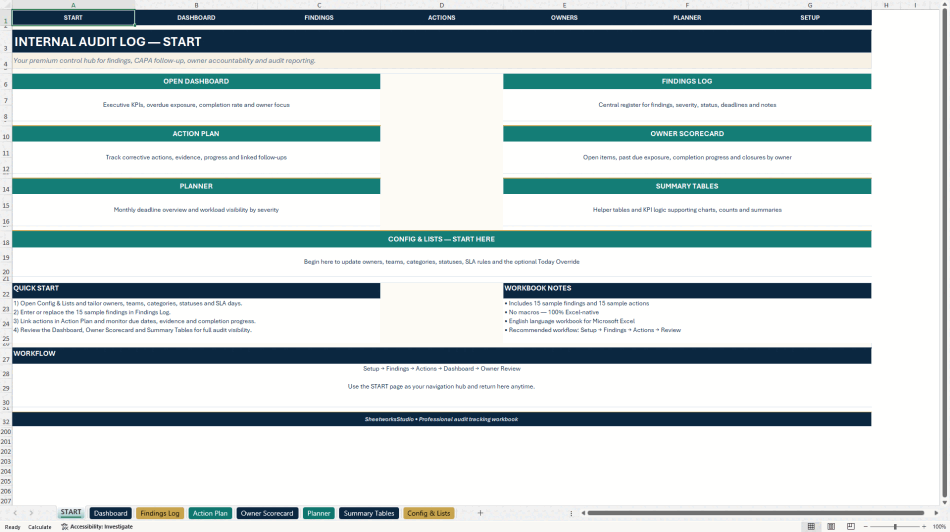
START
Professional welcome page with clickable navigation, workbook orientation, and recommended workflow.
DASHBOARD
Executive KPIs, five management charts, overdue exposure, completion information, and selected owner performance.
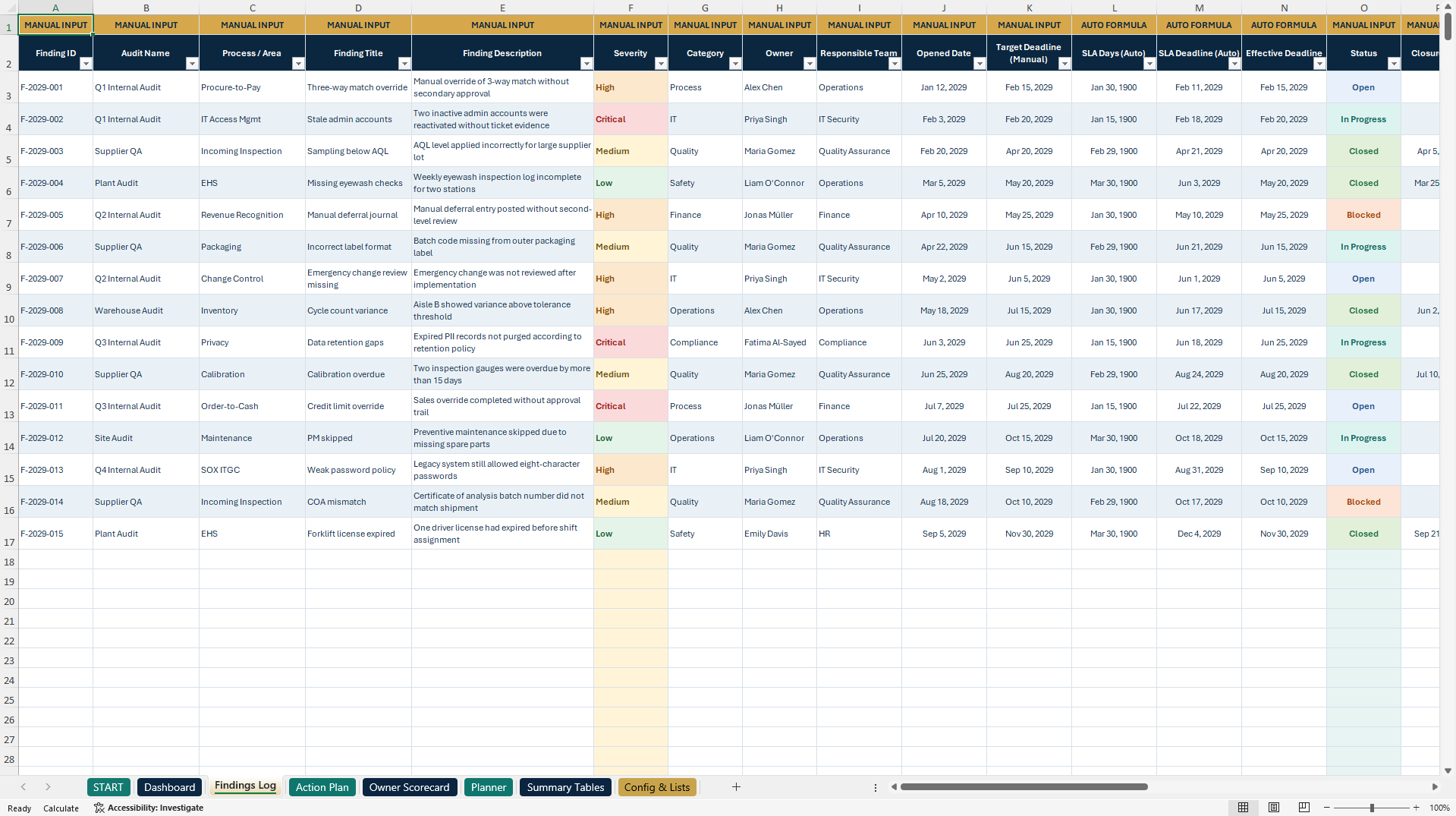
FINDINGS LOG
Central audit findings register covering:
• Finding ID, audit, and process
• Description, severity, and category
• Owner and responsible team
• Opened date and target deadline
• Automatic severity-based SLA deadline
• Effective deadline and Days Open
• Status and calculated completion percentage
• Past Due indicators
• Root cause and corrective actions
• Preventive actions, evidence links, and notes
The register includes 15 illustrative findings and 1,001 prepared data rows.
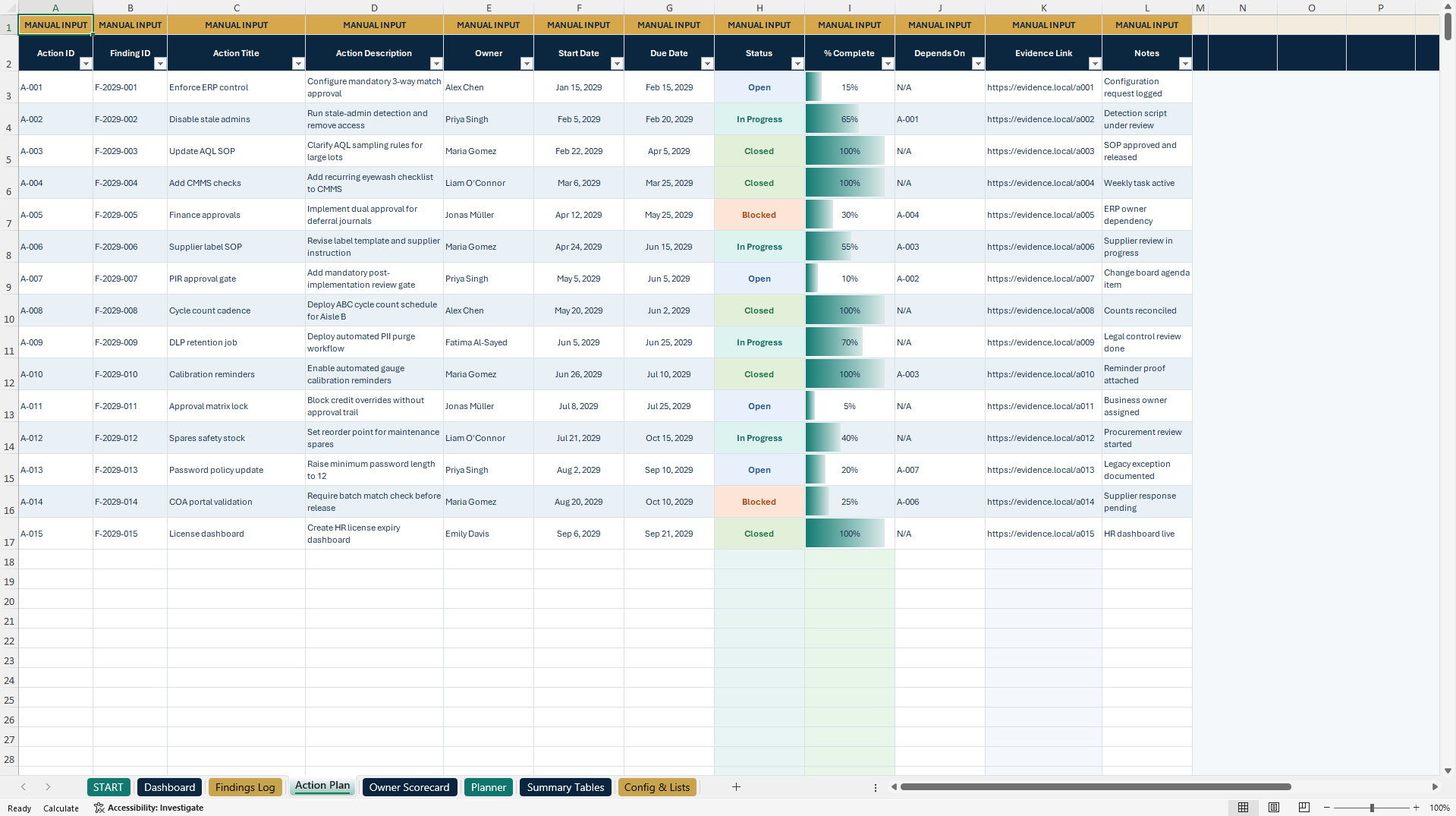
ACTION PLAN
Track corrective and preventive actions, linked Finding IDs, owners, start and due dates, implementation status, completion percentages, dependencies, evidence references, and notes.
Finding-level completion indicators can summarize progress from linked Action Plan entries.
OWNER SCORECARD
Review assigned open findings, overdue exposure, average progress, oldest open-item age, and year-to-date closures by responsible owner.
PLANNER
Review monthly audit deadlines, severity classifications, and upcoming follow-up workload by selected reporting year.
SUMMARY TABLES
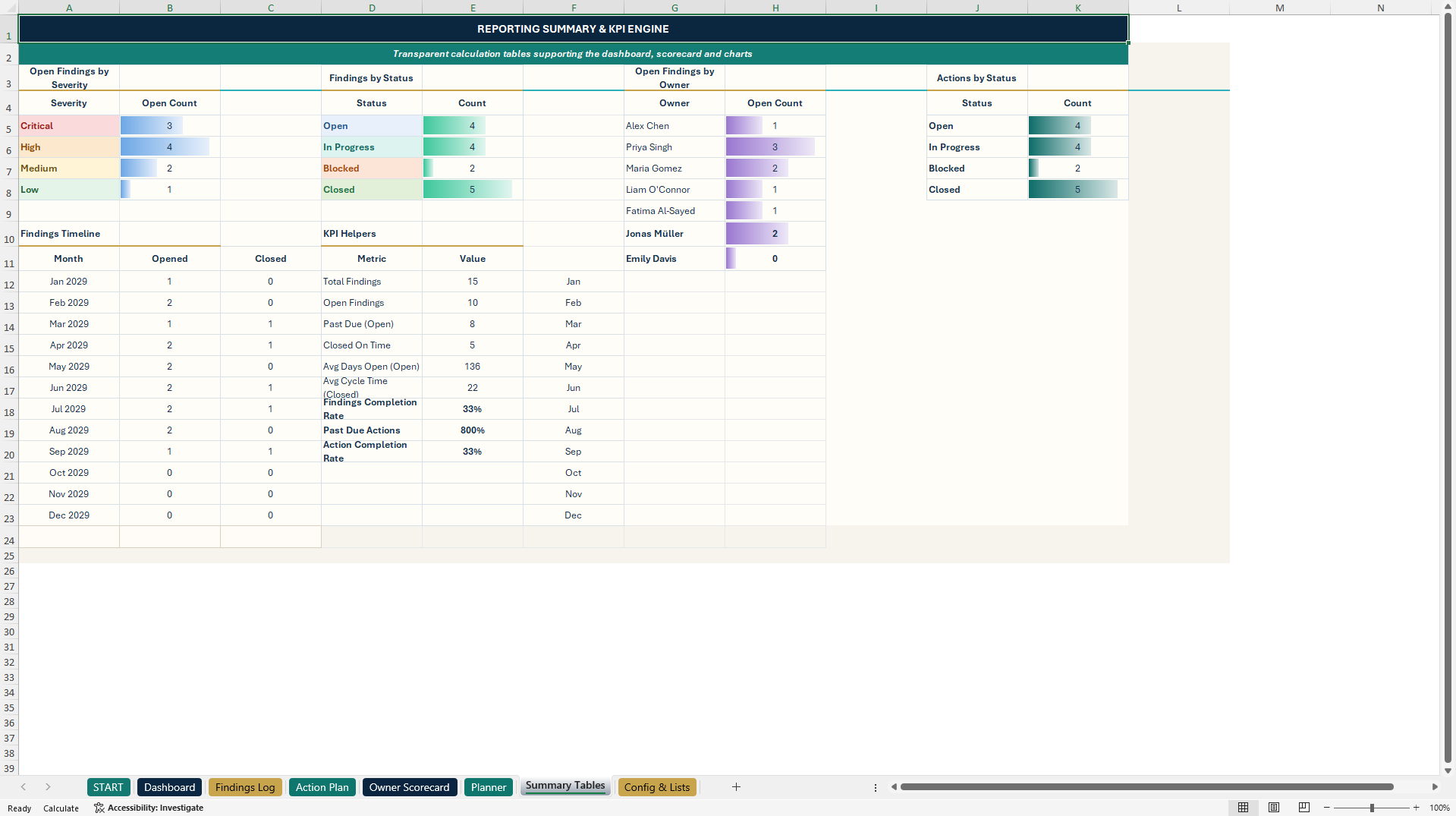
Transparent formula-driven summaries supporting management KPIs, status distributions, timeline analysis, and dashboard charts.
CONFIG & LISTS
Customize owners, teams, categories, statuses, severity-based SLA periods, and supporting dropdown values.
An optional Today Override supports demonstrations or fixed-date reporting. Clear the example override when live current-date calculations are required.
🧮 3. AUTOMATED AUDIT & CAPA CALCULATIONS
The system includes:
• Severity-based SLA calculations
• Automatic effective deadlines
• Days Open calculations
• Finding-level completion percentages
• Past Due indicators
• Owner workload and overdue metrics
• Closure and completion reporting
• Monthly deadline analysis
• Configurable dropdowns
• Conditional formatting and visual status indicators
The main findings and action registers contain 15 realistic sample records each.
Formula-driven fields are identified separately from manual inputs to support safer customization.
🎁 4. BONUS – AUDIT STARTER KIT
A separate six-worksheet Excel workbook supports audit preparation, evidence coordination, root cause analysis, corrective actions, and professional communication.
READ ME
A central start page with quick instructions and navigation.
EVIDENCE REQUEST LIST
Document evidence requests, responsible owners, priorities, evidence types, due dates, status, completion progress, and secure evidence references.
Six management KPIs summarize requests, received evidence, open items, overdue requests, average progress, and high-priority exposure.
KICK-OFF AGENDA
Plan audit opening meetings with structured agenda topics, assigned responsibilities, automatic meeting end times, a Decision Log, and an Action Parking Lot.
5-WHY ROOT CAUSE ANALYSIS
Investigate audit findings through a five-step Why Chain, Root Cause Summary, Containment Actions, and Effectiveness Criteria.
The worksheet also contains a CAPA Action Plan with assigned owners, deadlines, status, progress indicators, and Past Due calculations.
EMAIL TEMPLATES
Fifteen editable professional messages supporting:
• Audit kickoff and interview invitations
• Evidence requests and reminders
• Clarifications and finding validation
• CAPA follow-up
• Escalation and management updates
• Audit close-out and closure confirmation
CONFIG & SAMPLES
Central supporting lists, dropdown values, and an optional Today Override for testing and reporting snapshots.
The companion contains illustrative evidence requests, agenda items, and corrective actions. It operates independently and does not automatically synchronize with the main workbook.
📘 5. PREMIUM 12-PAGE USER GUIDE
The English illustrated PDF explains:
• Initial setup and quick-start workflow
• Main workbook navigation
• Manual inputs versus formulas
• Findings and CAPA management
• Dashboard, Owner Scorecard, and Planner
• Evidence Request List
• Kick-off Agenda and Decision Log
• 5-Why Root Cause Analysis
• Email template customization
• Printing and PDF export
• Troubleshooting, quality checks, and legal guidance
🔄 6. PRACTICAL AUDIT MANAGEMENT WORKFLOW
1. Customize owners, teams, categories, and SLA settings.
2. Replace illustrative audit findings with organizational records.
3. Assign responsibilities and document root causes.
4. Create corrective and preventive actions.
5. Record deadlines, status, and evidence references.
6. Monitor outstanding findings and completion progress.
7. Review executive dashboards and owner performance.
8. Use the Audit Starter Kit for meetings, evidence requests, root cause analysis, and follow-up communications.
🎯 7. BUSINESS APPLICATIONS & TARGET USERS
APPLICATIONS
• Internal Audit Management
• Audit Findings Tracking
• Quality Assurance and Quality Management
• Corrective and Preventive Action Management
• CAPA Monitoring
• Root Cause Analysis
• Evidence Request Coordination
• Audit Deadline and SLA Monitoring
• Supplier and Operational Audits
• Nonconformity and Remediation Tracking
• Management and Audit Reporting
IDEAL FOR
• Internal Auditors and Audit Managers
• Quality Assurance and Quality Management Teams
• GRC and Compliance Professionals
• Operations and Process Managers
• CAPA and Remediation Owners
• Internal Control Teams
• Audit and Quality Consultants
• Small and Medium-Sized Businesses
📦 8. COMPLETE PRODUCT PACKAGE
PRIMARY DOCUMENT
1× Internal Audit Log Control Center (.xlsx)
• Eight Excel worksheets
• Five executive dashboard charts
• Two additional management charts
• 1,001 prepared findings rows
• Fifteen illustrative findings
• Fifteen illustrative corrective actions
• Automated audit, deadline, and reporting calculations
SECONDARY DOCUMENT
1× Audit Starter Kit Companion (.xlsx)
• Six Excel worksheets
• Evidence Request List and six KPIs
• Kick-off Agenda and Decision Log
• 5-Why Root Cause Analysis
• CAPA follow-up management
• Fifteen professional email templates
• Editable configuration lists
1× English How-to-Use Guide (.pdf)
• Twelve professionally formatted A4 pages
TOTAL PACKAGE
• Two editable Excel workbooks
• One English PDF guide
• Fourteen Excel worksheets
• Seven native Excel charts
• Audit findings and CAPA trackers
• Evidence, meeting, and root cause analysis tools
• Fifteen editable email templates
• Realistic illustrative sample data
💻 9. TECHNICAL INFORMATION
• Microsoft Excel (.xlsx)
• Fully editable workbooks
• Built-in formulas and data validation
• Dropdown lists and conditional formatting
• Native Excel dashboards and charts
• No macros, VBA, or add-ins required
• No external database connections
• Microsoft Excel Desktop recommended
The workbooks are designed for local spreadsheet-based audit management rather than live audit software integrations or automated evidence collection.
⚠️ IMPORTANT AUDIT & COMPLIANCE DISCLAIMER
This product is an editable audit management, quality documentation, and CAPA tracking toolkit.
It is not an official or certified audit system, accredited quality management solution, or guarantee of compliance with any specific regulatory or professional standard.
SLA calculations, overdue indicators, completion metrics, and management summaries are internal planning aids based on entered data and configurable assumptions.
Users are responsible for validating findings, deadlines, evidence, corrective actions, formulas, and applicable organizational, legal, regulatory, and professional requirements.
The toolkit does not replace qualified legal, audit, quality management, financial, regulatory, or compliance advice.
Sensitive audit information and supporting evidence should be maintained in approved, appropriately secured environments.
All sample records are illustrative and must be reviewed or replaced before operational use.
ABOUT SHEETWORKSSTUDIO
SheetworksStudio develops professional, editable Excel management systems designed to support business operations, audit documentation, governance, risk oversight, quality management, and data-informed decision-making.
Got a question about the product? Email us at support@flevy.com or ask the author directly by using the "Ask the Author a Question" form. If you cannot view the preview above this document description, go here to view the large preview instead.
Source: Best Practices in RCA, Audit Management Excel: Internal Audit Log & CAPA Management Control Center Excel (XLSX) Spreadsheet, SheetworksStudio
ABOUT THE AUTHOR

SheetworksStudio creates premium Excel-based business templates, dashboards, trackers, financial models, and management systems for professionals, consultants, entrepreneurs, and organizations.
Our portfolio covers finance, project management, operations, risk management, compliance, AI governance, HR, supply chain, performance management, and business planning. Each product is designed to
... [read more]
Ask the Author a Question
You must be logged in to contact the author.




























