
 Click main image to view in full screen.
Skills, Performance & Capacity Planning Control Center – Excel XLSX
Excel (XLSX) + Zip archive file (ZIP)


BENEFITS OF THIS DOWNLOADABLE EXCEL DOCUMENT
- Centralize employee records, skill assessments, proficiency gaps, performance reviews, project demand, monthly capacity, and resource allocation in one structured Excel planning system.
- Identify skill shortages, utilization gaps, performance risk flags, and potential hiring requirements with automated formulas, scenario-based dashboard indicators, and four native Excel charts.
- Get two editable Excel workbooks with 13 worksheets and seven native charts, a Learning & Development companion with 200 prepared activity rows, realistic sample data, and a 10-page user guide.
PERFORMANCE MANAGEMENT EXCEL DESCRIPTION
📊 SKILLS, PERFORMANCE & CAPACITY PLANNING CONTROL CENTER
An Integrated Excel Workforce Management System for Skills Assessment, Employee Performance, Project Demand, Resource Capacity, Hiring Decisions & Executive Reporting
The Skills, Performance & Capacity Planning Control Center by SheetworksStudio is a professional, fully editable Excel management toolkit designed to help organizations assess employee capabilities, identify skill shortages, monitor performance, forecast project demand, and plan workforce capacity.
Combining a nine-worksheet workforce planning system, automated calculations, an executive dashboard with four native Excel charts, and a dedicated Learning & Development companion, the toolkit provides a structured working environment for HR professionals, People Operations teams, department managers, PMOs, resource planners, and management consultants.
Instead of managing separate spreadsheets for employee skills, project requirements, performance reviews, and resource availability, organizations can bring these important planning activities into one coordinated management workflow.
📈 1. EXECUTIVE WORKFORCE PLANNING DASHBOARD
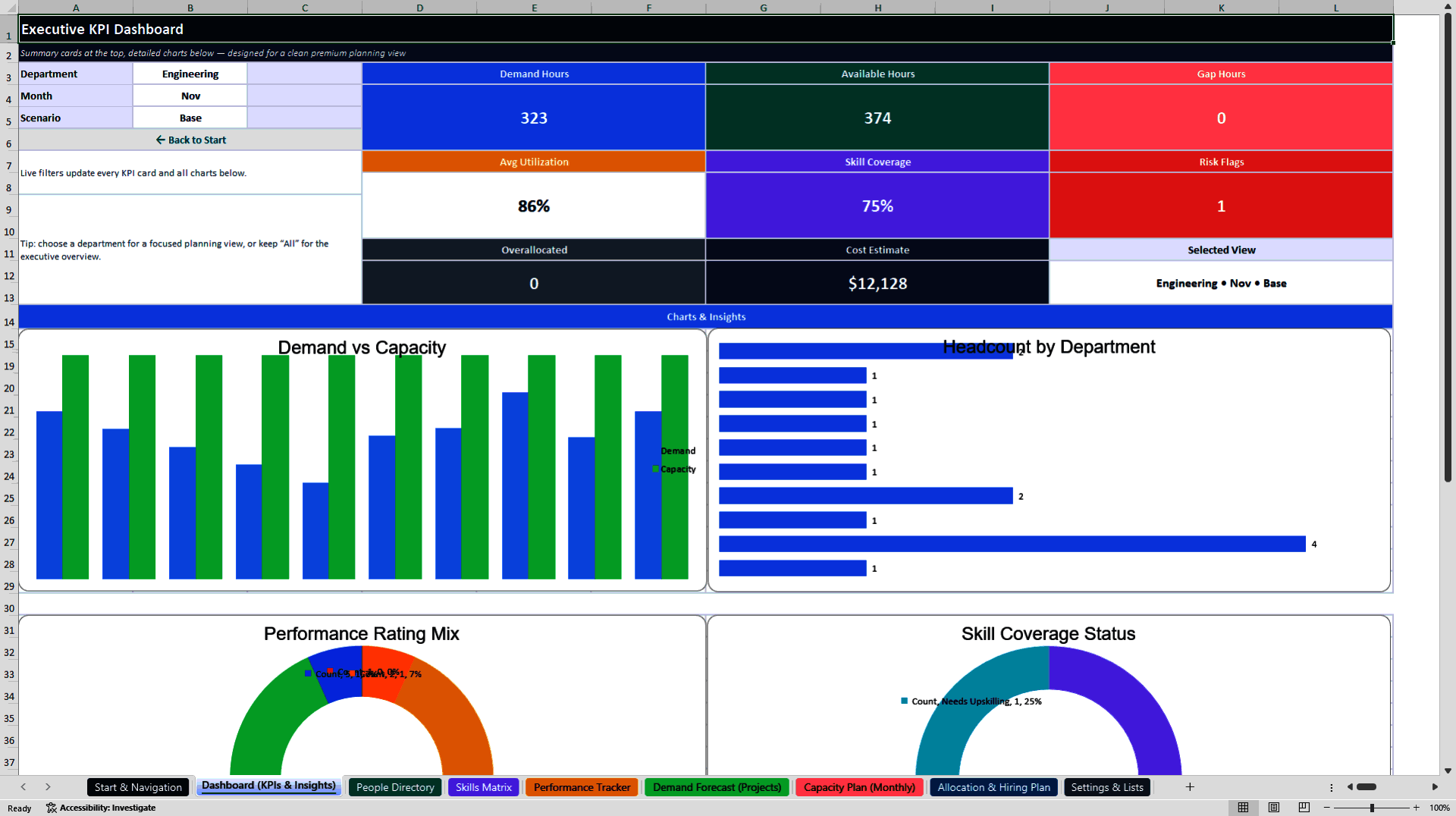
The Executive Dashboard consolidates workforce planning and performance indicators into a central reporting interface.
Four native Excel charts support the visualization of selected workforce information.
Monitor:
• Workforce demand and available capacity
• Monthly resource requirements
• Capacity gaps and utilization
• Departmental workforce information
• Employee performance ratings
• Skills coverage and proficiency gaps
• Workforce risk and planning priorities
The dashboard includes configurable department, month, and planning-scenario selections to support focused management reviews.
Built-in KPI calculations and visual indicators help users identify potential capacity shortages, review employee capabilities, and prepare workforce planning discussions.
⚙️ 2. NINE INTEGRATED WORKFORCE MANAGEMENT WORKSHEETS
The main Excel workbook contains nine structured worksheets.
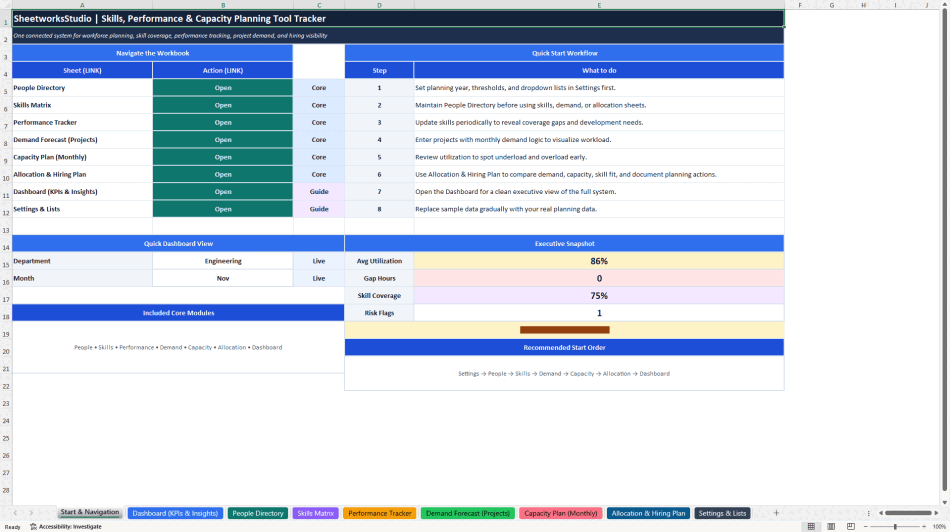
START & NAVIGATION
A central starting page introduces the system, explains the recommended workflow, and provides direct navigation to the planning modules.
SETTINGS & LISTS
Maintain the planning year, standard working hours, workforce categories, departments, teams, job roles, relevant skills, and supporting configuration values.
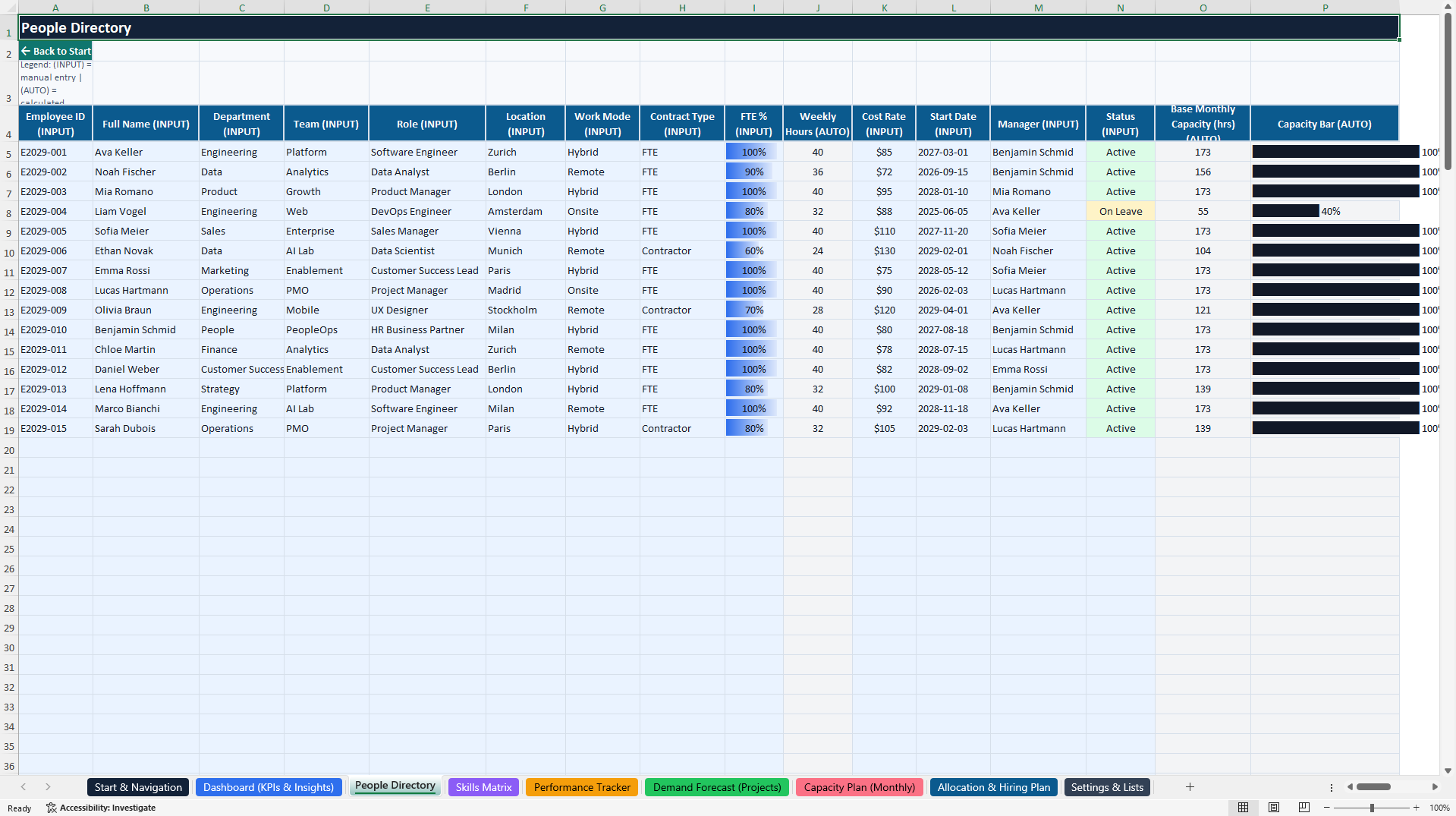
PEOPLE DIRECTORY
Build a structured employee register covering:
• Employee identification
• Departments and teams
• Roles and locations
• Employment arrangements
• Full-Time Equivalent (FTE) values
• Working hours
• Cost information
• Management ownership
• Employee status
• Available workforce capacity
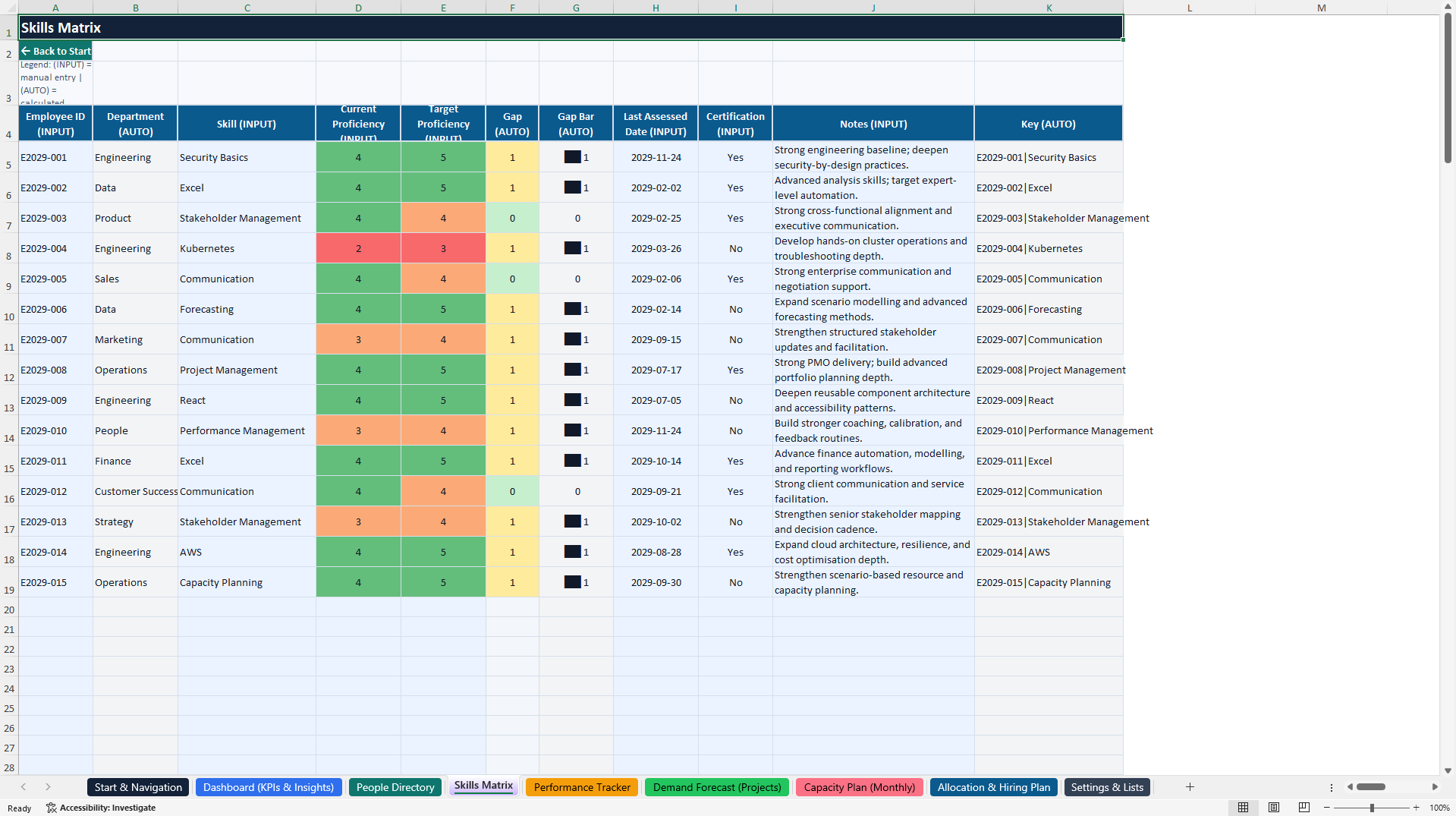
SKILLS MATRIX
Document employee skills and capabilities using structured proficiency assessments.
Record current and target proficiency, certifications, assessment dates, and relevant development notes.
Built-in calculations highlight proficiency gaps and help identify areas requiring additional development.
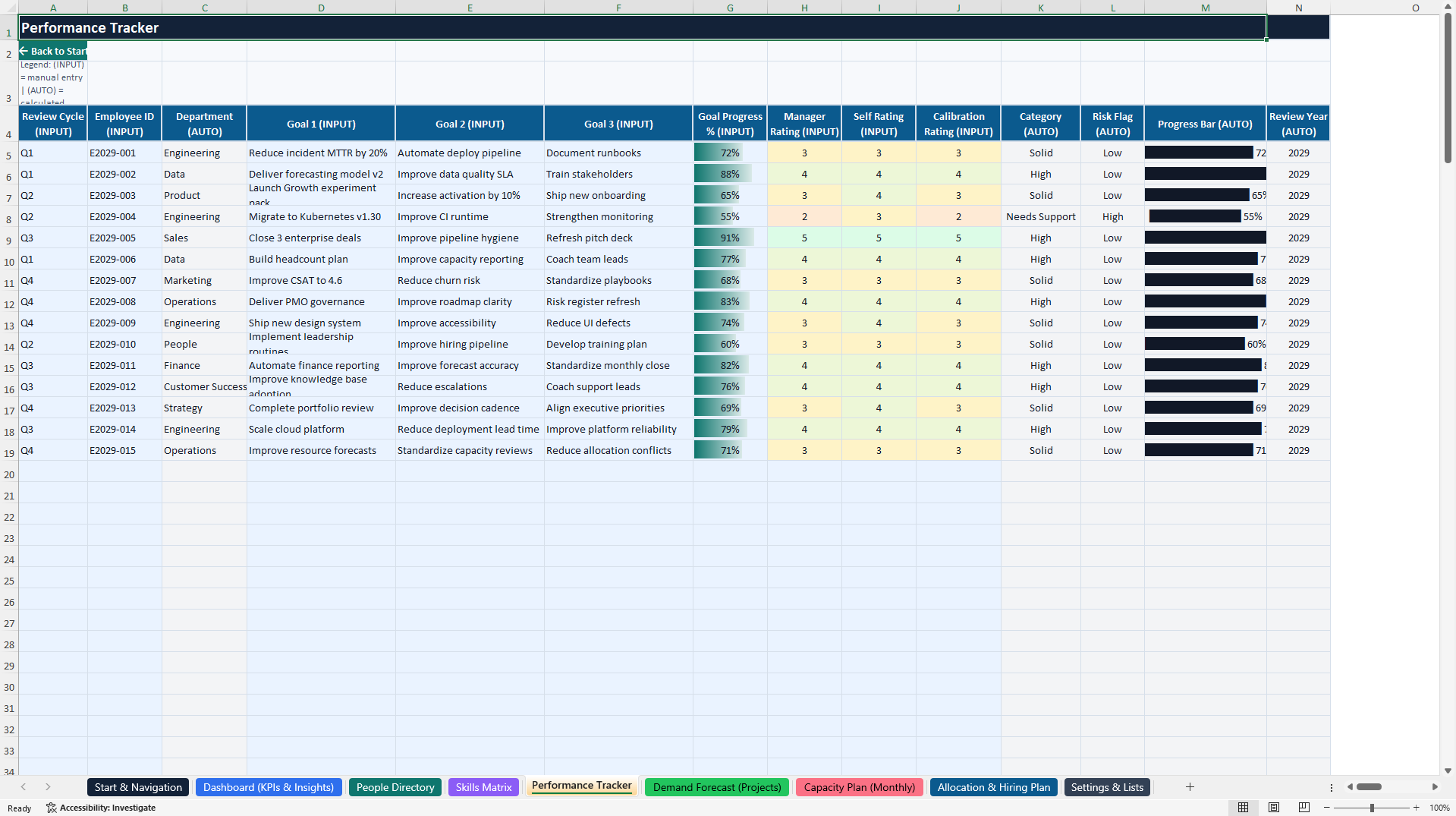
PERFORMANCE TRACKER
Manage employee performance reviews, review cycles, objectives, progress indicators, performance ratings, and calculated performance risk flags.
The tracker supports structured review documentation and helps management teams identify cases requiring further discussion.
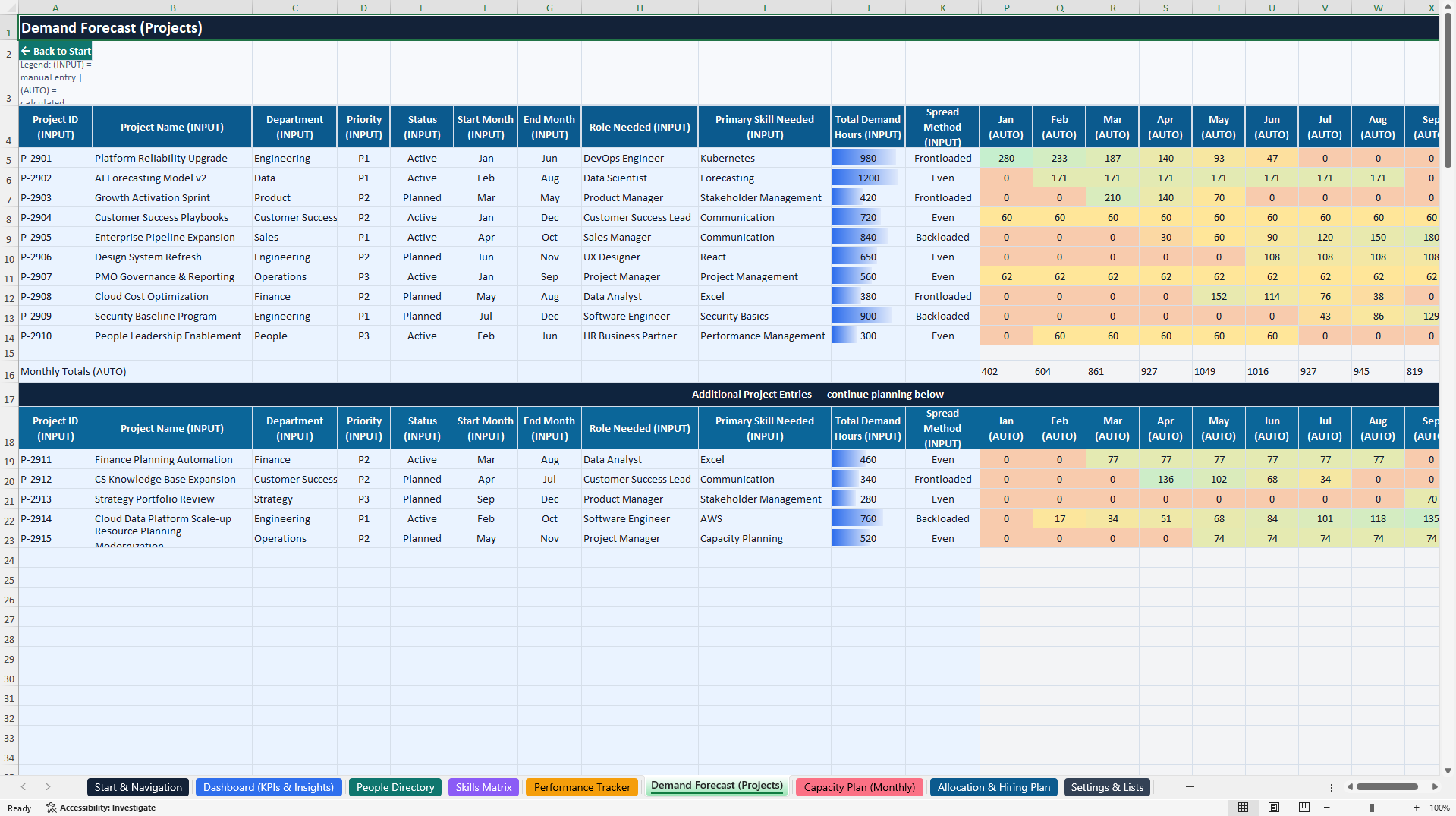
DEMAND FORECAST (PROJECTS)
Plan workforce demand across projects and initiatives.
Document project priorities, responsibilities, timelines, required roles, relevant skills, and planned monthly demand hours.
The system supports the comparison of project requirements with available workforce resources.
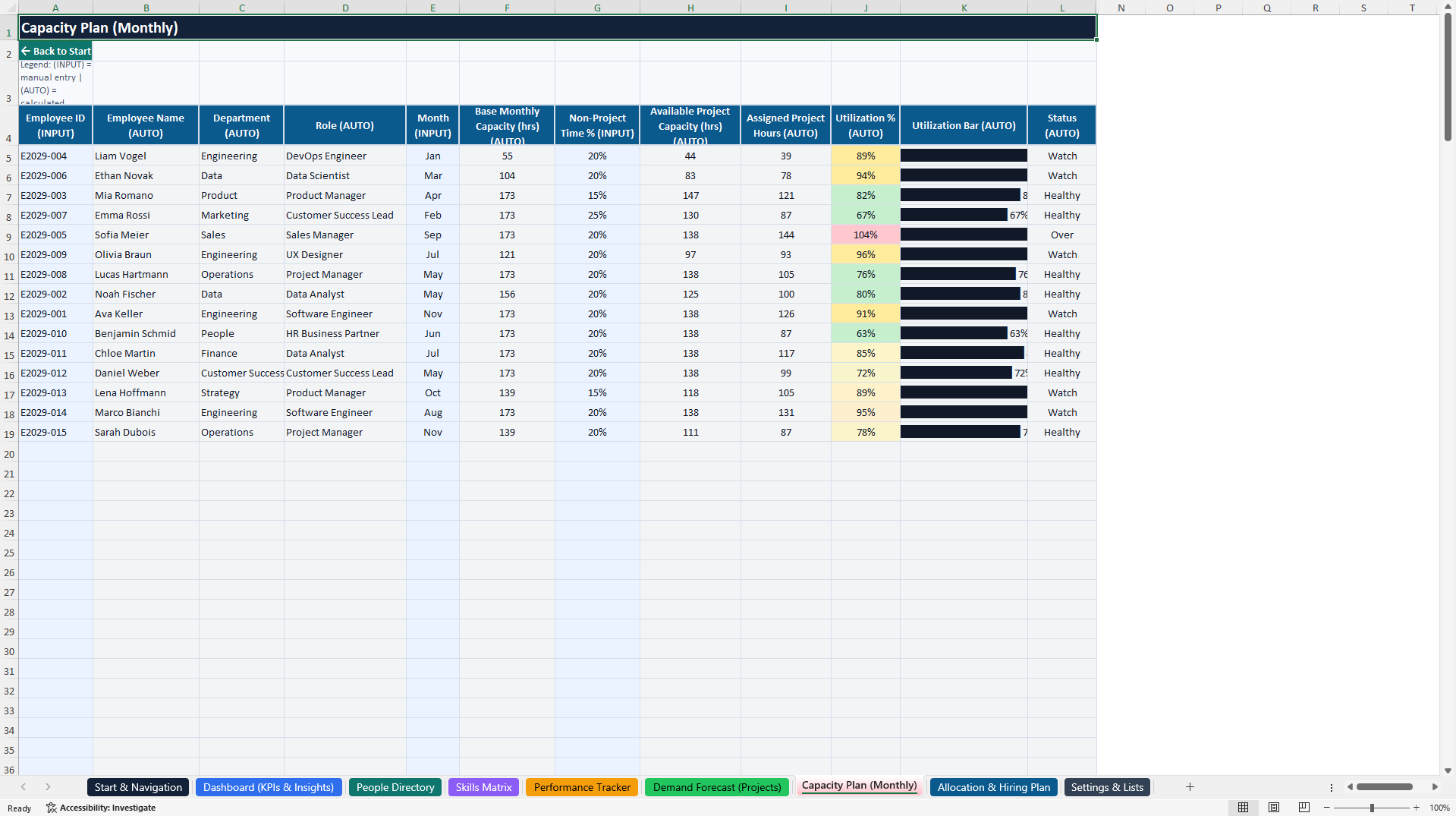
CAPACITY PLAN (MONTHLY)
Review employee capacity by month.
Compare available working hours with assigned project requirements and monitor utilization, capacity gaps, and workload indicators.
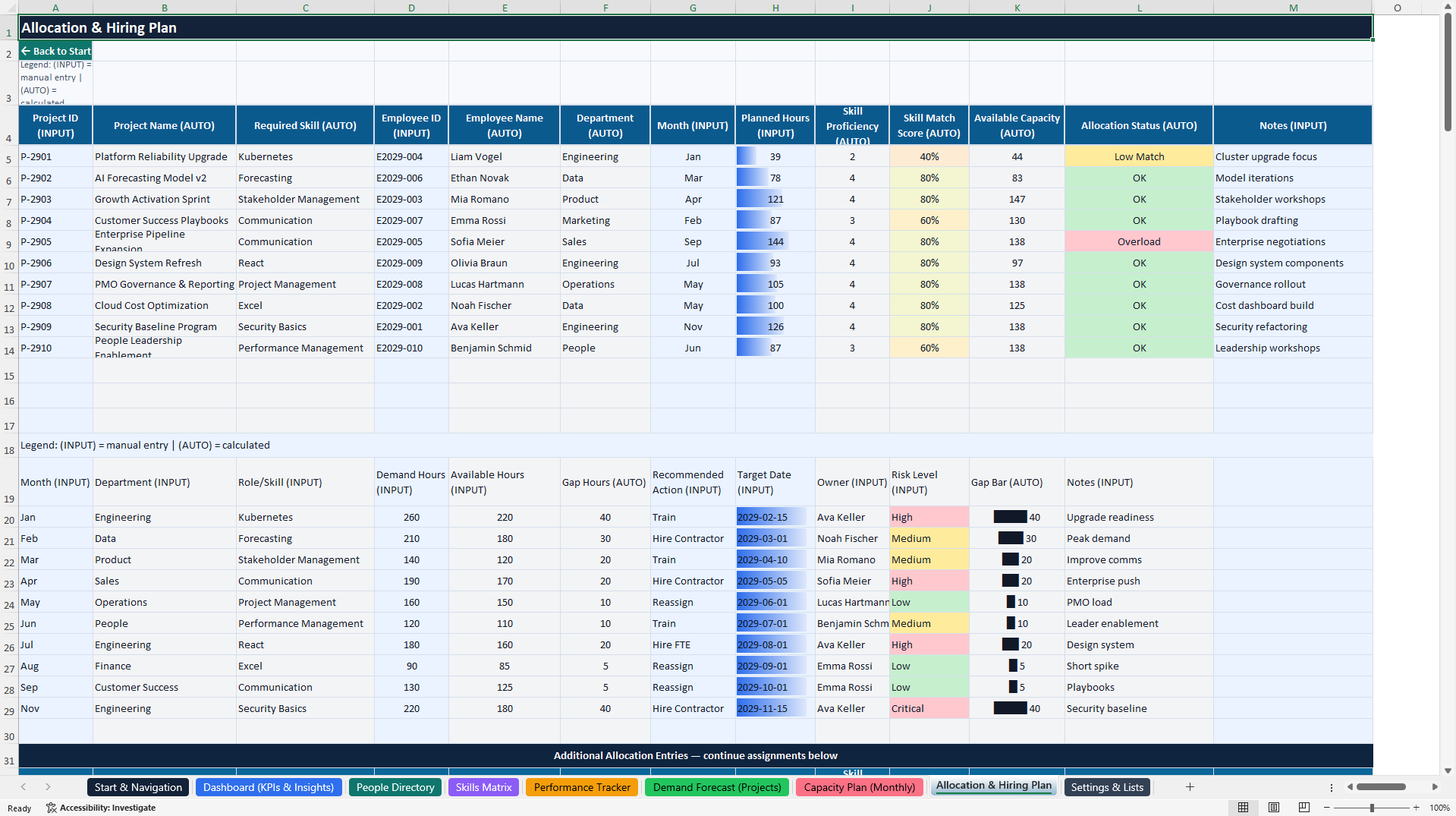
ALLOCATION & HIRING PLAN
Connect project assignments with employee availability and skills.
Document planned allocation hours, skill suitability, staffing gaps, and management actions such as:
• Training
• Reassignment
• Contractor engagement
• Additional full-time hiring
• Scope adjustments
• Timeline changes
DASHBOARD (KPIs & INSIGHTS)
Consolidate selected workforce, performance, demand, and capacity information into an executive reporting environment with four native Excel charts.
🧮 3. AUTOMATED CALCULATIONS & STRUCTURED DATA ENTRY
The main workbook includes built-in formulas, data validation, and structured input areas to support consistent workforce planning.
Key calculations and management indicators include:
• Current versus target proficiency gaps
• Employee capacity calculations
• Project demand by planning period
• Monthly workforce availability
• Capacity and utilization comparisons
• Employee performance classifications
• Skill suitability indicators
• Staffing and hiring gap assessments
• Executive dashboard KPI summaries
Fields are identified using an INPUT and AUTO structure.
INPUT fields are intended for manually entered or selected information.
AUTO fields contain formulas and calculations that should normally remain unchanged.
Realistic illustrative employee, project, skills, and performance records are included to demonstrate the workflow before users enter their own information.
🎁 4. BONUS – LEARNING & DEVELOPMENT MINI-TRACKER
A separate four-worksheet Excel workbook supports training coordination, development planning, and learning activity tracking.
The bonus contains:
START & NAVIGATION
Introduces the development workflow and provides quick access to the companion modules.
LEARNING TRACKER
Includes 200 prepared activity rows and 15 realistic example activities.
Record:
• Employee and department
• Learning category
• Course or development activity
• Training provider
• Start and target dates
• Learning status and priority
• Planned and completed hours
• Completion progress
• Training costs
• Certifications
• Development actions and notes
Built-in formulas support activity identification, progress calculations, and relevant learning indicators.
DASHBOARD (FREEBIE)
Provides a management overview with six KPI cards, a department filter, and three native Excel charts.
The dashboard helps users review learning activity, planned and completed hours, training costs, and development progress.
SETTINGS & LISTS
Contains planning parameters, learning categories, employee information, supporting lists, and dashboard calculation data.
The companion operates independently from the main workforce planning workbook. Data is not automatically synchronized between the two systems.
🎯 5. PRACTICAL WORKFORCE PLANNING WORKFLOW
The toolkit supports a structured sequence of management activities:
1. Configure the planning year, departments, roles, and settings.
2. Maintain employee information in the People Directory.
3. Assess current and target proficiency in the Skills Matrix.
4. Document performance goals and review outcomes.
5. Enter upcoming projects and workforce demand.
6. Review monthly employee capacity and utilization.
7. Compare project requirements with available resources.
8. Identify potential skill shortages and staffing gaps.
9. Document training, reassignment, contractor, or hiring actions.
10. Review dashboards and coordinate development activities.
This workflow provides a repeatable structure for operational workforce planning and management discussions.
🏢 6. PRACTICAL BUSINESS APPLICATIONS
The system can support:
• Workforce Capacity Planning
• Skills Matrix Management
• Employee Skills Gap Analysis
• Resource Allocation
• Project Demand Forecasting
• Employee Performance Reviews
• Headcount and Hiring Planning
• Training and Development Coordination
• Workforce Utilization Reviews
• Departmental Resource Planning
• Project and Portfolio Resource Discussions
• Management Reporting
• Organizational Capability Reviews
• HR and Operations Consulting
👥 IDEAL FOR
• Human Resources Managers
• People Operations Teams
• Workforce Planning Professionals
• Learning & Development Managers
• Operations Managers
• Department Heads and Team Leaders
• Project Management Offices (PMOs)
• Resource and Capacity Planners
• Management Consultants
• Professional Services Firms
• Agencies and Technology Teams
• Startups and Growing Organizations
• Small and Medium-Sized Businesses
📦 7. COMPLETE PRODUCT PACKAGE
PRIMARY DOCUMENT
1× Skills, Performance & Capacity Planning Control Center (.xlsx)
Includes nine worksheets:
• Start & Navigation
• Dashboard (KPIs & Insights)
• People Directory
• Skills Matrix
• Performance Tracker
• Demand Forecast (Projects)
• Capacity Plan (Monthly)
• Allocation & Hiring Plan
• Settings & Lists
Contains four native Excel dashboard charts, structured input fields, built-in calculations, and illustrative sample data.
SECONDARY DOCUMENT
1× Learning & Development Mini-Tracker (.xlsx)
Includes four worksheets:
• Start & Navigation
• Dashboard (Freebie)
• Learning Tracker
• Settings & Lists
Contains three native Excel charts, six KPI cards, 200 prepared learning activity rows, and 15 illustrative sample activities.
1× English How-to-Use Guide (.pdf)
A ten-page illustrated guide covering setup, workbook navigation, workforce planning workflows, dashboard interpretation, companion usage, safe customization, Google Sheets considerations, troubleshooting, and important legal information.
TOTAL PRODUCT PACKAGE
• Two fully editable Excel workbooks
• One English PDF user guide
• 13 Excel worksheets
• Seven native Excel charts
• Automated calculation formulas
• Structured workforce and development trackers
• Illustrative sample records
• Ten pages of user documentation
💻 8. TECHNICAL INFORMATION
• Microsoft Excel (.xlsx)
• Fully editable management workbooks
• Built-in Excel formulas
• Input and calculation field guidance
• Data validation in the main workbook
• Conditional formatting and status indicators
• Native Excel charts
• No macros or VBA required
• No external Excel data connections required
• No specialized HR software subscription required
• Microsoft Excel Desktop recommended
Google Sheets import may support many of the underlying formulas and editable data fields. However, chart appearance, navigation, conditional formatting, data validation, and other Excel-specific features may display or behave differently. Full Google Sheets feature parity is not guaranteed.
The toolkit is designed for spreadsheet-based planning and reporting. It does not provide automatic HRIS synchronization, live employee data integration, automated payroll calculations, or an applicant tracking system.
⚠️ 9. IMPORTANT HR & WORKFORCE PLANNING DISCLAIMER
This product is an editable organizational, workforce planning, and management documentation template.
It is not certified HR software, a validated employee assessment instrument, or a substitute for qualified human resources, employment law, financial, legal, or other professional advice.
Skills scores, performance classifications, utilization calculations, and capacity indicators are management planning aids based on user-provided information and assumptions.
They should not be used as the sole basis for hiring, promotion, disciplinary action, termination, or other consequential employment decisions.
Users are responsible for validating data, reviewing calculations, applying fair and lawful assessment practices, protecting employee information, and adapting the system to applicable employment, privacy, and data protection requirements.
All included employee information, project details, performance assessments, and learning activities are illustrative examples and must be reviewed or replaced before operational use.
ABOUT SHEETWORKSSTUDIO
SheetworksStudio develops professional, editable spreadsheet-based management systems designed to support workforce planning, operational organization, risk oversight, performance monitoring, and data-informed business decisions.
Got a question about the product? Email us at support@flevy.com or ask the author directly by using the "Ask the Author a Question" form. If you cannot view the preview above this document description, go here to view the large preview instead.
Source: Best Practices in Performance Management, Talent Management Excel: Skills, Performance & Capacity Planning Control Center Excel (XLSX) Spreadsheet, SheetworksStudio
ABOUT THE AUTHOR

SheetworksStudio creates premium Excel-based business templates, dashboards, trackers, financial models, and management systems for professionals, consultants, entrepreneurs, and organizations.
Our portfolio covers finance, project management, operations, risk management, compliance, AI governance, HR, supply chain, performance management, and business planning. Each product is designed to
... [read more]
Ask the Author a Question
You must be logged in to contact the author.




























