
 Click main image to view in full screen.
Procurement Savings Methodology and Benefits Tracking – PowerPoint PPTX Template
PowerPoint (PPTX) + Zip archive file (ZIP) 11 Slides


BENEFITS OF THIS DOWNLOADABLE POWERPOINT DOCUMENT
- Settle the argument with finance about what counts as a saving before you claim anything, not after.
- Handle the genuinely ambiguous baselines -- changed volume, changed specification, first-time buy -- with a defined decision path.
- Report procurement performance on more than savings, with a scorecard finance recognises.
PROCUREMENT STRATEGY PPT TEMPLATE DESCRIPTION
The argument with finance about what counts as a saving, settled in advance and written down.
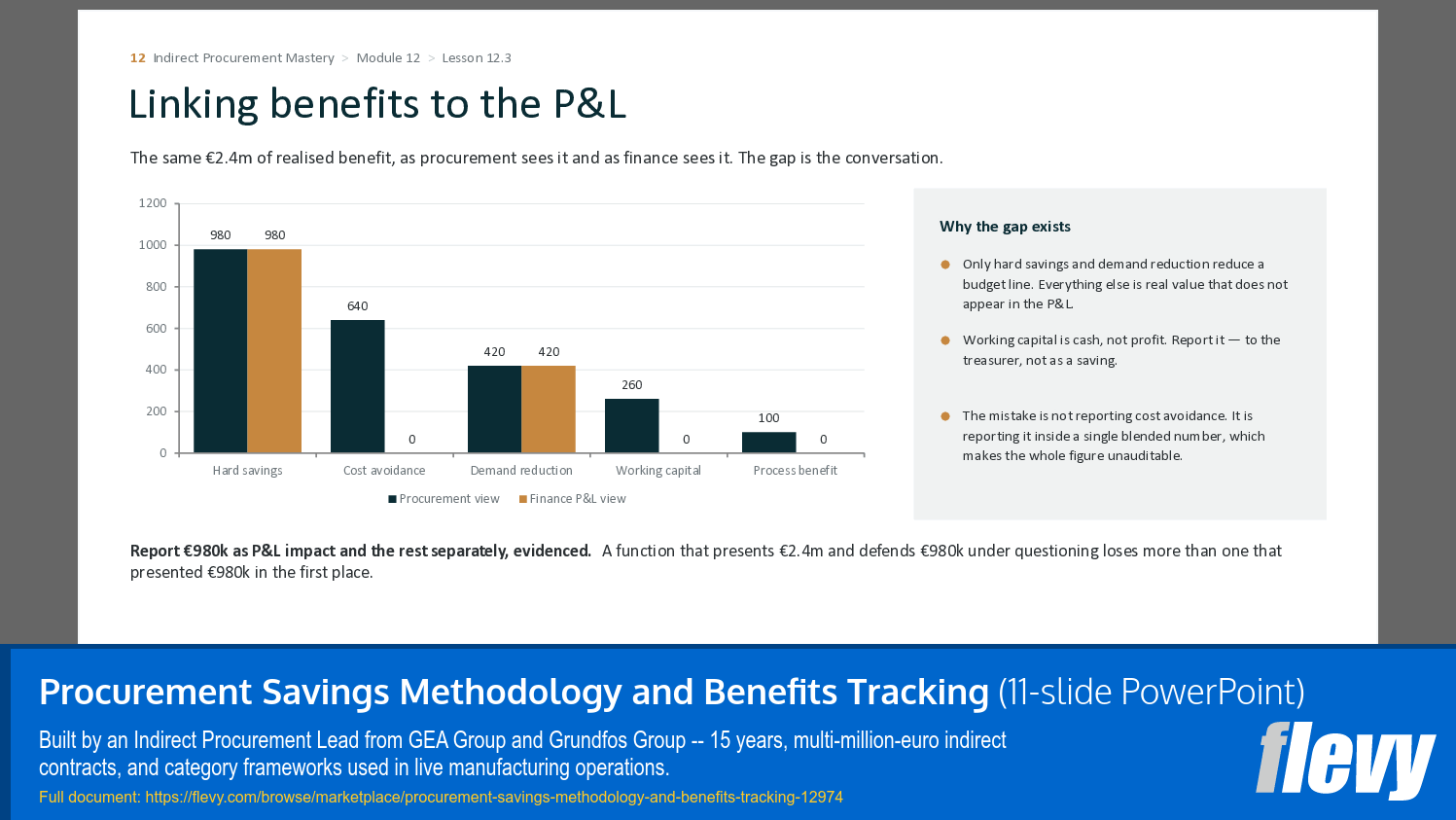
Procurement functions lose credibility in one specific way: they claim a number, finance cannot find it in the budget, and every subsequent claim is discounted. This toolkit defines six benefit types – hard savings, cost avoidance, demand reduction, working capital, process efficiency and risk mitigation – states how each is calculated, and states which ones will and will not appear in the P&L.
The baselining decision tree handles the genuinely hard cases: no prior contract, volume changed, specification changed, market index moved, one-off purchase, first-time buy.
WHAT IS INCLUDED
• Savings Methodology (Word) – the six benefit types, defined and worked.
• Baselining Decision Tree (Word) – for the cases where the baseline is genuinely ambiguous.
• Benefits Tracker (Excel) – initiative-level tracking with P&L linkage and phasing.
• Indirect Procurement Scorecard (Excel) – performance measured beyond savings.
• Savings Definition Guide (Word) – the short version, to agree with your finance business partner.
• Savings Tracker (Excel) – lightweight version for a single category or a small team.
WHO IT IS FOR
Heads of procurement who have to report a number, and anyone who has ever been told their savings did not show up.
WHAT YOU RECEIVE
The primary document is a 11-slide guide covering the material above, in the same consulting layout used throughout this series: a headline that states the point, a body that evidences it, and a closing line that tells you what to do with it. It is designed to be read on its own or presented internally.
The accompanying archive contains 6 working files – Excel models with live formulas, Word templates and, where relevant, PowerPoint canvases. Nothing is password-protected or locked. A locked template a professional cannot adapt is worth nothing.
HOW THE SPREADSHEETS ARE BUILT
Every workbook uses the standard financial-modelling colour convention, applied consistently: blue text on a pale yellow fill is an input you type over, black text is a formula you should not overwrite, and green text is a reference to another sheet that must be changed at source. Each model carries one worked example row, shaded and italicised, which you delete once your own data is in, and an assumptions block at the top that should be read before any output below it is trusted. Print areas and page setup are configured on every sheet.
WHAT THIS IS NOT
This is educational and commercial material, not legal, tax or financial advice. Contractual content exists so that you can identify what matters commercially and ask better questions of whoever does advise you; contract law and regulatory obligations vary by jurisdiction. All case material is composite – figures are drawn from real engagements, but no case describes a single identifiable organisation and every company name is invented.
A licence page inside each file sets out the terms of use: unrestricted use for your own work and inside your own organisation, no resale or redistribution outside it.
Got a question about the product? Email us at support@flevy.com or ask the author directly by using the "Ask the Author a Question" form. If you cannot view the preview above this document description, go here to view the large preview instead.
Source: Best Practices in Procurement Strategy PowerPoint Slides: Procurement Savings Methodology and Benefits Tracking PowerPoint (PPTX) Presentation Slide Deck, Davide Sferrazza
ABOUT THE AUTHOR

Indirect Procurement Lead, with 15 years spent in the categories most organisations manage least well: MRO, facilities, utilities and energy, marketing services, IT and software, professional services, logistics and CapEx.
That career has been inside manufacturing groups -- Pavan (GEA Group) and DAB Pumps (Grundfos Group) -- leading procurement transformation projects, negotiating
... [read more]
Ask the Author a Question
You must be logged in to contact the author.




























