
We are a firm of ex-consultants from McKinsey, E&Y, and Bearing Point specializing in designing consulting presentations. Learn exactly how strategy consultants craft and design presentations, from storyboarding to slide/graph/chart design.
Editor Summary
Presentation Development Primer (Storyboarding, Slide Design) is a 28-slide PowerPoint primer from PPT Lab, a firm of ex-consultants from McKinsey, E&Y, and Bearing Point, teaching presentation methods drawn from McKinsey, Bain, and BCG.
Read moreFocuses on 3 core areas—Storyboarding, Slide Structuring, and Graph Design—and references using the first 3 steps of a six-phase problem-solving process. Includes 5 deliverables/templates: storyboarding framework, slide structure guidelines, graph selection criteria, example headlines, and design rules. Sold as a digital download on Flevy with immediate digital download.
Use this primer when a team must prepare structured, client-facing presentations—such as before stakeholder briefings, trainings, or workshops—where narrative clarity and data visualization matter.
Corporate executives preparing stakeholder briefings that distill strategy decisions into slide headlines and key takeaways.
Consultants building client-ready decks who need to storyboard hypotheses, structure slides, and define bumpers before analysis.
Project managers presenting complex status updates who must select appropriate charts to show trends and comparisons.
Marketing leads crafting campaign narratives that combine storyboarding with consistent slide design.
The three-section approach and use of the first 3 steps of a six-phase problem-solving process reflect practices used at McKinsey, Bain, and BCG.
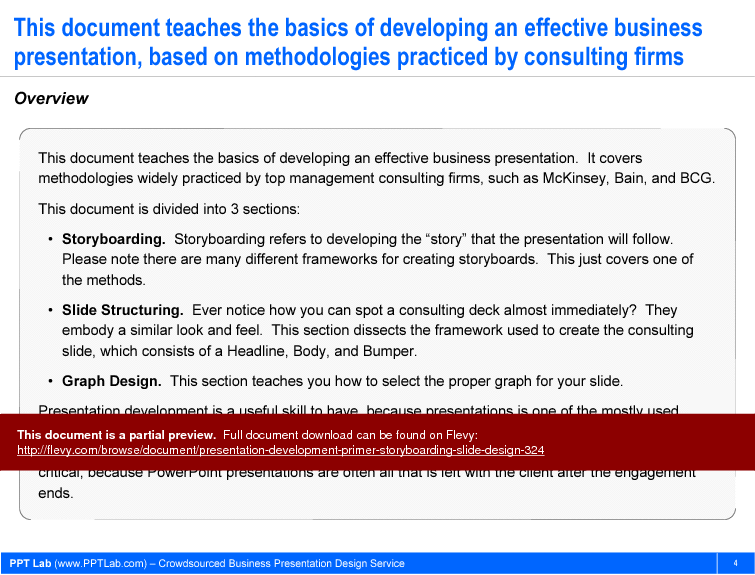
This document teaches the basics of developing an effective business presentation. It covers methodologies widely practiced by top management consulting firms, such as McKinsey, Bain, and BCG. This document is divided into 3 sections:
*Storyboarding. Storyboarding refers to developing the "story" that the presentation will follow. Please note there are many different frameworks for creating storyboards. This just covers one of the methods.
*Slide Structuring. Ever notice how you can spot a consulting deck almost immediately? They embody a similar look and feel. This section dissects the framework used to create the consulting slide, which consists of a Headline, Body, and Bumper.
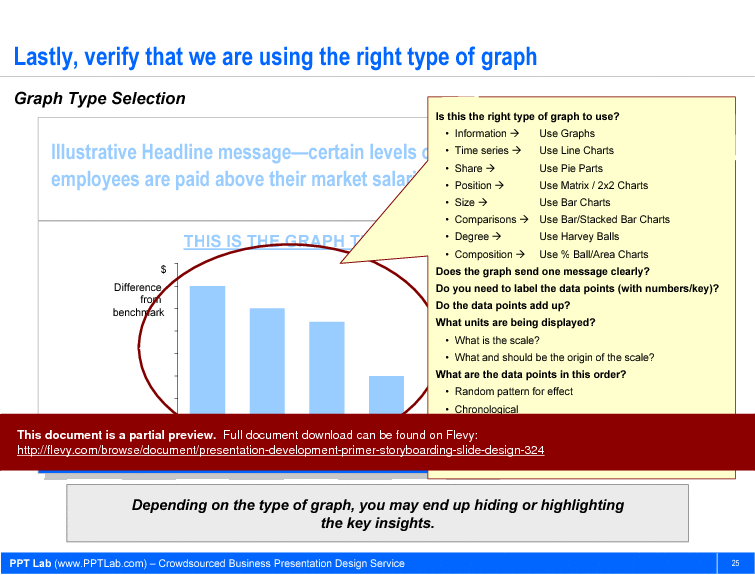
*Graph Design. This section teaches you how to select the proper graph for your slide.
Presentation development is a useful skill to have, because presentations is one of the mostly used communication tools in any workplace. Furthermore, presentations are work products that are easily and widely circulated both within and to outside an organization. For a consultant, this skill is even more critical, because PowerPoint presentations are often all that is left with the client after the engagement ends.
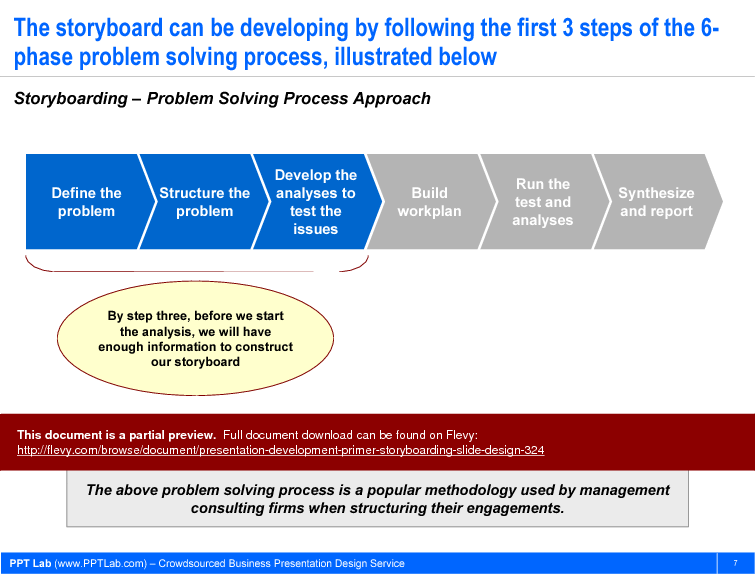
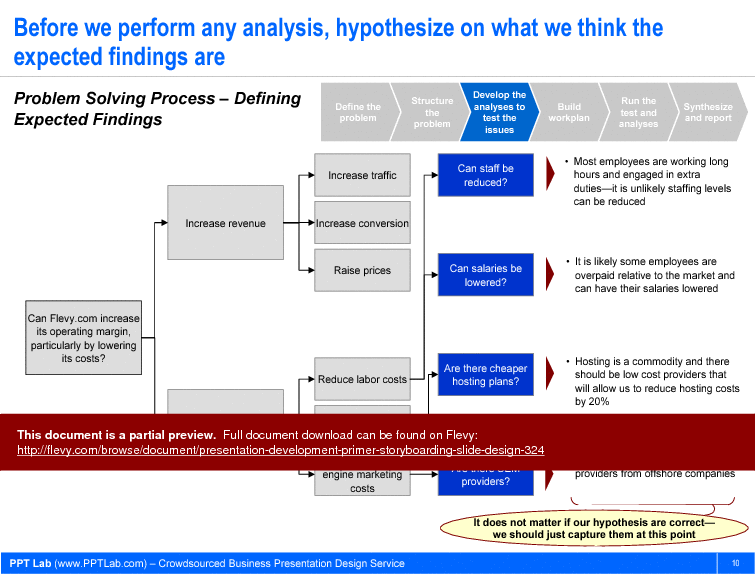
The storyboard can be developed by following the first three steps of the six-phase problem-solving process: defining the problem, structuring the problem, and developing the analyses to test the issues. This approach ensures that the presentation narrative is built on a solid foundation of problem identification and structured analysis, which is critical for delivering impactful insights to stakeholders. Before performing any analysis, hypothesizing expected findings helps in aligning the story with potential outcomes, making the final presentation more coherent and persuasive.
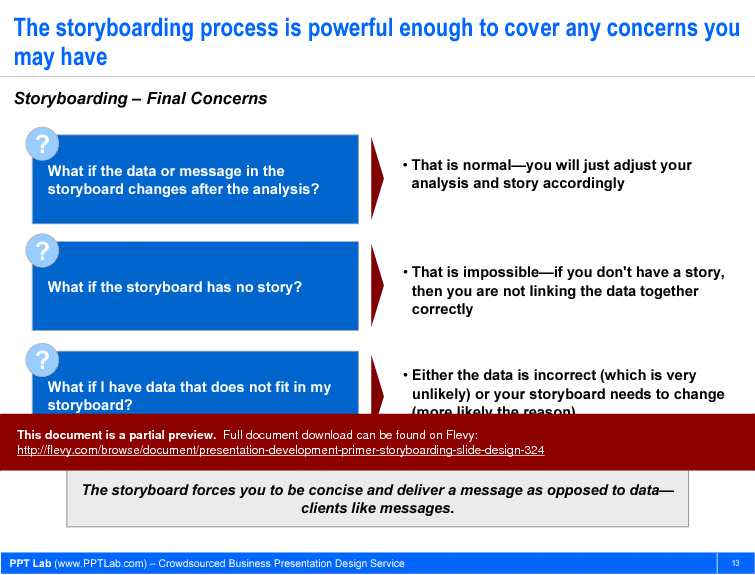
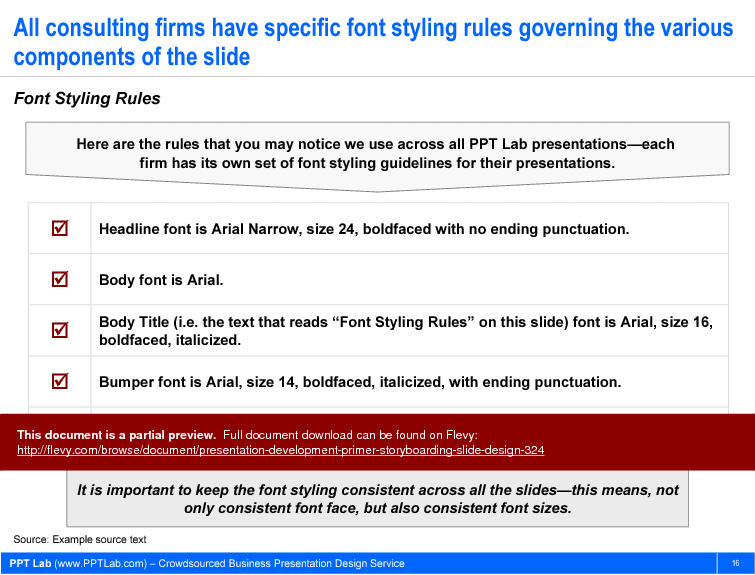
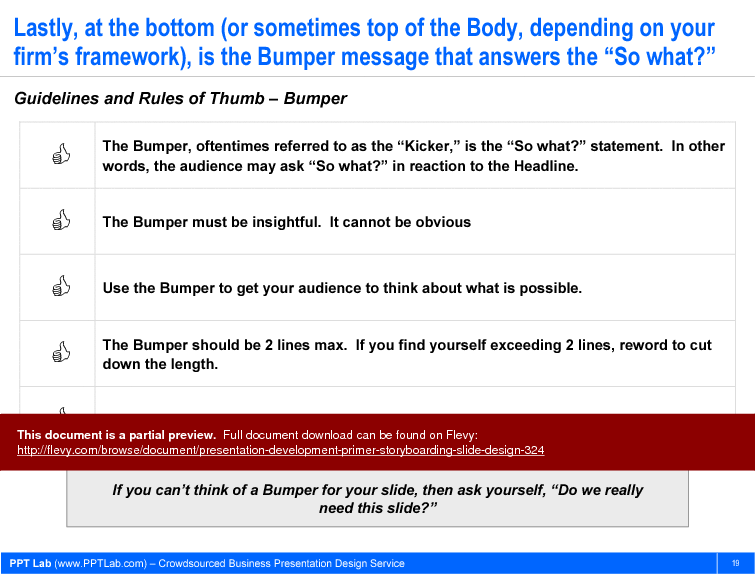
The document also addresses common concerns about the storyboarding process, such as changes in data or message post-analysis and ensuring all data fits within the storyboard. It emphasizes the importance of being concise and delivering a clear message, which resonates well with clients. Specific font styling rules are outlined to maintain consistency across slides, reinforcing the professional look and feel of the presentation. The guidelines for the Bumper message ensure that each slide concludes with a compelling takeaway, prompting the audience to consider the implications of the presented data.
Got a question about the product? Email us at support@flevy.com or ask the author directly by using the "Ask the Author a Question" form. If you cannot view the preview above this document description, go here to view the large preview instead.
MARCUS OVERVIEW
This synopsis was written by Marcus [?] based on the analysis of the full 28-slide presentation.
Executive Summary
The Presentation Development Primer is a comprehensive guide designed to equip professionals with the essential skills for creating impactful business presentations. Drawing on methodologies practiced by leading management consulting firms such as McKinsey, Bain, and BCG, this document focuses on 3 core areas: Storyboarding, Slide Structuring, and Graph Design. It empowers users to master the art of presentation development, ensuring that their presentations serve as effective communication tools and high-quality work products. This consulting-grade resource enables users to create presentations that resonate with audiences and leave a lasting impression.
Who This Is For and When to Use
• Corporate executives seeking to enhance their presentation skills
• Consultants aiming to deliver high-quality presentations to clients
• Project managers needing to communicate complex information clearly
• Marketing professionals who require effective storytelling in presentations
Best-fit moments to use this deck:
• When preparing for client meetings or stakeholder presentations
• During training sessions focused on presentation skills development
• In workshops aimed at improving team communication and collaboration
• For creating impactful presentations that require a structured approach
Learning Objectives
• Define the key components of effective storyboarding for presentations
• Build structured slides that convey clear messages and insights
• Establish guidelines for selecting appropriate graph types for data presentation
• Create compelling headlines that capture audience attention
• Develop a cohesive narrative that flows logically throughout the presentation
• Apply best practices in slide design to enhance visual communication
• Overview - An introduction to the principles of effective business presentation development, emphasizing the importance of storytelling and structure.
• Storyboarding - A detailed exploration of the storyboarding process, including rules of thumb and methodologies for creating a coherent narrative.
• Slide Structuring - Guidelines for structuring slides, focusing on the key components: Headline, Body, and Bumper.
• Graph Design - Best practices for selecting and designing graphs that effectively communicate data insights.
Deliverables, Templates, and Tools
• Storyboarding framework template to guide the development of presentation narratives
• Slide structure guidelines to ensure consistency in design and messaging
• Graph selection criteria to assist in choosing the right type of graph for data representation
• Example headlines that illustrate effective messaging techniques
• Design rules for maintaining visual consistency across all slides
Slide Highlights
• Overview slide that outlines the importance of effective presentation development
• Storyboarding introduction slide that emphasizes the significance of narrative structure
• Slide structuring overview that breaks down the components of a consulting-quality slide
• Graph design slide that illustrates the criteria for selecting appropriate graph types
Potential Workshop Agenda
Introduction to Presentation Development (60 minutes)
• Overview of the importance of effective presentations
• Discussion on the role of storytelling in business communication
Storyboarding Techniques (90 minutes)
• Hands-on practice in developing storyboards
• Group exercises to refine presentation narratives
Slide Structuring and Design Principles (60 minutes)
• Review of slide components: Headline, Body, Bumper
• Tips for maintaining visual consistency and clarity
Graph Design Best Practices (60 minutes)
• Exploration of different graph types and their applications
• Practical exercises in selecting and designing graphs
Customization Guidance
• Tailor the storyboard framework to fit specific project requirements and objectives
• Adjust slide structuring guidelines to align with organizational branding and messaging
• Modify graph design principles to suit the audience's familiarity with data visualization
Secondary Topics Covered
• The importance of concise messaging in presentations
• Techniques for engaging audiences through visual storytelling
• Strategies for handling questions and feedback during presentations
Topic FAQ
What are the main stages in developing a consulting-style presentation?
A consulting-style presentation development process emphasizes 3 core stages: defining the narrative through storyboarding, structuring individual slides (Headline, Body, Bumper), and selecting/designing appropriate graphs. The storyboard can be built by following the first 3 steps of a six-phase problem-solving process, making these 3 stages central to development.
How should I structure an individual slide to make its message clear?
Slides should be structured into 3 components: a concise Headline that states the main message, a Body that supports it with evidence or visuals, and a Bumper that answers the “So what?” This Headline-Body-Bumper framework is a central guideline in the primer and in consulting slide design.
How do I choose the right chart type for different datasets?
Choose charts based on data characteristics: line charts for time series trends, pie charts for shares, and bar charts for comparisons. Flevy's Presentation Development Primer (Storyboarding, Slide Design) provides graph selection criteria and examples to guide appropriate choices for data visualization.
What should I look for when selecting a presentation template for corporate use?
Look for a template that includes a storyboarding framework, slide-structuring rules (Headline/Body/Bumper), graph selection guidance, font styling rules, and example headlines so you can maintain consistent messaging and visual style across slides—features like a storyboarding framework template are important.
How can I storyboard effectively before running detailed analyses?
Build the storyboard by defining the problem, structuring it into sub-issues, and developing analyses to test hypotheses; hypothesizing expected findings before analysis helps align story and analysis. The author describes using the first 3 steps of the six-phase problem-solving process for this purpose.
Are paid slide templates worth the investment compared with free resources?
Paid templates like Flevy's Presentation Development Primer (Storyboarding, Slide Design) consolidate proven practices—storyboarding framework, slide structure guidelines, graph selection criteria, font styling rules, and example headlines—into reusable assets that support producing consistent, circulatable work products such as client decks and reports.
What should I do if my data doesn’t fit the current storyboard narrative?
Reassess the analysis and adjust the storyboard so that every data point contributes to the narrative; the primer explicitly advises revising either the analysis or the storyboard to ensure coherence between data and story, ensuring the message remains clear and relevant.
What are common slide design mistakes that reduce presentation effectiveness?
Common pitfalls include cluttered slides, excessive text, and inconsistent formatting, which obscure messages and harm readability. The primer emphasizes concise messaging, font styling rules, and visual consistency to avoid these issues and improve slide clarity.
Document FAQ
These are questions addressed within this presentation.
What is the purpose of storyboarding in presentation development?
Storyboarding helps to outline the narrative structure of a presentation before analysis begins, ensuring that the message is clear and coherent.
How can I ensure my slides are visually appealing?
Follow the guidelines for slide structuring, including consistent font styles and sizes, and use visuals to support key messages.
What types of graphs should I use for my data?
Select graph types based on the nature of the data: use line charts for time series, pie charts for shares, and bar charts for comparisons.
How do I create effective headlines for my slides?
Headlines should be concise, meaningful, and aligned with the key message of the slide, ideally limited to 2 lines.
Why is it important to maintain consistency in slide design?
Consistent design enhances readability and helps the audience follow the narrative more easily, making the presentation more effective.
What should I do if my data does not fit into my storyboard?
Reassess your analysis and adjust your storyboard to ensure that all data points contribute to the overall narrative.
How can I improve my presentation skills?
Practice regularly, seek feedback from peers, and utilize resources like this primer to refine your techniques.
What are the common pitfalls in presentation design?
Avoid cluttered slides, excessive text, and inconsistent formatting, as these can detract from the message and confuse the audience.
How do I handle audience questions during a presentation?
Prepare for potential questions in advance and engage with the audience by encouraging discussion and feedback.
Glossary
• Storyboarding - The process of outlining the narrative structure of a presentation.
• Slide Structuring - The organization of slide components to convey messages effectively.
• Graph Design - The art of selecting and designing graphs to represent data visually.
• Headline - The main message presented at the top of a slide.
• Body - The central part of a slide that supports the headline with additional information.
• Bumper - The concluding statement on a slide that answers the “So what?” question.
• Consulting Presentation Framework - A structured approach to developing consulting-quality presentations.
• Visual Storytelling - The use of visuals to convey a narrative and engage the audience.
• Data Visualization - The graphical representation of information and data.
• Key Message - The primary takeaway or insight intended for the audience.
• Font Styling Rules - Guidelines for maintaining consistent font usage across slides.
• Rule of Two - A principle that limits text elements to 2 lines for clarity.
• Engagement Techniques - Strategies for involving the audience during presentations.
• Presentation Tools - Software and resources used to create and deliver presentations.
• Consultant - A professional who provides expert advice in a particular area.
• Stakeholder - An individual or group with an interest in the outcome of a project or presentation.
• Audience Analysis - The process of understanding the audience's needs and preferences.
• Feedback Loop - The mechanism for receiving and incorporating audience feedback.
• Narrative Flow - The logical progression of ideas throughout a presentation.
• Visual Consistency - The uniformity of design elements across all slides.
• Communication Tools - Methods and resources used to convey information effectively.
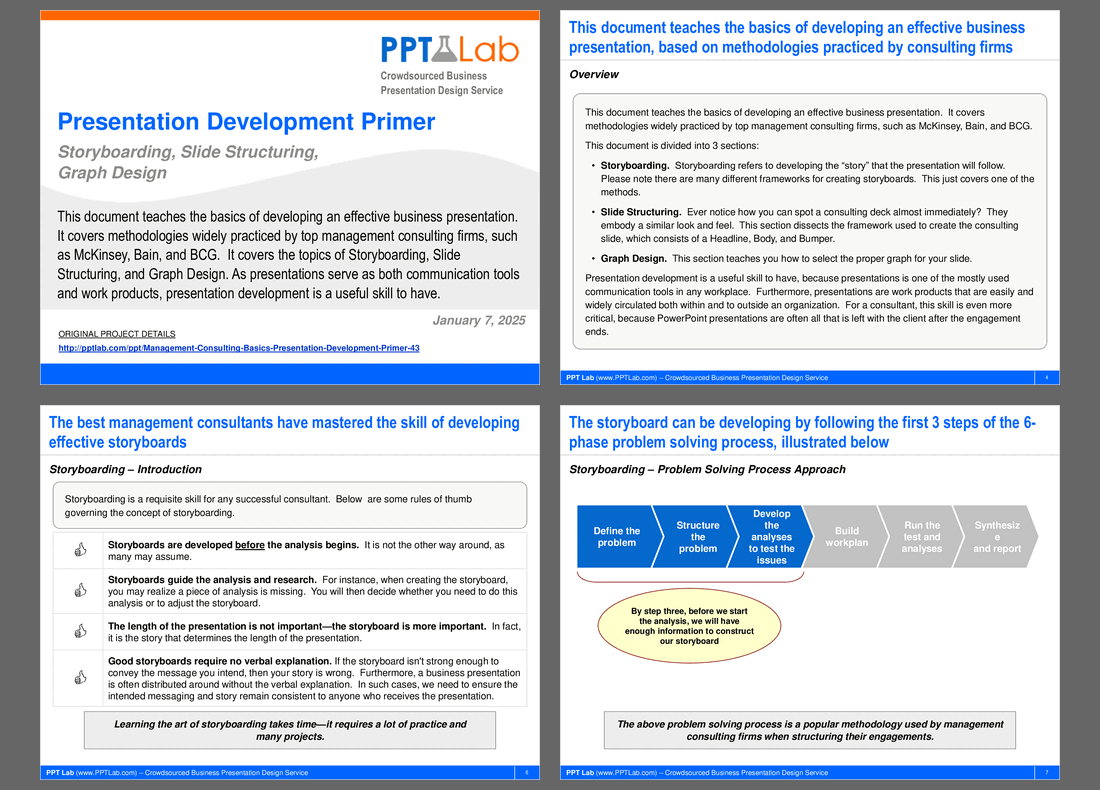
This PPT slide introduces storyboarding as a critical consulting practice. Storyboards should be developed prior to analysis, countering the misconception that analysis precedes storyboard creation. Establishing the storyboard first helps consultants frame their research effectively. Storyboards act as a guiding framework, allowing consultants to identify analysis gaps and make necessary adjustments. The strength of the storyboard dictates the presentation's duration, emphasizing clarity and coherence over mere time constraints. Effective storyboards must communicate the intended message independently, highlighting the importance of self-explanatory storytelling. Mastering storyboarding is a skill that requires practice and time, essential for successful consultants.
This PPT slide outlines a structured approach to developing expected findings for consulting projects, divided into "Original Expected Findings" and "Re-Ordered and Re-Wordered Findings." The original section poses 4 key questions: potential for staff reduction, possibility of lowering salaries, availability of cheaper hosting options, and existence of affordable SEM providers. Initial analysis suggests most employees are overworked, limiting staffing reductions, and identifies some salaries above market rates as an adjustment opportunity. The rephrased findings clarify insights, emphasizing above-market salaries and lack of excess staff capacity. Actionable strategies include identifying low-cost hosting providers and leveraging offshore SEM providers to reduce costs significantly. This approach transforms raw data into a coherent narrative for informed decision-making.
This PPT slide outlines the essential components of an effective presentation slide: the Headline, Body, and Bumper. The Headline, positioned at the top, serves as the primary attention-grabber, setting the tone and context for the slide's focus. The Body contains the main content, delivering detailed information that supports the Headline and influences audience understanding. The Bumper, located at the bottom, acts as a concluding statement or call to action, reinforcing the key message and prompting further discussion. A structured approach enhances communication effectiveness, making this a valuable reference for refining presentation skills.
This PPT slide outlines a six-phase problem-solving process, focusing on the first 3 steps. The initial phase, "Define the problem," is critical for understanding the issue, laying the groundwork for effective analysis. The second step, "Structure the problem," organizes identified issues into a coherent framework, aiding in prioritization. The third step, "Develop the analyses to test the issues," prepares for deeper investigation, leading to the creation of a storyboard that visually represents the problem-solving journey. Subsequent phases include building a work plan, running tests, and synthesizing findings into a report, ensuring insights translate into actionable recommendations. This structured approach enhances clarity and efficiency in addressing complex challenges.
This PPT slide outlines a structured approach to problem-solving, focusing on defining a problem statement to enhance Flevy's operating margin through cost reduction. It presents 2 primary strategies: increasing revenue and cutting costs. Revenue enhancement tactics include increasing traffic, improving conversion rates, and raising prices, each representing potential avenues for growth. Cost-cutting strategies target labor costs, hosting expenses, and search engine marketing costs, with probing questions to identify efficiencies, such as reducing staff or finding cheaper hosting plans. This comprehensive framework guides organizations in addressing financial challenges through actionable solutions.
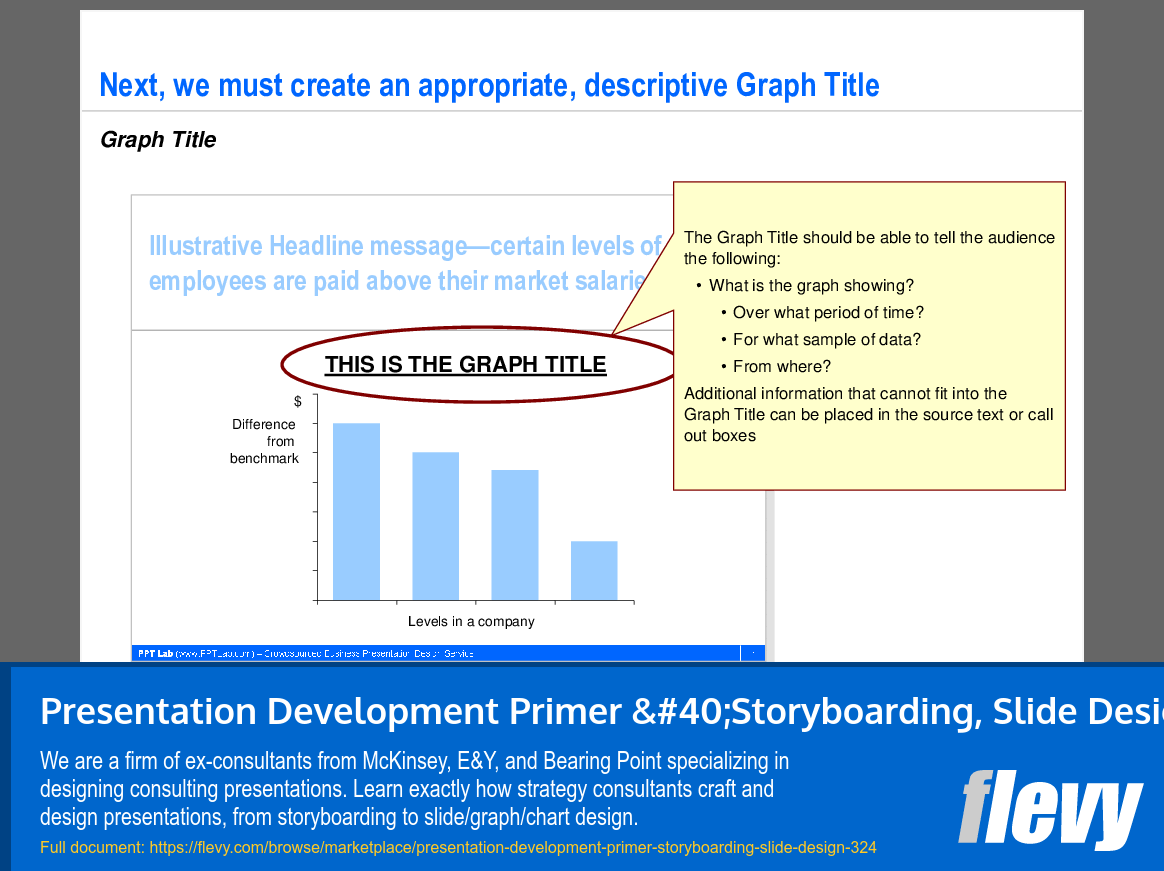
This PPT slide details the importance of a clear, descriptive graph title that communicates essential elements such as the graph's subject, time frame, sample, and data source. The graph illustrates employee salary disparities compared to a benchmark, segmented by company levels. An effective title should be tailored to reflect the graph's specific content and insights. Supplementary information can be included in source text or call-out boxes for comprehensive understanding without overcrowding the title. This guidance enhances the audience's ability to interpret data accurately through impactful visual aids.
This PPT slide discusses the development of impactful presentation headlines, focusing on employee compensation and operational efficiency. It notes that some employees earn above-market salaries, indicating a potential misalignment with industry standards and a need for compensation strategy review. There is no excess workforce capacity, as employees are working longer hours, suggesting high engagement, but potential burnout and inefficiencies. A proposed solution for cost reduction includes finding a low-cost hosting provider, potentially reducing costs by 20%, and leveraging offshore SEM providers for a 50% reduction in SEM costs. This dual approach illustrates a proactive strategy for optimizing expenses while hinting at the importance of exploring revenue enhancement opportunities for comprehensive improvement.
Source: Best Practices in Presentation Development PowerPoint Slides: Presentation Development Primer (Storyboarding, Slide Design) PowerPoint (PPT) Presentation Slide Deck, PPT Lab
We are a firm of ex-consultants from McKinsey, E&Y, and Bearing Point specializing in designing consulting presentations. Learn exactly how strategy consultants craft and design presentations, from storyboarding to slide/graph/chart design.
PPT Lab is a presentation design firm specializing in business frameworks and PowerPoint templates. Our team is comprised of ex-consultants from McKinsey, E&Y, Bearing Point, and boutique consulting firms. We have worked with hundreds of clients globally, ranging from mid-size manufacturing companies to global Fortune 500 conglomerates.
All of our documents are of the
... [read more] same quality produced by top-tier consulting firms and utilize the Consulting Presentation Framework.
The average daily rate of a McKinsey consultant is $6,625 (not including expenses). The average price of a Flevy document is $65.
Trusted by over 10,000+ Client Organizations
Since 2012, we have provided business templates to over 10,000 businesses and organizations of all sizes, from startups and small businesses to the Fortune 100, in over 130 countries.
"As a young consulting firm, requests for input from clients vary and it's sometimes impossible to provide expert solutions across a broad spectrum of requirements. That was before I discovered Flevy.com.
Through subscription to this invaluable site of a plethora of topics that are key and crucial to consulting, I
have been able to exceed expectations and deliver quality advice and solutions to my clients. The quality and expertise of the authors are exemplary and gives me great confidence to use as part of my service offerings.
I highly recommend this company for any consultant wanting to apply international best practice standards in their service offerings.
"
– Nishi Singh, Strategist and MD at NSP Consultants
"Flevy.com has proven to be an invaluable resource library to our Independent Management Consultancy, supporting and enabling us to better serve our enterprise clients.
The value derived from our [FlevyPro] subscription in terms of the business it has helped to gain far exceeds the investment made, making a subscription a no-brainer for any growing consultancy – or in-house strategy team."
– Dean Carlton, Chief Transformation Officer, Global Village Transformations Pty Ltd.
"As an Independent Management Consultant, I find Flevy to add great value as a source of best practices, templates and information on new trends. Flevy has matured and the quality and quantity of the library is excellent. Lastly the price charged is reasonable, creating a win-win value for
the customer, Flevy and the various authors. This is truly a service that benefits the consulting industry and associated clients. Thanks for providing this service.
"
– Jim Schoen, Principal at FRC Group
"FlevyPro has been a brilliant resource for me, as an independent growth consultant, to access a vast knowledge bank of presentations to support my work with clients. In terms of RoI, the value I received from the very first presentation I downloaded paid for my subscription many times over! The
quality of the decks available allows me to punch way above my weight – it's like having the resources of a Big 4 consultancy at your fingertips at a microscopic fraction of the overhead.
"
– Roderick Cameron, Founding Partner at SGFE Ltd
"I am extremely grateful for the proactiveness and eagerness to help and I would gladly recommend the Flevy team if you are looking for data and toolkits to help you work through business solutions."
– Trevor Booth, Partner, Fast Forward Consulting
"One of the great discoveries that I have made for my business is the Flevy library of training materials.
As a Lean Transformation Expert, I am always making presentations to clients on a variety of topics: Training, Transformation, Total Productive Maintenance, Culture, Coaching, Tools, Leadership Behavior, etc. Flevy
It is well worth the money to purchase these presentations. Sure, I have the knowledge and information to make my point. It is another thing to create a presentation that captures what I want to say. Flevy has saved me countless hours of preparation time that is much better spent with implementation that will actually save money for my clients.
"
– Ed Kemmerling, Senior Lean Transformation Expert at PMG
"As a consultant requiring up to date and professional material that will be of value and use to my clients, I find Flevy a very reliable resource.
The variety and quality of material available through Flevy offers a very useful and commanding source for information. Using Flevy saves me time, enhances my expertise and ends up being a good decision."
– Dennis Gershowitz, Principal at DG Associates
"Flevy is now a part of my business routine. I visit Flevy at least 3 times each month.
Flevy has become my preferred learning source, because what it provides is practical, current, and useful in this era where the business world is being rewritten.
many challenges and there is the need to make the right decisions in a short time, with so much scattered information, we are fortunate to have Flevy. Flevy investigates, selects, and puts at our disposal the best of the best to help us be successful in our work.
Receive our FREE whitepaper on the Top 101 Consulting Frameworks
Download our 200+ page guide summarizing the Top 101 Management Consulting Frameworks. Each framework provides a structured approach to analyzing and solving a common business problem.