 Click main image to view in full screen. Unlock all 18 preview images:
Wealth Builder Suite: Financial Planning Toolkit – Excel XLSX
Excel (XLSX)


BENEFITS OF THIS DOWNLOADABLE EXCEL DOCUMENT
- Combines retirement planning, wealth accumulation, lifetime income, investing, debt, property, taxes, insurance, and 25 financial planning templates in one comprehensive suite.
- Includes retirement readiness dashboards, Monte Carlo simulations, scenario analysis, inflation-adjusted projections, cash-flow planning, and investment modeling to explore a wide range of financial outcomes.
- Provides a User Manual, detailed Cell Guide, workbook navigation, and specialized financial calculators to help users organize their financial goals and evaluate complex financial decisions.
WEALTH MANAGEMENT EXCEL DESCRIPTION
# Wealth Builder Suite: Financial Planning, Retirement, Investing & Wealth Management Toolkit
Building wealth is rarely the result of a single financial decision. It develops over time through the decisions people make about saving, investing, retirement, debt, property, taxes, insurance, income, spending, risk, and the financial goals they choose to pursue.
Yet many individuals manage these decisions using disconnected calculators, separate spreadsheets, online tools, and incomplete financial records. They may have a retirement calculator in one place, a monthly budget somewhere else, investment calculations in another spreadsheet, and no consolidated view of how these decisions influence their long-term financial future.
The Wealth Builder Suite brings an extensive collection of financial planning, wealth management, retirement, investment, risk, business, and lifestyle planning tools together in one structured workbook.
Designed for individuals, households, financial planning professionals, wealth-minded entrepreneurs, retirement planners, and personal finance enthusiasts, this comprehensive financial modeling suite provides a framework for evaluating financial decisions, building wealth, planning retirement, analyzing investments, managing obligations, and projecting future outcomes.
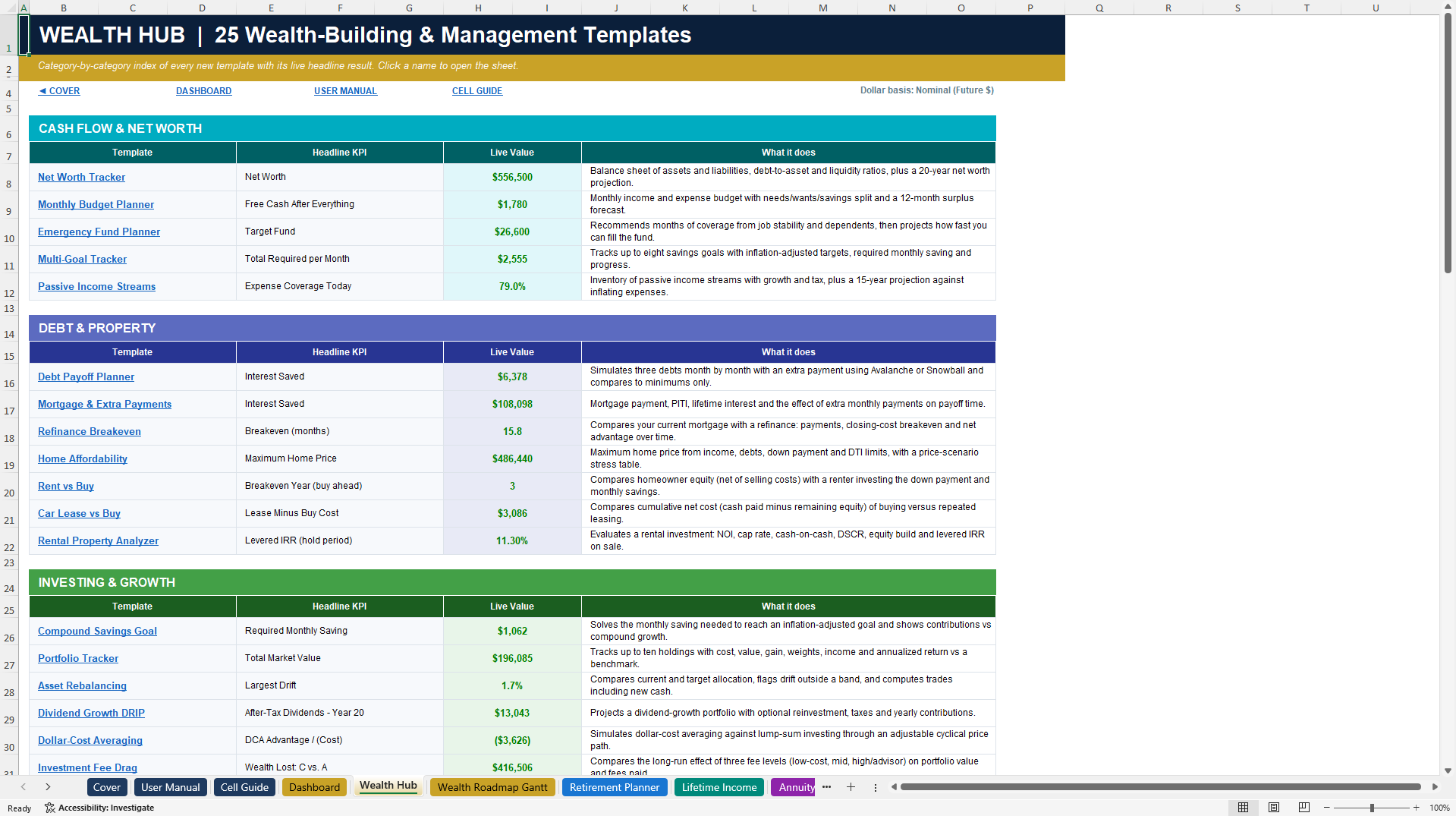
The workbook includes a financial command center, retirement accumulation and decumulation models, lifetime income planning, annuity and pension analysis, Monte Carlo simulation, scenario testing, a net worth tracker, 25 wealth-building and financial management templates, a wealth roadmap, a User Manual, and an extensive Cell Guide.
It is designed to help users move from isolated financial calculations toward a more organized and comprehensive approach to long-term financial planning.
## A Comprehensive Financial Planning and Wealth Management System
The Wealth Builder Suite covers multiple stages of financial life.
It can support users who are building their first savings plan, paying down debt, evaluating housing decisions, investing for long-term growth, planning for financial independence, preparing for retirement, evaluating pension benefits, managing retirement income, or organizing their estate and protection needs.
Rather than being limited to a single calculator, the workbook contains specialized financial models addressing different decisions. Many tools can be used independently, while selected retirement and dashboard components connect key assumptions and results to provide a consolidated financial picture.
The system covers five broad financial objectives:
• Wealth accumulation and financial independence.
• Retirement readiness and lifetime income.
• Investment, asset, and portfolio planning.
• Debt, property, business, and income decisions.
• Financial risk, protection, taxes, and life goals.
## 1. Wealth & Retirement Command Center
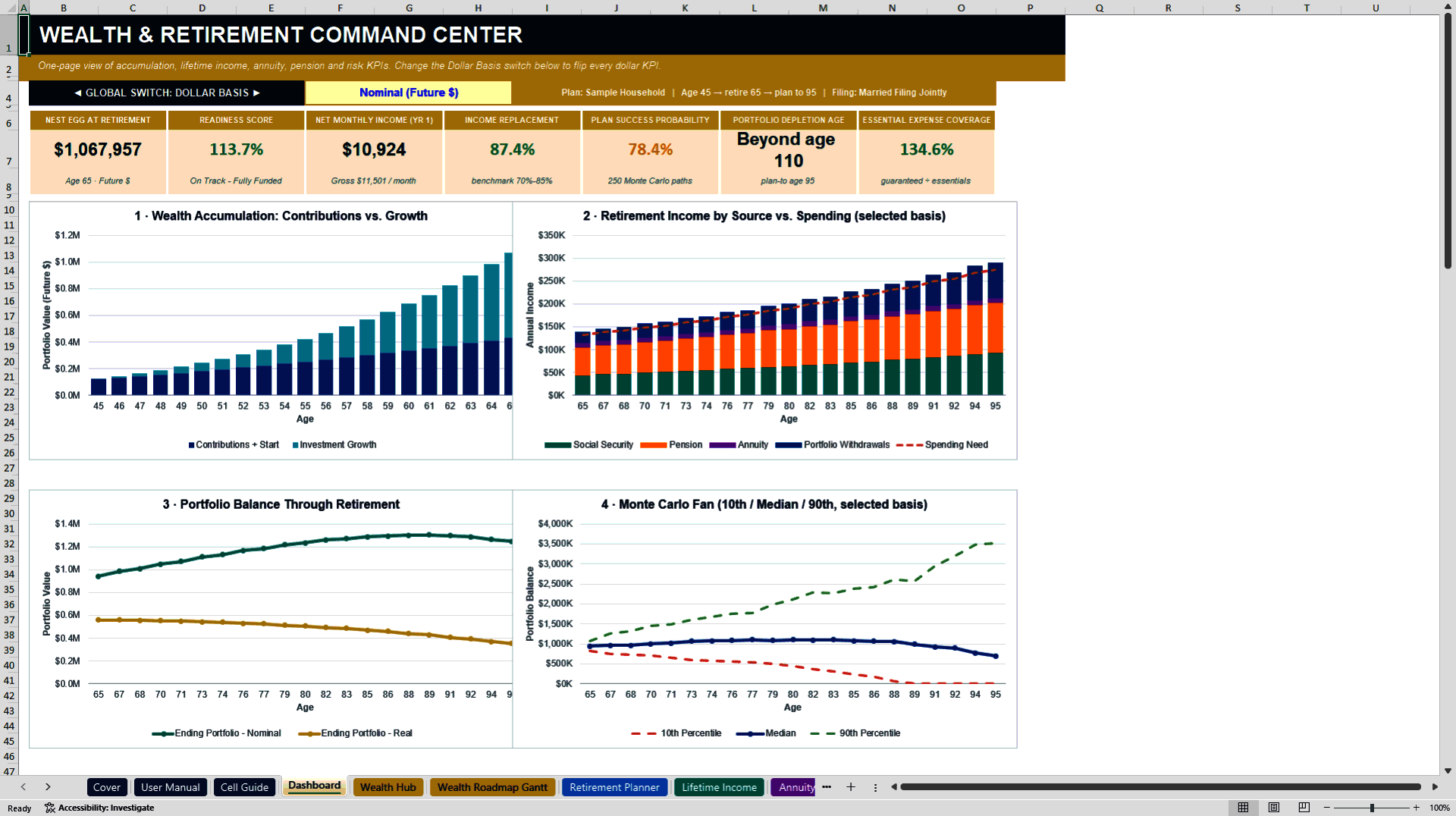
The Dashboard provides a consolidated financial planning command center with headline retirement and wealth indicators, charts, a five-pillar KPI scorecard, traffic-light status indicators, and scenario comparisons.
The dashboard includes a global Dollar Basis switch that allows users to view relevant financial figures using nominal future dollars or real purchasing-power-adjusted dollars.
This distinction is important when evaluating long-term financial goals. A retirement balance expressed in future dollars may appear substantial, but inflation can significantly reduce its purchasing power.
The dashboard brings together key metrics from the accumulation, lifetime income, annuity, pension, and risk planning areas.
Headline indicators include:
• Projected nest egg at retirement.
• Retirement readiness score.
• Net monthly retirement income.
• Income replacement ratio.
• Probability of plan success.
• Portfolio depletion age.
• Essential expense coverage.
The five-pillar scorecard expands the overview into accumulation readiness, lifetime income and cash flow, annuity valuation, defined-benefit pension analysis, and risk, sensitivity, and tax efficiency.
Users can review financial indicators against benchmarks and editable thresholds, helping identify areas that may require attention.
The dashboard also provides conservative, base-case, and optimistic scenario comparisons, allowing users to examine the potential effects of different return and inflation assumptions on retirement outcomes.
## 2. Retirement Planner: Accumulation and Wealth Readiness
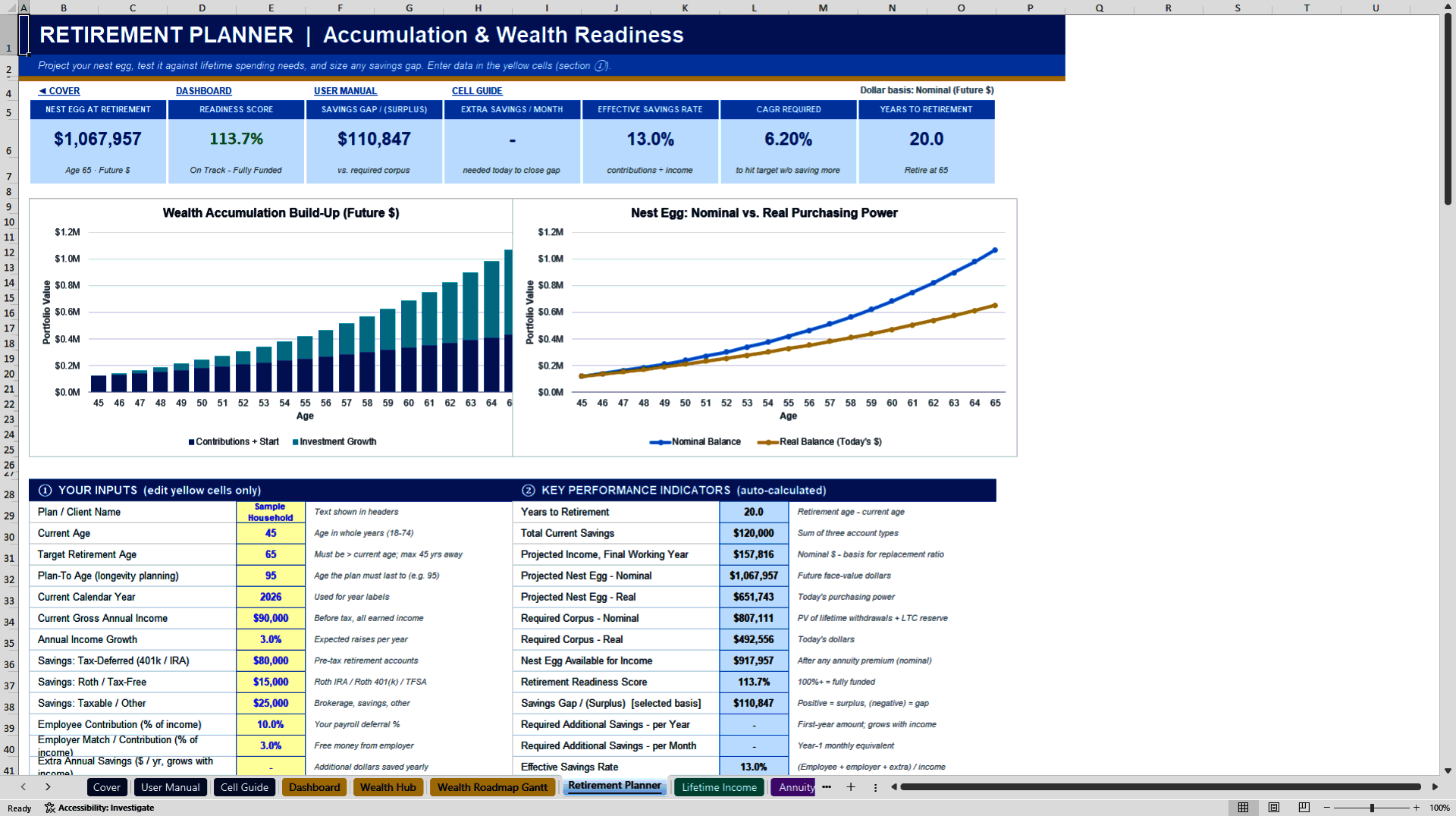
The Retirement Planner focuses on the financial preparation required to reach retirement.
Users can enter their personal planning assumptions, current savings, income, contributions, expected investment returns, inflation, retirement age, and other relevant inputs to project their retirement accumulation.
The model calculates projected retirement wealth and compares the resulting nest egg with the estimated capital required to support retirement spending.
The planner includes:
• Projected retirement nest egg.
• Retirement readiness score.
• Savings gap or surplus.
• Additional monthly savings required.
• Effective savings rate.
• Required compound annual growth rate.
• Years remaining until retirement.
The readiness score provides a relative assessment of projected retirement assets against the estimated required corpus.
The savings-gap analysis helps users identify whether their current plan may be on track, whether additional savings may be needed, or whether their projections indicate a surplus.
The additional monthly savings calculation provides a practical way to evaluate how changes in contributions may influence the retirement outcome.
Users can explore different retirement ages, savings amounts, return assumptions, and financial targets to understand how accumulation decisions affect long-term financial readiness.
## 3. Lifetime Income Planner
Retirement planning does not end when a person reaches retirement age. The challenge shifts from accumulating assets to converting those assets and other financial resources into sustainable income.
The Lifetime Income Planner models the decumulation stage of retirement, bringing together retirement assets, Social Security, pension income, annuity income, portfolio withdrawals, taxes, expenses, and longevity assumptions.
The model is designed to evaluate how income sources interact throughout retirement and how the projected portfolio may support spending over the selected planning horizon.
Its indicators include:
• Gross monthly retirement income.
• Net monthly retirement income.
• Income replacement ratio.
• Essential expense coverage ratio.
• Safe withdrawal rate.
• Portfolio depletion age.
• Effective retirement tax rate.
• Real purchasing-power erosion.
Users can evaluate projected retirement income against expected spending requirements and review how guaranteed income sources compare with essential expenses.
The planner also examines portfolio longevity, helping users assess whether projected assets may be depleted before the selected planning age.
The lifetime income model can be used to explore retirement income strategies, withdrawal assumptions, tax effects, inflation, and longevity scenarios.
## 4. Annuity Calculator
Annuities can be complicated financial products involving payout structures, guarantees, timing, life expectancy, survivor options, taxation, and opportunity costs.
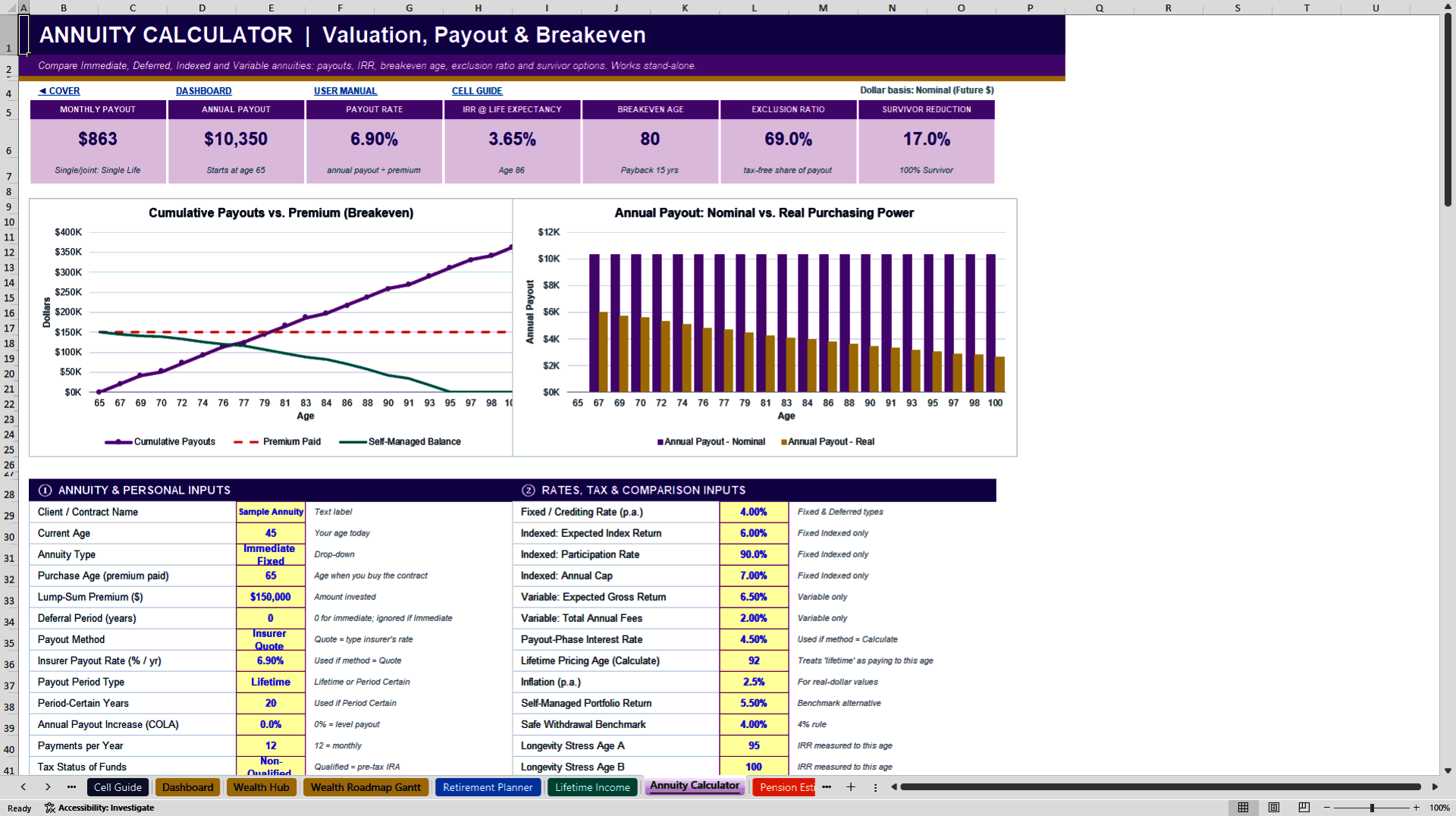
The Annuity Calculator provides a framework for evaluating and comparing annuity scenarios.
The workbook covers immediate, deferred, indexed, and variable annuity scenarios, with analysis of payout amounts and selected valuation indicators.
The model includes:
• Monthly annuity payout.
• Annual annuity payout.
• Payout rate.
• Internal rate of return.
• Breakeven age.
• Exclusion ratio.
• Joint and survivor considerations.
• Survivor-benefit reduction.
Users can compare payout structures and evaluate how the timing of distributions and assumed longevity influence the financial outcome.
The breakeven analysis provides a useful perspective on the age at which cumulative payments may equal the premium paid, based on the model's assumptions.
This calculator is useful for structured annuity comparisons and educational analysis of retirement income choices.
## 5. Pension Estimator
Defined-benefit pensions may represent a significant component of retirement income, but their value can be difficult to assess when considering early retirement, full-service benefits, lump-sum alternatives, inflation adjustments, or continuing employment.
The Pension Estimator provides a structured model for reviewing pension benefits and comparing alternative pension decisions.
The workbook evaluates:
• Accrued annual pension benefits.
• Projected full-service pension benefits.
• Early-retirement reductions.
• Lump-sum commuted value.
• Lump-sum hurdle rate.
• Cost-of-living adjustment impact.
Users can examine the difference between accrued benefits and projected benefits at normal retirement age and explore the effect of early retirement penalties.
The lump-sum analysis provides a comparison framework for evaluating the return that may be required from a lump-sum rollover to replicate the projected pension stream.
The COLA analysis helps illustrate the potential long-term value of inflation-adjusted pension payments compared with flat payments.
## 6. Risk & Scenarios Analysis
Financial projections depend on assumptions that may not unfold as expected.
Investment returns can vary, inflation can rise, retirement can begin during a market downturn, healthcare costs can increase, and individuals may live longer than anticipated.
The Risk & Scenarios sheet helps users examine the sensitivity of their financial plan to changes in important assumptions.
The model includes conservative, base, and optimistic scenarios and supports sensitivity analysis around return and inflation assumptions.
It also examines selected risk scenarios, including:
• Lower investment returns.
• Higher inflation.
• Sequence-of-returns risk.
• Early market crash scenarios.
• Longevity stress.
• Tax and healthcare buffers.
The scenario analysis provides an opportunity to evaluate how changes in assumptions may influence the projected nest egg, portfolio depletion age, years funded, and financial outcome at the selected planning horizon.
Instead of relying on one forecast, users can compare multiple potential paths and consider the implications for their savings, retirement timing, and spending assumptions.
## 7. Monte Carlo Retirement Simulation
Long-term investment returns are uncertain. A retirement portfolio may experience strong years, weak years, periods of volatility, and different sequences of returns.
The Monte Carlo sheet uses 250 simulated market paths to analyze the retirement plan under multiple modeled return sequences.
The simulation provides indicators such as:
• Probability of plan success.
• Percentile outcomes.
• Ending-balance distribution.
• Fan-chart-style projection.
• Portfolio outcomes across simulated paths.
The probability-of-success metric helps users evaluate the percentage of modeled scenarios in which the plan meets its defined success conditions.
The percentile analysis provides a range of possible financial outcomes rather than relying exclusively on a single projected investment return.
The ending-balance histogram allows users to examine the distribution of projected outcomes.
This model is particularly useful when discussing sequence-of-returns risk and the uncertainty associated with retirement withdrawals.
Monte Carlo results are dependent on the assumptions, model design, simulation parameters, and inputs used. They should be interpreted as modeled scenarios, not predictions or guarantees.
## 8. Net Worth Tracker
Net worth provides a broader picture of financial health than income or account balances alone.
The Net Worth Tracker provides a balance-sheet framework for organizing assets and liabilities and reviewing the resulting net worth.
The sheet includes:
• Asset tracking.
• Liability tracking.
• Net worth calculation.
• Debt-to-asset ratio.
• Liquidity ratios.
• Long-term net worth projections.
Users can organize their financial resources and obligations and review the relationship between assets, debt, and liquidity.
The 20-year net worth projection provides a forward-looking framework for examining how wealth may evolve under the selected assumptions.
This tracker can support recurring personal financial reviews and help users assess progress toward long-term financial independence.
## 9. Monthly Budget Planner
A wealth-building plan requires control over income, spending, and the amount available for savings and investments.
The Monthly Budget Planner provides a framework for organizing income and expenses using a needs, wants, and savings structure.
The model includes monthly budgeting, category-level planning, financial surplus calculations, and a 12-month surplus forecast.
Users can evaluate:
• Monthly income.
• Essential spending.
• Discretionary spending.
• Savings allocations.
• Free cash after expenses.
• Monthly and projected surplus.
The planner helps users identify how much money is available after their planned obligations and expenses.
It can support household budgeting, savings planning, expense reviews, and financial goal setting.
## 10. Emergency Fund Planner
Unexpected events can create financial pressure even for individuals with strong incomes or investment portfolios.
The Emergency Fund Planner provides a structured approach to estimating emergency savings requirements and planning how to build the fund.
The model considers selected planning inputs, including job stability and dependents, to recommend a coverage target based on the configured framework.
It includes:
• Recommended months of coverage.
• Emergency fund target.
• Current emergency savings.
• Funding gap.
• Projected time to fill the fund.
Users can explore how changing savings contributions may influence the time needed to reach their emergency fund objective.
This tool supports financial resilience planning and can help users establish a reserve before pursuing more aggressive financial goals.
## 11. Multi-Goal Tracker
People often have several financial goals competing for the same monthly savings capacity.
The Multi-Goal Tracker is designed to organize up to eight savings goals and evaluate the required monthly contribution for each.
It includes inflation-adjusted goal targets, savings requirements, and progress calculations.
Users can organize objectives such as:
• Home down payment.
• New vehicle.
• Education.
• Wedding.
• Travel.
• Business startup.
• Major purchases.
• Other personal financial goals.
The model helps users understand the financial commitment associated with each goal and how monthly savings may need to be allocated to reach target amounts.
## 12. Passive Income Streams
Passive income planning involves evaluating the income generated from assets and considering how that income may develop over time.
The Passive Income Streams sheet provides a framework for inventorying passive income sources and projecting their growth, taxation assumptions, and contribution toward future expenses.
The model includes a 15-year projection and compares projected income with expenses that may increase through inflation.
Users can explore income coverage, growth assumptions, tax effects, and the relationship between recurring passive income and future spending.
This tool can support discussions about financial independence, income diversification, and long-term wealth planning.
## 13. Debt Payoff Planner
Debt management can have a significant impact on savings capacity, cash flow, and financial flexibility.
The Debt Payoff Planner simulates three debts over time and supports extra-payment strategies using the Avalanche or Snowball method.
Users can evaluate the effect of additional payments and compare the modeled results against a minimum-payment-only scenario.
The analysis supports review of debt balances, repayment timing, and the financial implications of different payoff strategies.
This tool can help users organize debts and develop a structured repayment plan based on their selected strategy.
## 14. Mortgage, Housing, and Property Decision Tools
Housing decisions involve multiple financial variables, including purchase price, interest rates, down payments, monthly payments, closing costs, maintenance, taxes, insurance, equity, and opportunity costs.
The Wealth Builder Suite includes multiple property and housing models.
Mortgage & Extra Payments: Calculates mortgage payment, PITI, lifetime interest, and the effect of additional monthly payments on the mortgage payoff timeline.
Refinance Breakeven: Compares the current mortgage with a refinance, including payment differences, closing-cost breakeven, and net advantage over time.
Home Affordability: Estimates a maximum home price using income, debts, down payment, and debt-to-income limits, with scenario stress analysis.
Rent vs Buy: Compares homeowner equity after selling costs with a renter's modeled investment of the down payment and monthly savings.
Car Lease vs Buy: Compares cumulative net costs of buying a vehicle with repeated leasing, taking remaining equity into account.
Rental Property Analyzer: Evaluates a rental property using net operating income, capitalization rate, cash-on-cash return, DSCR, equity build, and levered IRR at sale.
These tools provide a structured environment for comparing major financial commitments and property-related decisions.
## 15. Investing & Growth Planning
Long-term wealth accumulation often requires consistent contributions, an understanding of compounding, and a disciplined approach to asset allocation.
The investing section includes multiple calculators and trackers designed to evaluate different investment planning questions.
Compound Savings Goal: Calculates the monthly savings required to reach an inflation-adjusted financial target and separates contributions from projected compound growth.
Portfolio Tracker: Tracks up to ten holdings, including cost, current value, gain or loss, weights, income, and annualized return compared with a benchmark.
Asset Rebalancing: Compares current asset allocation with target allocation, flags allocation drift outside a specified band, and calculates potential trades, including adjustments using new cash.
Dividend Growth DRIP: Projects dividend growth, optional reinvestment, taxes, and yearly contributions.
Dollar-Cost Averaging: Simulates recurring investment contributions and compares them with a lump-sum investment through an adjustable price path.
Investment Fee Drag: Compares the long-term impact of different investment fee levels on portfolio value and cumulative fees.
Bond Ladder Planner: Models bond ladder maturities, yield to maturity, annual cash flows, and inflation-adjusted income.
FIRE Calculator: Calculates financial independence targets based on spending and withdrawal assumptions, estimates years to independence, and includes Coast FIRE analysis using real-dollar planning.
Together, these tools help users explore the relationships between contributions, compounding, fees, allocation, investment income, and financial independence objectives.
## 16. Planning & Protection
Financial planning also involves protecting financial resources and preparing for obligations that may arise throughout life.
The suite includes several protection and planning tools.
Education Fund (529): Projects education costs using tuition inflation and calculates education savings balances and required monthly contributions.
Life Insurance Needs: Evaluates coverage needs using income replacement, debt, education, final expenses, and available financial resources.
Estate Distribution: Estimates estate tax using modeled value, debts, and exemption assumptions, then distributes bequests and residual assets across up to five beneficiaries.
Charitable Giving Planner: Compares annual giving, donation bunching, cash donations, and appreciated-stock donations within the model's tax assumptions.
These models can help organize financial protection and legacy planning considerations.
## 17. Taxes & Income Planning
Taxes influence savings, investment returns, retirement income, compensation decisions, and financial planning.
The Wealth Builder Suite includes tax and income planning models addressing several distinct areas.
Income Tax Estimator: Estimates federal income tax using editable bracket assumptions, payroll taxes, take-home pay, and effective and marginal tax rates.
Capital Gains Harvesting: Organizes investment lots and compares short- and long-term gains, losses, netting, loss deduction limits, and carry-forward under modeled scenarios.
Roth Conversion Planner: Compares retaining a traditional retirement balance with converting a selected amount annually to Roth, including taxes paid from outside funds.
Freelancer Tax Planner: Models self-employed monthly profit, self-employment and income tax, SEP contributions, quarterly estimated payments, and the revenue required to achieve a target take-home amount.
The tax-related sheets are built around editable assumptions and US-specific tax frameworks. The tax tables include 2026 federal assumptions, and users outside the United States should treat these as illustrative models and replace them with applicable local rules before relying on calculations.
## 18. Risk & Insurance
Insurance decisions can affect both financial security and long-term savings.
The suite includes tools for examining insurance needs, coverage gaps, premium costs, deductibles, and selected long-term risks.
Disability Insurance Needs: Compares employer and personal disability benefits with essential expenses and simulates savings during the waiting period.
Long-Term Care Planner: Projects long-term care cost inflation, insurance benefits with inflation protection, and the savings needed to cover modeled shortfalls.
Insurance Coverage Audit: Organizes policies, premiums, coverage, and recommended coverage to identify potential gaps and premium burden.
Deductible Optimizer: Evaluates deductible options using modeled claim probability, claim size, and premium quotes to identify the option with the lowest expected annual cost.
These models provide a structured starting point for financial risk discussions and insurance planning.
## 19. Retirement Extras
The retirement extras section expands retirement planning beyond the primary retirement and lifetime income models.
Social Security Claiming: Compares claiming ages 62 through 70 by monthly benefit, lifetime benefit, present value, and cumulative benefits across selected claiming strategies.
Retirement Bucket Strategy: Sizes cash, income, and growth buckets using projected withdrawals, inflation, and return assumptions and tracks the buckets over a 30-year horizon.
Retirement Healthcare Costs: Projects retirement healthcare costs across ages, including marketplace premiums before 65, modeled Medicare B/D and Medigap costs after 65, and out-of-pocket expenses.
Phased Retirement Planner: Compares a phased retirement strategy involving part-time income with fully retiring at the phase-start age.
Savings Milestones by Age: Projects retirement savings to milestone ages and compares results with editable salary-multiple benchmarks.
These tools can help users examine different retirement timing, income, healthcare, savings, and portfolio planning considerations.
## 20. Career, Business & Alternative Asset Planning
The workbook extends beyond conventional household financial planning to include career, entrepreneurship, business, and alternative asset analysis.
Side Hustle Profitability: Projects a side business over 24 months, including revenue growth, costs, taxes, startup payback, and effective hourly rate.
Startup Runway & Burn: Models revenue, expenses, cash burn, cash balances, runway, breakeven, and additional funding needs over 36 months.
Break-Even Analysis: Calculates contribution margin, break-even units and revenue, margin of safety, target-profit volume, and profit at modeled capacity.
Stock Options & RSU Planner: Projects stock-option and restricted-stock-unit vesting over eight years, with price growth, ordinary-income tax assumptions, and after-tax value.
House Flip Analyzer: Analyzes acquisition, rehabilitation, financing, holding and selling costs, net profit, cash-on-cash return, annualized return, 70% rule price, and after-repair-value sensitivity.
Crypto Position Tracker: Tracks cryptocurrency holdings, cost basis, gains or losses, share of net worth, concentration limits, and drawdown stress scenarios.
FX & International Savings: Compares foreign-currency savings with home-currency savings, considering modeled exchange-rate movements, interest, and fees.
Inflation & Real Returns: Evaluates purchasing-power erosion and compares the real value of cash, bonds, equities, gold, and real estate after inflation.
These tools are useful for exploring entrepreneurial financial decisions, compensation choices, investment diversification, alternative assets, and inflation effects.
## 21. Family & Lifestyle Financial Planning
Financial planning is not exclusively about investment accounts or retirement.
Major life events, family commitments, education, celebrations, and travel can all influence long-term savings and cash flow.
The Family & Lifestyle section includes:
Wedding & Event Budget: Tracks planned budgets, quotes, payments, balances due, category costs, and cost per guest.
Cost of Raising a Child: Projects the cost of raising a child from ages 0 through 22 using inflation assumptions and compares costs with a monthly savings plan.
Vacation & Trip Budget: Organizes trip expenses, shared and per-person costs, trip duration, savings already accumulated, contingency buffer, total cost, and the monthly savings required before departure.
These planners help users incorporate personal financial goals into a broader financial planning framework.
## 22. Wealth Roadmap Gantt
Financial goals often involve several actions that need to happen in a particular order and over an extended period.
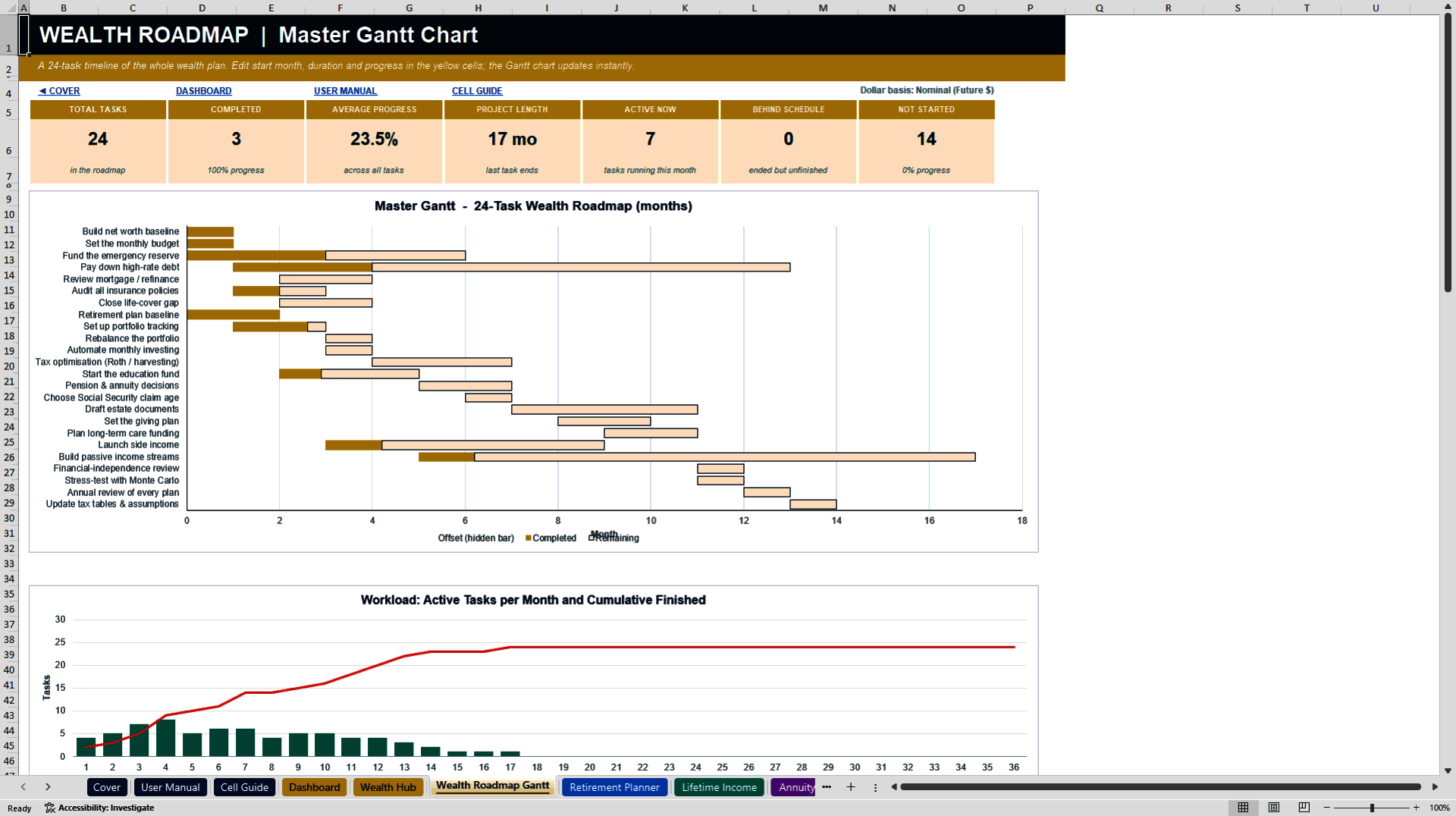
The Wealth Roadmap Gantt sheet provides a master timeline for the wealth plan, using a 36-month framework and a 24-task structure.
Users can edit task start months, durations, and progress percentages in the designated input cells.
The roadmap includes tracking indicators for total tasks, completed tasks, average progress, project length, active tasks, behind-schedule tasks, and tasks not yet started.
The timeline and workload chart provide a visual framework for organizing financial priorities and tracking progress.
This sheet can be used to organize activities such as building an emergency reserve, paying down debt, increasing savings, reviewing insurance, planning investment allocations, and preparing for major goals.
## 23. The User Manual and Cell Guide
A financial workbook with extensive functionality should be usable without requiring the buyer to decipher every formula or worksheet independently.
The Wealth Builder Suite includes two dedicated guidance sheets.
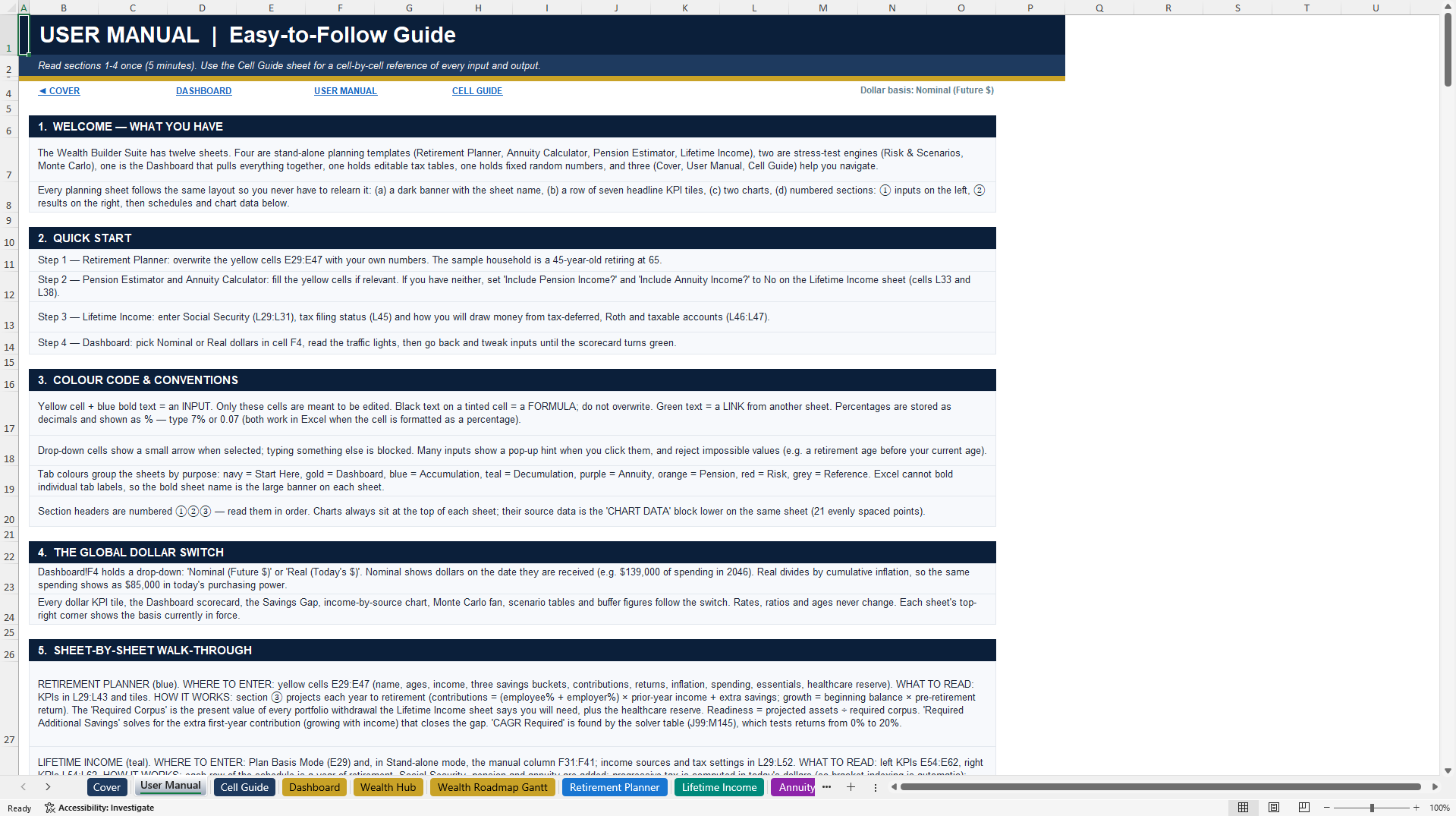
User Manual: Provides a plain-English guide covering workbook use, sheet connections, scenario recipes, assumptions, FAQs, and KPI definitions.
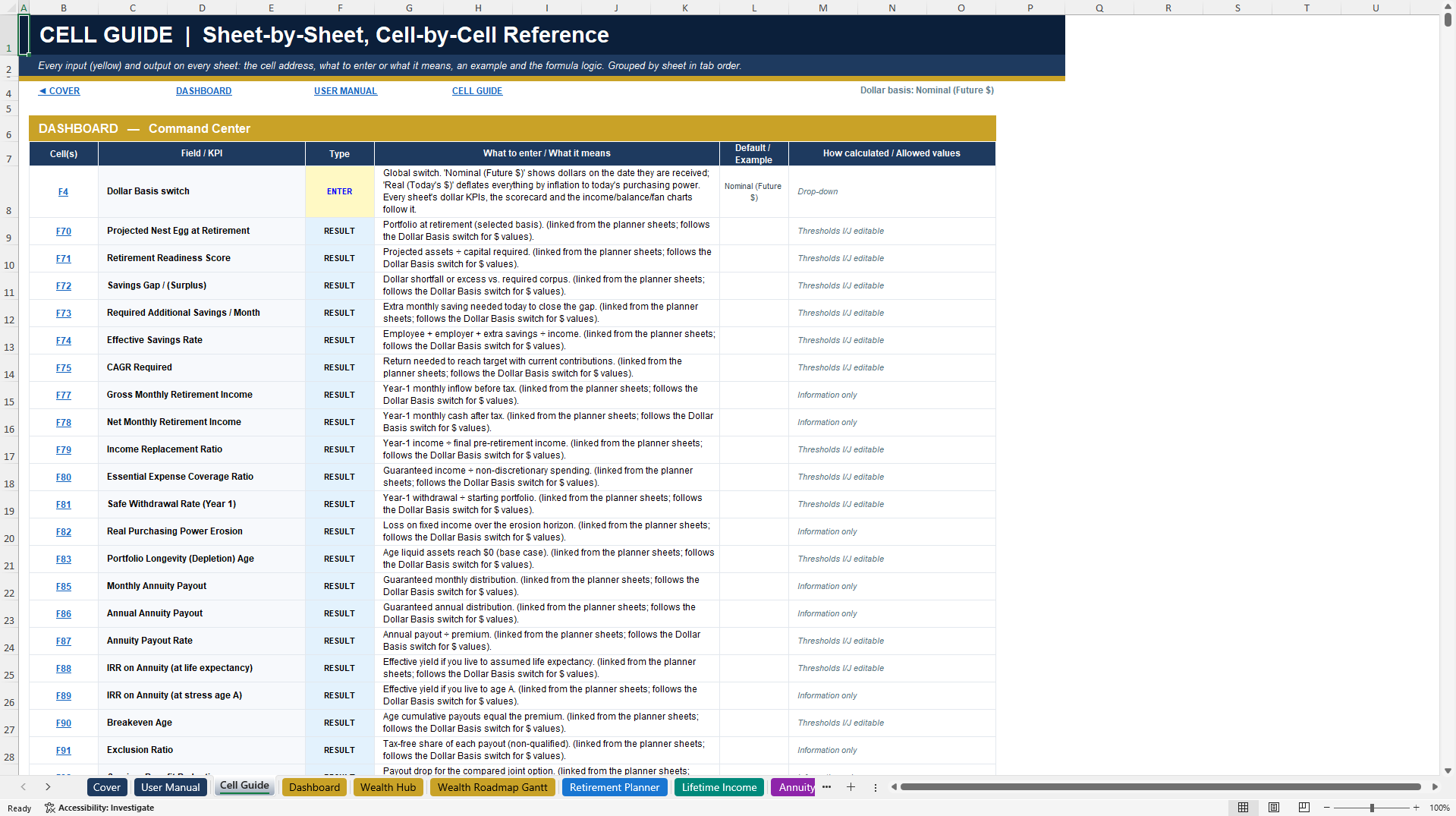
Cell Guide: Provides a detailed cell-by-cell reference across the workbook, explaining inputs and outputs, what to enter, examples, meanings, and calculation logic.
These guides are designed to help users understand the inputs, interpret results, and navigate the financial planning models more confidently.
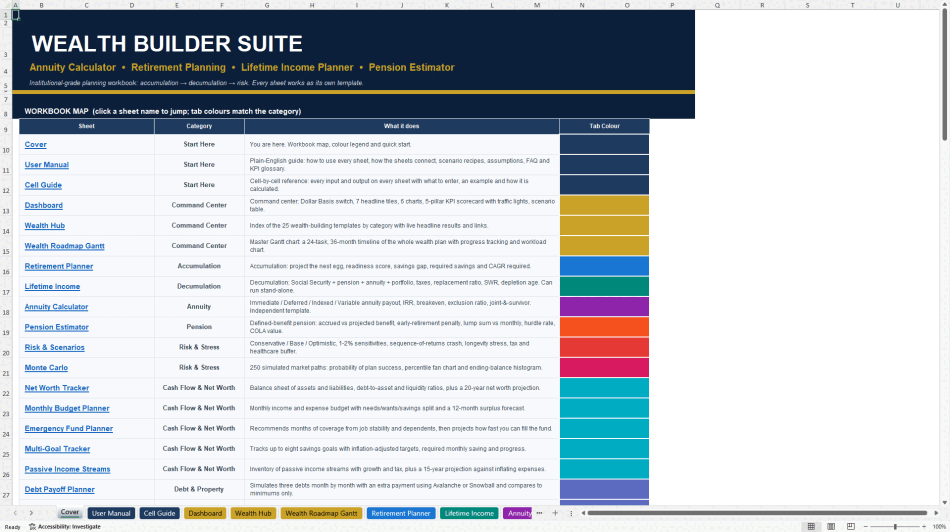
The workbook also includes a Cover sheet containing the workbook map, categories, sheet descriptions, and navigation structure.
## 24. What Is Included
The downloadable product is the Wealth Builder Suite Excel workbook.
The workbook includes:
• Financial command center dashboard.
• Wealth Hub with 25 wealth-building and management templates.
• Retirement accumulation planner.
• Lifetime income planner.
• Annuity calculator.
• Pension estimator.
• Risk and scenario analysis.
• Monte Carlo retirement simulation.
• Net worth tracker.
• Monthly budget planner.
• Emergency fund planner.
• Multi-goal tracker.
• Passive income planner.
• Debt payoff planner.
• Mortgage and extra payment model.
• Refinance breakeven analysis.
• Home affordability calculator.
• Rent-versus-buy comparison.
• Car lease-versus-buy model.
• Rental property analyzer.
• Compound savings goal planner.
• Portfolio tracker.
• Asset rebalancing planner.
• Dividend growth and DRIP model.
• Dollar-cost averaging simulator.
• Investment fee drag analysis.
• Bond ladder planner.
• FIRE calculator.
• Education fund planner.
• Life insurance needs calculator.
• Estate distribution planner.
• Charitable giving planner.
• Business valuation DCF.
• Income tax estimator.
• Capital gains harvesting planner.
• Roth conversion planner.
• Freelancer tax planner.
• Job offer comparison.
• Disability insurance needs.
• Long-term care planner.
• Insurance coverage audit.
• Deductible optimizer.
• Social Security claiming planner.
• Retirement bucket strategy.
• Retirement healthcare costs.
• Phased retirement planner.
• Savings milestones by age.
• Side hustle profitability.
• Startup runway and burn rate.
• Break-even analysis.
• Stock options and RSU planner.
• House flip analyzer.
• Crypto position tracker.
• FX and international savings model.
• Inflation and real returns model.
• Wedding and event budget.
• Cost of raising a child planner.
• Vacation and trip budget.
• User Manual.
• Cell Guide.
• Tax Tables & Assumptions.
• Monte Carlo random data engine.
## 25. Who Should Use the Wealth Builder Suite?
This workbook is designed for people who want a structured way to examine and organize their financial decisions.
It may be particularly useful for:
• Individuals building long-term wealth.
• Couples and households planning retirement.
• Professionals approaching retirement.
• Early retirement and FIRE enthusiasts.
• Entrepreneurs and business owners.
• Freelancers and independent professionals.
• Investors tracking assets and financial goals.
• People managing mortgages and multiple debts.
• Individuals evaluating pension and annuity decisions.
• Financial planning enthusiasts.
• Coaches and consultants working with personal finance planning frameworks.
The workbook can be used for personal financial organization, educational modeling, scenario analysis, and structured financial planning conversations.
## 26. How to Use the Suite
A practical starting point is to begin with the Cover, User Manual, and Cell Guide before entering assumptions into the planning models.
Users can then proceed in stages:
Stage 1 – Establish Your Financial Position: Use the Net Worth Tracker, Monthly Budget Planner, and Emergency Fund Planner to organize assets, obligations, income, spending, and savings.
Stage 2 – Build Your Financial Goals: Use the Multi-Goal Tracker, Compound Savings Goal, and Wealth Roadmap to organize financial priorities and monthly contribution requirements.
Stage 3 – Manage Debt and Major Decisions: Use the Debt Payoff Planner, Mortgage & Extra Payments, Home Affordability, Rent vs Buy, and other relevant calculators to explore financial alternatives.
Stage 4 – Review Investments and Wealth Growth: Use the Portfolio Tracker, Asset Rebalancing, Investment Fee Drag, Dividend Growth DRIP, and FIRE Calculator to evaluate selected investment and financial independence scenarios.
Stage 5 – Plan Retirement: Use the Retirement Planner, Lifetime Income, Pension Estimator, Annuity Calculator, Retirement Bucket Strategy, and Retirement Healthcare Costs to examine accumulation and retirement income.
Stage 6 – Stress-Test Your Plan: Use Risk & Scenarios and Monte Carlo to evaluate how different assumptions and modeled outcomes may affect financial readiness.
The workbook is modular, so users do not have to complete every sheet. They can begin with the tools relevant to their current financial priorities and expand their use as their planning needs evolve.
## Build a More Organized Financial Future
Financial planning becomes more useful when goals, resources, obligations, assumptions, and potential outcomes can be viewed in an organized way.
The Wealth Builder Suite provides an extensive financial modeling environment covering wealth accumulation, retirement readiness, lifetime income, investment growth, debt, property, business, insurance, taxes, family goals, and risk.
Use the suite to organize your financial picture, model different possibilities, examine long-term outcomes, and develop a more structured approach to financial decision-making.
One workbook. Multiple financial planning disciplines. A comprehensive toolkit for building, managing, protecting, and planning your wealth.
Educational and planning purposes only. Financial projections, investment simulations, tax estimates, retirement calculations, and scenario results are based on assumptions and are not guarantees. The workbook is not investment, legal, tax, actuarial, or financial advice. Users should verify applicable laws, tax rules, product terms, and assumptions with qualified professionals before making financial decisions.
Got a question about the product? Email us at support@flevy.com or ask the author directly by using the "Ask the Author a Question" form. If you cannot view the preview above this document description, go here to view the large preview instead.
Source: Best Practices in Wealth Management Excel: Wealth Builder Suite: Financial Planning Toolkit Excel (XLSX) Spreadsheet, MW & Digitelax Consulting
ABOUT THE AUTHOR

Welcome to the official enterprise resource hub of MW & Digitelax Consulting. Directed by a seasoned banking executive, corporate risk consultant, and financial content strategist with over 28 years of institutional leadership experience, our practice delivers deployment-ready frameworks designed to drive enterprise efficiency, enforce regulatory compliance, and eliminate systemic model risk. ... [read more]
Ask the Author a Question
You must be logged in to contact the author.