 Click main image to view in full screen. Unlock all 12 preview images:
Advanced Annuity & Retirement Wealth Modelling System – Excel XLSX
Excel (XLSX)


BENEFITS OF THIS DOWNLOADABLE EXCEL DOCUMENT
- Delivers institutional-grade retirement and annuity projections with a live dashboard, 600-month engine, and twelve specialized analytical modules in a single clean workbook.
- Enables financial advisors and wealth managers to quantify delay cost, fee and tax drag, tipping points, and real purchasing power with complete transparency.
- Provides fully white-label, client-ready outputs including print-optimized cash flow schedules and interactive lifecycle Gantt charts for professional presentations.
WEALTH MANAGEMENT EXCEL DESCRIPTION
Annuity Wealth Architect Pro
Advanced Annuity & Retirement Wealth Modelling System
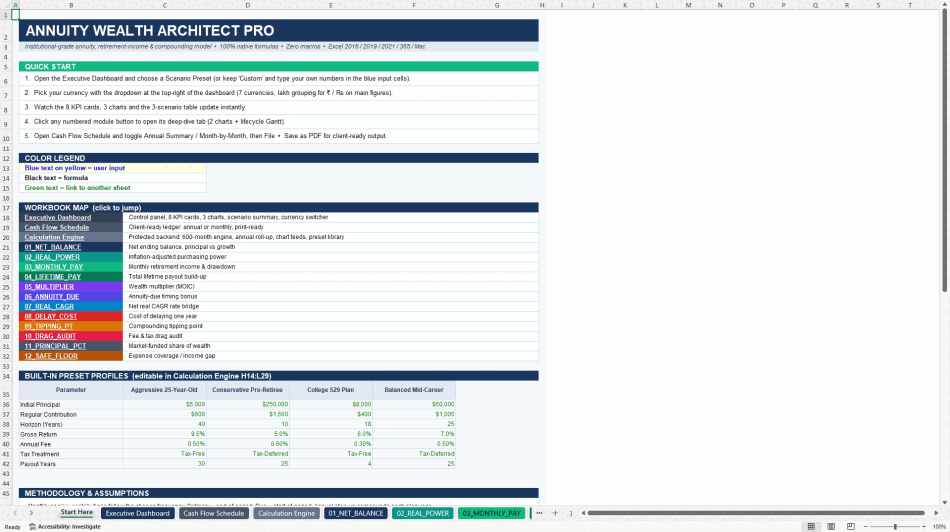
Annuity Wealth Architect Pro is a comprehensive, formula-driven Microsoft Excel financial modelling system designed for financial advisors, wealth managers, retirement planners, RIAs, family offices and sophisticated individual investors.
It provides an integrated framework for modelling long-term wealth accumulation, evaluating retirement income potential, understanding the effects of fees and taxation, measuring inflation-adjusted purchasing power, and analyzing the financial consequences of delaying investment contributions.
Unlike basic compound-interest calculators, this solution combines an interactive Executive Dashboard, a 600-month calculation engine, a structured Cash Flow Schedule and twelve specialized analytical modules in one professionally organized workbook.
The model is designed to make complex retirement projections easier to construct, analyze, compare and communicate.
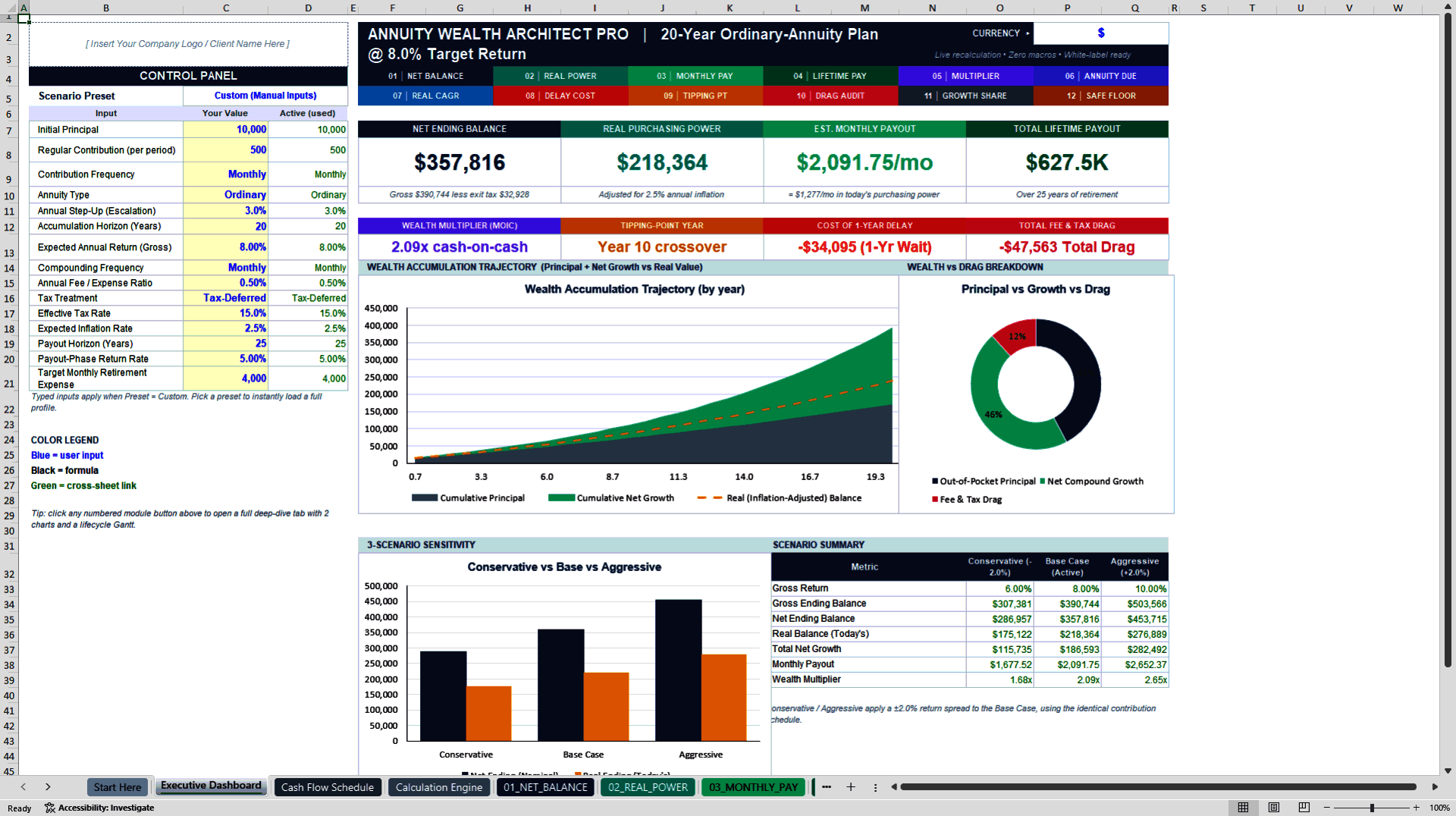
1. Executive Dashboard – Central Financial Control Panel
The Executive Dashboard provides a consolidated view of the retirement wealth model.
Its principal capabilities include:
• Eight financial KPI outputs covering net ending balance, real purchasing power, estimated monthly retirement payout, total lifetime payout, wealth multiplier, compounding tipping point, cost of a one-year delay, and cumulative fees and taxes.
• Interactive currency selection supporting eight currency formats.
• Four built-in scenario presets and a customizable manual-input mode.
• Three-scenario sensitivity analysis covering Conservative, Base Case and Aggressive assumptions.
• Three dynamic charts illustrating wealth accumulation, wealth composition and scenario comparisons.
• Clearly identified input fields for principal, contributions, contribution frequency, investment horizon, expected return, fees, taxation and inflation.
Changes to the model assumptions automatically flow through the linked calculations and dashboard outputs.
2. Advanced 600-Month Calculation Engine
The Calculation Engine provides the underlying mathematical framework for the workbook.
It includes:
• Monthly wealth accumulation calculations covering up to 600 months.
• Annual contribution escalation and configurable contribution frequency.
• Ordinary Annuity versus Annuity-Due contribution timing.
• Configurable investment compounding frequency.
• Effective annual rate conversion and monthly growth calculations.
• Separate accumulation-phase and retirement payout-phase return assumptions.
• Annual fee and expense-ratio deductions.
• Three selectable tax treatments: Tax-Free, Tax-Deferred and Taxable.
• Inflation-adjusted wealth calculations.
• Annual roll-up calculations and supporting chart data.
• Editable scenario preset library.
The calculation structure is formula-driven, allowing users to inspect the underlying assumptions and customize the model.
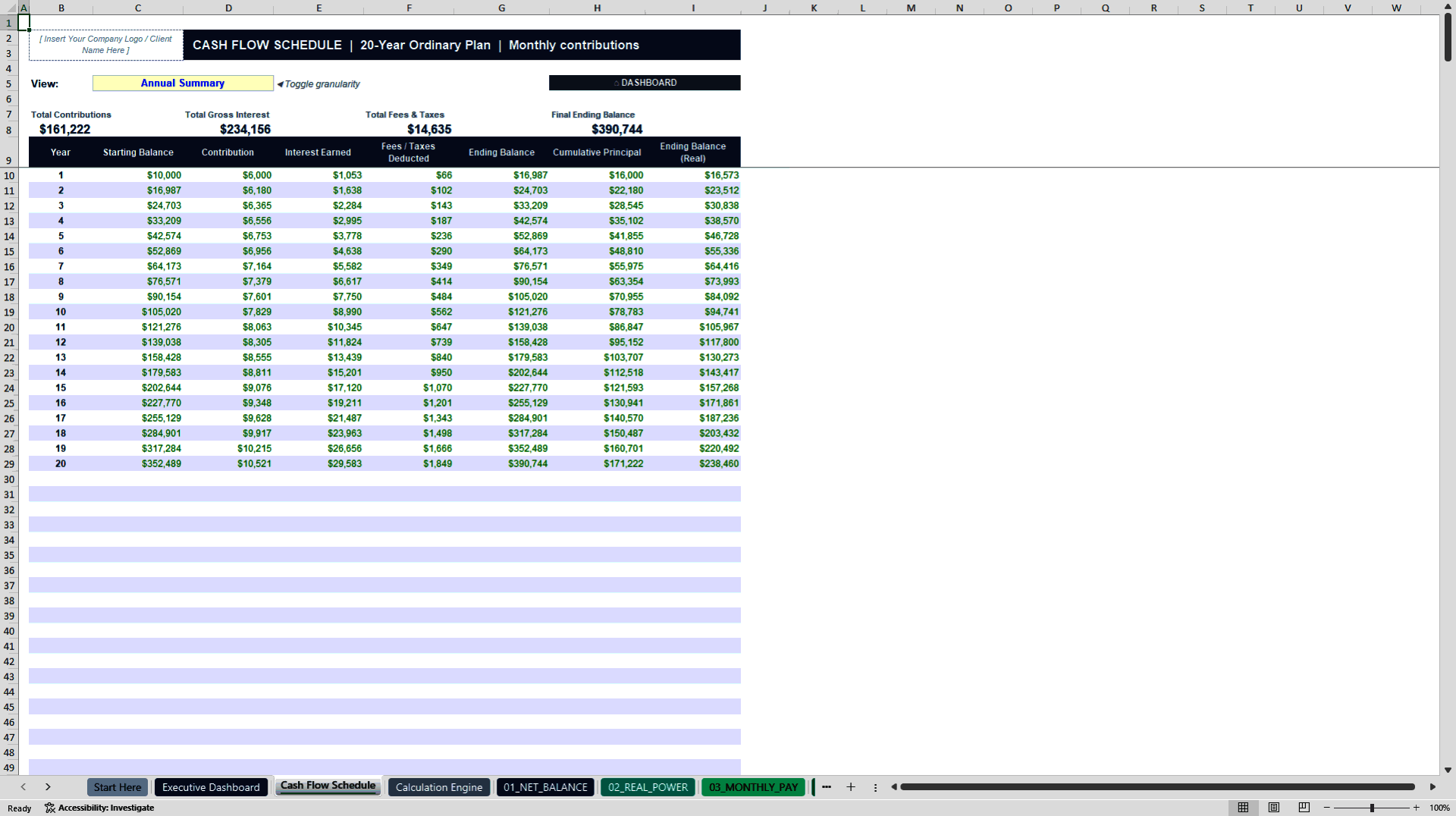
3. Cash Flow Schedule
The dedicated Cash Flow Schedule provides two reporting modes:
Annual Summary: Presents an annual overview of the accumulation process.
Month-by-Month: Provides detailed monthly calculations over the selected accumulation horizon.
The schedule displays:
• Beginning balance.
• Scheduled contributions.
• Gross interest earned.
• Advisory and fund fees.
• Tax deductions.
• Ending balance.
• Cumulative principal.
• Inflation-adjusted ending balance.
The structured reporting layout supports financial analysis, documentation and PDF-based client reporting.
4. Twelve Specialized Analytical Modules
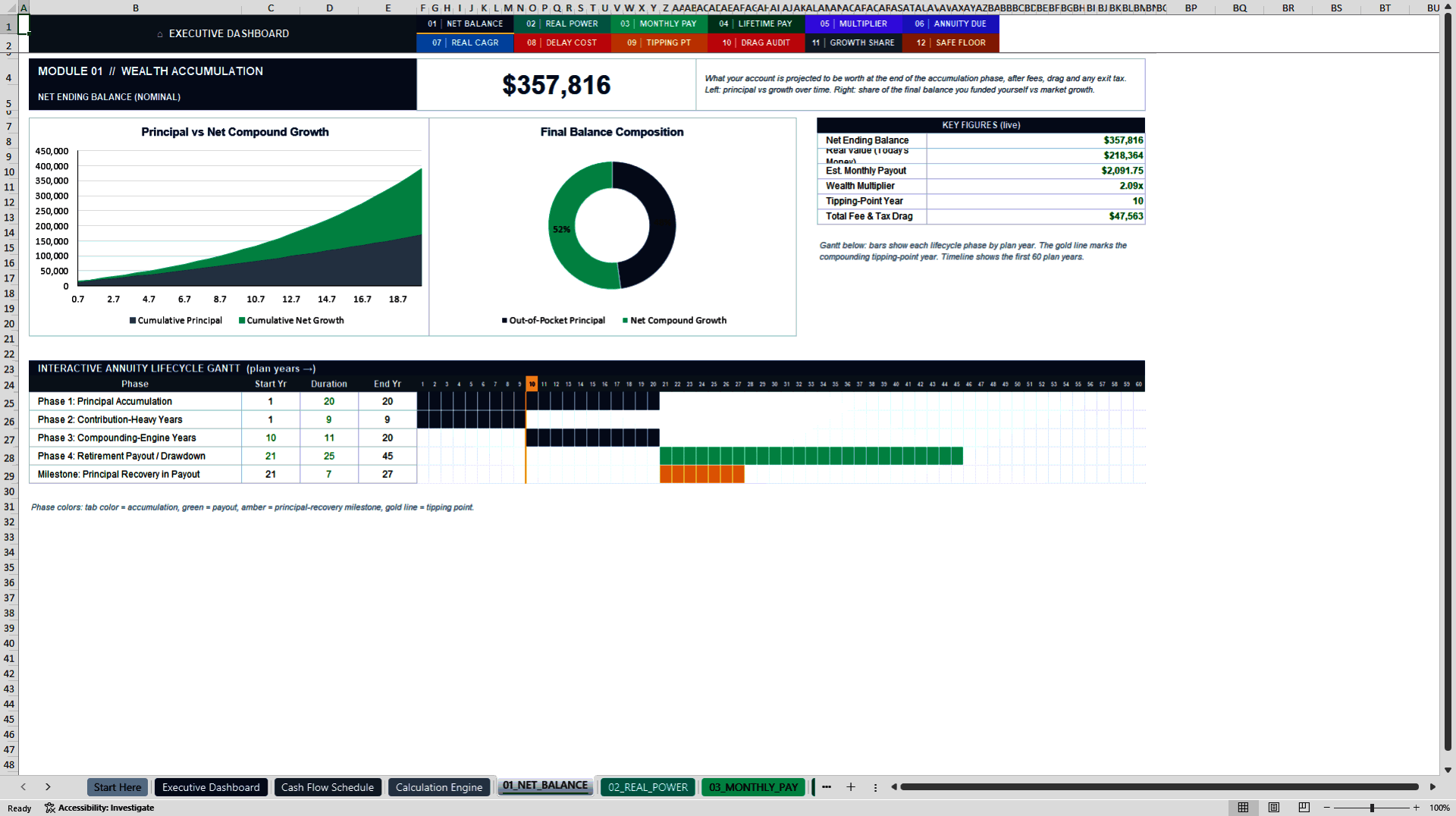
The workbook contains twelve dedicated analytical modules, each incorporating two charts and an interactive retirement lifecycle Gantt timeline.
"Module 01 – Net Balance Analysis"
Examines gross and net ending wealth, including the estimated impact of exit taxation.
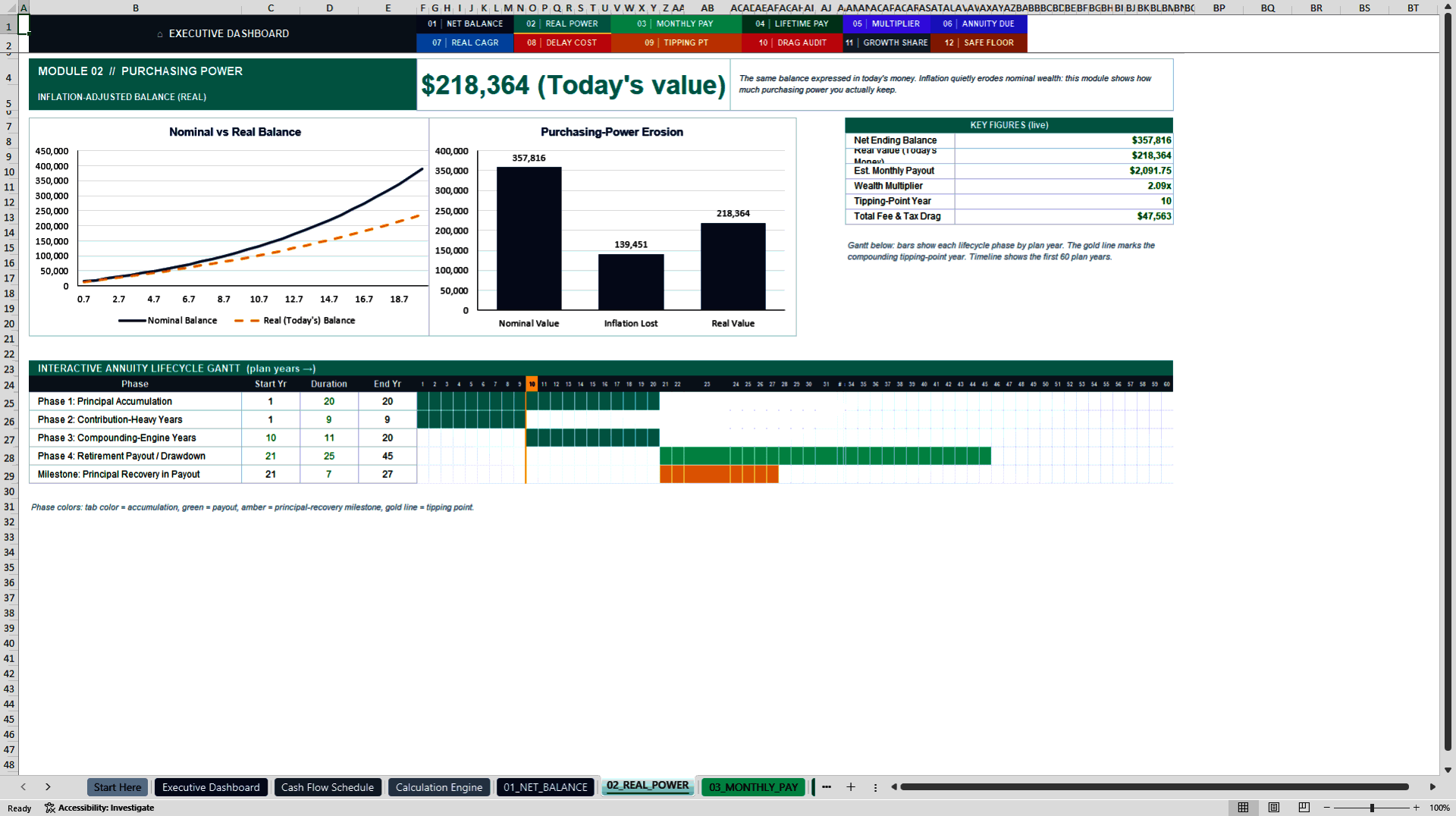
"Module 02 – Real Purchasing Power"
Evaluates the effect of inflation on accumulated wealth and future purchasing power.
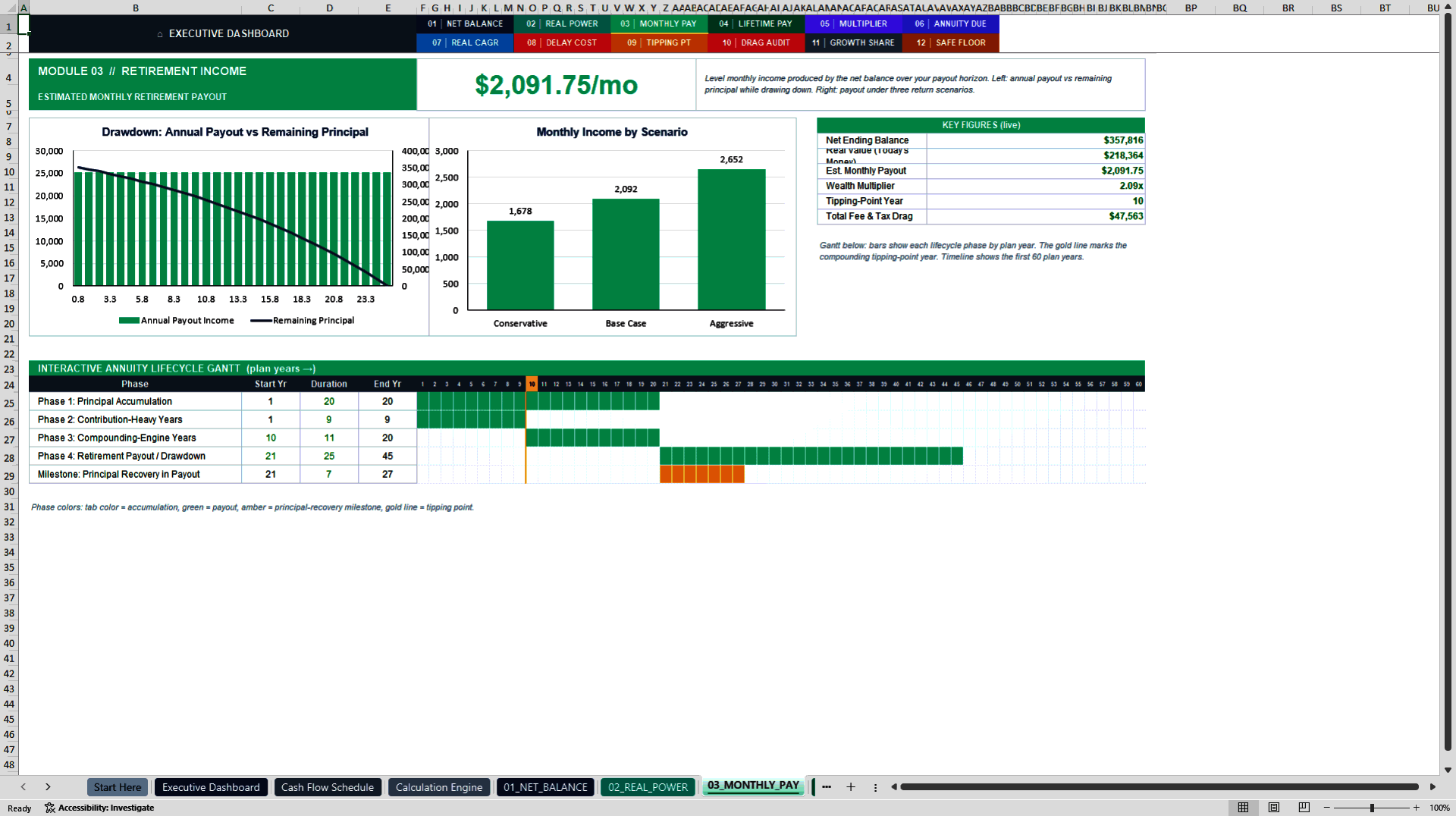
"Module 03 – Monthly Retirement Income"
Estimates potential monthly retirement income and its inflation-adjusted equivalent.
"Module 04 – Lifetime Payout Analysis"
Calculates estimated cumulative retirement payouts over the selected payout horizon.
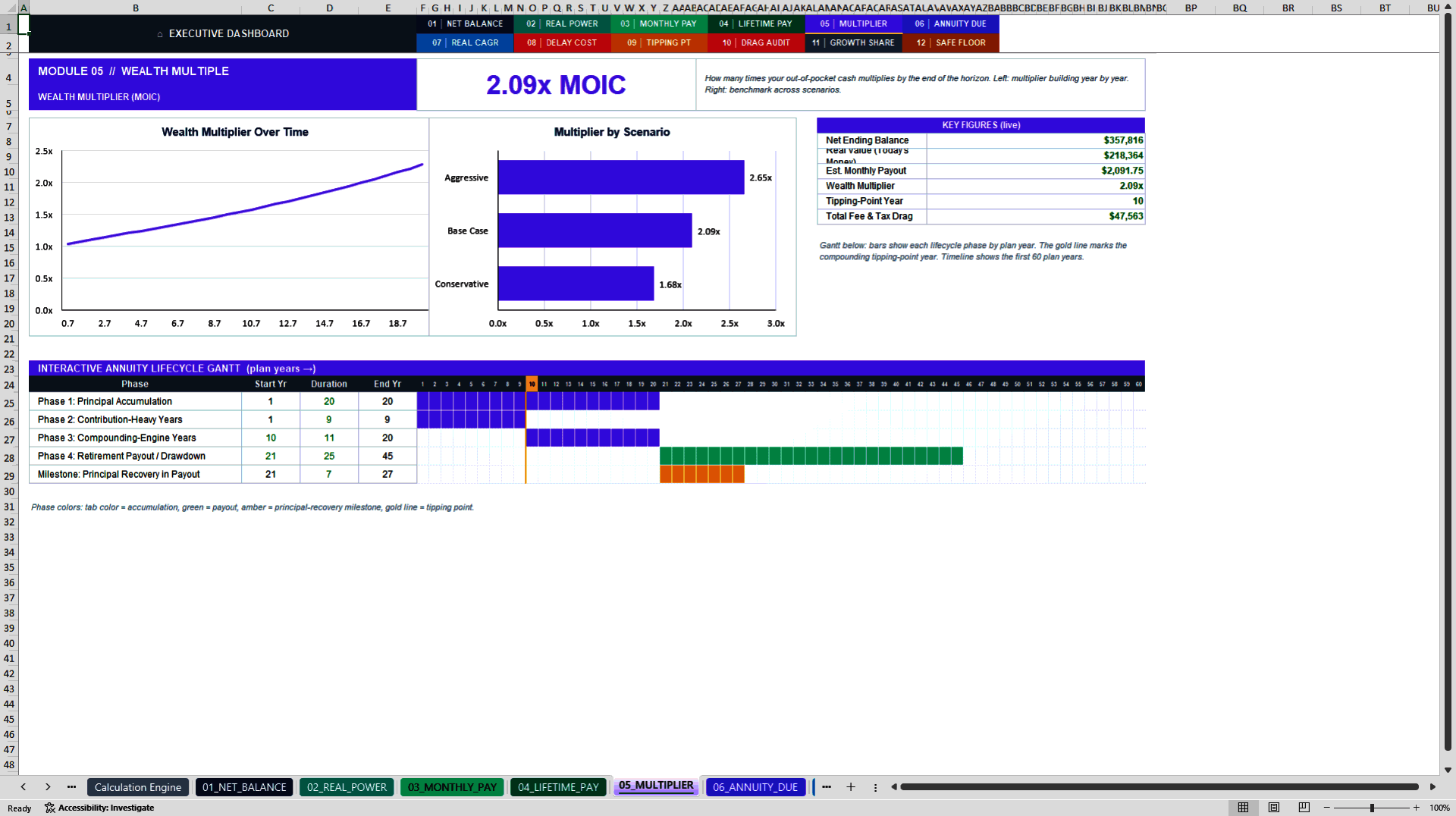
"Module 05 – Wealth Multiplier (MOIC)"
Measures projected wealth relative to total principal contributed.
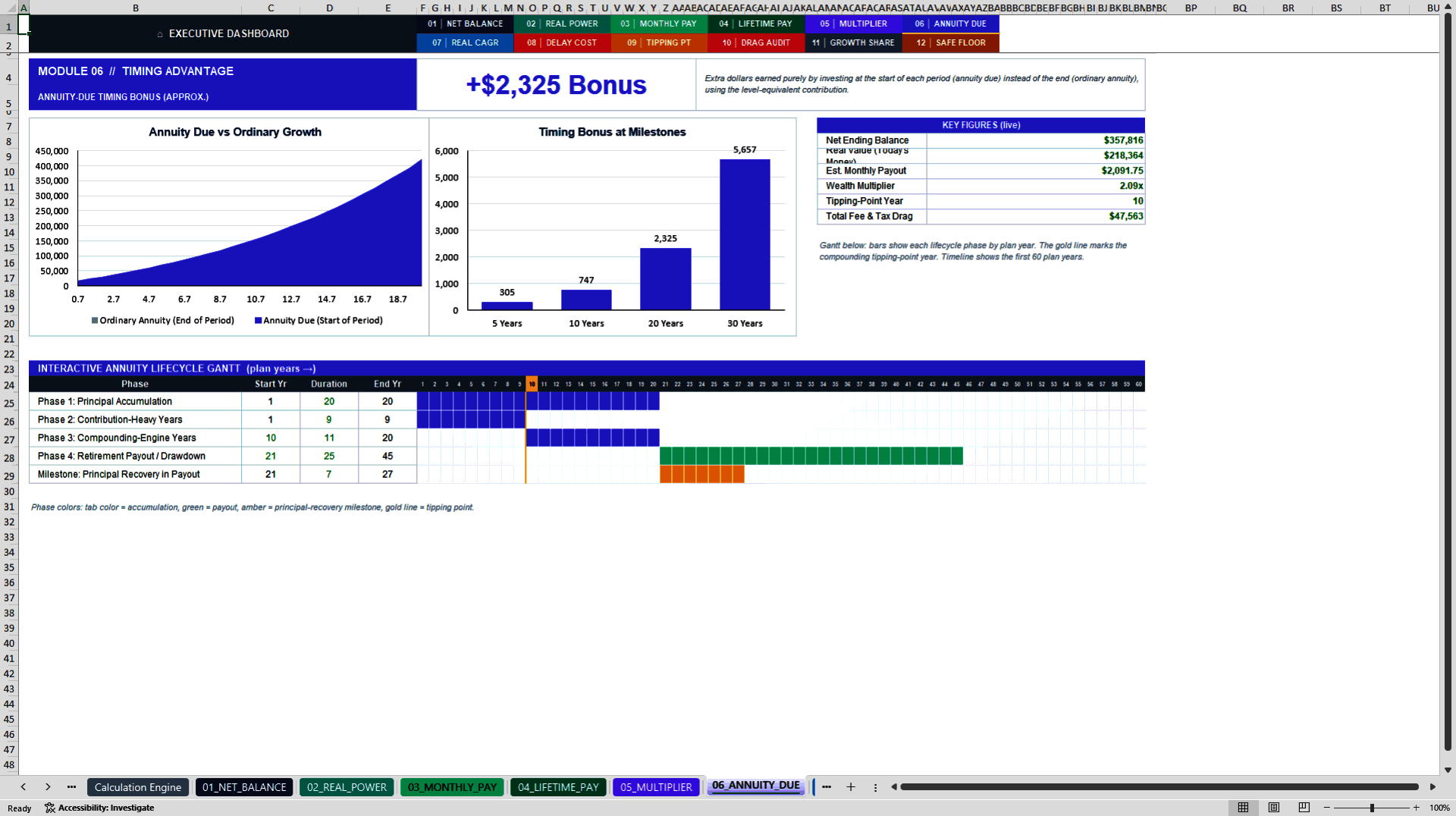
"Module 06 – Annuity-Due Advantage"
Compares beginning-of-period and end-of-period contribution timing.
"Module 07 – Real CAGR Analysis"
Provides an approximate net real money-weighted return measure.
"Module 08 – Cost of a One-Year Delay"
Quantifies the projected wealth difference associated with beginning an otherwise identical contribution plan one year later.
"Module 09 – Compounding Tipping Point"
Identifies the projected year in which annual investment growth first exceeds annual out-of-pocket contributions.
"Module 10 – Fee and Tax Drag Audit"
Illustrates the cumulative impact of fees and modeled taxation on projected wealth.
"Module 11 – Principal Versus Growth Analysis"
Examines the respective contributions of investor deposits and accumulated investment growth to projected wealth.
"Module 12 – Retirement Expense Coverage"
Compares estimated monthly retirement income against a user-defined monthly expense target and identifies potential income gaps.
5. Retirement Lifecycle Visualization
Each analytical module includes a lifecycle Gantt visualization covering:
• Principal Accumulation.
• Contribution-Heavy Years.
• Compounding-Engine Years.
• Retirement Payout / Drawdown.
• Principal Recovery Milestones.
The visualizations help communicate the progression of a long-term financial plan and highlight the projected compounding tipping point.
These timelines are illustrative planning visualizations rather than separate monthly drawdown simulations.
6. Customization and Professional Applications
The workbook is designed for flexible application across different retirement and investment planning scenarios.
Users can:
• Enter their own investment assumptions.
• Modify contribution amounts and schedules.
• Change the investment horizon.
• Adjust fees, taxation and inflation assumptions.
• Compare alternative return scenarios.
• Apply different currencies.
• Insert their own organization or client branding.
• Inspect and customize the underlying formulas.
The workbook is white-label ready for adaptation within a professional practice or personal financial planning environment.
7. Product Specifications
"Format:" Microsoft Excel (.xlsx)
"Calculation methodology:" Native Excel formulas.
"Macros:" No VBA or macros required.
"Calculation capacity:" Up to 600 monthly accumulation periods.
"Analytical components:" Executive Dashboard, Cash Flow Schedule, Calculation Engine and twelve specialized analytical modules.
"Visualizations:" 27 charts across the dashboard and analytical modules, together with twelve lifecycle Gantt timelines.
"Currency support:" Eight selectable currency formats.
"Compatibility:" Designed for Microsoft Excel 2016, 2019, 2021 and Microsoft 365, including Mac editions. Desktop Excel is recommended.
"Customization:" Editable input assumptions, scenario presets and white-label branding.
8. Intended Audience
This financial modelling resource is particularly suitable for:
• Financial Advisors and Wealth Managers.
• Registered Investment Advisors (RIAs).
• Certified Financial Planners (CFPs).
• Retirement Planning Consultants.
• Family Office Analysts.
• Financial Services Professionals.
• Investment and Wealth Management Teams.
• Advanced Individual Investors.
9. Important Methodological Disclaimer
All outputs are hypothetical projections generated from user-defined assumptions. They are not guarantees of investment performance or future retirement income.
Tax calculations are simplified modelling assumptions and should not be interpreted as jurisdiction-specific tax advice. Retirement payout figures are estimates based on the selected payout assumptions and do not constitute a separately modelled month-by-month withdrawal schedule.
This workbook does not constitute investment, financial, tax or legal advice. Users should independently verify assumptions and consult appropriately qualified professionals before making financial decisions.
"Annuity Wealth Architect Pro brings retirement wealth projections, accumulation analysis, fee-and-tax transparency, inflation adjustments and retirement income estimation together in one structured Excel modelling environment."
Got a question about the product? Email us at support@flevy.com or ask the author directly by using the "Ask the Author a Question" form. If you cannot view the preview above this document description, go here to view the large preview instead.
Source: Best Practices in Wealth Management, Retirement Excel: Advanced Annuity & Retirement Wealth Modelling System Excel (XLSX) Spreadsheet, MW & Digitelax Consulting
ABOUT THE AUTHOR

Welcome to the official enterprise resource hub of MW & Digitelax Consulting. Directed by a seasoned banking executive, corporate risk consultant, and financial content strategist with over 28 years of institutional leadership experience, our practice delivers deployment-ready frameworks designed to drive enterprise efficiency, enforce regulatory compliance, and eliminate systemic model risk. ... [read more]
Ask the Author a Question
You must be logged in to contact the author.