 Click main image to view in full screen. Unlock all 10 preview images:
Film Production & Streaming Financial Model – Excel XLSX
Excel (XLSX) + supplemental PDF


BENEFITS OF THIS DOWNLOADABLE EXCEL DOCUMENT
- 🎬 Connect 15 production budget lines with 15 theatrical, streaming and licensing rights streams to see how release delays affect spending and collection timing.
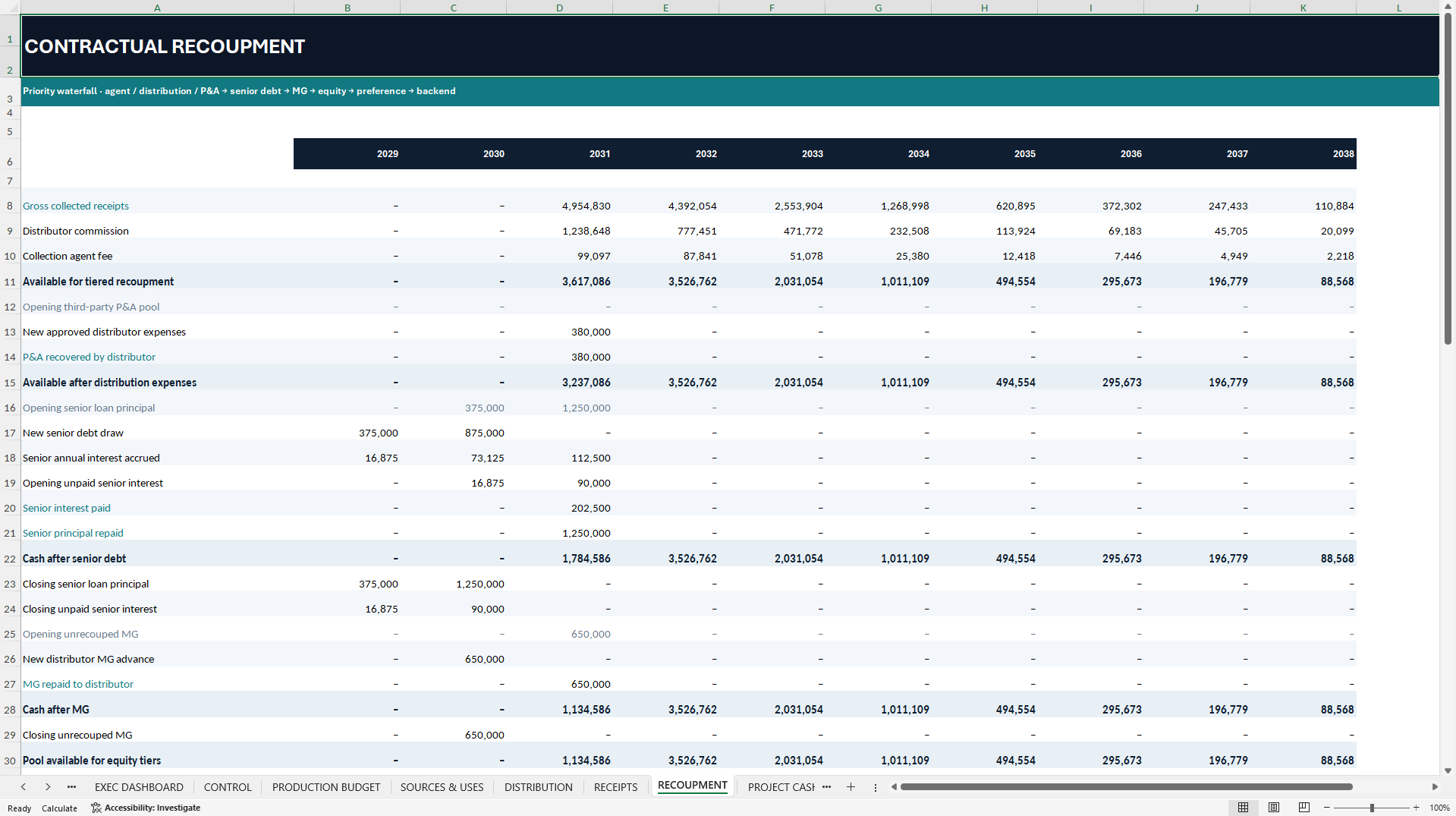
- 🏦 Trace each year's receipts through distribution fees, senior debt, minimum guarantee recovery, equity recoupment, investor preference and backend participation.
- 📈 Test four scenarios and review funding gaps, unrecovered capital, Investor IRR, NPV and MOIC separately, so positive returns do not hide a cash shortfall.
INTEGRATED FINANCIAL MODEL EXCEL DESCRIPTION
🎬 FILM PRODUCTION & STREAMING FINANCIAL MODEL
A 10-year model for independent film budgeting, distribution receipts and investor recoupment.
A film can generate substantial distribution receipts before its investors recover their capital. This editable Excel model shows where those receipts go, when each party gets paid and how a delayed release or weaker rights sales can affect project cash and investor returns.
Built for independent producers, production companies, film-finance consultants and entertainment analysts, the workbook connects a single film's production budget, funding commitments, distribution receipts and recoupment priorities across ten annual periods. All sample inputs and outputs are fictional.
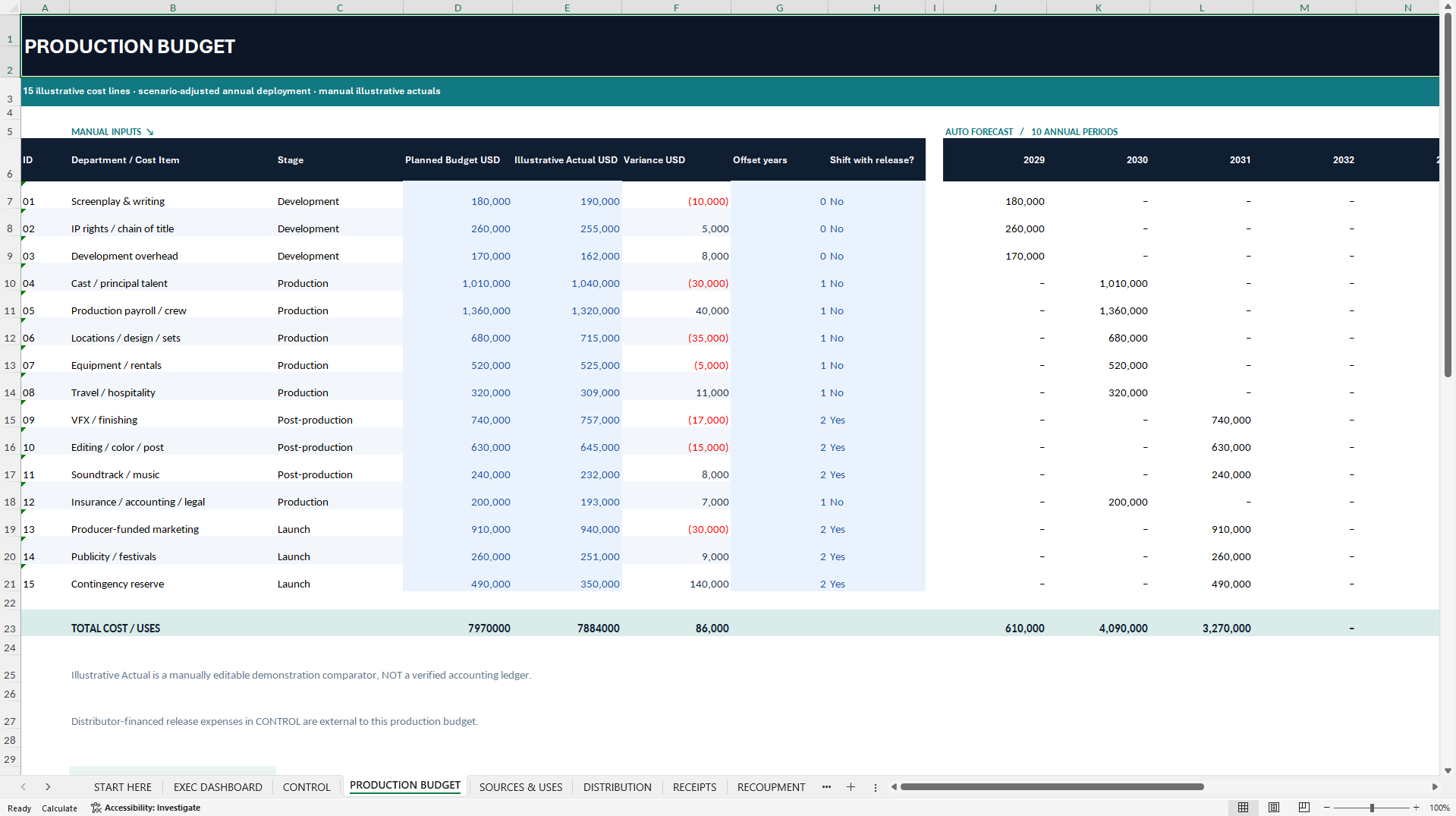
🎥 PRODUCTION BUDGET & RELEASE TIMING
Build the budget across 15 editable cost lines spanning development, production, post-production and launch. Enter planned and actual costs separately to review budget variances. Assign each line a timing offset and specify whether its forecast spending shifts when the release is delayed.
Entered actual costs are comparison figures. The cash flow forecast uses the scheduled budget and scenario assumptions, and the model does not connect to an accounting system.
🌍 DISTRIBUTION RIGHTS, TERRITORIES & COLLECTIONS
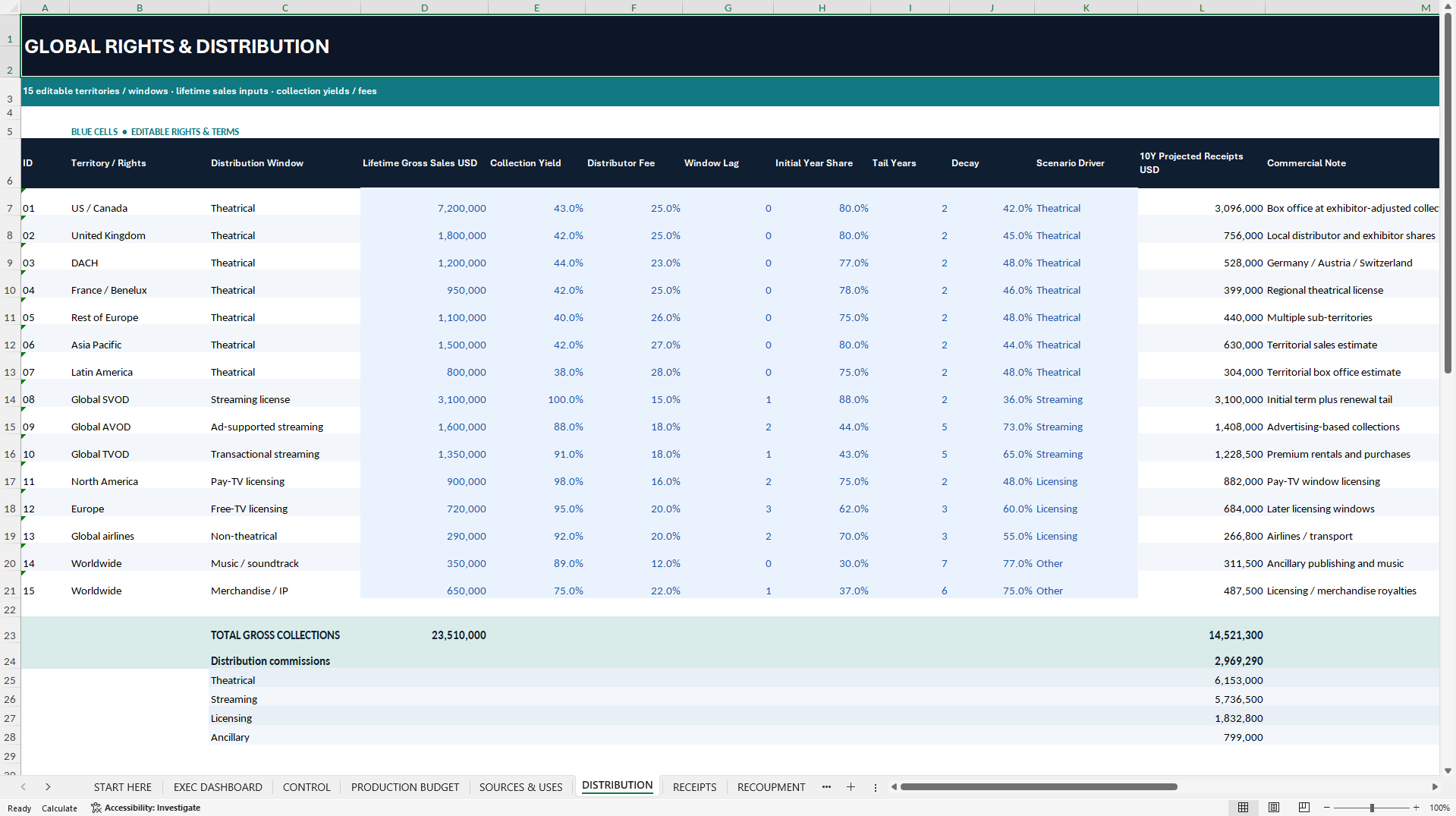
Configure 15 pre-linked rights streams. The examples cover theatrical distribution in North America, Europe, Asia Pacific and Latin America, as well as global SVOD, AVOD and TVOD rights, television and airline licensing, soundtrack income and merchandise or IP revenue.
Set commercial estimates, collection yields, distributor commissions, release-window timing and collection decay by stream. Review which receipts fall within the ten-year forecast and account for timing beyond it. Streaming is modeled as film-rights revenue. There is no subscription billing or audience-cohort engine.
💼 SOURCES, USES & PROJECT CASH FLOW
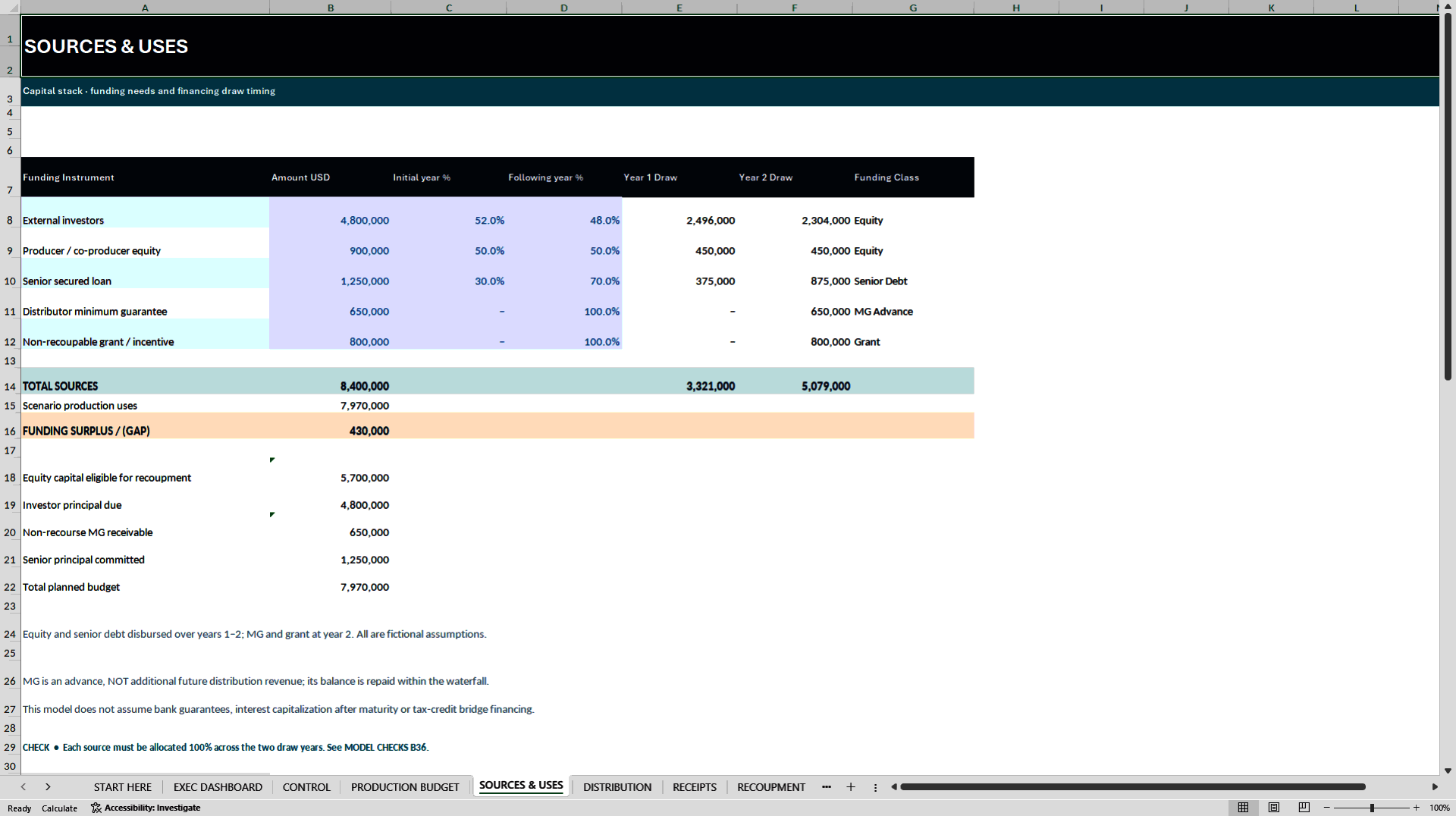
Plan external investor equity, producer equity, senior loan financing, a distributor minimum guarantee (MG) and non-recoupable grants or incentives. Allocate funding draws across the first two forecast years, compare committed sources with production uses and check whether money arrives before the project needs it.
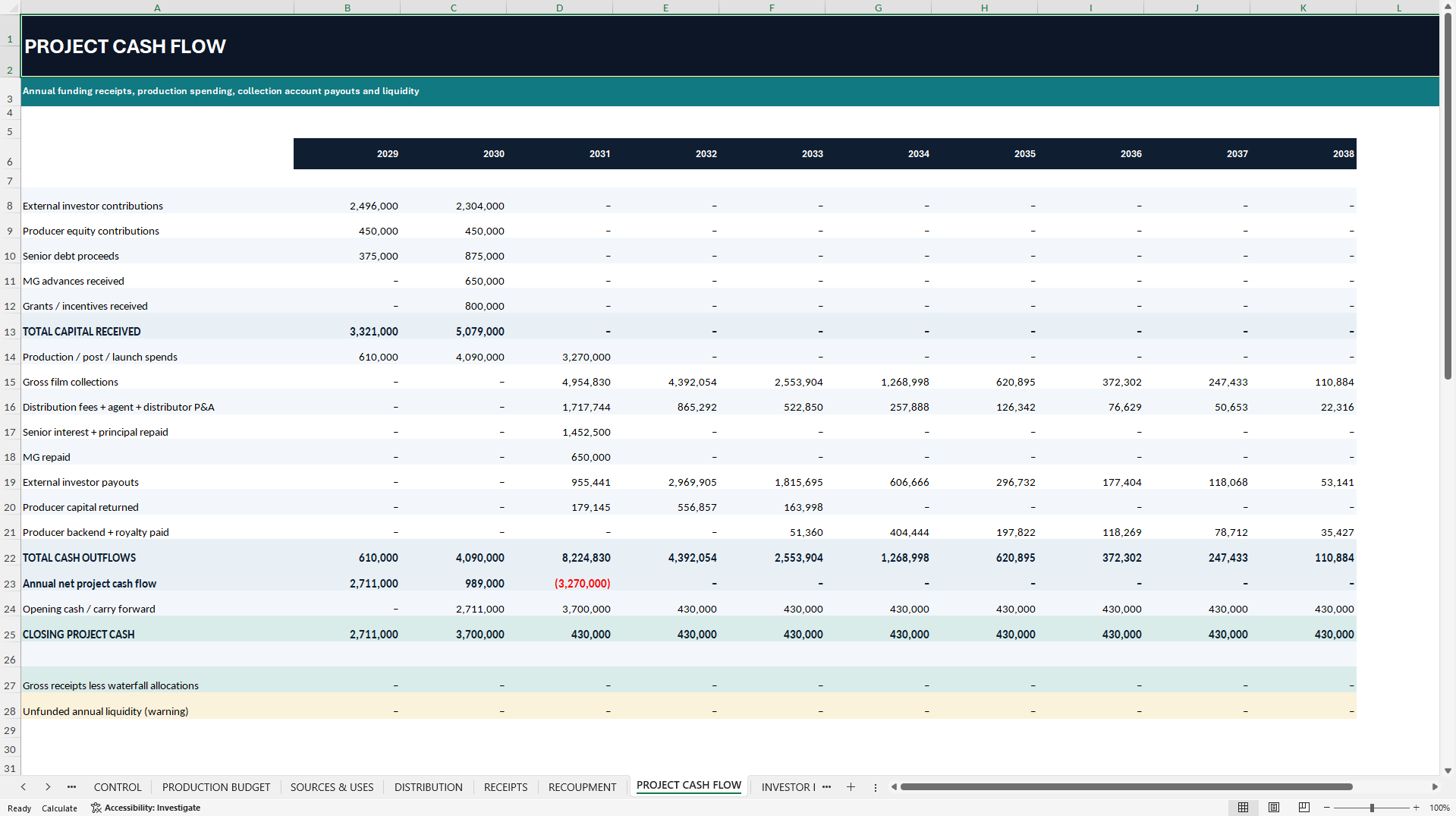
PROJECT CASH FLOW tracks funding received, production spend, gross collections, waterfall payments and closing cash. The model flags negative closing cash without assuming replacement financing. A funding surplus on paper does not by itself establish annual liquidity.
🏦 PRIORITY RECOUPMENT WATERFALL
Follow the annual allocation of collected receipts in the modeled payment order:
① Distributor commissions and collection-agent fees
② Recovery of distributor-funded release expenses
③ Senior loan interest and principal
④ Recovery of the distributor minimum guarantee
⑤ Pro-rata return of external investor and producer capital
⑥ External investor preferred premium
⑦ Residual investor and producer participation, with a talent royalty on the producer's share
Unpaid balances carry forward and are not forced to settle in Year 10. The investor premium is a flat percentage of contributions, not a compounded annual preferred return. The sequence is illustrative and must be checked against actual distribution, financing and participation agreements.
📈 INVESTOR IRR, NPV & MOIC
Track the external investor class separately from the producer. Review capital contributed, principal recovered, preferred premium, backend distributions and cumulative net cash flow. The workbook calculates annual Investor IRR, Investor NPV, MOIC and the share of original capital recouped.
The fictional Base Case produces approximately 12.95% Investor IRR and 1.46× MOIC, but an Investor NPV of approximately negative USD 108,189 at the illustrative 14% discount rate. IRR uses equally spaced annual net cash flows rather than transaction-date XIRR. NPV discounts the entire annual series starting in Period 1.
🔀 FOUR SCENARIOS & LIQUIDITY WARNINGS
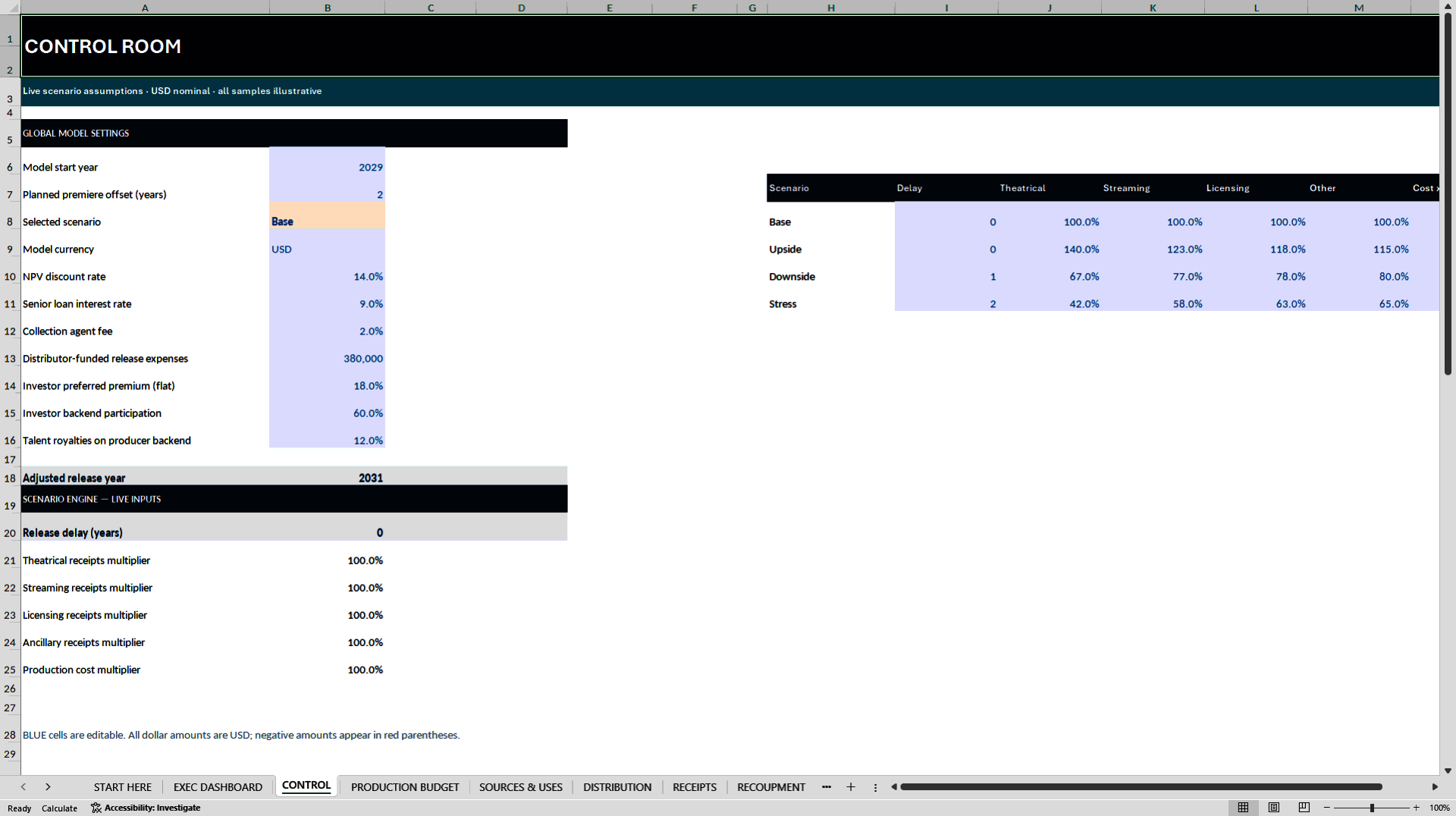
Switch between Base, Upside, Downside and Stress. Adjust release delays, theatrical and streaming receipts, licensing and ancillary income, and production costs. The active case updates timing, collections, recoupment, cash and investor returns.
SCENARIO LAB provides an indicative comparison of commercial economics before financing. It does not run four complete waterfalls side by side. In the supplied Downside and Stress examples, the project runs short of cash and external investor capital is not fully recovered by Year 10.
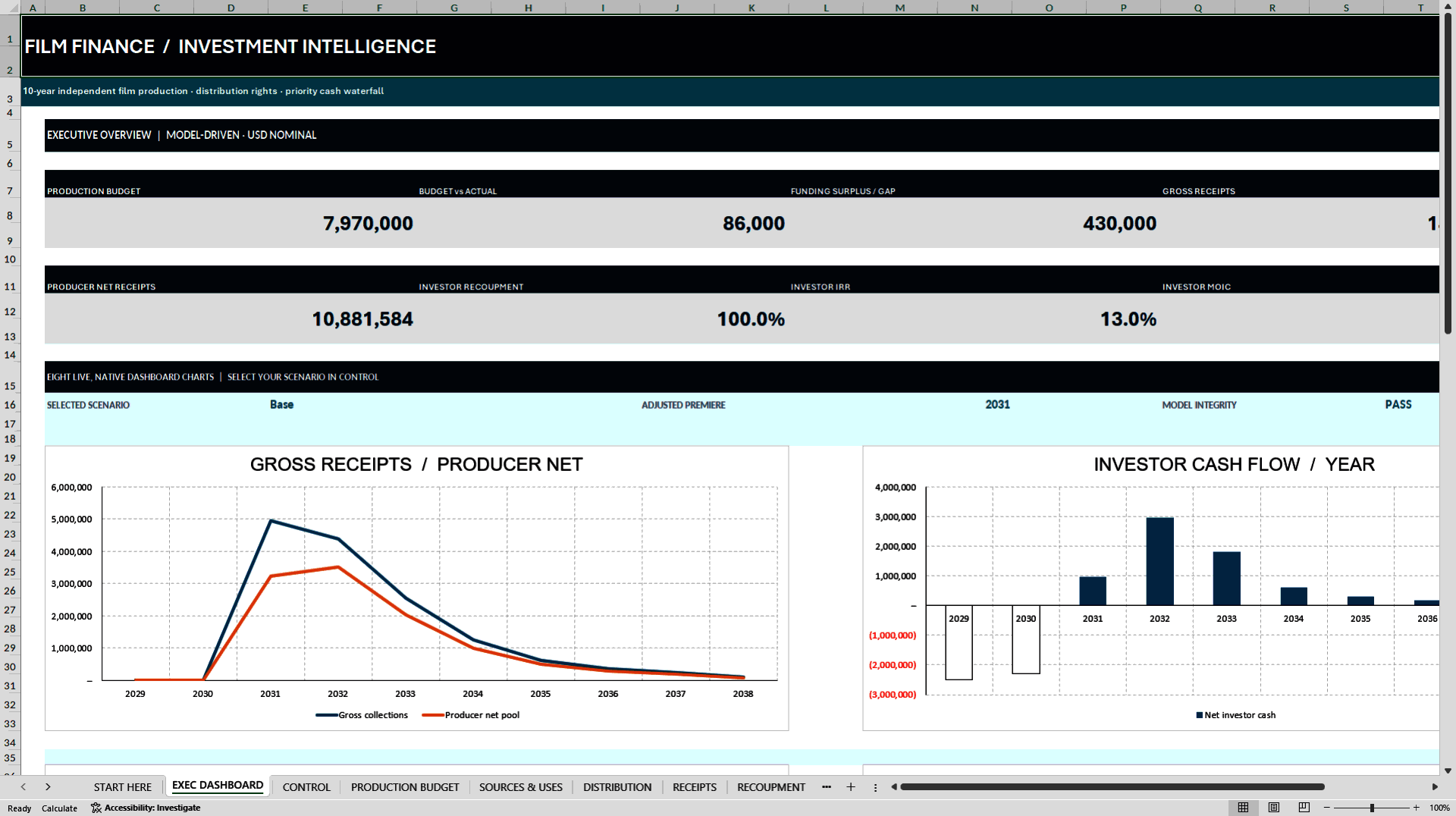
📊 EXECUTIVE DASHBOARD & MODEL CHECKS
Eight KPI cards cover production budget, budget versus actual, funding surplus or gap, gross collected receipts, producer net receipts before financing, investor capital recoupment, Investor IRR and MOIC.
Eight native Excel charts show gross and net receipts, annual investor cash flow, release-window revenue mix, budget versus actual by stage, investor distributions by tier, loan and MG balances, project liquidity, and distribution fees and net receipts.
MODEL CHECKS reconciles receipts by rights category, waterfall allocations, capital and financing balances, and project cash movements. Liquidity warnings and unpaid obligations are separate from arithmetic checks. A technical PASS does not establish funding adequacy or contractual validity.
📦 WHAT YOU RECEIVE
• One editable Excel workbook with 13 worksheets, ten annual forecast periods, 15 production budget lines, 15 rights streams, four scenarios and eight native dashboard charts.
• One 38-page English PDF guide covering setup, production budgeting, distribution windows, collections, funding, recoupment, investor returns, scenarios and troubleshooting.
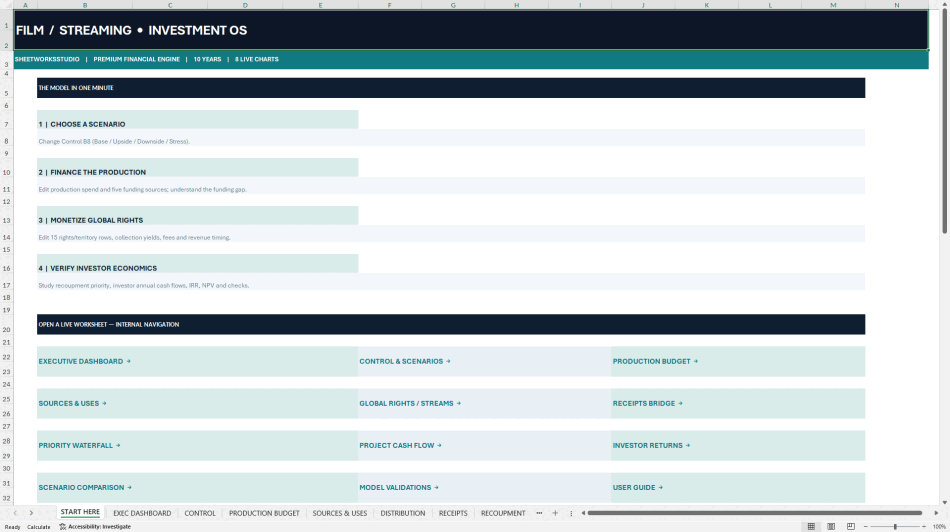
🧭 GETTING STARTED
Save a working copy and open START HERE. Set the start year, premiere timing and scenario in CONTROL. Replace the sample budget, funding commitments and rights assumptions, then trace the results through RECEIPTS, RECOUPMENT, PROJECT CASH FLOW and INVESTOR RETURNS. Review liquidity and unrecovered balances before drawing conclusions about returns.
⚙️ COMPATIBILITY & SCOPE
The workbook is macro-free and contains no VBA, Power Query or live external data connections. Microsoft Excel Desktop is recommended. The charts are linked to worksheet data, but the supplied file does not store numerical chart caches. Check chart display after opening and recalculating in Excel. Native Excel Desktop behavior and Google Sheets import have not been independently verified. The currency setting is a display label and does not convert amounts.
This is an annual single-film project model. It is not a monthly cash schedule, a consolidated production-company three-statement model, a detailed tax simulator or a substitute for administering actual contracts.
🛡️ INDEPENDENT TEMPLATE
Developed by SheetworksStudio as an independent, unofficial financial planning template. All sample data and results are fictional. The workbook is not audited, certified, lender-approved or endorsed by any studio or distributor. It does not provide individualized investment, financial, legal, accounting or tax advice. Validate assumptions and contractual terms independently before using the model for a real project. Digital product only.
Got a question about the product? Email us at support@flevy.com or ask the author directly by using the "Ask the Author a Question" form. If you cannot view the preview above this document description, go here to view the large preview instead.
Source: Best Practices in Integrated Financial Model Excel: Film Production & Streaming Financial Model Excel (XLSX) Spreadsheet, SheetworksStudio
ABOUT THE AUTHOR

SheetworksStudio creates premium Excel-based business templates, dashboards, trackers, financial models, and management systems for professionals, consultants, entrepreneurs, and organizations.
Our portfolio covers finance, project management, operations, risk management, compliance, AI governance, HR, supply chain, performance management, and business planning. Each product is designed to
... [read more]
Ask the Author a Question
You must be logged in to contact the author.