

 Click main image to view in full screen.
A3 Report (A3 Problem Solving) Poster (PDF)
PDF document + PowerPoint (PPTX) 5 Pages


BENEFITS OF THIS PDF DOCUMENT
- Provides a summary of the A3 problem solving process.
- Serves as a supplementary tool for your A3 problem solving workshop session.
- Print the poster in A3/A4 size right out from your office copier machine.
A3 PDF DESCRIPTION
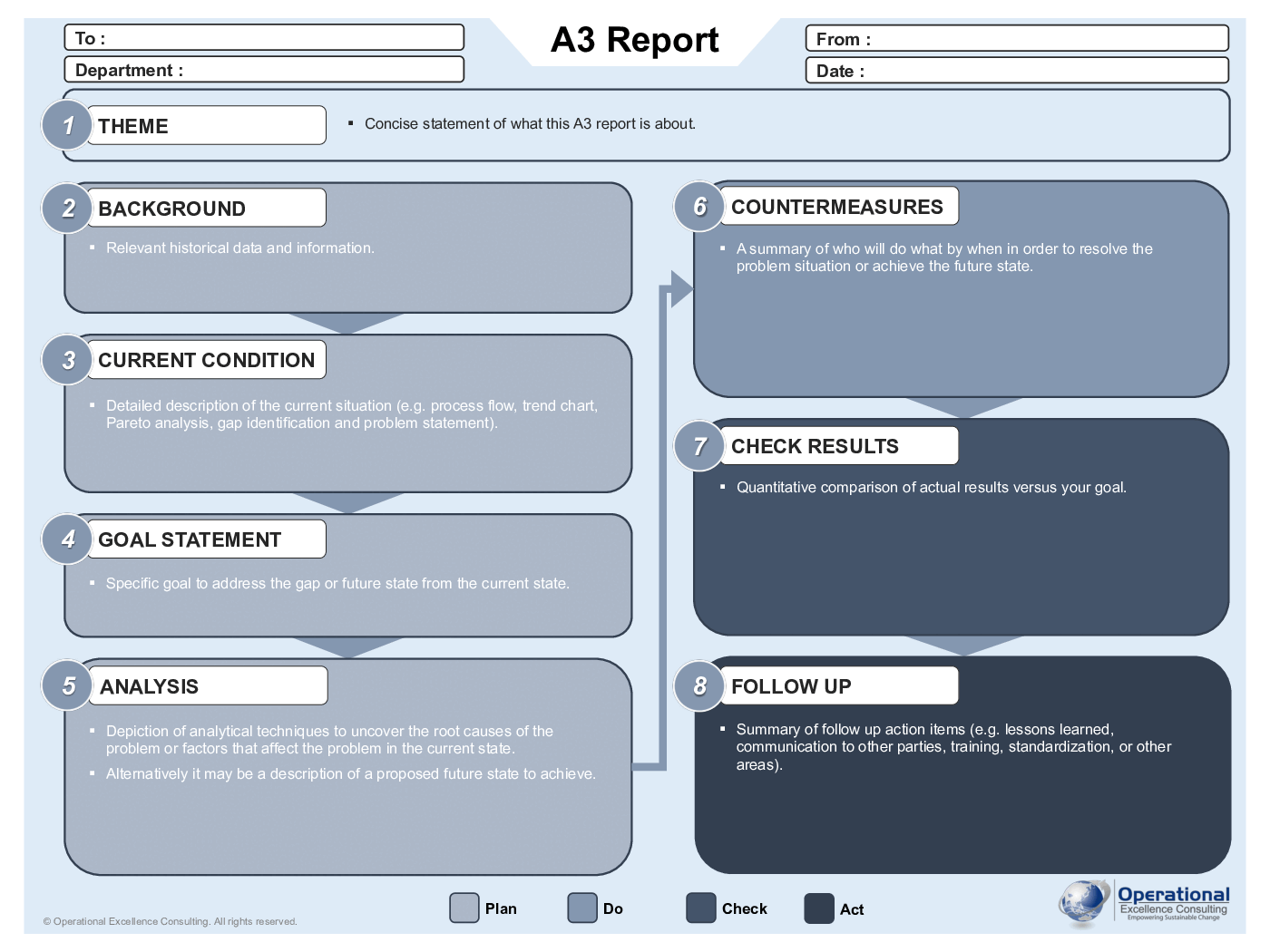
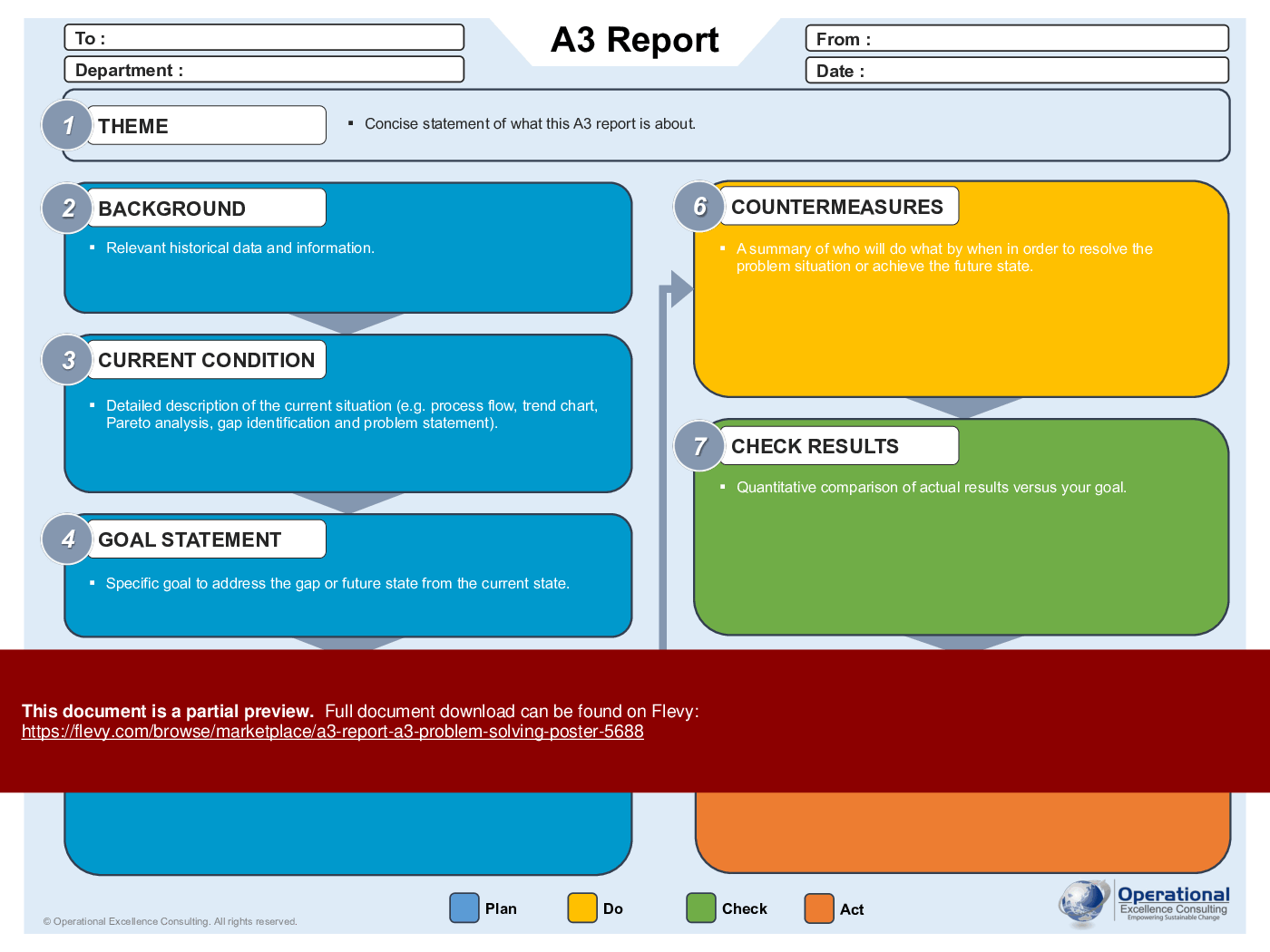
The A3 Report poster depicts the A3 problem solving process from problem identification to resolution in a fashion that fosters learning, collaboration, and personal development.
The poster is available in two distinct themes: vibrant color schemes and a professional monochrome version. In both formats, the poster comes in a convenient PDF as well as an editable PPTX format, enabling effortless printing on A3/A4-sized paper from standard office copier machines. This versatile resource can be prominently displayed on employee workstations or distributed alongside your training materials.
The A3 Report poster supplements your A3 Problem Solving training presentation materials. It serves as a takeaway and summary of your process improvement presentation.
The A3 Report structure consists of eight elements:
1. Theme – Concise statement of what this A3 report is about.
2. Background – Relevant historical data and information.
3. Current Condition – Detailed description of the current situation (e.g. process flow, trend chart, Pareto analysis, gap identification and problem statement).
4. Goal Statement – Specific goal to address the gap or future state from the current state.
5. Analysis – Depiction of analytical techniques to uncover the root causes of the problem or factors that affect the problem in the current state.
6. Countermeasures – A summary of who will do what by when in order to resolve the problem situation or achieve the future state.
7. Check Results – Quantitative comparison of actual results versus your goal.
8. Follow Up – Summary of follow up action items (e.g. lessons learned, communication to other parties, training, standardization, or other areas).
This poster is an essential tool for reinforcing the A3 methodology across your organization. It visually guides teams through each step, ensuring consistent application and understanding.
Got a question about the product? Email us at support@flevy.com or ask the author directly by using the "Ask the Author a Question" form. If you cannot view the preview above this document description, go here to view the large preview instead.
TOPIC FAQ
What are the core sections I should include on an A3 problem-solving report?
An A3 problem-solving report typically captures a concise Theme, Background, Current Condition, Goal Statement, Analysis, Countermeasures, Check Results, and Follow Up. These eight elements structure the problem narrative, root-cause work, proposed actions, and verification steps, ending with lessons learned and next steps across eight elements.How does an A3 support root-cause analysis and data visualization?
The A3’s Analysis element is where teams depict techniques to uncover root causes and influencing factors. Typical visual approaches include process flow descriptions, trend charts, and Pareto analysis to illustrate issues and drivers, all placed within the Analysis section of the A3.What belongs in the 'Check Results' and 'Follow Up' sections of an A3?
'Check Results' records quantitative comparisons of actual outcomes versus the goal statement, while 'Follow Up' summarizes action items such as lessons learned, communication needs, training, and standardization. These sections close the A3 loop with measurable results and documented next steps in the Check Results and Follow Up sections.What should I look for when choosing an A3 poster or printable A3 training takeaway?
Prioritize clear representation of the A3’s eight elements, printable sizing (A3/A4), an editable source for customization, and readable color or monochrome themes for workplace display. The presence of both PDF and an editable PPTX format is a practical attribute to look for.How does a ready-made A3 poster integrate into classroom or workshop training materials?
A ready-made poster can supplement a training presentation by serving as a visible reference during instruction and as a takeaway summary afterward. It enables consistent messaging about each step of the A3 process and is typically provided in printable PDF and editable PPTX formats like the A3 Report (A3 Problem Solving) Poster.Can I print the poster for shop-floor display, and what sizes are supported?
Yes; the poster is prepared for straightforward printing on standard office copiers and supports A3 and A4 sizes for workstation display or distribution alongside training materials, making it suitable for shop-floor posting in A3/A4 sizes.I need materials to reinforce A3 methodology after a workshop—what format works best for follow-up?
A concise visual poster that summarizes each A3 element and is editable for local examples works well as follow-up. Distribute printed copies at workstations and provide an editable file so teams can adapt content; the A3 Report (A3 Problem Solving) Poster is presented in both PDF and PPTX for this purpose.Are paid A3 poster templates worth buying instead of creating one from scratch?
Purchasing a template provides a pre-formatted A3 layout, selectable themes, and editable source files, avoiding initial design work. Look for templates that include printable PDF and an editable PPTX and clear labeling of the A3’s eight elements, such as the two-theme PDF/PPTX package.Source: Best Practices in A3 PDF: A3 Report (A3 Problem Solving) Poster PDF (PDF) Document, Operational Excellence Consulting
ABOUT THE AUTHOR

Operational Excellence Consulting, founded in 2009 by Allan Ung, draws from extensive experience at Microsoft, IBM, and Underwriters Laboratories (UL). We specialize in strategy deployment, customer experience design, and operational excellence, applying Design Thinking, Lean, and Systems Thinking to maximize customer value and minimize waste.
Our
... [read more]
Ask the Author a Question
You must be logged in to contact the author.