
 Click main image to view in full screen. Unlock all 10 preview images:
Project Portfolio Management System & PMO Dashboard – Excel XLSX
Excel (XLSX) + Zip archive file (ZIP)


BENEFITS OF THIS DOWNLOADABLE EXCEL DOCUMENT
- Centralizes project portfolio oversight, delivery status, risks, milestones, dependencies, resource capacity, budgets, and management reporting within one coordinated Excel system.
- Provides eight management KPI cards and four dynamic dashboard charts for project progress, budgets, portfolio health, risk exposure, resource capacity, and performance reporting.
- Includes a dedicated Project Review Freebie and an 8-page How-to-Use Guide for project reviews, action tracking, stakeholder updates, and professional portfolio reporting.
PMO EXCEL DESCRIPTION
📊 Project Portfolio Management & PMO Reporting System
The Project Portfolio Management System by SheetworksStudio is a professional Excel toolkit for project managers, PMOs, consultants, agencies, and business teams that need clearer control across multiple projects.
Instead of managing project status, risks, milestones, budgets, dependencies, resources, and reporting across disconnected spreadsheets, the system brings the key portfolio-management activities into one coordinated workflow.
The toolkit supports portfolio management from initial project registration through delivery monitoring, risk management, resource planning, budget control, and executive reporting.
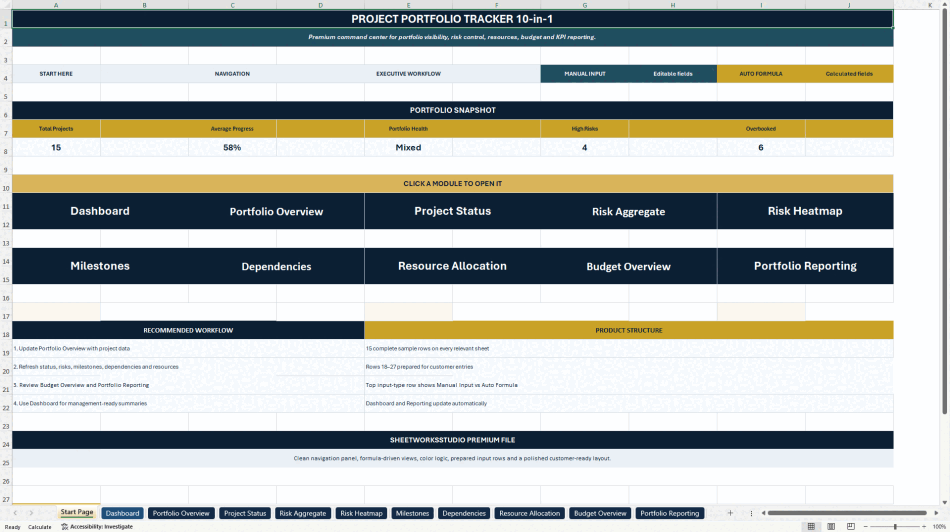
📘 10-in-1 Project Portfolio Management System
The core system includes:
• Portfolio Overview
• Executive Dashboard
• Project Status
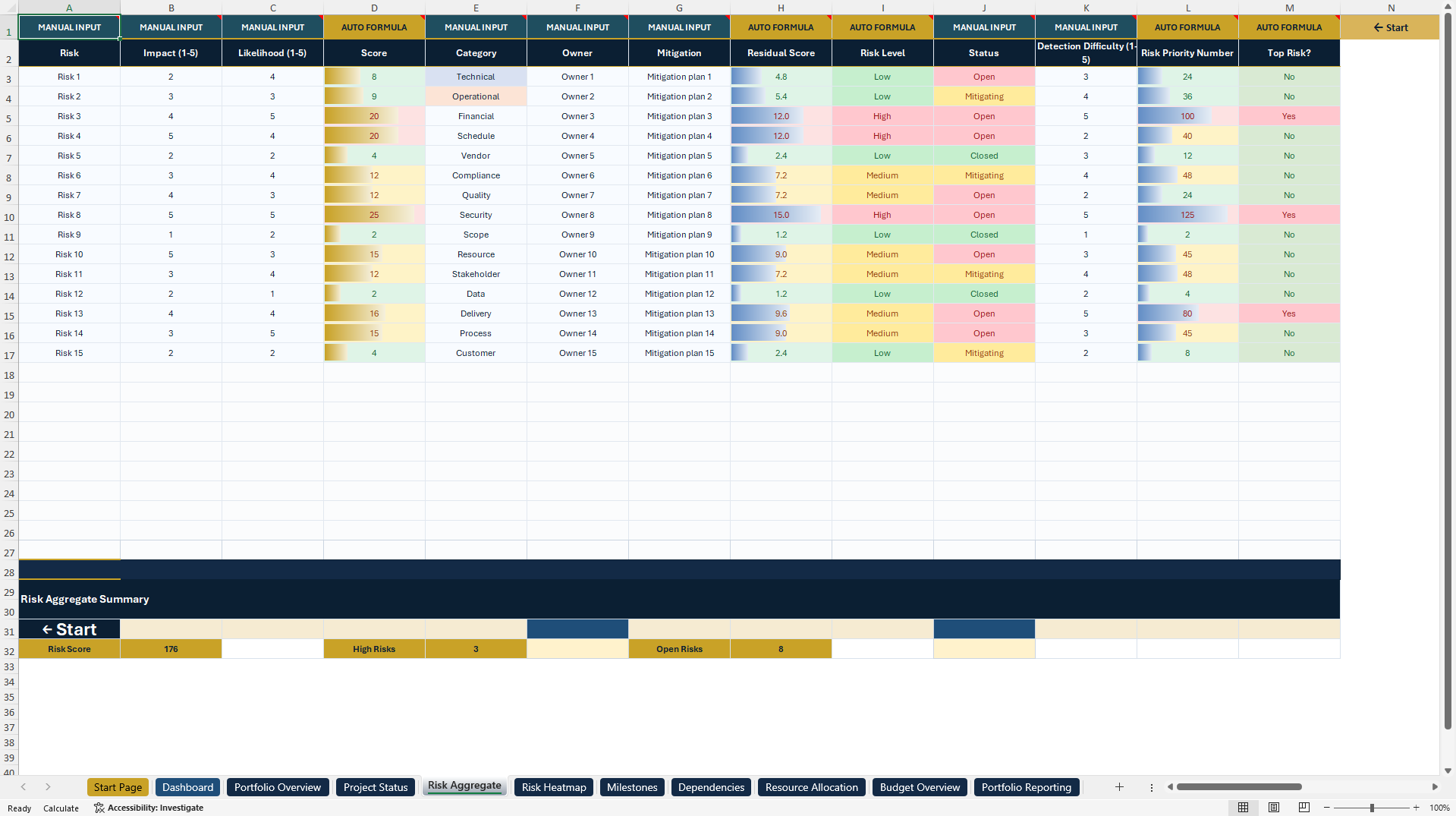
• Risk Aggregate
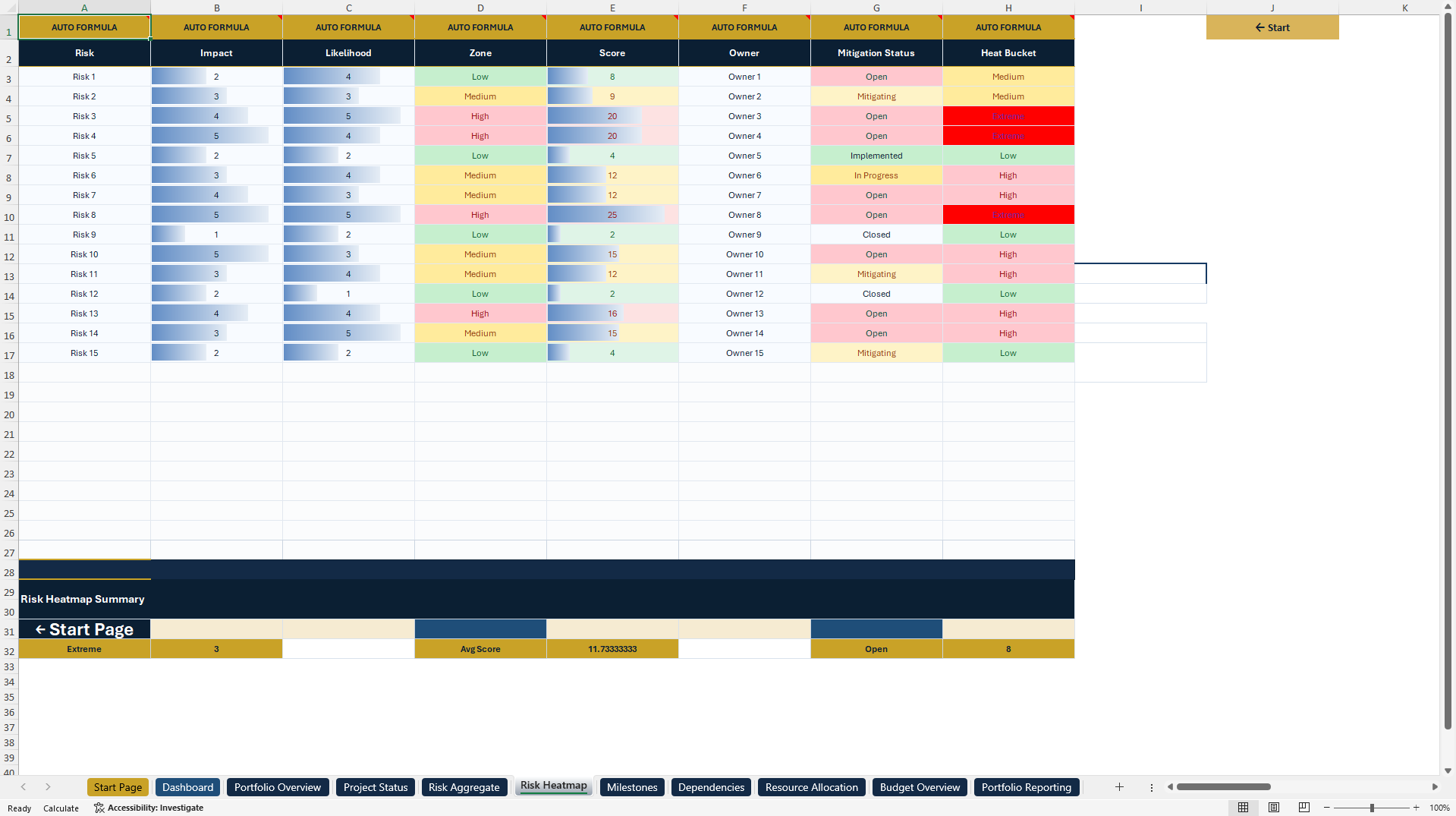
• Risk Heatmap
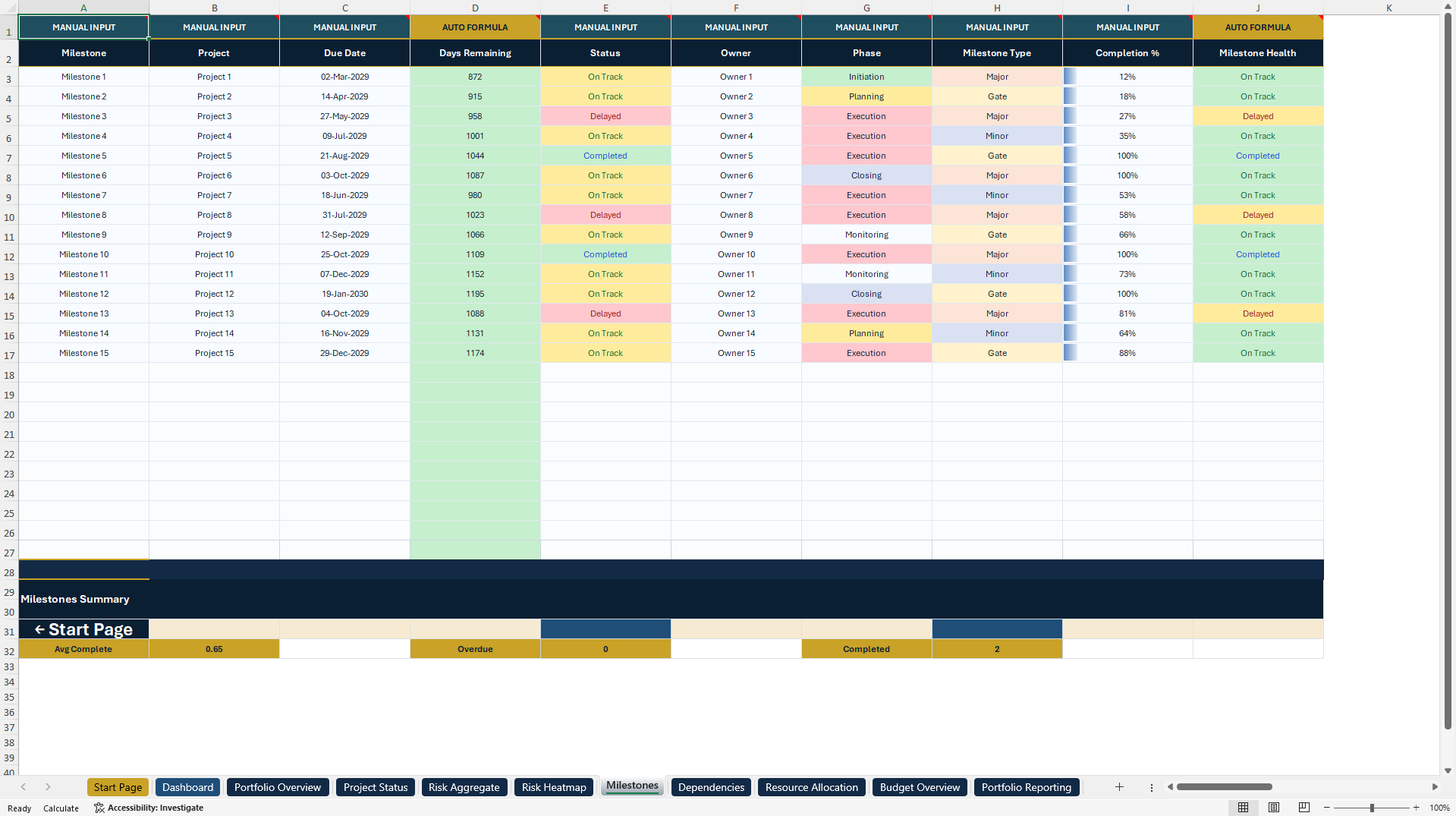
• Milestones
• Dependencies
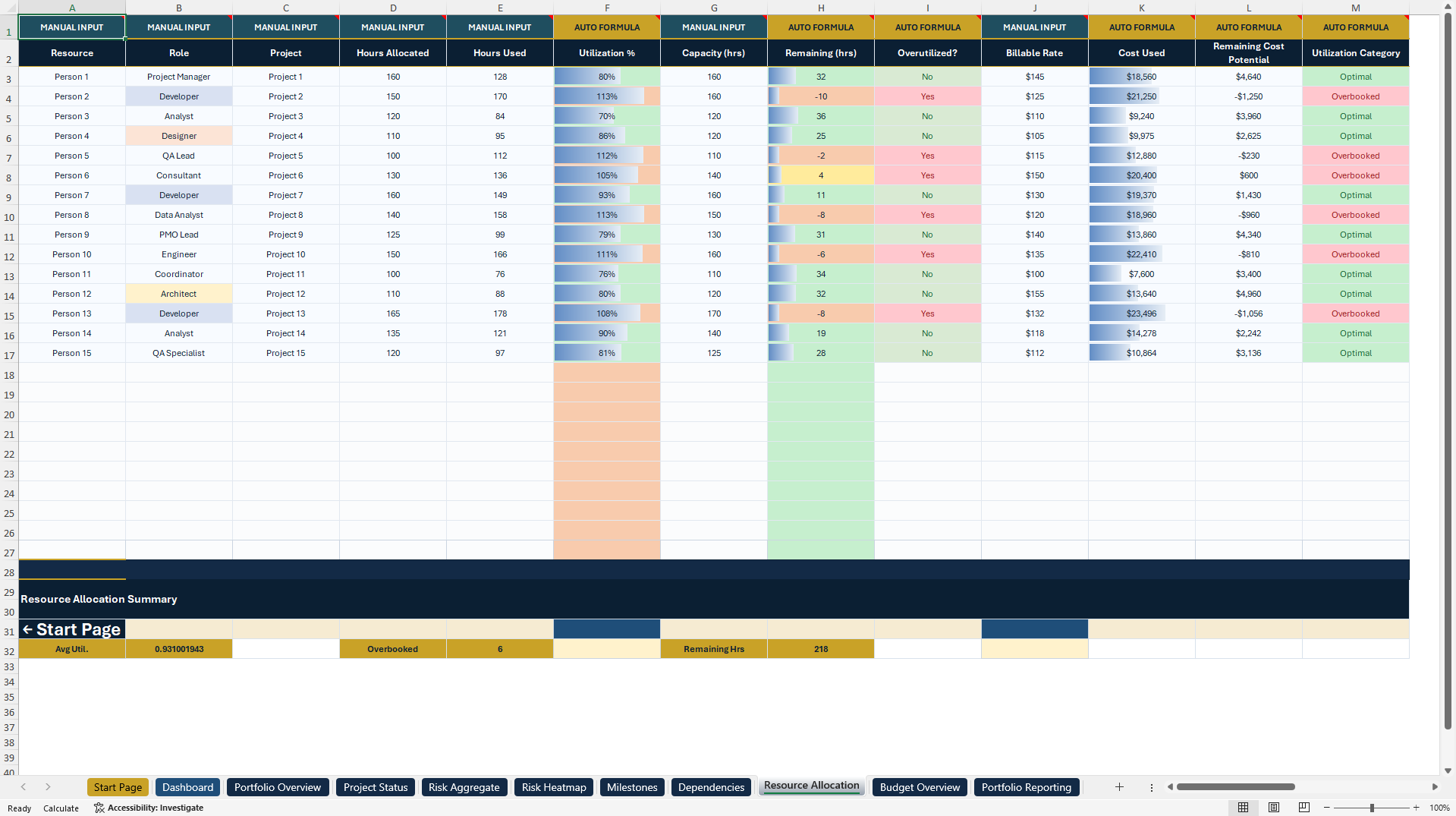
• Resource Allocation
• Budget Overview
• Portfolio Reporting
A professional Start Page provides structured navigation, while dedicated system logic supports automated calculations, management reporting, and dynamic dashboard charts.
The operational modules include 15 illustrative sample records together with prepared continuation rows for customer data.
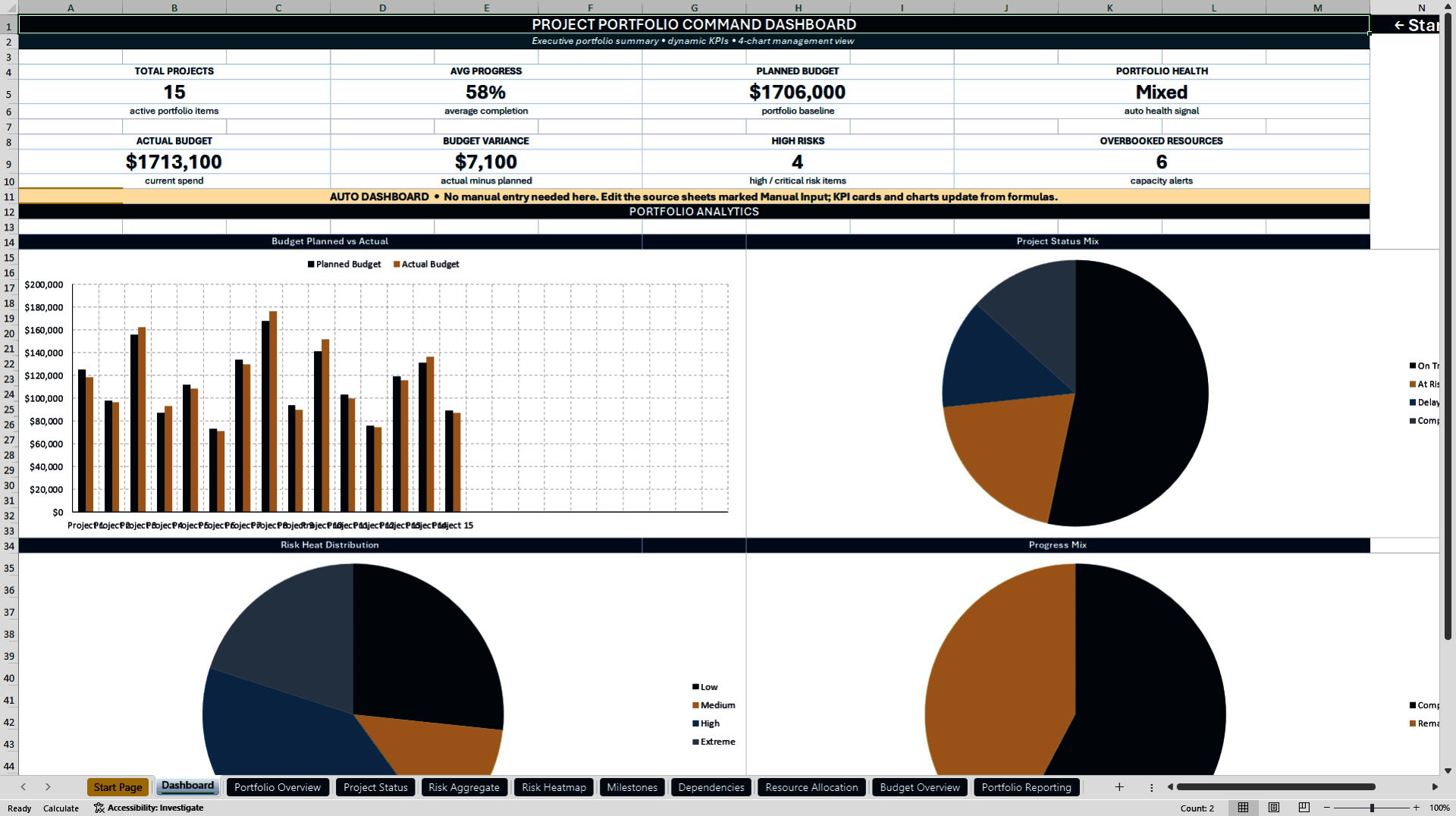
📈 Executive PMO Dashboard
The integrated dashboard provides eight management KPI cards covering:
• Total Projects
• Average Progress
• Planned Budget
• Actual Budget
• Budget Variance
• Portfolio Health
• High Risks
• Overbooked Resources
Four dynamic management charts visualize:
• Budget Planned vs Actual
• Project Status Mix
• Risk Heat Distribution
• Progress Mix
The dashboard is designed for PMO meetings, management reviews, stakeholder reporting, and executive updates.
📋 Portfolio & Project Status Management
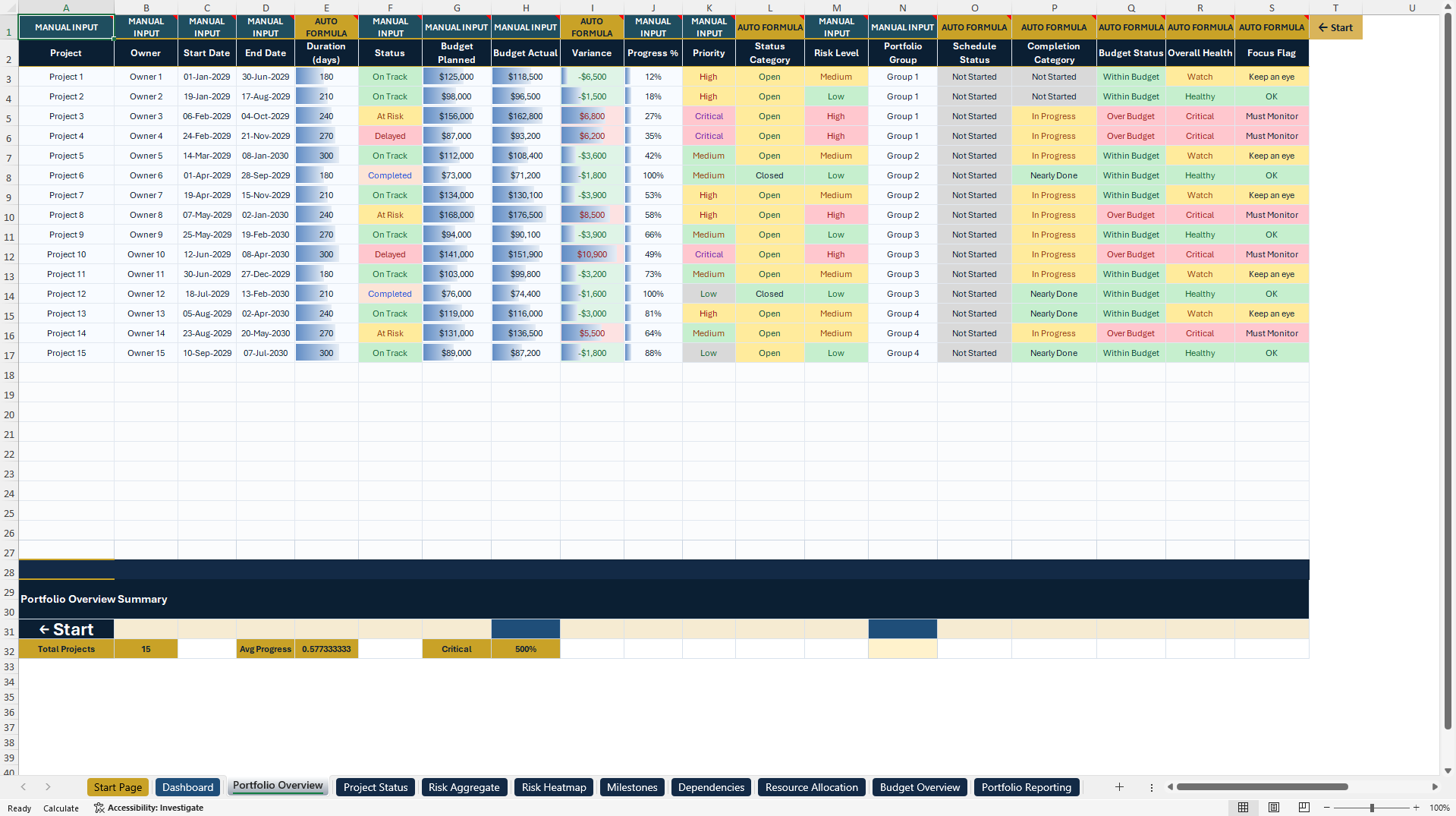
The Portfolio Overview acts as the central project register for ownership, dates, status, budgets, progress, priorities, risks, portfolio groups, and management health indicators.
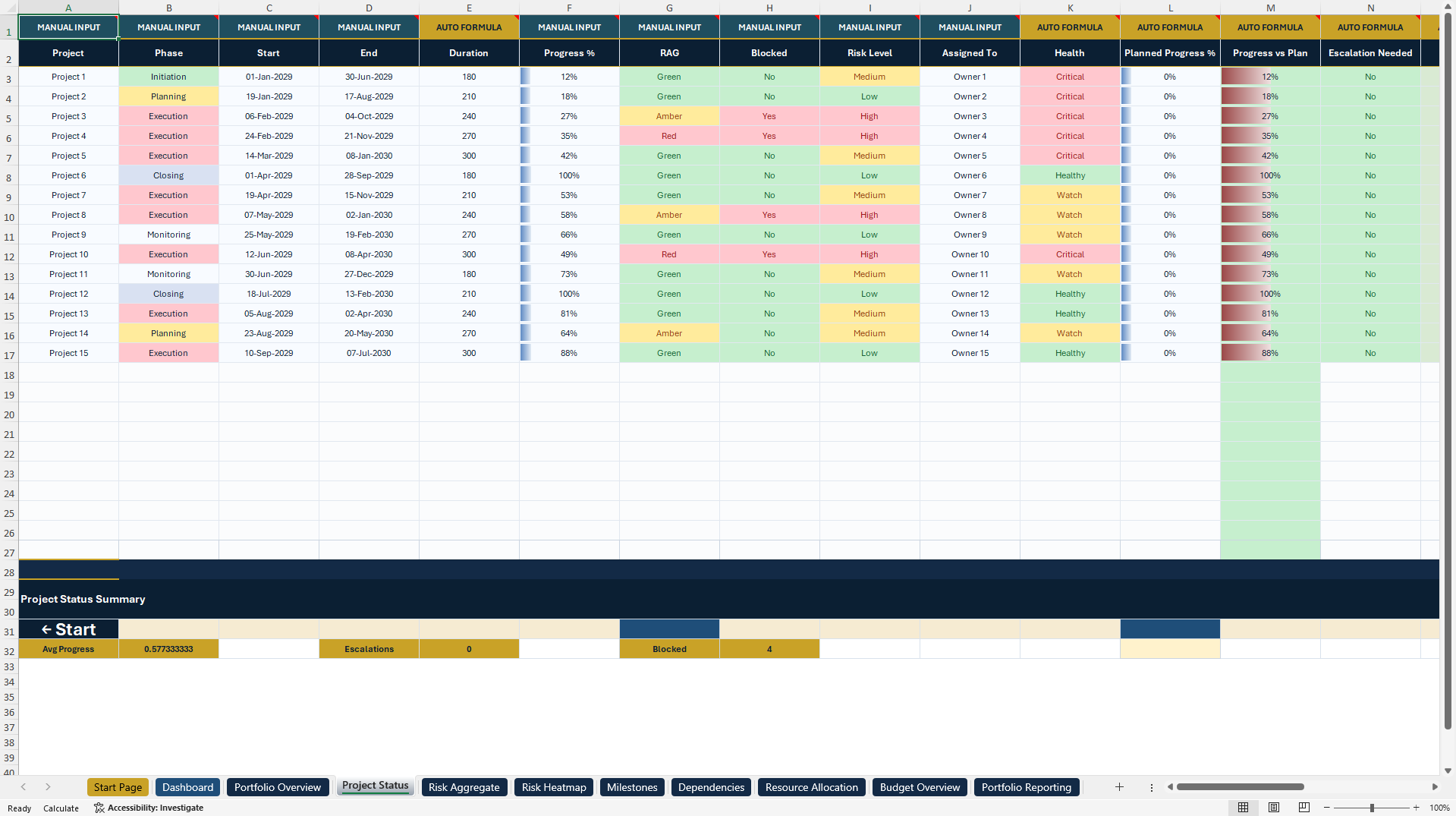
The Project Status module provides additional visibility into phases, blockers, delivery health, progress, schedule performance, and escalation requirements.
🛡️ Risk Management & Heatmap
Dedicated Risk Aggregate and Risk Heatmap modules support:
• Impact and likelihood
• Risk scoring
• Risk categories
• Risk ownership
• Mitigation actions
• Residual exposure
• Risk levels
• Detection difficulty
• Risk Priority Number
The heatmap provides an additional management view of portfolio risk exposure and severity.
⏱️ Milestones & Dependencies
The Milestones module supports milestone dates, ownership, project phases, milestone types, completion percentages, and milestone health.
The Dependencies module helps document cross-project relationships, dependency types, criticality, lag, risk, ownership, and available slack.
Together, these modules help PMOs identify delivery pressure and cross-project constraints more clearly.
👥 Resource Allocation
The Resource Allocation module supports capacity and workload management through:
• Resource and role
• Assigned project
• Allocated hours
• Used hours
• Utilization
• Capacity
• Remaining hours
• Overutilization indicators
• Rates and resource costs
Automatic indicators help highlight potential capacity pressure and resource overbooking.
💰 Budget & Financial Control
The Budget Overview provides project-level visibility across:
• Planned budget
• Actual spend
• Budget variance
• Cost Performance Index
• Budget usage
• Budget health
• Variance classification
This supports more structured portfolio-level financial monitoring.
📑 Portfolio Reporting
The Portfolio Reporting module consolidates management metrics for portfolio size, progress, financial performance, risks, delayed projects, resource capacity, milestone completion, and other critical portfolio indicators.
It provides a structured reporting layer for PMO meetings, management reviews, and stakeholder updates.
🎁 Project Review Freebie
The Supplemental Package includes a separate Project Review workbook with:
• Project Snapshot One-Pager
• Action, Risk & Issue Log
The Project Snapshot provides a compact management review with project information, progress, health indicators, notes, decisions, and follow-up information.
The Action, Risk & Issue Log includes 15 illustrative entries and supports actions, risks, issues, decisions, owners, due dates, priorities, statuses, risk levels, project areas, next steps, and notes.
The freebie is useful for individual project reviews, weekly status meetings, and stakeholder updates.
📘 8-Page How-to-Use Guide
The included PDF guide explains:
• Initial setup
• Workbook structure
• Manual Input vs Auto Formula logic
• Navigation
• Dashboard workflow
• Day-to-day portfolio management
• Project Review Freebie usage
• Customization
• PDF export
• Common mistakes and usage guidance
💼 Practical Use Cases
The toolkit can support:
• Project portfolio management
• PMO reporting
• Multi-project monitoring
• Project health reviews
• Risk management
• Budget control
• Resource capacity planning
• Milestone tracking
• Dependency management
• Executive reporting
• Stakeholder meetings
• Consulting engagements
👥 Ideal For
Designed for:
• Project managers
• PMO teams
• Portfolio managers
• Project control functions
• Consultants
• Agencies
• Operations teams
• Business leaders
• Organizations managing multiple projects simultaneously
📦 File Package
Primary Document
• 10-in-1 Project Portfolio Management System – Excel
Supplemental Package
• Project Review Freebie – Excel
• 8-page How-to-Use Guide – PDF
💻 Technical Information
• Microsoft Excel .xlsx
• PDF Guide
• Fully editable Excel workbooks
• Formula-driven calculations
• Structured dropdown controls
• Conditional formatting
• Internal workbook navigation
• Executive KPI reporting
• 8 management KPI cards
• 4 dynamic dashboard charts
• Illustrative 2029 sample data
• Prepared continuation rows
• No VBA
• No macros
• No APIs
• No external live-data connections
Microsoft Excel Desktop is the reference environment for formatting and functionality.
⚠️ Important Information
All projects, budgets, risks, resources, milestones, dependencies, KPIs, and other examples are illustrative sample data.
Users should replace the examples with their own project and portfolio information and review calculated outputs before using them for operational, financial, or strategic decisions.
This toolkit is a project-management, reporting, and organizational system. It does not replace certified project-management software, organization-specific governance, professional consulting, legal advice, or financial advice.
⚖️ Professional Disclaimer
This toolkit is provided for general planning, documentation, project management, analysis, and internal reporting purposes only.
It does not constitute legal, financial, regulatory, contractual, investment, or professional project-management advice.
All calculations, KPIs, risk indicators, financial metrics, schedules, and management outputs depend on user-provided data and should be independently reviewed before being relied upon for business decisions.
No guarantee is made regarding project performance, financial results, delivery outcomes, risk reduction, or other business results.
ℹ️ SheetworksStudio Disclaimer
All SheetworksStudio templates are independently created and unofficial.
SheetworksStudio is not affiliated with, endorsed by, or sponsored by Microsoft, PMI, any consulting firm, project-management software provider, or any other third-party brand.
Got a question about the product? Email us at support@flevy.com or ask the author directly by using the "Ask the Author a Question" form. If you cannot view the preview above this document description, go here to view the large preview instead.
Source: Best Practices in PMO, Dashboard Design Excel: Project Portfolio Management System & PMO Dashboard Excel (XLSX) Spreadsheet, SheetworksStudio
ABOUT THE AUTHOR

SheetworksStudio creates premium Excel-based business templates, dashboards, trackers, financial models, and management systems for professionals, consultants, entrepreneurs, and organizations.
Our portfolio covers finance, project management, operations, risk management, compliance, AI governance, HR, supply chain, performance management, and business planning. Each product is designed to
... [read more]
Ask the Author a Question
You must be logged in to contact the author.




























