
 Click main image to view in full screen.
NIS2 Readiness & Evidence Tracker | Excel GRC Toolkit Dashboard – Excel XLSX
Excel (XLSX) + Zip archive file (ZIP)


BENEFITS OF THIS DOWNLOADABLE EXCEL DOCUMENT
- Centralize NIS2-oriented controls, maturity gap assessments, remediation actions, evidence records, security incidents, supplier risks, and critical asset tracking in one structured Excel system.
- Improve oversight with six executive KPIs, four native dashboard charts, configurable maturity targets, weighted readiness calculations, evidence freshness monitoring, and automated deadline indicators.
- Receive two editable Excel workbooks with 13 worksheets and five native charts, realistic sample records, a 15-question weighted NIS2 Pulse Check, and a practical 10-page English user guide.
CYBER SECURITY EXCEL DESCRIPTION
🛡️ NIS2 READINESS & EVIDENCE TRACKER OS
Professional Excel-Based Cybersecurity Readiness System for Control Assessments, Maturity Gaps, Evidence Management, Remediation, Incidents, Supplier Risk & Executive Reporting
The NIS2 Readiness & Evidence Tracker OS by SheetworksStudio is a professional, fully editable Excel management toolkit designed to help organizations structure internal NIS2 readiness activities, assess cybersecurity controls, identify maturity gaps, manage evidence, and monitor corrective actions.
Combining a ten-worksheet management system, an executive dashboard with four native Excel charts, a separate NIS2 Pulse Check companion, and a ten-page user guide, the toolkit provides a practical working environment for CISOs, Security Managers, GRC Teams, Compliance Professionals, Internal Auditors, and Consultants.
Replace disconnected spreadsheets with one organized approach to cybersecurity readiness documentation, accountability, action tracking, and management reporting.
📊 1. EXECUTIVE NIS2 READINESS DASHBOARD
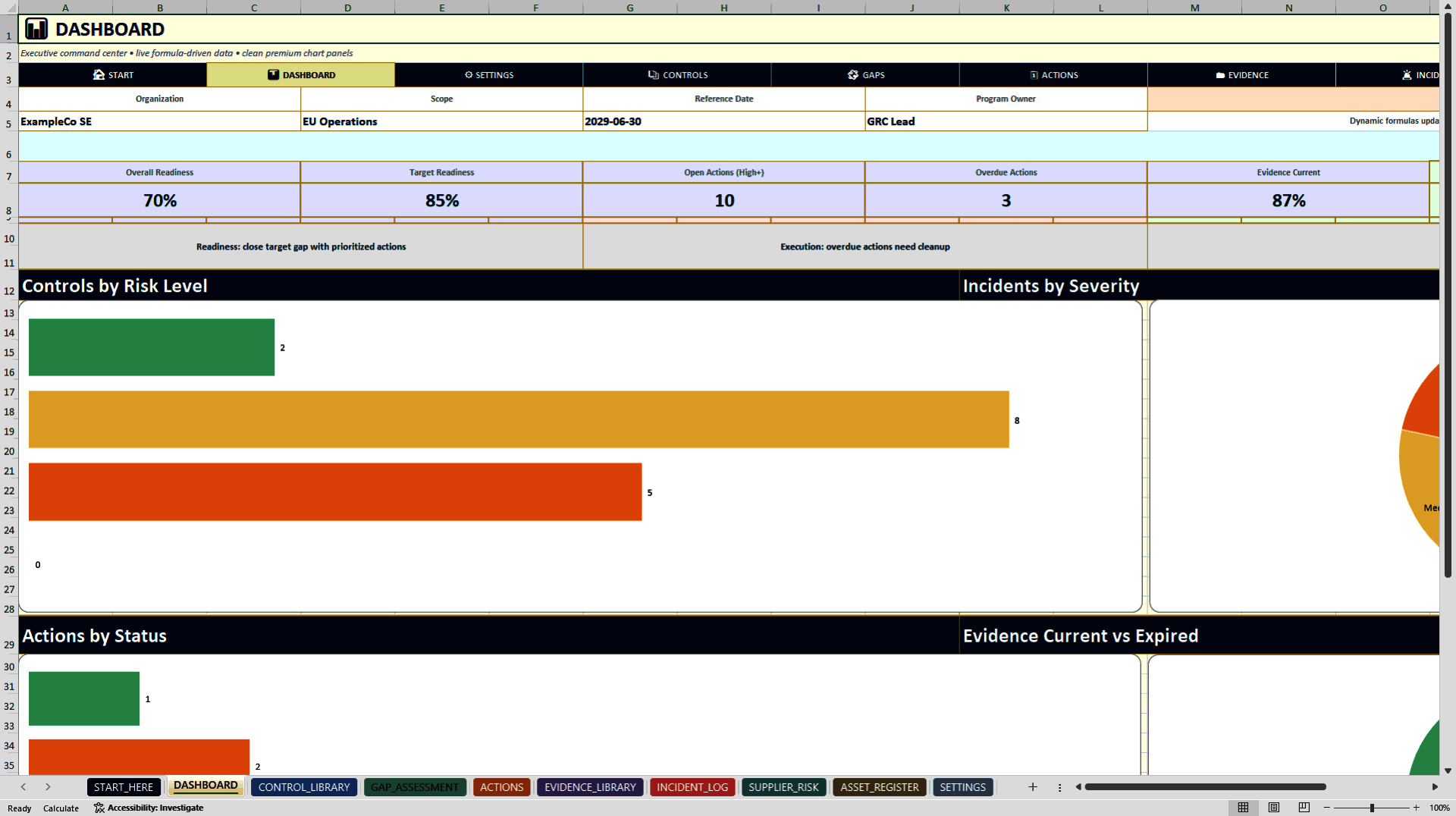
The executive dashboard features six KPI cards and four native Excel charts.
Monitor:
• Overall weighted readiness
• Target readiness
• Open High and Critical actions
• Overdue remediation activities
• Current versus expired evidence
• High-risk suppliers
Four charts visualize controls by risk level, incidents by severity, actions by status, and evidence freshness.
Formula-driven calculations support recurring management reviews, readiness discussions, and executive reporting.
⚙️ 2. TEN INTEGRATED EXCEL MANAGEMENT MODULES
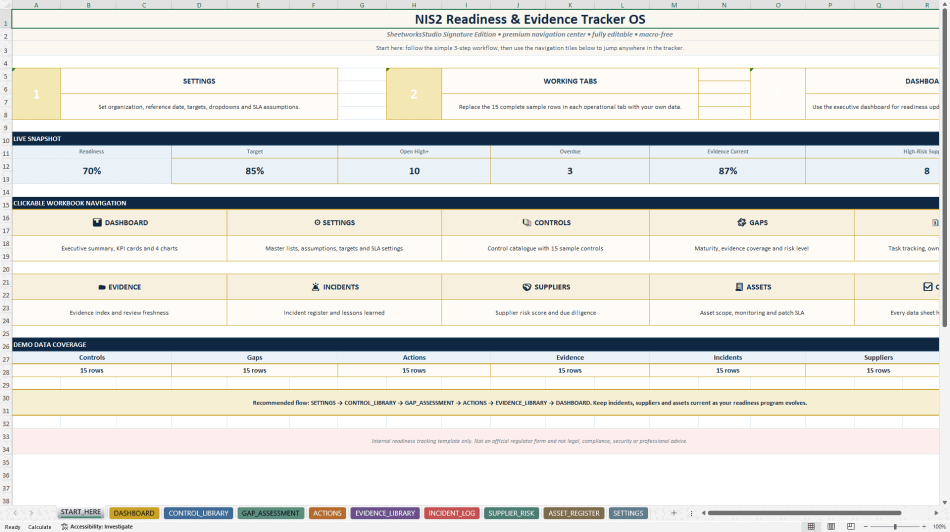
START_HERE
Professional navigation, quick-start workflow, live KPI snapshot, and direct access to operational registers.
DASHBOARD
Central executive reporting interface with six KPI cards and four native charts.
SETTINGS
Configure organization details, reporting date, readiness targets, maturity criteria, domain weightings, status lists, responsible roles, and patch SLA assumptions.
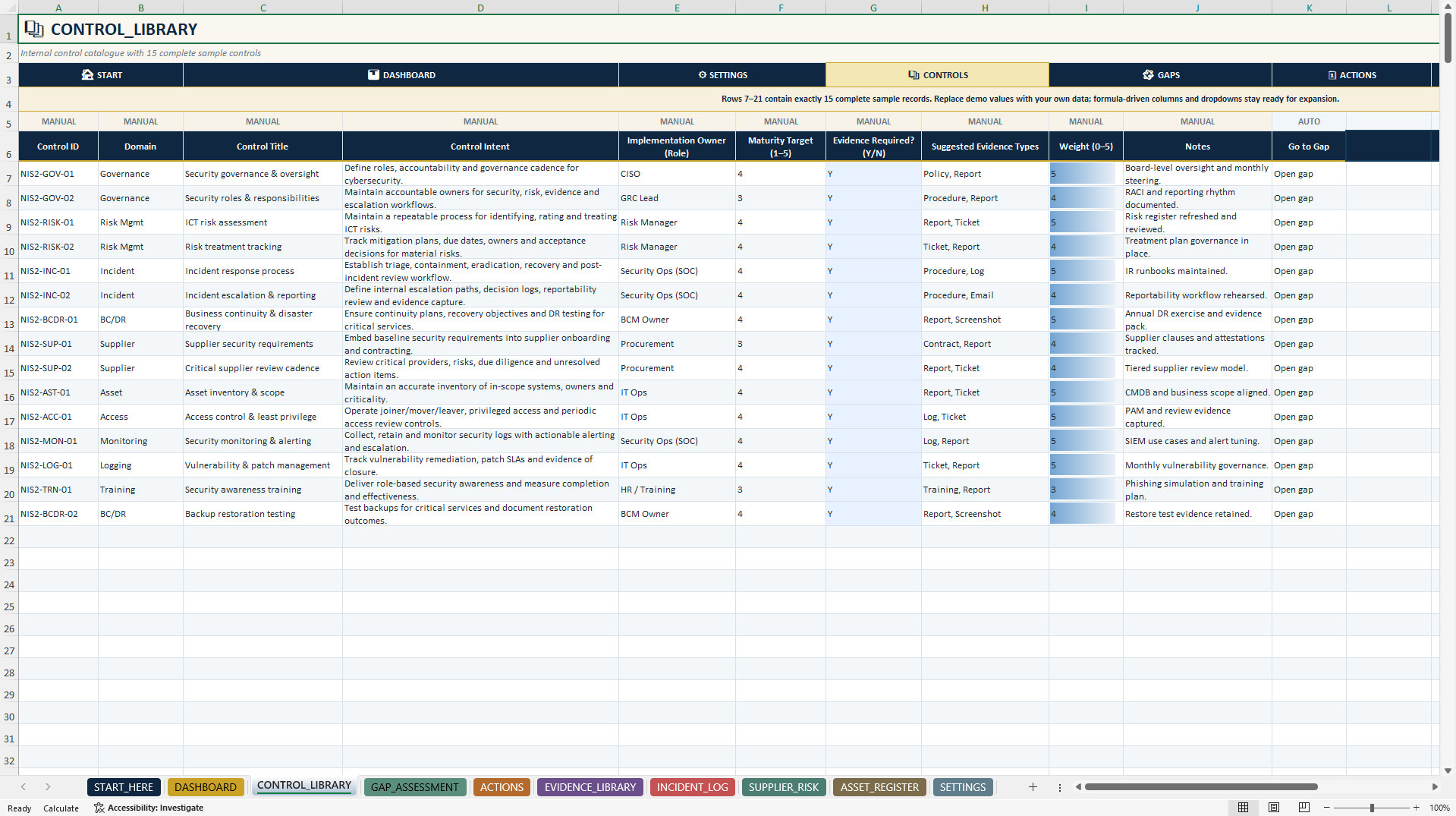
CONTROL_LIBRARY
Maintain internal cybersecurity controls, control objectives, responsible roles, target maturity, evidence requirements, and weighting information.
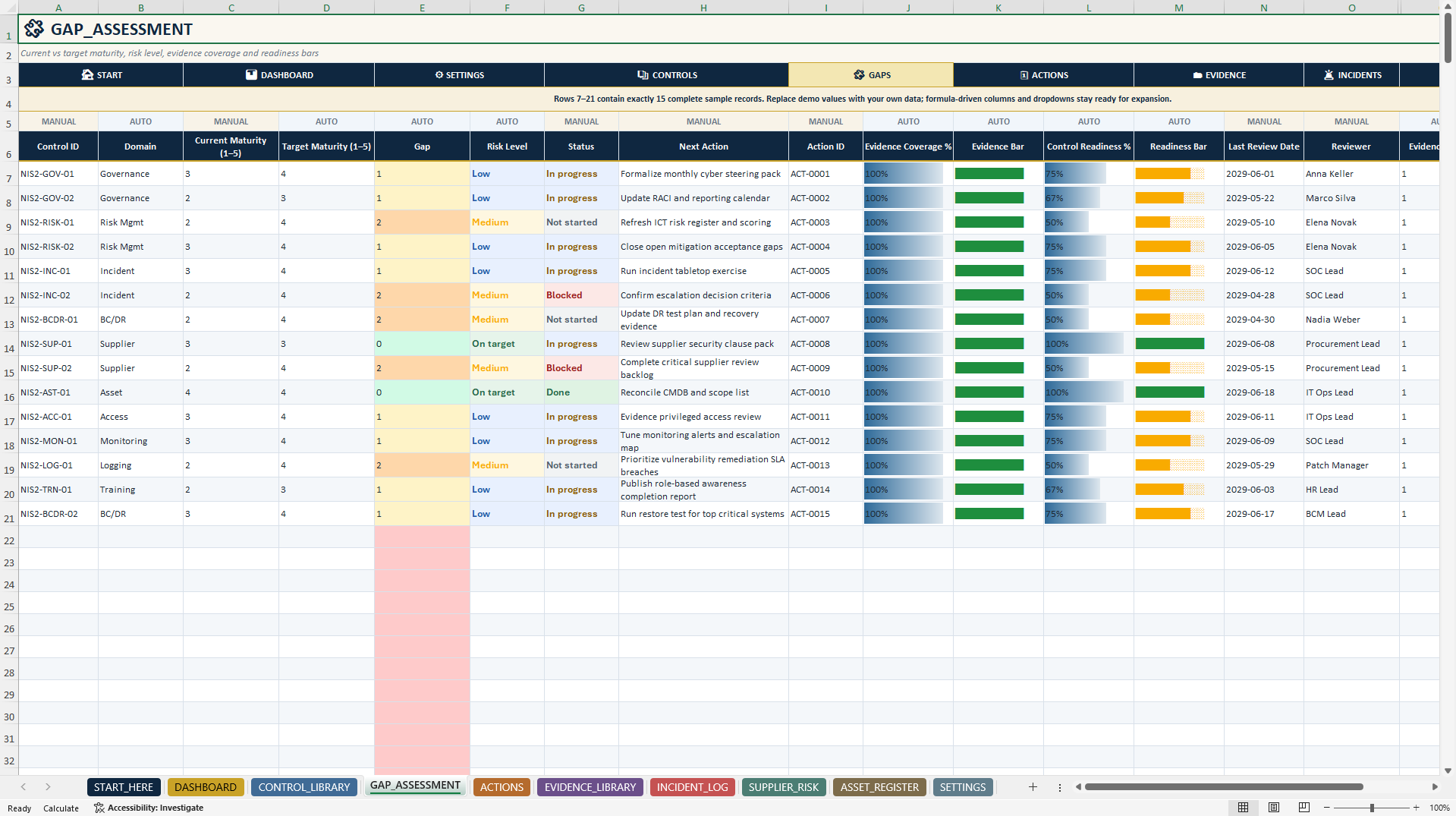
GAP_ASSESSMENT
Compare current and target maturity levels using validated 1–5 inputs.
Automatic calculations support maturity gaps, risk classifications, evidence coverage, control readiness percentages, and visual progress indicators.
ACTIONS
Manage remediation activities, priorities, responsible owners, start and due dates, progress, dependencies, linked evidence, and overdue indicators.
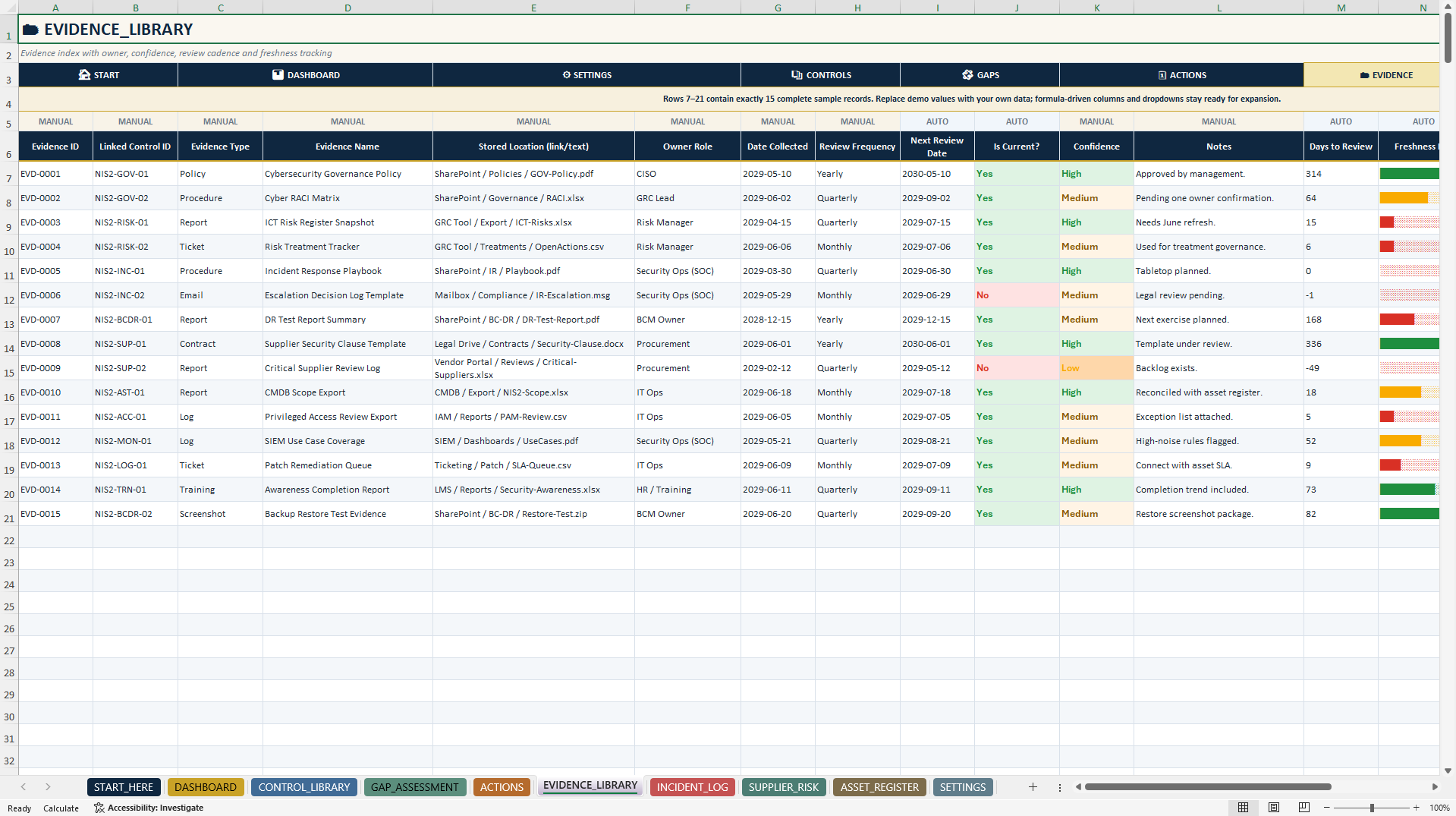
EVIDENCE_LIBRARY
Document policies, reports, tickets, logs, screenshots, and other supporting evidence.
Track linked control IDs, evidence types, storage references, owners, collection dates, review frequency, evidence freshness, and review status.
INCIDENT_LOG
Maintain structured records of security incidents, severity, categories, business impact, incident ownership, resolution status, lessons learned, evidence references, and reportability considerations.
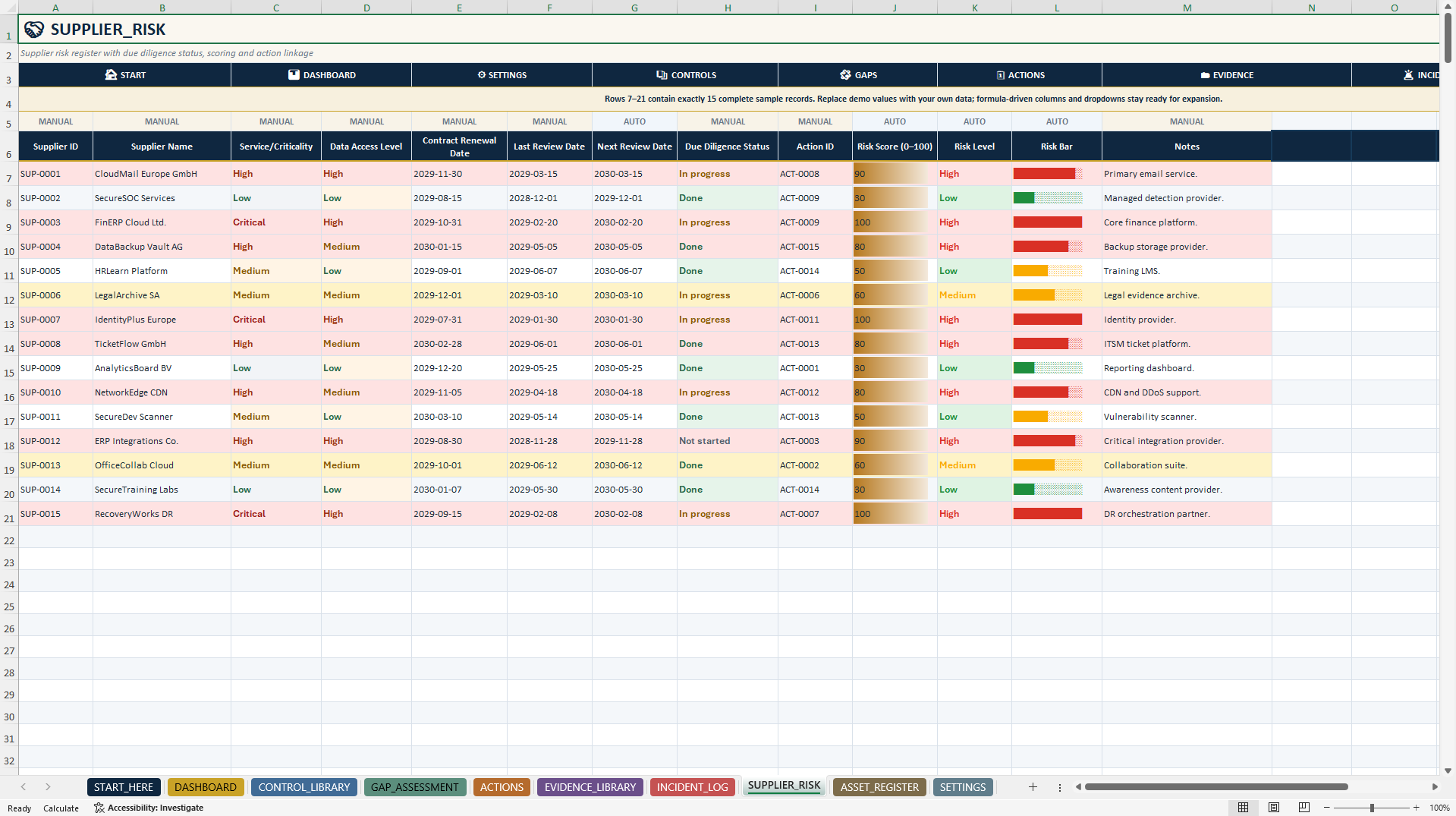
SUPPLIER_RISK
Assess supplier criticality, data access, due diligence status, contract information, review dates, and related actions.
Built-in calculations provide internal supplier risk scores and classifications.
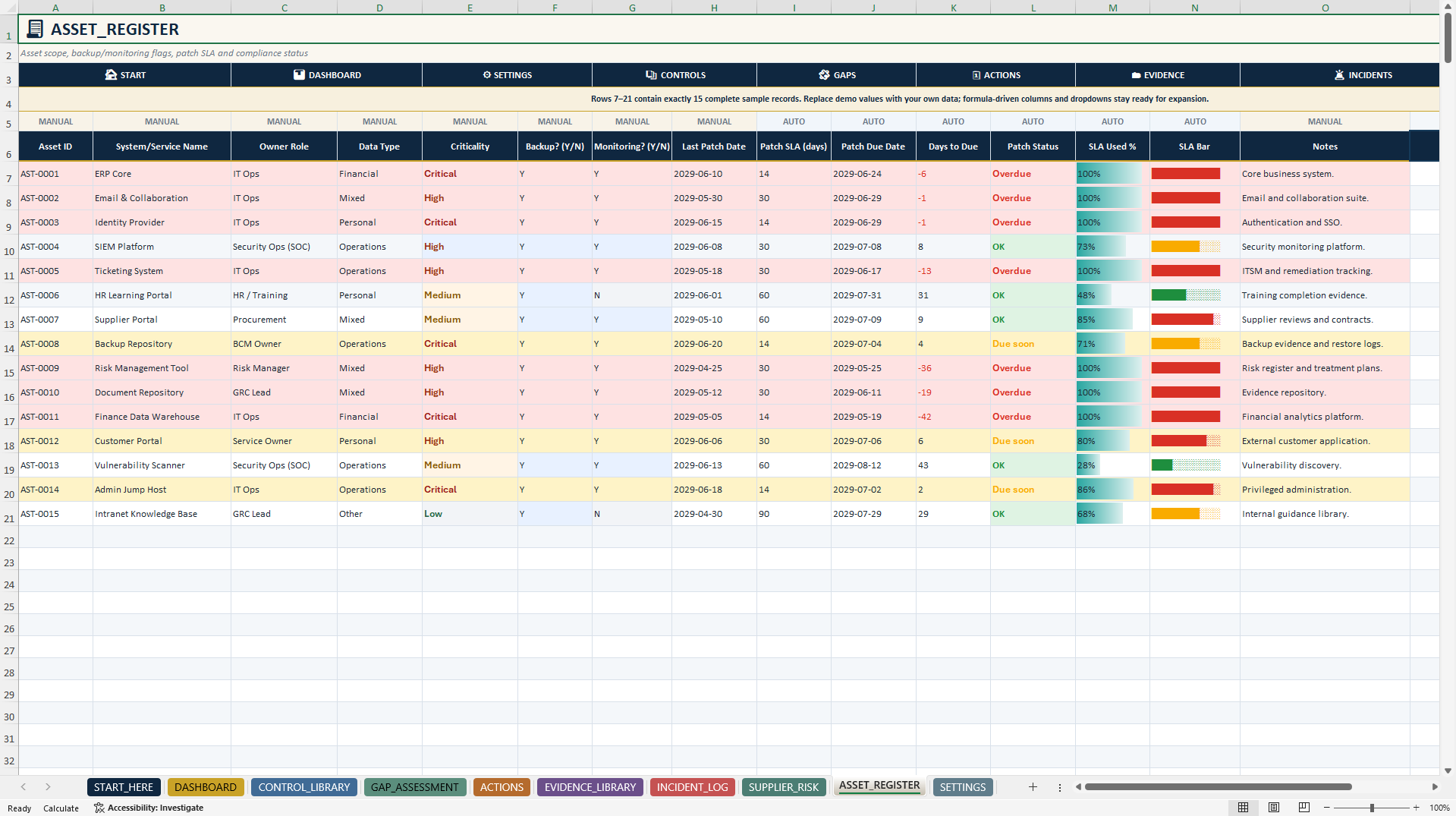
ASSET_REGISTER
Monitor business-critical systems and services, owners, data categories, backup and monitoring status, patch dates, configurable patch SLAs, deadlines, and patch compliance indicators.
🧮 3. AUTOMATED CALCULATIONS & DATA MANAGEMENT
The main workbook includes:
• Weighted domain readiness calculations
• Current versus target maturity assessments
• Automatic maturity gap classifications
• Evidence coverage and freshness indicators
• Remediation progress and deadline monitoring
• Incident age calculations
• Supplier risk scoring
• Asset patch SLA monitoring
• Validated dropdowns and conditional formatting
• Clear MANUAL and AUTO input guidance
Each operational main register contains 15 illustrative sample records. The prepared tracking areas extend from row 7 through row 500.
Incomplete assessment information and missing dates are handled separately from completed records to reduce misleading calculations and status indicators.
🎁 4. BONUS – NIS2 PULSE CHECK
A separate three-worksheet Excel companion provides a practical 15-question readiness assessment across ten cybersecurity management domains.
Included worksheets:
• START_HERE – Navigation, quick-start guidance, and live assessment summary
• PULSE_CHECK – Fifteen readiness questions, scoring, domain analysis, and recommendations
• SETTINGS – Response values, domain weights, and readiness thresholds
Key features include:
• Validated Yes / Partial / No / N/A responses
• Automatic response scoring
• Weighted overall readiness
• Dynamic domain analysis
• Strong, Attention, and Priority classifications
• Automatic management recommendations
• One native Excel chart
• Configurable scoring thresholds
• Correct exclusion of N/A responses from readiness calculations
N/A responses count as answered but are excluded from applicable readiness scores. When no applicable responses remain, the workbook displays an appropriate unassessed status instead of a misleading percentage.
The companion operates independently and does not automatically synchronize with the main tracker.
📘 5. PREMIUM 10-PAGE USER GUIDE
The included English PDF explains:
• Initial setup and recommended workflow
• Workbook navigation and module descriptions
• Manual versus automatic input fields
• Control, action, evidence, incident, supplier, and asset IDs
• Maturity assessment and scoring logic
• Dashboard interpretation
• Evidence and remediation tracking
• Bonus Pulse Check usage
• Google Sheets import considerations
• Safe customization and troubleshooting
• Final quality checks and legal information
🔄 6. PRACTICAL NIS2 READINESS WORKFLOW
A recommended workflow includes:
1. Configure organizational scope, reference dates, and readiness targets.
2. Review the internal control library.
3. Assess current versus target control maturity.
4. Identify gaps and prioritize corrective actions.
5. Assign owners, responsibilities, and deadlines.
6. Maintain supporting evidence and review dates.
7. Document incidents, supplier risks, and critical assets.
8. Review executive dashboards and management priorities.
9. Use the NIS2 Pulse Check for recurring assessments.
🎯 7. APPLICATIONS & TARGET USERS
APPLICATIONS
• NIS2 Readiness Preparation
• Cybersecurity Control Assessments
• Maturity Gap Analysis
• Evidence and Documentation Management
• Remediation and Corrective Action Tracking
• Security Incident Documentation
• Third-Party and Supplier Risk Reviews
• Asset and Patch SLA Monitoring
• Internal Audit Preparation
• Management and Executive Reporting
IDEAL FOR
• CISOs and Information Security Managers
• IT Security and Operations Teams
• Governance, Risk & Compliance Professionals
• Internal Auditors and Evidence Owners
• Supplier and Third-Party Risk Managers
• Cybersecurity Consultants
• Organizations preparing internal NIS2 assessments
📦 8. COMPLETE PRODUCT PACKAGE
PRIMARY DOCUMENT
1× NIS2 Readiness & Evidence Tracker OS (.xlsx)
• Ten Excel worksheets
• Six executive KPI indicators
• Four native Excel dashboard charts
• Control, maturity, action, evidence, incident, supplier, and asset management
• Automated calculations and validated dropdowns
• Fifteen illustrative records per operational register
SECONDARY DOCUMENT
1× NIS2 Pulse Check Companion (.xlsx)
• Three Excel worksheets
• Fifteen assessment questions
• Ten weighted readiness domains
• One native Excel chart
• Automatic scoring and recommendations
1× English How-to-Use Guide (.pdf)
• Ten professionally formatted A4 pages
TOTAL PRODUCT PACKAGE
• Two fully editable Excel workbooks
• One English PDF guide
• Thirteen Excel worksheets
• Five native Excel charts
• Formula-driven readiness and management indicators
• Realistic illustrative sample data
• Ten pages of documentation
💻 9. TECHNICAL INFORMATION
• Microsoft Excel (.xlsx)
• Editable management worksheets
• Built-in formulas and calculations
• Data validation and dropdown menus
• Conditional formatting and visual status indicators
• Native Excel dashboards and charts
• No macros or VBA required
• No external Excel data connections
• Microsoft Excel Desktop recommended
Google Sheets import may support many underlying formulas and editable fields. However, charts, navigation, formatting, validation behavior, and some Excel-specific features may differ. Full feature parity is not guaranteed.
The workbooks are independent spreadsheet-based tools. They do not provide live cybersecurity monitoring, automatic evidence collection, incident reporting to authorities, or regulatory system integrations.
⚠️ IMPORTANT NIS2 & CYBERSECURITY DISCLAIMER
This product is an editable internal cybersecurity management and readiness documentation template. It is not an official EU publication, government-issued form, certified NIS2 compliance solution, or substitute for a professional cybersecurity assessment.
Readiness percentages, maturity scores, domain weights, risk classifications, and SLA indicators are internal planning aids. They do not establish legal compliance or guarantee successful audits or regulatory outcomes.
The toolkit does not automatically determine whether an organization falls within NIS2 scope, provide an exhaustive legal requirements catalog, or generate mandatory regulatory submissions.
Users must review applicable national NIS2 implementation rules, sector-specific requirements, reporting obligations, organizational scope, and cybersecurity measures.
The toolkit does not replace qualified legal, regulatory, cybersecurity, risk management, audit, or compliance advice.
All illustrative sample data must be reviewed or replaced before operational use.
ABOUT SHEETWORKSSTUDIO
SheetworksStudio develops professional, editable Excel management systems for cybersecurity readiness, governance, risk management, compliance documentation, operational oversight, and data-informed decision-making.
Got a question about the product? Email us at support@flevy.com or ask the author directly by using the "Ask the Author a Question" form. If you cannot view the preview above this document description, go here to view the large preview instead.
Source: Best Practices in Cyber Security, Compliance Excel: NIS2 Readiness & Evidence Tracker | Excel GRC Toolkit Excel (XLSX) Spreadsheet, SheetworksStudio
ABOUT THE AUTHOR

SheetworksStudio creates premium Excel-based business templates, dashboards, trackers, financial models, and management systems for professionals, consultants, entrepreneurs, and organizations.
Our portfolio covers finance, project management, operations, risk management, compliance, AI governance, HR, supply chain, performance management, and business planning. Each product is designed to
... [read more]
Ask the Author a Question
You must be logged in to contact the author.




























