
Kamishibai Boards   20-slide PPT PowerPoint presentation slide deck (PPTX)
$35.00

Kamishibai Boards (20-slide PPT PowerPoint presentation slide deck (PPTX)) Preview Image
Flevy is the marketplace for business best practices.
Kamishibai Boards (20-slide PPT PowerPoint presentation slide deck (PPTX)) Preview Image
Arrow   Click main image to view in full screen.

Kamishibai Boards (PowerPoint PPTX Slide Deck)

PowerPoint (PPTX) 20 Slides

Top 1,000 Best Practice $35.00

Add to Cart


Immediate download
Fully editable PowerPoint
Free lifetime updates

BENEFITS OF THIS POWERPOINT DOCUMENT

  1. Learn the Kamishibai techniques for creating visual management tools.
  2. Learn how a Kamishibai board functions.
  3. Learn how to engage team members, implement and utilize a Kamichibai Board.

VISUAL WORKPLACE PPT DESCRIPTION

Editor Summary 20-slide PowerPoint presentation and training course that teaches Kamishibai visual management for lean audits and process checks. Read more

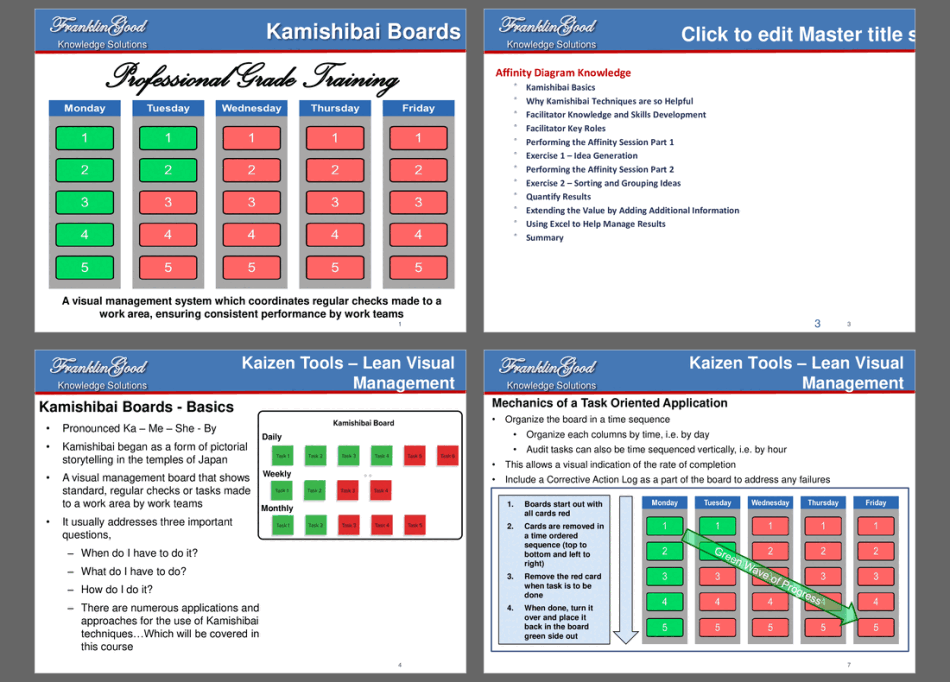
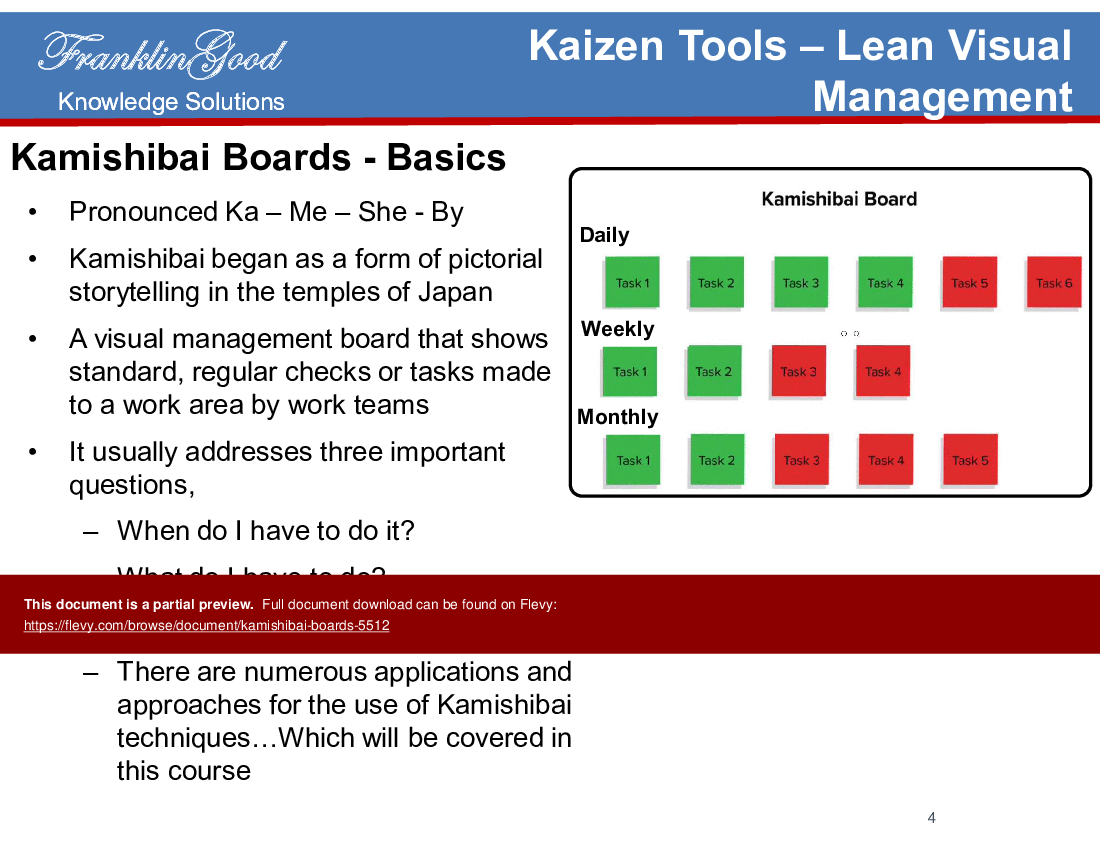
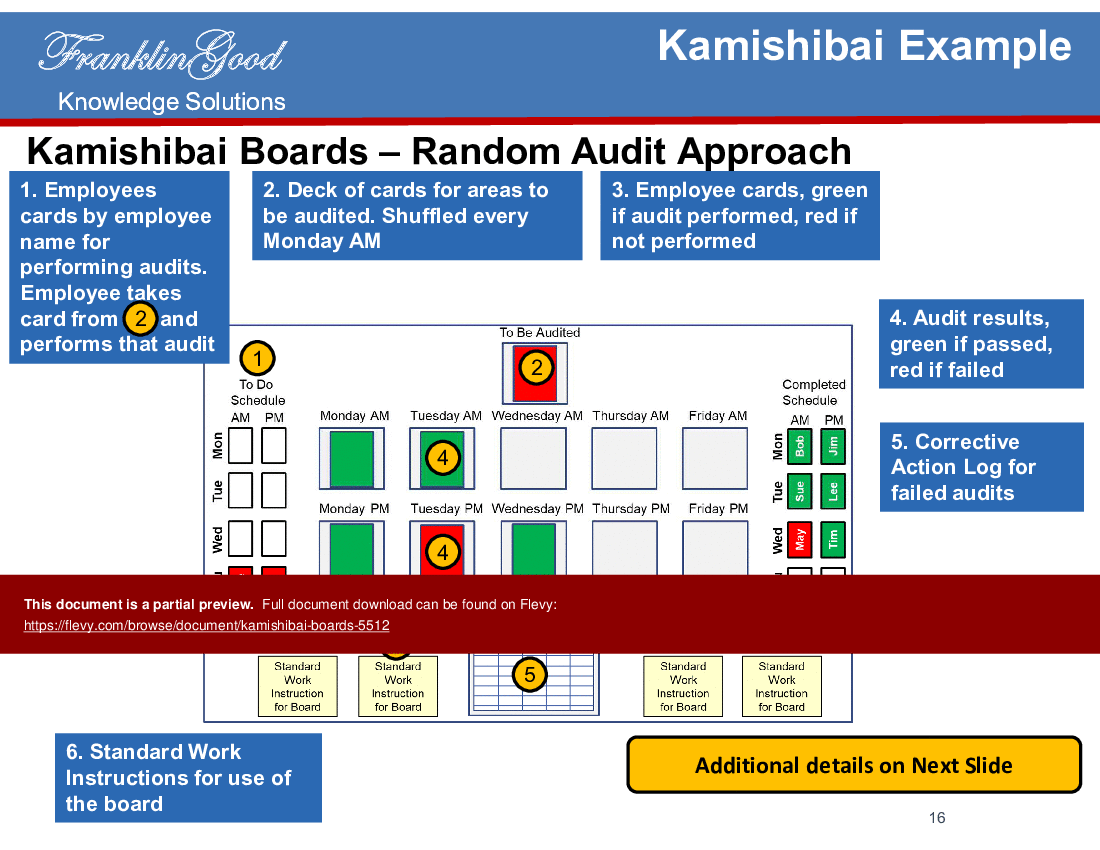
Kamishibai Boards are used as a visual control for performing specific tasks and/or audits within any process by both work area team members and management. These boards contain two-sided colored Kamishibai cards (red side and green side) to indicate that a task is scheduled (red) or has been completed (green).

Kamishibai Boards are practical visual control tools that assist with the allocation, sequencing, execution, and follow-up of key work routines and tasks. Kamishibai is a Lean Kaizen tool, as part of Lean Visual Management The Kamishibai technique can be used for a near-infinite number of task/audit functions and can be used for daily weekly, monthly, and even quarterly tasks/audits. Kamishibai boards are located at or very near the workplace. They are normally within visible range of the process in the scope of the audit.

Kamishibai Cards look like the Kanban board utilized in Manufacturing processes. In fact, Toyota is widely using the Kamishibai concept to do perform daily, weekly, and monthly audits of their business processes. Usage of Kamishibai Boards found in tackling many business processes and activities in Manufacturing, including production, maintenance, sourcing & procurement, and so forth.

What This Course Provides

This 20-page PowerPoint presentation and course, inclusive of a video on how to create a Leadership Audit Board, provides learners with a thorough understanding of the terminology and methodology associated with Kamishibai Boards. It is presented in FranklinGood's comprehensive and highly visual learning format. This course will help learners understand what Kamishibai Boards are, the scientific rationale why they are beneficial, the approach of engaging the team and building a board. Further, there are a number of examples to build additional understanding and demonstrate their application.

Learning Objectives

•  Learn the Kamishibai techniques for creating Lean Visual Management tools.
•  Learn how to make a Kamishibai Board.
•  Learn how a Kamishibai Board functions.
•  Learn how to engage team members, implement and utilize a Kamichibai Board.
•  Understand the multiple applications for Kamichibai Boards.

Extended Benefits from This Course

Our approach to Kamichibai Boards is very comprehensive. Our Leadership Audit video will quickly expand your understanding of and how to apply Kamichibai techniques to improve your processes. We teach you advanced applications and methods most people are unaware of.

When team members cooperate to create a Kamichibai Board, some very important things tend to occur:

•  A common base of knowledge and understanding is quickly developed about process execution.
•  Every team member contributes.
•  Communication is clear and easily understandable.
•  Problems are surfaced in a "friendly" way, are made visible, and lead to root cause countermeasures.
•  Everyone quickly knows the status of work tasks and activities, are we on track or off track?

Why is a Kamishibai Board used?

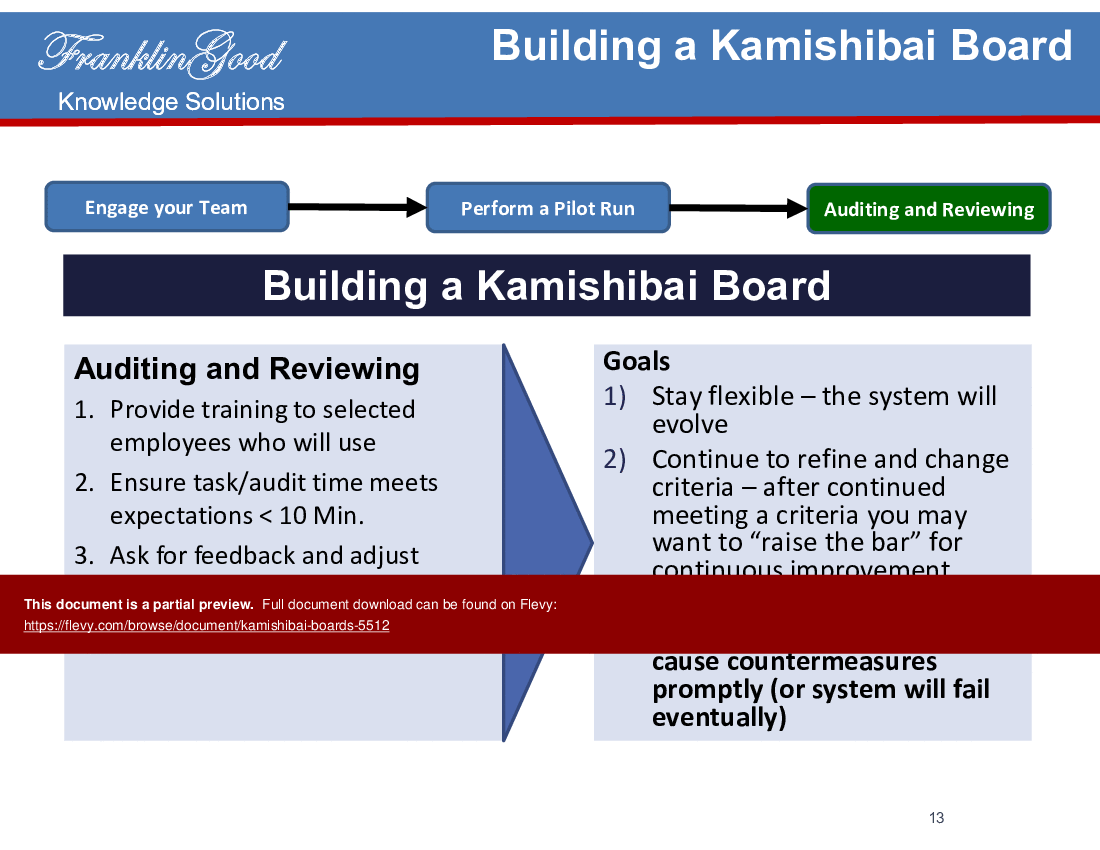
Objective of using Kamishibai is not a fault finding process. The proper use of a Kamishibai is to train the mind and eyes of the involved person's to see problems (deviations from the standard output), identify improvements even though these are small, and teach others also to see and solve these kind of problems.

This presentation can also be used as a template for your own business presentations on explaining Kamishibai Boards.

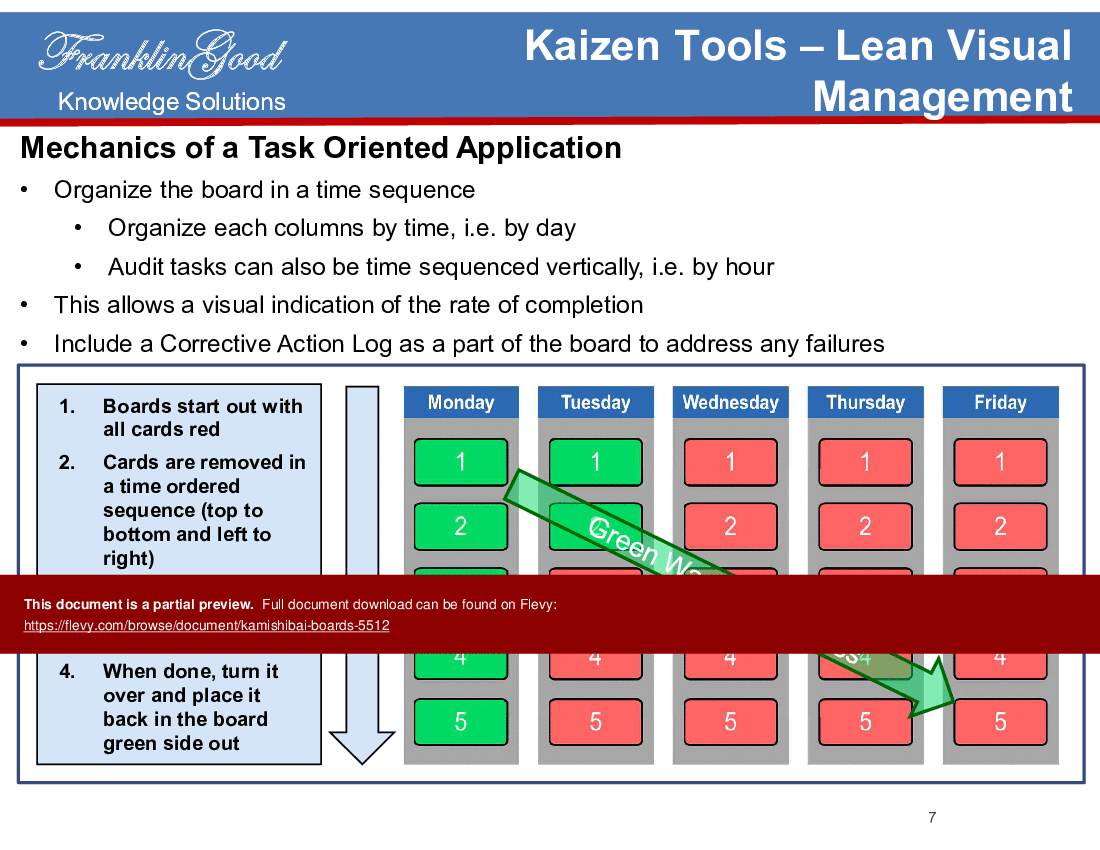
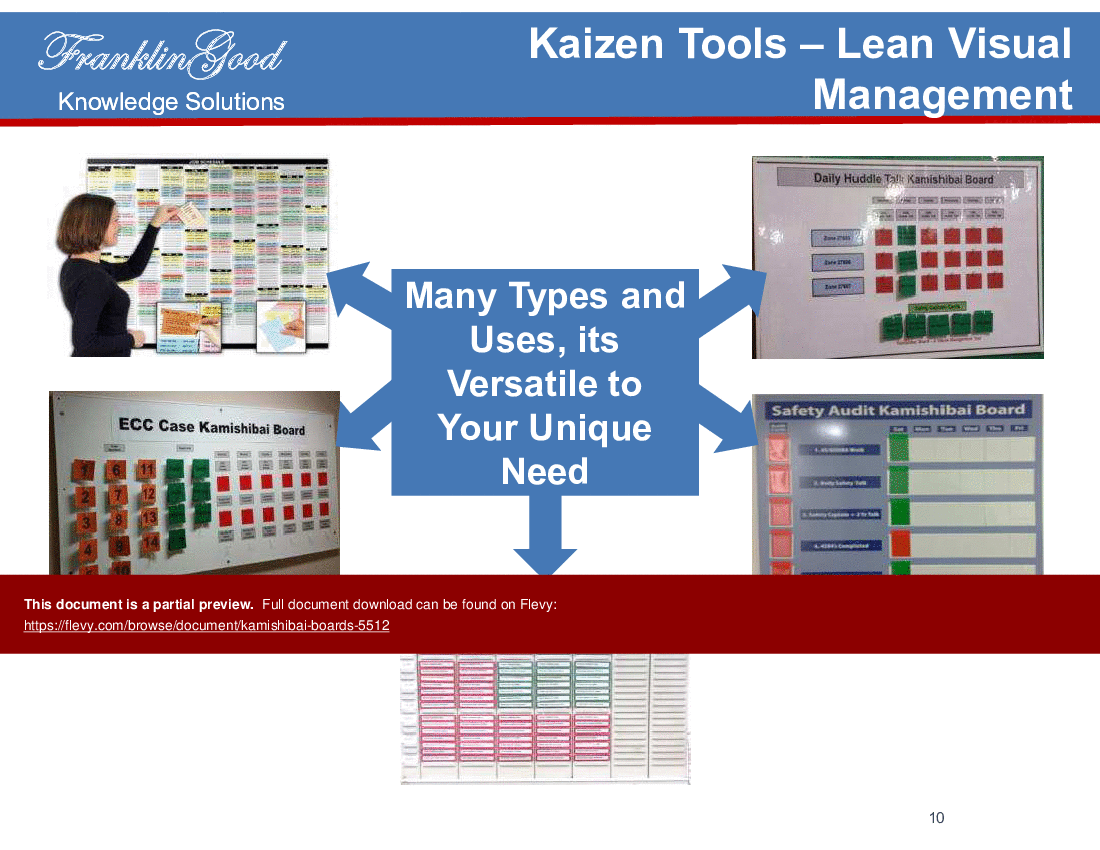
The course also delves into the mechanics of task-oriented applications, emphasizing time-sequenced organization and corrective action logs. Various examples illustrate the versatility and adaptability of Kamishibai Boards to different business needs.

Got a question about the product? Email us at support@flevy.com or ask the author directly by using the "Ask the Author a Question" form. If you cannot view the preview above this document description, go here to view the large preview instead.

MARCUS OVERVIEW

This synopsis was written by Marcus [?] based on the analysis of the full 20-slide presentation.


Executive Summary
The Kamishibai Boards presentation provides a structured approach to implementing a visual management system designed for lean audits and process checks. This professional-grade training deck equips users with the tools necessary to enhance workflow efficiency and ensure consistent performance within work teams. By utilizing Kamishibai techniques, organizations can streamline task management, improve communication, and foster a culture of accountability. The ready-to-use templates facilitate immediate application, making it an essential resource for any organization committed to continuous improvement.

Who This Is For and When to Use
•  Lean practitioners and process improvement teams
•  Quality assurance and audit professionals
•  Operations managers overseeing workflow efficiency
•  Training and development leaders implementing visual management systems

Best-fit moments to use this deck:
•  During lean training sessions to introduce visual management concepts
•  When implementing new processes that require regular checks and audits
•  For team meetings focused on performance tracking and accountability
•  In workshops aimed at fostering a culture of continuous improvement

Learning Objectives
•  Define the Kamishibai system and its applications in visual management.
•  Build a Kamishibai board tailored to specific operational needs.
•  Establish effective auditing processes using Kamishibai techniques.
•  Identify key roles and responsibilities for facilitators and team members.
•  Quantify results from audits and track performance over time.
•  Utilize QR codes to enhance task management and training processes.

Table of Contents
•  Kamishibai Basics (page 4)
•  Why Kamishibai Techniques Are Helpful (page 5)
•  Facilitator Knowledge and Skills Development (page 3)
•  Performing the Affinity Session Part 1 (page 3)
•  Exercise 1 – Idea Generation (page 3)
•  Performing the Affinity Session Part 2 (page 3)
•  Exercise 2 – Sorting and Grouping Ideas (page 3)
•  Summary (page 3)

Primary Topics Covered
•  Kamishibai Basics - Introduces the Kamishibai system as a visual management tool that originated in Japan, focusing on regular checks and task management.
•  Visual Learning Impact - Highlights the effectiveness of visual information, noting that people remember 80% of what they see and do, enhancing understanding and performance.
•  Task-Oriented Application Mechanics - Details the organization of Kamishibai boards, emphasizing time sequencing and the use of corrective action logs for task management.
•  Audit Types and Procedures - Differentiates between Type 1 and Type 2 Kamishibai cards, outlining their use for task completion tracking and process auditing.
•  Building a Kamishibai Board - Provides a step-by-step guide on engaging teams, piloting the board, and refining processes based on feedback.
•  Advanced Techniques - Discusses the integration of QR codes for enhanced task management and training, streamlining processes for new employees.

Deliverables, Templates, and Tools
•  Kamishibai board template for visual management and task tracking.
•  Audit card examples for daily and weekly checks.
•  Corrective action log template for tracking audit results.
•  QR code integration guide for task instructions.
•  Visual work instructions for team training.
•  Feedback and adjustment log for continuous improvement.

Slide Highlights
•  Overview of Kamishibai boards and their purpose in visual management.
•  Visual representation of the impact of visual learning on retention and performance.
•  Step-by-step mechanics of organizing a Kamishibai board for task management.
•  Examples of audit cards and their applications in process checks.
•  Guidelines for building and refining a Kamishibai board with team engagement.

Potential Workshop Agenda
Introduction to Kamishibai Boards (30 minutes)
•  Overview of visual management principles
•  Discussion on the importance of regular audits

Building Your Kamishibai Board (60 minutes)
•  Hands-on session to create a customized board
•  Group brainstorming on task identification and sequencing

Pilot Run and Feedback Session (45 minutes)
•  Conduct a pilot run of the Kamishibai board
•  Gather feedback and discuss adjustments

Customization Guidance
•  Tailor the Kamishibai board to reflect specific operational tasks and timelines.
•  Adjust the frequency of audits based on team needs and workflow.
•  Incorporate team-specific terminology and metrics for clarity.

Secondary Topics Covered
•  Facilitator roles and skills necessary for effective implementation.
•  Strategies for engaging team members in the Kamishibai process.
•  Methods for quantifying and analyzing audit results.
•  Best practices for using visual management tools in various environments.

Topic FAQ

What are Kamishibai Boards and how do they function on the shop floor?

Kamishibai Boards are visual control tools that display tasks and audits using two-sided colored cards (red = scheduled, green = completed). They are placed near the workplace to allocate, sequence, execute, and follow up on routine tasks, supporting daily, weekly, monthly, or quarterly checks with a visible red/green card system.

What types of audits exist in Kamishibai and how are they used differently?

Kamishibai distinguishes Type 1 and Type 2 audits: Type 1 tracks task completion while Type 2 assesses process compliance. Organizations use Type 1 for routine task verification and Type 2 for deeper process checks, typically recording outcomes in corrective action logs and audit card examples.

How should a team build and pilot a Kamishibai board?

A typical approach involves engaging the team to identify and sequence tasks, creating the board with time-sequenced cards, running a pilot, collecting feedback, and refining the board and audit cadence. The Kamishibai Boards course provides step-by-step guidance, templates, and a pilot agenda for implementation.

How can QR codes be integrated with Kamishibai Boards to support training?

QR codes can be added to Kamishibai task cards so employees scan to access task instructions, visual work steps, or training videos. Integration streamlines onboarding and enables on-demand guidance; the course includes a QR code integration guide to support this setup.

What should I look for when buying a Kamishibai board training deck for my team?

Prioritize decks that include practical templates (board and audit cards), corrective action logs, examples for daily/weekly checks, a workshop agenda, and guidance on piloting and team engagement. Flevy's Kamishibai Boards deck lists these specific items including a Leadership Audit video and board template.

Are ready-made Kamishibai templates worth the cost compared with building one from scratch?

Ready-made templates accelerate deployment by providing example audit cards, corrective action logs, visual work instructions, and a pilot agenda so teams can start checking tasks immediately. The Flevy deck bundles a 20-page PowerPoint course plus a Leadership Audit video and templates for immediate use.

Can Kamishibai Boards support audits after organizational changes like a merger?

Yes. Kamishibai Boards are adaptable for many business processes (manufacturing, maintenance, procurement) and can be tailored to new workflows, audit frequencies, and team terminology, helping standardize checks across merged teams for daily and weekly audits.

How do I measure the effectiveness of a Kamishibai implementation?

Measure effectiveness by tracking task completion rates, audit pass/fail results, corrective-action closure, and team engagement. The Kamishibai Boards course teaches methods to quantify audit outcomes and track performance over time using audit card examples and corrective action logs.

Document FAQ
These are questions addressed within this presentation.

What is a Kamishibai board?
A Kamishibai board is a visual management tool that displays tasks and audits in a structured format, facilitating regular checks and performance tracking.

How does the Kamishibai system improve workflow?
By providing clear visual cues and accountability, the Kamishibai system enhances communication, reduces confusion, and fosters a culture of continuous improvement.

What types of audits can be performed using Kamishibai boards?
Kamishibai boards can be used for various audits, including task completion checks (Type 1) and process compliance audits (Type 2).

How can QR codes be integrated into Kamishibai boards?
QR codes can be added to task cards, allowing employees to scan and access specific instructions or information related to their tasks.

What is the recommended frequency for audits?
The frequency of audits can be customized based on operational needs,, but regular checks (daily or weekly) are typically recommended for optimal performance tracking.

How do I engage my team in the Kamishibai process?
Engage your team by involving them in the creation of the board, explaining its purpose, and encouraging feedback during pilot runs.

What should be included in a corrective action log?
A corrective action log should document any failed audits, the reasons for failure, and the steps taken to address the issues identified.

How can I measure the effectiveness of the Kamishibai system?
Effectiveness can be measured by tracking improvements in task completion rates, audit results, and overall team engagement in the process.

Glossary
•  Kamishibai - A visual management system for task and audit management.
•  Visual Management - The use of visual tools to enhance communication and performance tracking.
•  Audit - A systematic check of tasks or processes to ensure compliance and effectiveness.
•  Corrective Action Log - A record of actions taken to address issues identified during audits.
•  QR Code - A machine-readable code that provides quick access to information via smartphones.
•  Task Completion - The successful execution of assigned tasks within a specified timeframe.
•  Continuous Improvement - Ongoing efforts to enhance processes, products, or services.
•  Engagement - The involvement and commitment of team members in a process or system.
•  Performance Tracking - Monitoring and evaluating the effectiveness of tasks and processes.
•  Facilitator - A person who guides and supports a team in implementing processes or systems.
•  Lean Management - An approach to improving efficiency by eliminating waste and optimizing processes.
•  Kaizen - A Japanese term meaning "continuous improvement" through small, incremental changes.

Source: Best Practices in Visual Workplace, Kaizen PowerPoint Slides: Kamishibai Boards PowerPoint (PPTX) Presentation Slide Deck, FranklinGood


$35.00

Add to Cart
  

ABOUT THE AUTHOR

Author: FranklinGood
Additional documents from author: 18

Don Redinius, CEO of FranklinGood, is a globally recognized expert in business and personal performance improvement with a broad base of knowledge, extensive experience and he is an excellent teacher. He has over thirty years of business experience. More than twenty-five years of executive management experience at the VP, Senior VP, President, and CEO level, is a certified Six Sigma Master Black ... [read more]

Ask the Author a Question

You must be logged in to contact the author.

Click here to log in Click here register

Did you know?
The average daily rate of a McKinsey consultant is $6,625 (not including expenses). The average price of a Flevy document is $65.


Trusted by over 10,000+ Client Organizations
Since 2012, we have provided business templates to over 10,000 businesses and organizations of all sizes, from startups and small businesses to the Fortune 100, in over 130 countries.
AT&T GE Cisco Intel IBM Coke Dell Toyota HP Nike Samsung Microsoft Astrazeneca JP Morgan KPMG Walgreens Walmart 3M Kaiser Oracle SAP Google E&Y Volvo Bosch Merck Fedex Shell Amgen Eli Lilly Roche AIG Abbott Amazon PwC T-Mobile Broadcom Bayer Pearson Titleist ConEd Pfizer NTT Data Schwab


Read Customer Testimonials

 
"Flevy is our 'go to' resource for management material, at an affordable cost. The Flevy library is comprehensive and the content deep, and typically provides a great foundation for us to further develop and tailor our own service offer."

– Chris McCann, Founder at Resilient.World
 
"Last Sunday morning, I was diligently working on an important presentation for a client and found myself in need of additional content and suitable templates for various types of graphics. Flevy.com proved to be a treasure trove for both content and design at a reasonable price, considering the time I "

– M. E., Chief Commercial Officer, International Logistics Service Provider
 
"FlevyPro has been a brilliant resource for me, as an independent growth consultant, to access a vast knowledge bank of presentations to support my work with clients. In terms of RoI, the value I received from the very first presentation I downloaded paid for my subscription many times over! The "

– Roderick Cameron, Founding Partner at SGFE Ltd
 
"I like your product. I'm frequently designing PowerPoint presentations for my company and your product has given me so many great ideas on the use of charts, layouts, tools, and frameworks. I really think the templates are a valuable asset to the job."

– Roberto Fuentes Martinez, Senior Executive Director at Technology Transformation Advisory
 
"I am extremely grateful for the proactiveness and eagerness to help and I would gladly recommend the Flevy team if you are looking for data and toolkits to help you work through business solutions."

– Trevor Booth, Partner, Fast Forward Consulting
 
"As a young consulting firm, requests for input from clients vary and it's sometimes impossible to provide expert solutions across a broad spectrum of requirements. That was before I discovered Flevy.com.

Through subscription to this invaluable site of a plethora of topics that are key and crucial to consulting, I "

– Nishi Singh, Strategist and MD at NSP Consultants
 
"[Flevy] produces some great work that has been/continues to be of immense help not only to myself, but as I seek to provide professional services to my clients, it gives me a large "tool box" of resources that are critical to provide them with the quality of service and outcomes they are expecting."

– Royston Knowles, Executive with 50+ Years of Board Level Experience
 
"I have used FlevyPro for several business applications. It is a great complement to working with expensive consultants. The quality and effectiveness of the tools are of the highest standards."

– Moritz Bernhoerster, Global Sourcing Director at Fortune 500


Customers Also Bought These Documents


Customers Also Like These Documents

Explore Templates on Related Management Topics


Your Recently Viewed Documents
Receive our FREE presentation on Operational Excellence

This 50-slide presentation provides a high-level introduction to the 4 Building Blocks of Operational Excellence. Achieving OpEx requires the implementation of a Business Execution System that integrates these 4 building blocks.









