
Excel Project Management Dashboard   Excel template (XLSX)
$20.00

Excel Project Management Dashboard (Excel template (XLSX)) Preview Image
Flevy is the marketplace for business best practices.
Excel Project Management Dashboard (Excel template (XLSX)) Preview Image
Arrow   Click main image to view in full screen.

Excel Project Management Dashboard – Excel XLSX

Excel (XLSX)

$20.00

Add to Cart


Immediate download
Fully editable Excel
Free lifetime updates

BENEFITS OF THIS DOWNLOADABLE EXCEL DOCUMENT

  1. Excel XLSX File

PROJECT MANAGEMENT EXCEL DESCRIPTION

Excel Project Management Dashboard (xlsx) – Download an automated project tracker with dashboard, Gantt chart, budget vs actual, KPIs & manager performance insights. Excel Project Management Dashboard is an Excel template (XLSX) available for immediate download upon purchase.

⚙️ Settings Sheet
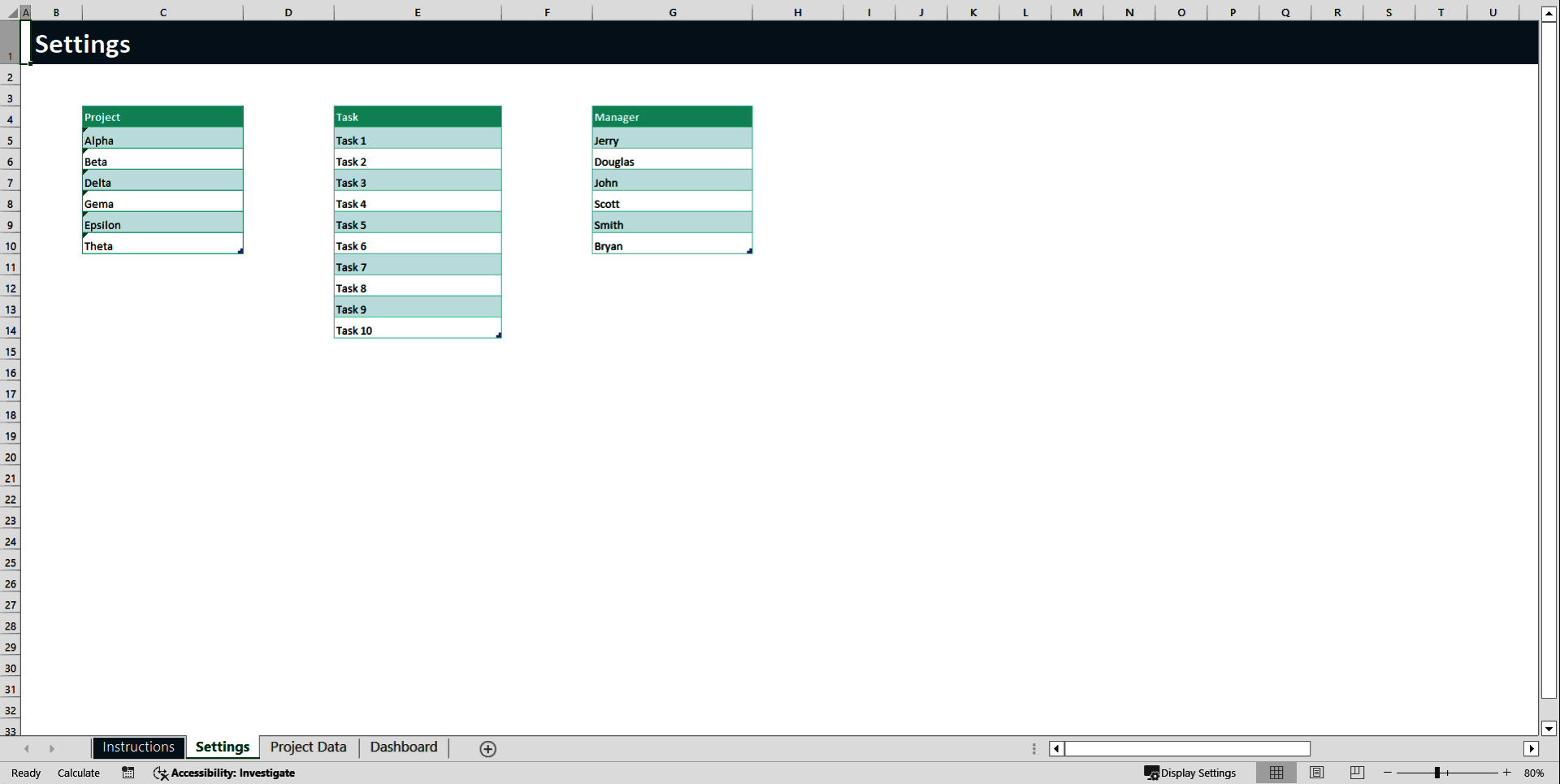
The Settings sheet is the configuration area of the template. It allows you to customize the structure before entering any project data.

•  This sheet contains predefined lists for Projects, Tasks, and Managers.
•  These lists are connected to dropdown menus in the Project Data sheet.
•  Updating these lists ensures consistent data entry and prevents spelling errors.
•  You can add new projects, tasks, or managers at the bottom of each list.
•  Do not leave blank rows within the lists, as this may affect dropdown functionality.
•  Avoid renaming the sheet or deleting headers to maintain proper formula connections.
This sheet only needs to be updated when you want to customize or expand your system.

📋 Project Data Sheet
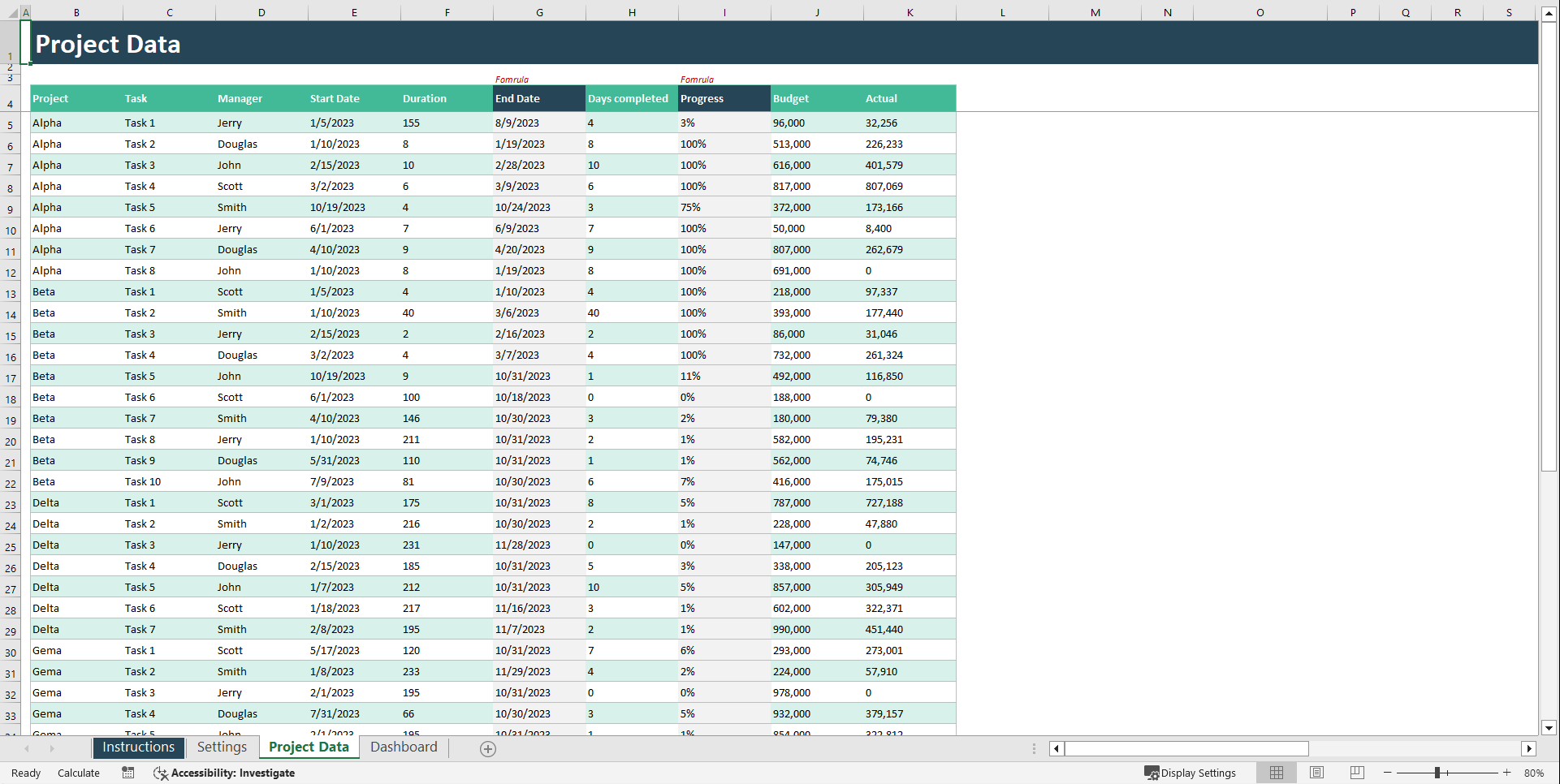
The Project Data sheet is the main input area of the template. Every row represents a single task and feeds the Dashboard and Gantt Chart automatically.

•  Select the Project name from the dropdown menu.
•  Select the Task name from the dropdown menu.
•  Choose the responsible Manager.
•  Enter the Start Date of the task.
•  Enter the Duration in days.
•  The End Date is calculated automatically (if formulas are enabled).
•  Enter the number of Days Completed to track progress.
•  The Progress percentage is calculated automatically based on completed days divided by total duration.
•  Enter the planned Budget for the task.
•  Enter the Actual cost spent so far.

Important usage guidelines:
•  Do not delete or modify formula cells.
•  Do not change the table headers.
•  Always use valid date formats.
•  Update progress and actual costs regularly to keep reports accurate.
All dashboard charts and timeline visuals update automatically based on this sheet.

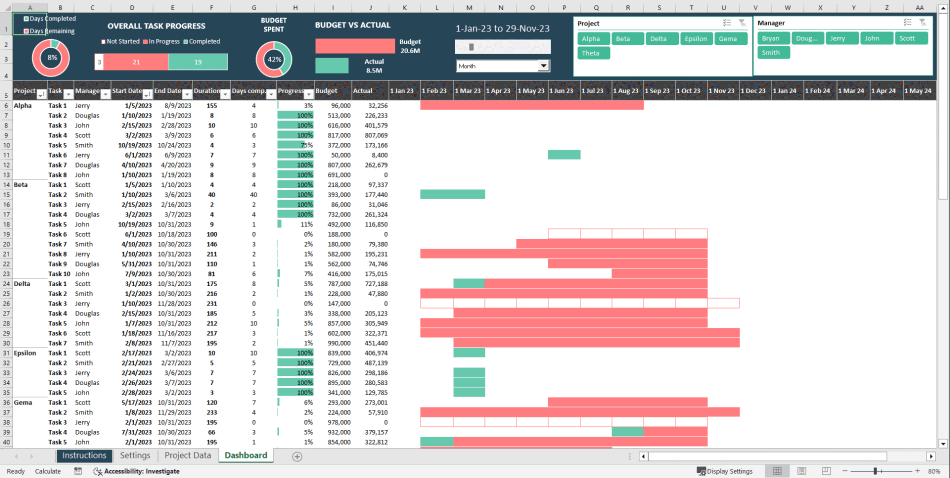
📈 Dashboard Sheet
The Dashboard sheet provides a high-level visual summary of your projects. It is fully automated and does not require manual data entry.

•  Displays overall project performance metrics.
•  Shows task completion percentages.
•  Compares Budget vs Actual spending.
•  Highlights manager performance.
•  Provides visual charts and KPI indicators for quick insights.
•  Updates automatically when changes are made in the Project Data sheet.
This sheet is designed for reporting, presentations, and performance analysis.

📅 Gantt Chart
The Gantt Chart sheet provides a timeline view of all tasks across projects. It visually represents scheduling and progress.

•  Displays tasks across a calendar timeline.
•  Shows task start and end dates visually.
•  Highlights planned task duration.
•  Indicates completed portion of each task.
•  Helps identify delays or overlapping tasks.
•  Updates automatically based on Project Data entries.
This sheet is ideal for monitoring project timelines and workload distribution.

🔄 Recommended Workflow
To use the template effectively:
•  First, customize project names, tasks, and managers in the Settings sheet.
•  Second, enter all task details in the Project Data sheet.
•  Third, review insights in the Dashboard sheet.
•  Finally, monitor timelines in the Gantt Chart sheet.

Once data is entered, refresh it and everything else updates automatically.

Got a question about the product? Email us at support@flevy.com or ask the author directly by using the "Ask the Author a Question" form. If you cannot view the preview above this document description, go here to view the large preview instead.

Source: Best Practices in Project Management Excel: Excel Project Management Dashboard Excel (XLSX) Spreadsheet, Improve Your Excel


$20.00

Add to Cart
  

ABOUT THE AUTHOR

Author image
Additional documents from author: 104

Introducing our Excel Premium Templates – your solution to simplifying your tasks. Our collection offers meticulously designed templates that are crafted to streamline your work processes and enhance efficiency. Whether you're managing budgets, creating reports, or organizing data, our premium templates are tailored to cater to your specific needs. With user-friendly interfaces and ... [read more]

Ask the Author a Question

You must be logged in to contact the author.

Click here to log in Click here register

Did you know?
The average daily rate of a McKinsey consultant is $6,625 (not including expenses). The average price of a Flevy document is $65.



Trusted by over 10,000+ Client Organizations
Since 2012, we have provided business templates to over 10,000 businesses and organizations of all sizes, from startups and small businesses to the Fortune 100, in over 130 countries.
AT&T GE Cisco Intel IBM Coke Dell Toyota HP Nike Samsung Microsoft Astrazeneca JP Morgan KPMG Walgreens Walmart 3M Kaiser Oracle SAP Google E&Y Volvo Bosch Merck Fedex Shell Amgen Eli Lilly Roche AIG Abbott Amazon PwC T-Mobile Broadcom Bayer Pearson Titleist ConEd Pfizer NTT Data Schwab


Read Customer Testimonials

 
"FlevyPro has been a brilliant resource for me, as an independent growth consultant, to access a vast knowledge bank of presentations to support my work with clients. In terms of RoI, the value I received from the very first presentation I downloaded paid for my subscription many times over! The "

– Roderick Cameron, Founding Partner at SGFE Ltd
 
"One of the great discoveries that I have made for my business is the Flevy library of training materials.

As a Lean Transformation Expert, I am always making presentations to clients on a variety of topics: Training, Transformation, Total Productive Maintenance, Culture, Coaching, Tools, Leadership Behavior, etc. Flevy "

– Ed Kemmerling, Senior Lean Transformation Expert at PMG
 
"Flevy is our 'go to' resource for management material, at an affordable cost. The Flevy library is comprehensive and the content deep, and typically provides a great foundation for us to further develop and tailor our own service offer."

– Chris McCann, Founder at Resilient.World
 
"[Flevy] produces some great work that has been/continues to be of immense help not only to myself, but as I seek to provide professional services to my clients, it gives me a large "tool box" of resources that are critical to provide them with the quality of service and outcomes they are expecting."

– Royston Knowles, Executive with 50+ Years of Board Level Experience
 
"As a small business owner, the resource material available from FlevyPro has proven to be invaluable. The ability to search for material on demand based our project events and client requirements was great for me and proved very beneficial to my clients. Importantly, being able to easily edit and tailor "

– Michael Duff, Managing Director at Change Strategy (UK)
 
"Last Sunday morning, I was diligently working on an important presentation for a client and found myself in need of additional content and suitable templates for various types of graphics. Flevy.com proved to be a treasure trove for both content and design at a reasonable price, considering the time I "

– M. E., Chief Commercial Officer, International Logistics Service Provider
 
"As a young consulting firm, requests for input from clients vary and it's sometimes impossible to provide expert solutions across a broad spectrum of requirements. That was before I discovered Flevy.com.

Through subscription to this invaluable site of a plethora of topics that are key and crucial to consulting, I "

– Nishi Singh, Strategist and MD at NSP Consultants
 
"As a consultant requiring up to date and professional material that will be of value and use to my clients, I find Flevy a very reliable resource.

The variety and quality of material available through Flevy offers a very useful and commanding source for information. Using Flevy saves me time, enhances my expertise and ends up being a good decision."

– Dennis Gershowitz, Principal at DG Associates


Customers Also Bought These Documents


Customers Also Like These Documents

Explore Templates on Related Management Topics


Your Recently Viewed Documents
Receive our FREE presentation on Operational Excellence

This 50-slide presentation provides a high-level introduction to the 4 Building Blocks of Operational Excellence. Achieving OpEx requires the implementation of a Business Execution System that integrates these 4 building blocks.