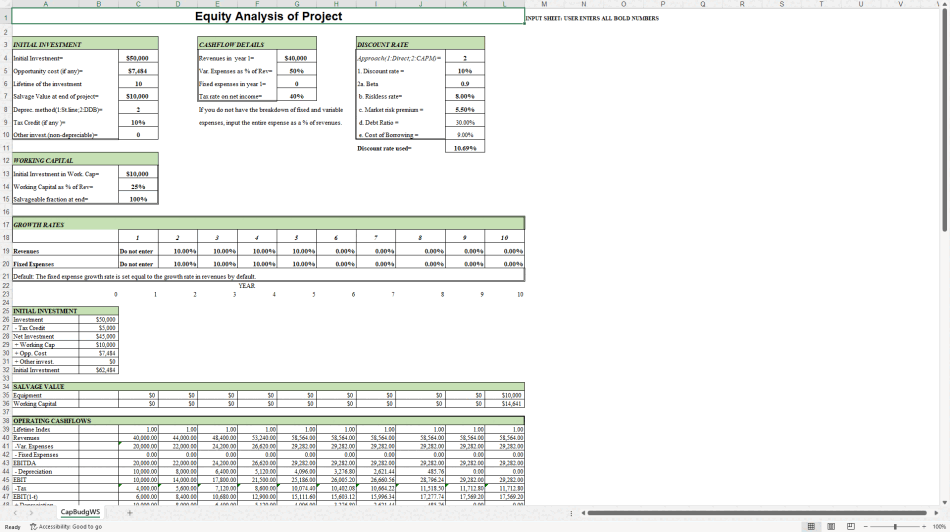

 Click main image to view in full screen.
Equity Analysis of a Project – Excel XLSX
Excel (XLSX)


BENEFITS OF THIS DOWNLOADABLE EXCEL DOCUMENT
- Provides a transparent capital budgeting model that calculates NPV, IRR and return on capital from clear project assumptions.
- Supports both straight-line and double-declining balance depreciation plus flexible revenue growth and working-capital rules.
- Allows the discount rate to be entered directly or derived from CAPM inputs for consistent risk-adjusted analysis.
FINANCIAL ANALYSIS EXCEL DESCRIPTION
Equity Analysis of a Project
Capital Budgeting Model with NPV, IRR and Return on Capital
A focused Excel model for evaluating the equity attractiveness of a capital project. Enter the initial investment, operating assumptions, growth rates and discount rate, and the workbook produces year-by-year cash flows, NPV, IRR and return on capital.
The model is designed for analysts, students and managers who need a transparent, assumption-driven project analysis rather than a black-box calculator.
WHAT THE MODEL CALCULATES
• Initial investment (including tax credit, opportunity cost, working capital and other non-depreciable investment)
• Operating cash flows over the project life (revenues, variable expenses, fixed expenses, depreciation, tax, change in working capital)
• Depreciation under straight-line or double-declining balance methods
• Salvage value of equipment and working capital at the end of the project
• Discount rate either entered directly or calculated via CAPM (beta, risk-free rate, market risk premium, debt ratio and cost of borrowing)
• Net Present Value (NPV)
• Internal Rate of Return (IRR)
• Return on Capital (ROC)
• Full year-by-year book value and depreciation schedule
KEY INPUTS (BOLD CELLS)
• Initial investment and opportunity cost
• Project lifetime and salvage value
• Depreciation method (1 = straight-line, 2 = double-declining balance)
• Tax credit rate
• Working capital (initial amount and % of revenue)
• Year-1 revenues, variable expense %, fixed expenses and tax rate
• Growth rates for revenues and fixed expenses by year
• Discount rate approach (direct or CAPM) and all CAPM components
HOW TO USE
Enter all bold numbers in the input sections at the top of the sheet.
Choose depreciation method (1 or 2) and discount-rate approach (1 = direct, 2 = CAPM).
Review the calculated initial investment, operating cash flows, discounted cash flows, NPV, IRR and ROC.
Adjust growth rates, margins or discount rate to run sensitivity scenarios.
TECHNICAL NOTES
• Single-sheet model – all calculations visible on one worksheet
• 100% formula-based (no macros)
• Compatible with Microsoft Excel 2010 and later
• Transparent structure so every cash-flow line can be audited
• Educational and practical tool for project evaluation and capital budgeting teaching
This model is ideal for quick equity analysis of a project, classroom use, or as a starting point for more detailed investment appraisal.
Got a question about the product? Email us at support@flevy.com or ask the author directly by using the "Ask the Author a Question" form. If you cannot view the preview above this document description, go here to view the large preview instead.
Source: Best Practices in Financial Analysis, Valuation Excel: Equity Analysis of a Project Excel (XLSX) Spreadsheet, MW & Digitelax Consulting
ABOUT THE AUTHOR

Welcome to the official enterprise resource hub of MW & Digitelax Consulting. Directed by a seasoned banking executive, corporate risk consultant, and financial content strategist with over 28 years of institutional leadership experience, our practice delivers deployment-ready frameworks designed to drive enterprise efficiency, enforce regulatory compliance, and eliminate systemic model risk. ... [read more]
Ask the Author a Question
You must be logged in to contact the author.




























