
 Click main image to view in full screen. Unlock all 9 preview images:
Equipment Rental Business 5-Year Financial Model – Excel XLSX
Excel (XLSX) + Excel (XLSX)


VIDEO DEMO
BENEFITS OF THIS DOWNLOADABLE EXCEL DOCUMENT
- Prepare financial projection for an equipment rental business
- Visualise projection outputs on dashboard
- Value equipment rental business
ASSET MANAGEMENT EXCEL DESCRIPTION
MODEL OVERVIEW
An equipment rental business provides machinery and equipment to customers on a short-term or long-term rental basis, typically priced per day, week or month, enabling clients to access essential equipment without the need for significant upfront capital investment. By retaining ownership of the equipment and managing maintenance, logistics and fleet utilisation, rental companies deliver flexible, cost-efficient access to machinery while generating recurring rental income and ancillary service revenues.
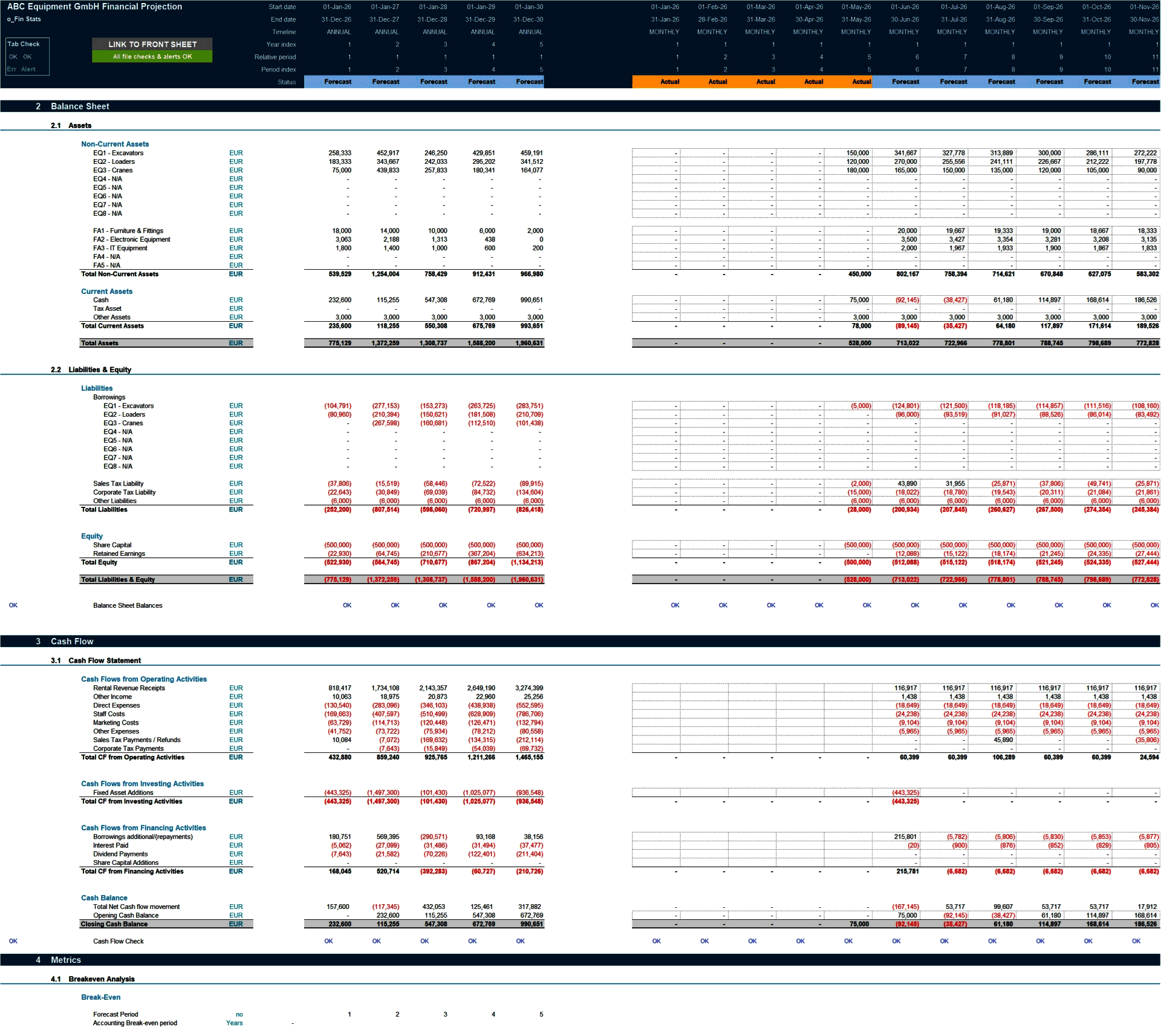
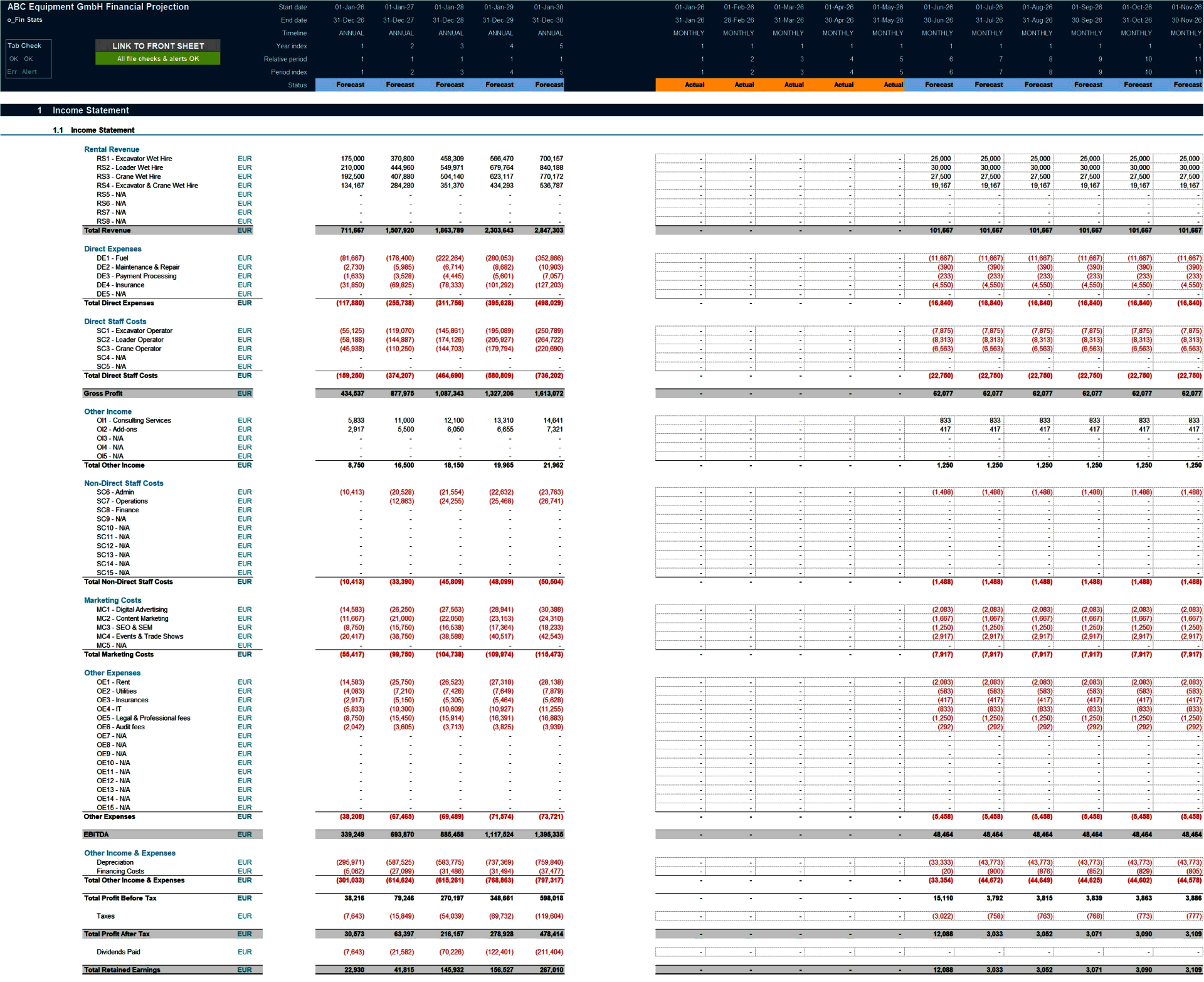
Our highly versatile and user-friendly Excel model enables the preparation of a 5-year rolling, fully integrated 3-statement financial projection (Income Statement, Balance Sheet and Cash Flow Statement) on a monthly timeline for a startup or established equipment rental business offering machinery and equipment rentals.
he model allows users to simulate up to 8 rental services and 8 equipment categories, together with other income streams, direct rental costs, staff costs, marketing costs, other operating expenses, equipment fleet capital expenditure and depreciation, borrowings, sales tax, corporate tax, and dividend distributions.
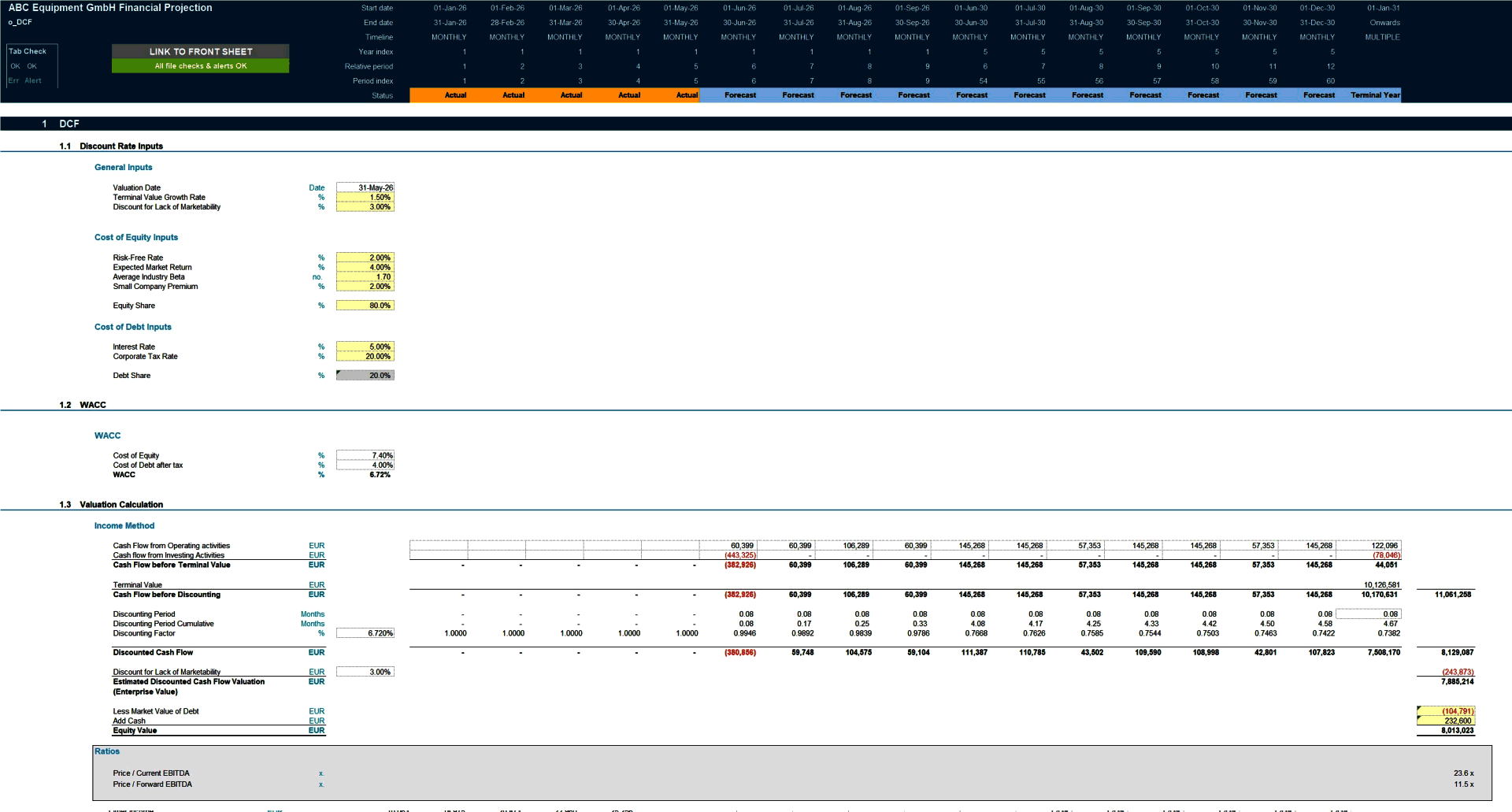
The model follows good-practice financial modelling principles and includes clear instructions, line-item explanations, built-in checks and input validations. It also incorporates a discounted cash flow (DCF) valuation based on projected cash flows, providing a robust framework for analysing fleet and unit economics, capital requirements and long-term value creation in an equipment rental business.
KEY OUTPUTS
The key outputs include:
• Projected full financial statements (Income Statement, Balance Sheet and Cash flow Statement) presented on a monthly basis across 5 years and summarised on an annual basis.
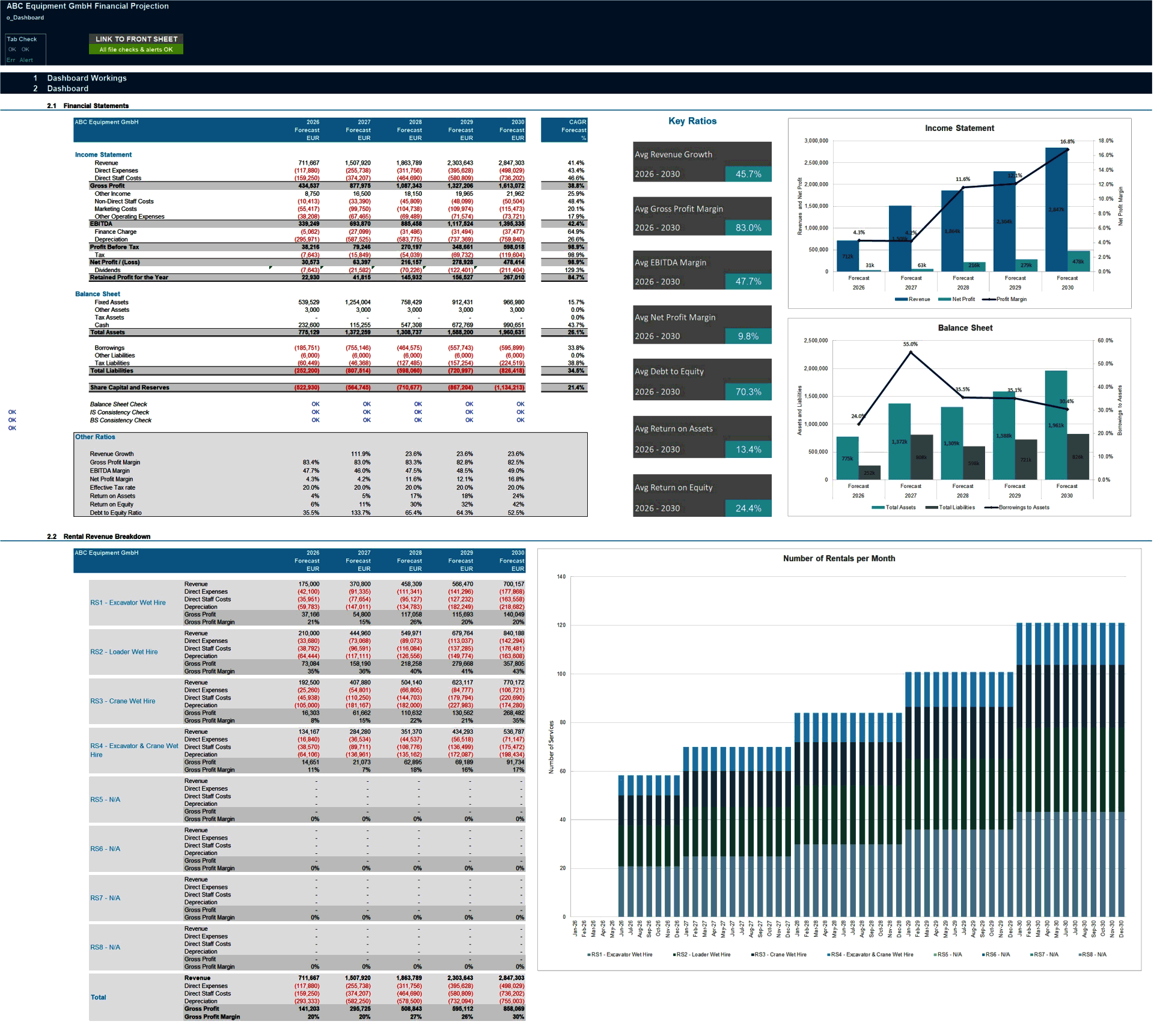
• Dashboard with:
• Summarised projected Income Statement and Balance Sheet;
• Compounded Annual Growth Rate (CAGR) for each summarised income statement and balance sheet line item;
• List of key ratios including average revenue growth, average profit margins, average return on assets and equity and average debt to equity ratio;
• Tables and Bar charts summarising revenue, direct expenses and rental volumes;
• Charts and graphs showing: cash balance by month, free cash flow generation, cash flow statement breakdown, profit margins, income statement breakdown, net cash vs net income, working capital, valuation and capital structure.
• Discounted cash flow valuation using the projected cash flow output.
• Breakeven analysis
KEY INPUTS
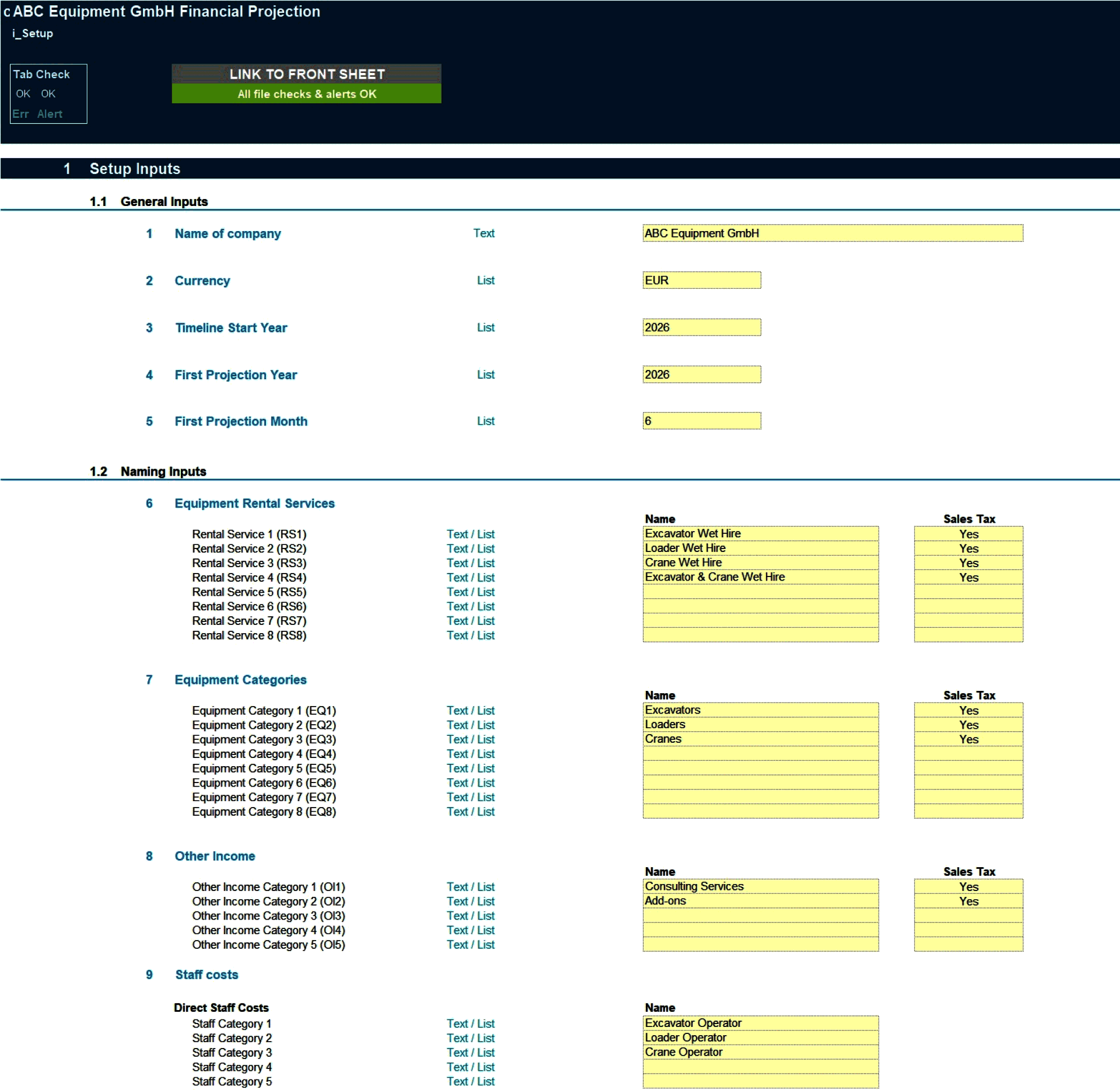
Setup Inputs:
• Name of business;
• Currency;
• First projection year and month;
• Naming for rental services, equipment categories, other income, direct expenses, staff costs, marketing costs, other operating costs, fixed assets and borrowings;
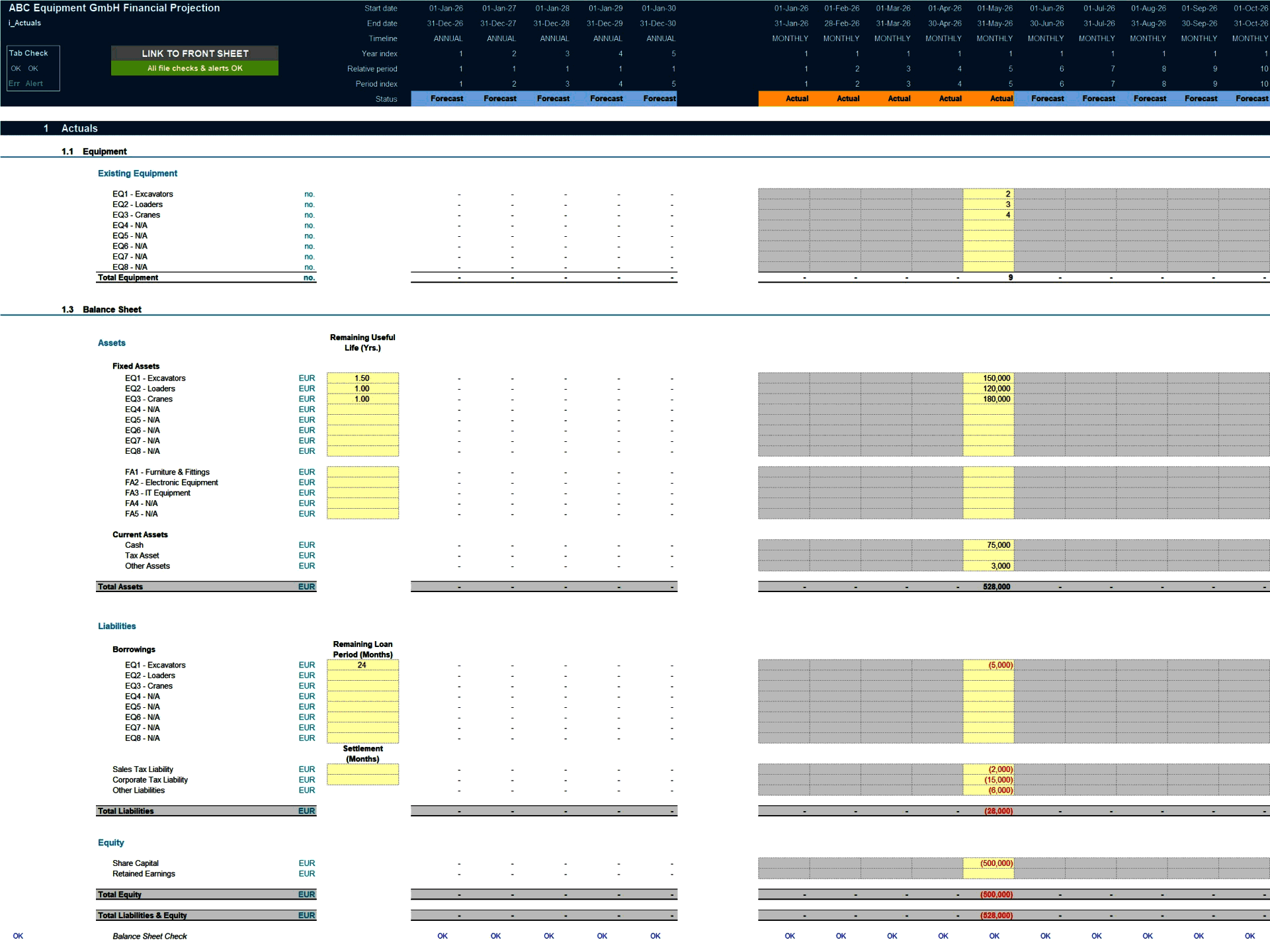
Actuals Inputs:
• Opening balance sheet (for existing businesses);
• Income Statement actuals (for trend analysis);
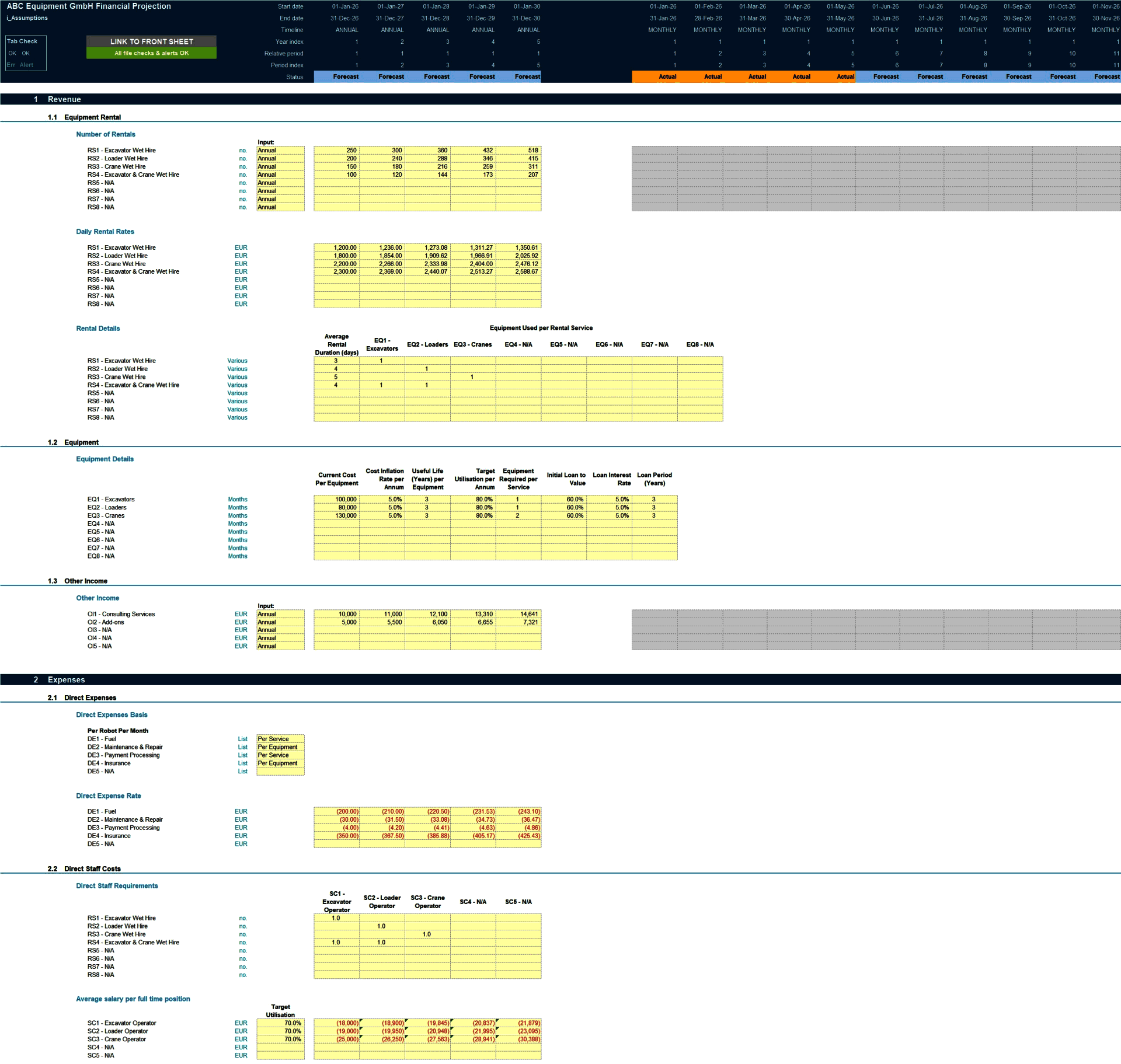
Projection Inputs:
• Equipment rental services including number of rentals, daily rental rates, equipment per rental, average rental days, direct staff per rental service;
• Equipment inputs including cost per equipment, annual inflation rate, useful life, target utilisation, number of equipment required per service, initial loan to value, loan interest rate and loan period.
• Direct expenses calculated based on number of rentals, amount per equipment, or amount per annum basis.
• Non-Direct Staff cost inputs including staff numbers, average salary per full time position, average employer's social security percentage of salary, average annual bonus and bonus payment months.
• Other income and costs inputs including marketing costs and other operating costs;
• Sales and corporate tax inputs including rate and payment periods;
• Dividend inputs including amount (percentage of retained earnings) and frequency;
• Fixed assets including addition amounts and useful life;
• Borrowings including addition amounts, interest rate and maturity date;
• Share capital additions;
• Discount rate inputs (for valuation calculation).
MODEL STRUCTURE
The model comprises of 9 tabs split into input ('i_'), calculation ('c_'), output ('o_') and system tabs. The tabs to be populated by the user are the input tabs ('i_Setup', ‘i_Actuals' and 'i_Assumptions'). The calculation tab uses the user-defined inputs to calculate and produce the projection outputs which are presented in 'o_Fin Stats', ‘o_Dashboard' and ‘o_DCF'.
KEY FEATURES
• The model contains a flexible timeline that allows for a mix of actual and forecast periods across a 5-year period. This allows projections to be easily rolled forward as forecast periods become actual period;
• Timeline is split on a monthly basis and summarised on an annual basis;
• The model is not password protected and can be modified as required following download;
• The model allows for the following number of underlying categories for each line item (these can be easily expanded if required):
• Rental services – 8 types;
• Equipment categories – 8 types;
• Other income categories – 5 categories;
• Direct expenses – 5 categories;
• Staff costs – 15 categories (5 Direct and 10 Non-Direct);
• Marketing costs – 5 categories;
• Other expenses – 15 categories;
• Fixed assets – 5 categories;
• Borrowings – 3 facilities
• Apart from projecting revenue and costs the model includes the possibility to model fixed assets, borrowings (amortising), dividends and corporate tax;
• Business name, currency, starting projection period are fully customisable;
• Revenue, cost and fixed asset descriptions are fully customisable;
• The model included an integrated discounted cash flow valuation using the projected cash flow outputs;
• The model includes instructions, line-item explanations, checks and input validations to help ensure input fields are populated accurately;
• The model includes a checks dashboard which summarises all the checks included in the various tabs making it easier to identify any errors.
SUPPORT / MODIFICATIONS
We are keen to ensure our customers are satisfied and find the models useful for their financial projection needs. Our models are developed with the user in mind and include instructions, line-item explanations, checks and input validations to ensure they are as user-friendly and easy to use as possible without requiring extensive knowledge of Microsoft Excel, finance or accounting. If any questions do arise, we are more than happy to assist. We are also happy to support with any be-spoke modifications you may require to the models to better suit your business needs. To get in touch, please send us a message through the website or contact us on:
We are also always keen to receive feedback so please do let us know what you think of our models by sending us a message or submitting a review.
ABOUT PROJECTIFY
We are financial modelling professionals with experience working in big 4 business modelling teams and strong experience supporting businesses with their financial modelling and decision support needs. Our aim is to provide robust and easy-to-use tools that follow good practice financial modelling guidelines and assist individuals and businesses with their financial projection and analysis requirements.
Got a question about the product? Email us at support@flevy.com or ask the author directly by using the "Ask the Author a Question" form. If you cannot view the preview above this document description, go here to view the large preview instead.
TOPIC FAQ
What core inputs are required to forecast an equipment rental company's revenues and costs?
Core inputs include rental service demand (number of rentals, average rental days, daily rates), equipment parameters (cost per unit, useful life, utilisation, number required), direct and non-direct staff costs, marketing and other operating costs, tax and dividend policies, and borrowings and discount rate inputs, supporting up to 8 rental services and 8 equipment categories.How should I capture fleet capital expenditure and depreciation in a rental model?
Model fixed asset additions and equipment-specific inputs such as cost per equipment, useful life and target utilisation; use these to schedule capex additions and straight-line or defined depreciation across the asset useful life, with fixed assets and addition amounts captured in the fixed-asset inputs and useful-life fields.What valuation approach is typical for an equipment rental business model?
A discounted cash flow (DCF) valuation using projected unlevered or levered cash flows is typical; the model integrates a DCF calculated from its projected cash flow outputs, enabling valuation analysis based on the 5-year projection and discount rate inputs.What are the expected output reports from a 5-year rental financial model?
Expected outputs are fully integrated monthly Income Statement, Balance Sheet and Cash Flow Statement across 5 years, a dashboard with charts and key ratios (growth, margins, ROA/ROE, debt ratios), breakeven analysis, and a DCF valuation built from the projection outputs.What features should I prioritize when choosing a financial model template for equipment rental?
Prioritise a model with monthly-to-annual timelines, ability to mix actuals and forecasts, clear input tabs and checks, editable not password-protected structure, multi-category support (e.g., 8 rental services), amortising borrowings and an integrated DCF; also check for a checks dashboard and user instructions.How should I assess the value-for-money of a pre-built rental financial model?
Compare functionality against your needs: whether it provides a 5-year rolling, monthly 3-statement projection, supports your number of service and equipment categories, includes borrowings and DCF, and offers checks and documentation; features like 8 rental services and an included DCF inform relative value.I need to size external financing for a fleet expansion—which model components help estimate funding needs?
Use opening balance sheet inputs, equipment capex schedules, initial loan-to-value, borrowings inputs (addition amounts, interest, maturity) and cash flow projections to size external funding and repayment capacity; the model supports amortising borrowings and up to 3 borrowing facilities to analyse funding needs.How can I combine historicals with projections after acquiring another rental business?
Import income statement and opening balance sheet actuals into the actuals input tab, then use the model’s flexible timeline to mix actual and forecast periods and roll forward the 5-year monthly projection to reflect post-acquisition performance across the integrated statements.Source: Best Practices in Asset Management, Integrated Financial Model Excel: Equipment Rental Business 5-Year Financial Model Excel (XLSX) Spreadsheet, Projectify
ABOUT THE AUTHOR
We are financial modelling professionals, accountants and CFA charterholders with experience working within Deloitte supporting clients with their financial planning and decision support needs. Our aim is to provide robust and easy-to-use financial models that follow good practice financial modelling guidelines and assist individuals and businesses with key financial planning and analysis ... [read more]
Ask the Author a Question
You must be logged in to contact the author.




























