
 Click main image to view in full screen.
AI-DLC RACI & Governance Gate Design Template – Excel XLSX
Excel (XLSX) + supplemental PDF


BENEFITS OF THIS DOWNLOADABLE EXCEL DOCUMENT
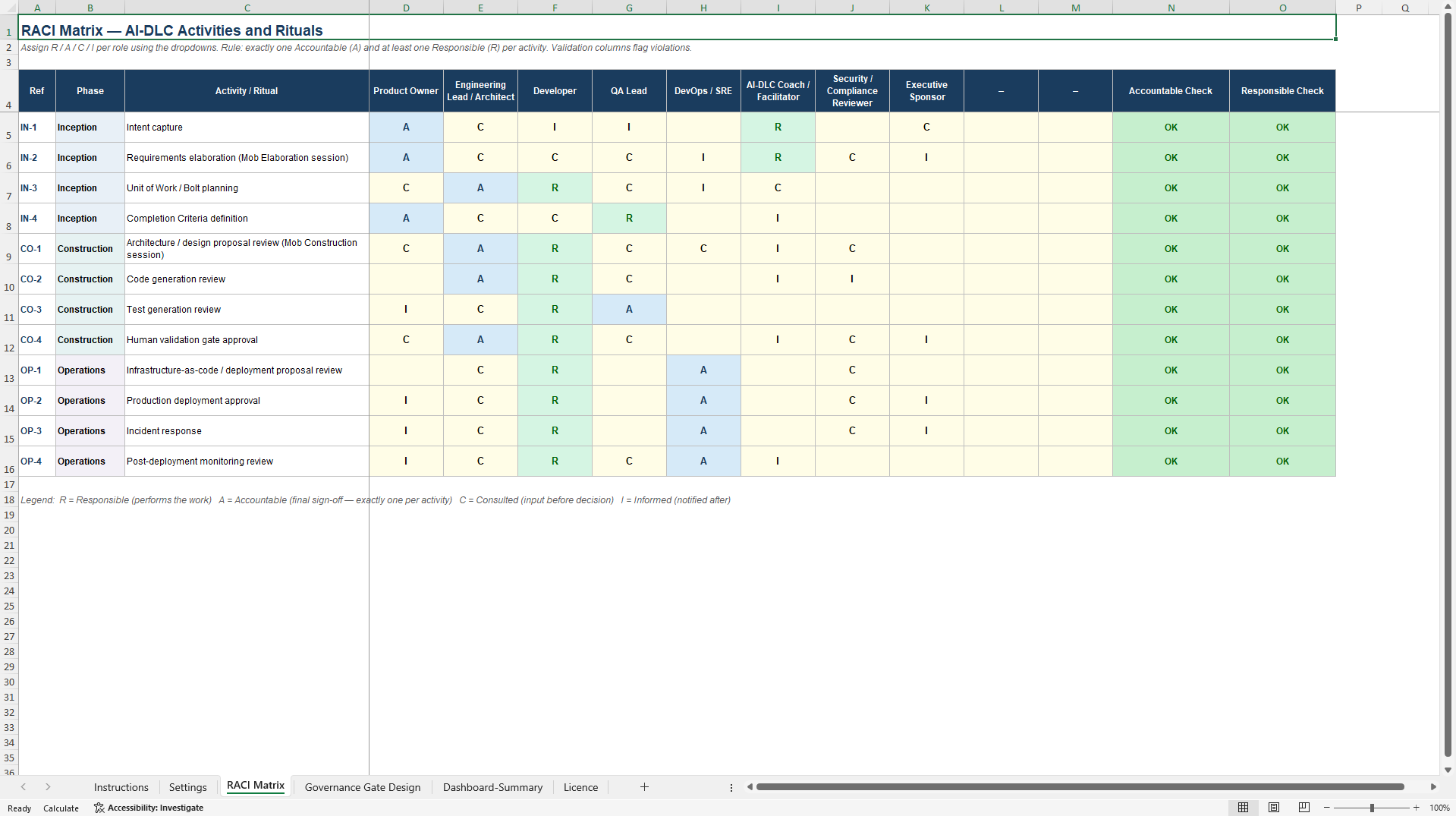
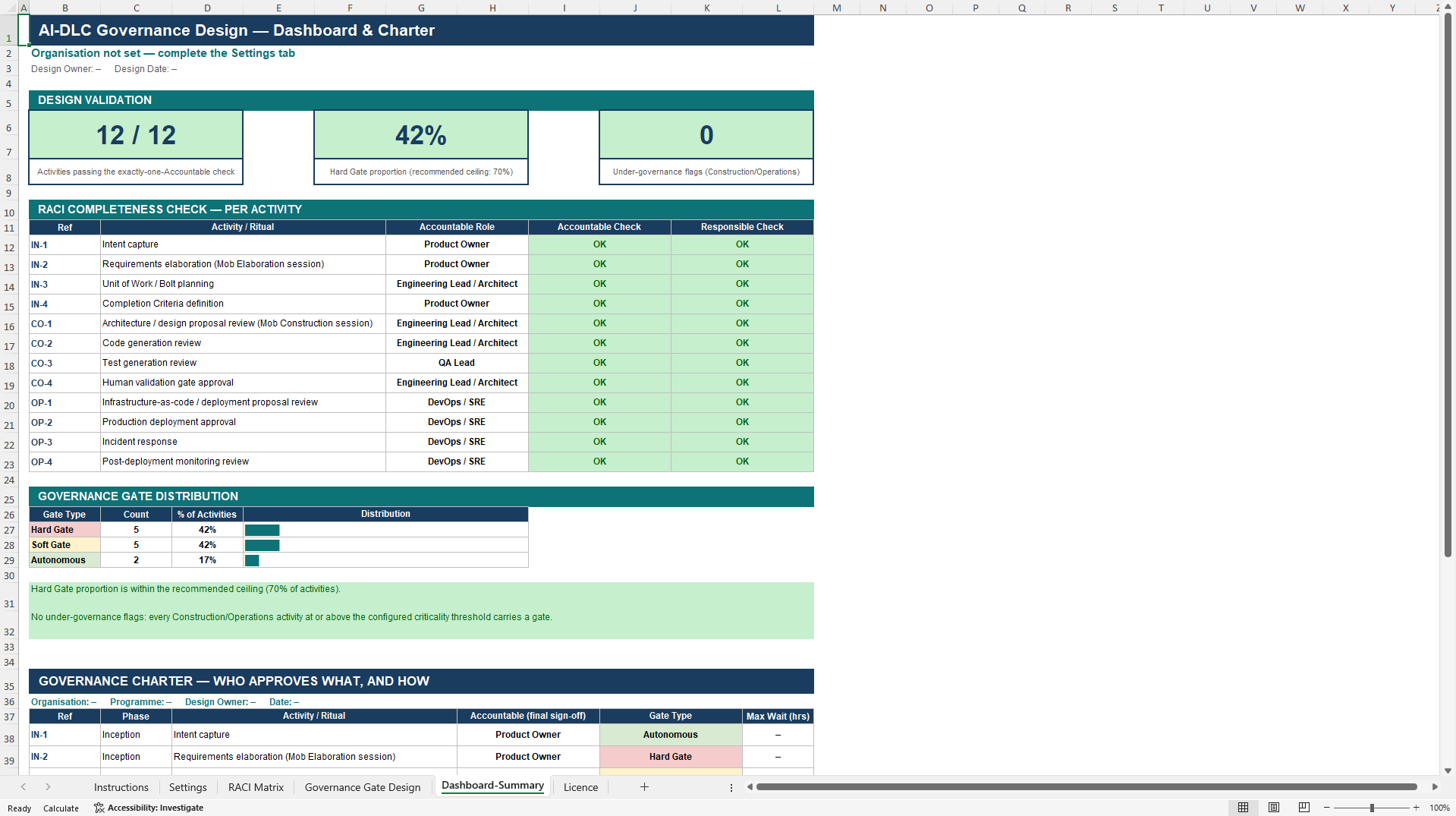
- An automated exactly-one-Accountable rule checks every one of the twelve pre-seeded activities in real time, flagging any row with zero or multiple accountable owners before the design is circulated.
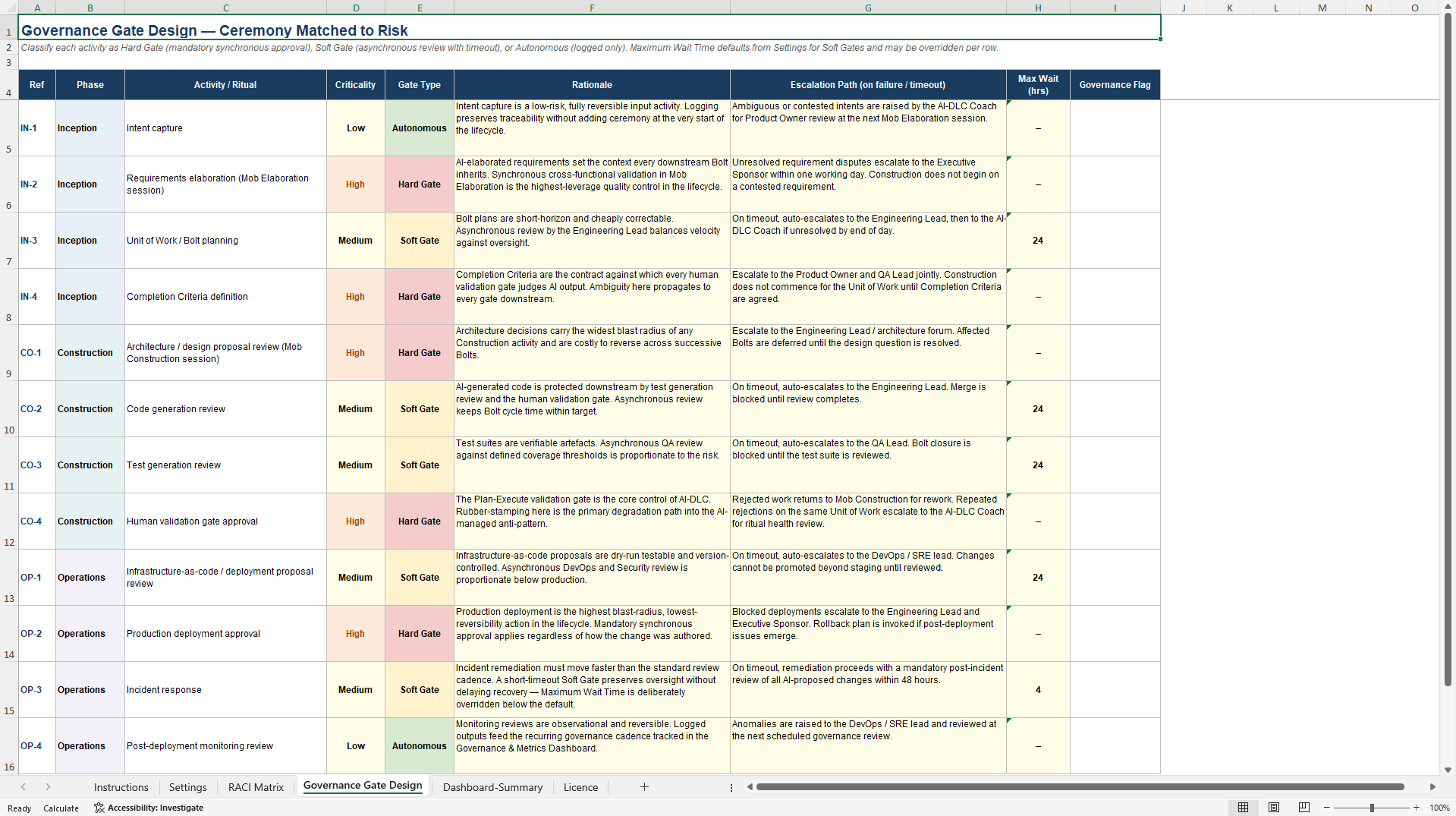
- Each activity is classified as a Hard Gate, Soft Gate, or Autonomous action based on blast radius and reversibility, with the Dashboard automatically flagging over-ceremony (Hard Gates above a recommended ceiling) and under-governance (high-cr
- The Dashboard/Summary tab exports a clean, landscape Governance Charter listing every activity's accountable role, gate type, and maximum wait time, ready to print or circulate as the team's single source of truth.
ARTIFICIAL INTELLIGENCE EXCEL DESCRIPTION
Every AI-generated output either gets a synchronous human gate, or gates quietly evaporate under delivery pressure until review exists in name only. Most teams adopting AI-assisted delivery never make an explicit, activity-by-activity decision between the two – they inherit whichever default their tooling, or their most cautious reviewer, happens to apply. The result is a process either so heavy it invites people to route around it, or so thin that nobody can say with confidence who actually signed off.
This Excel workbook makes that decision explicit and checks it automatically. It produces two linked artefacts against the same twelve pre-seeded activities spanning Inception, Construction, and Operations: a RACI matrix assigning Responsible, Accountable, Consulted, and Informed roles by dropdown, and a Governance Gate Design that classifies each activity as a Hard Gate, Soft Gate, or Autonomous action, based on blast radius and reversibility rather than how the work happened to be produced. Two automated checks run underneath: an exactly-one-Accountable rule flagging any activity with zero or multiple accountable owners, and a Responsible check flagging any activity nobody is performing.
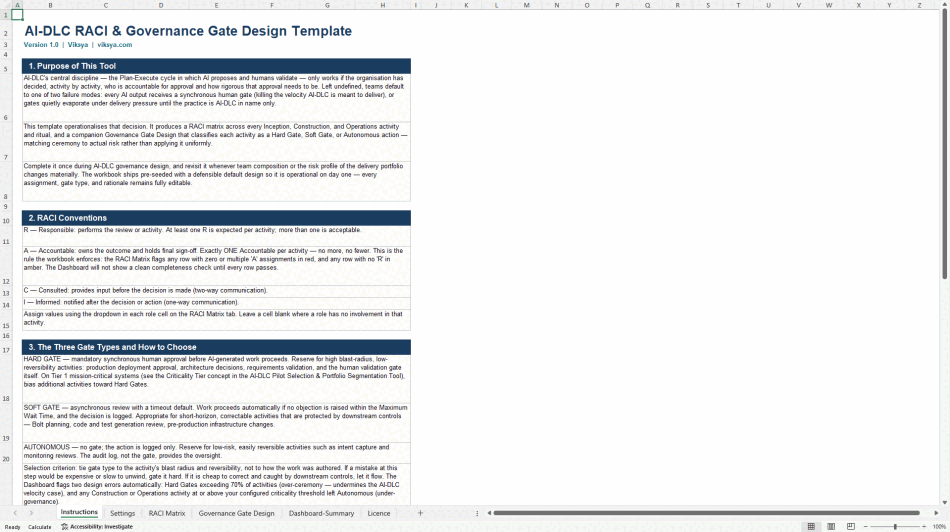
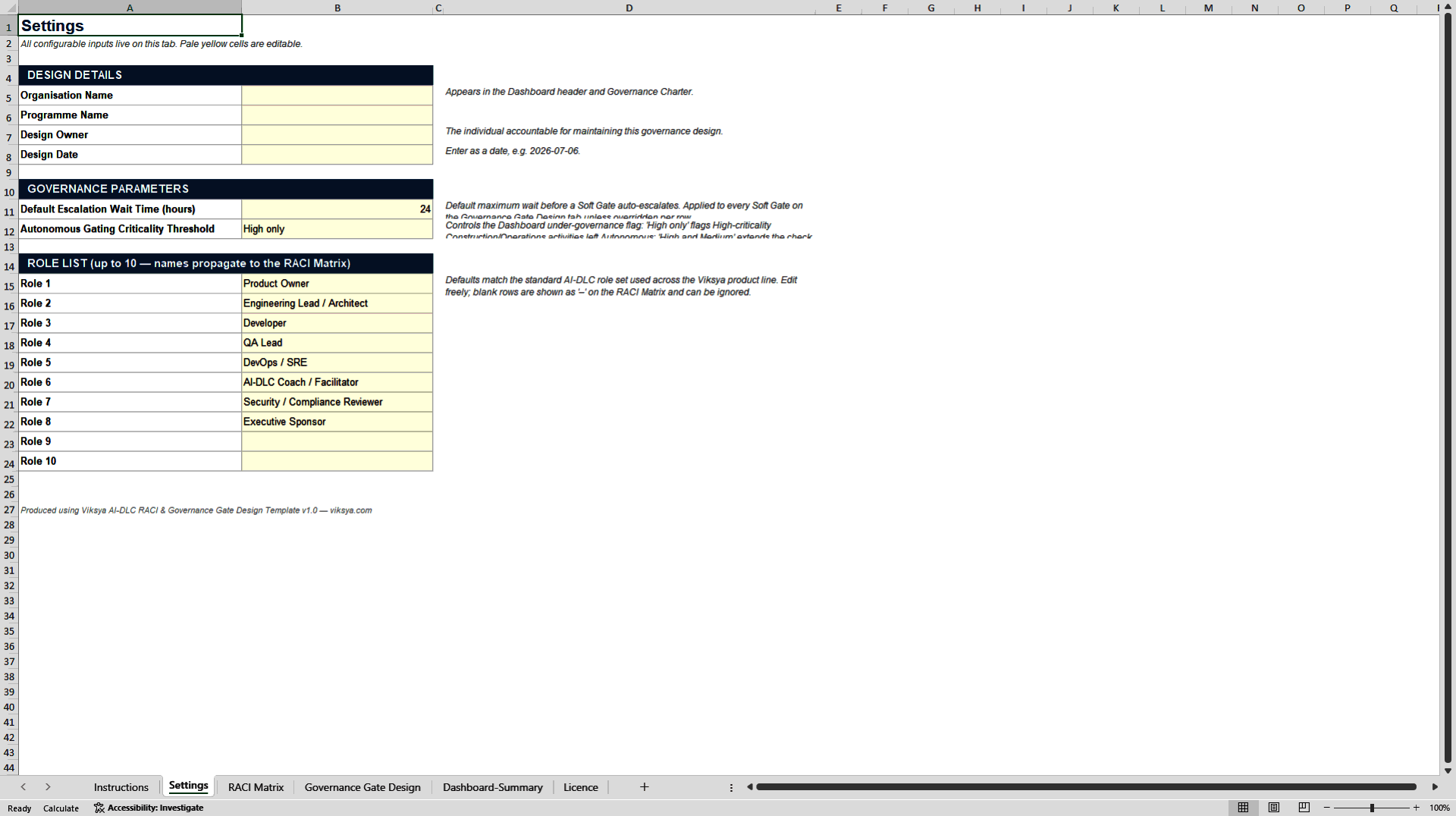
The workbook spans five tabs. Instructions is reference-only, covering RACI conventions and how to choose between gate types. Settings holds design details, a default escalation wait time for Soft Gates, an adjustable under-governance threshold, and up to ten editable role names that propagate automatically to the RACI Matrix. RACI Matrix and Governance Gate Design carry the twelve activities themselves, each editable with a criticality rating, rationale, and escalation path. Dashboard/Summary auto-calculates a completeness tile, a Hard Gate proportion against a recommended ceiling, and an under-governance flag count, then exports a landscape Governance Charter – accountable role, gate type, and maximum wait time per activity – formatted for print or PDF circulation.
Built for CIOs and programme managers, engineering leads and architects, DevOps/SRE and QA leads, and consultants running a governance design session – anyone who needs a defensible, on-record answer for who approves what and how tightly. The pre-seeded design is a working starting point: teams typically walk through all twelve activities in one session with every role represented, adjust Accountable assignments and gate classifications to their own risk posture, then export and formally adopt the resulting charter.
Unlike a scored assessment, nothing here is rated on a numeric scale – it is a structured design instrument, meant to be completed once and formally revisited whenever team composition or portfolio risk changes materially.
Format: Excel (.xlsx), fully formula-based, no macros or VBA, requires Excel 2016 or later (desktop or Microsoft 365). A full user guide is included. Sheet protection prevents accidental edits only – there is no password lock, and every input cell stays editable.
Published by Viksya. Seller licence terms are included within the document and take precedence over platform defaults
Got a question about the product? Email us at support@flevy.com or ask the author directly by using the "Ask the Author a Question" form. If you cannot view the preview above this document description, go here to view the large preview instead.
Source: Best Practices in Artificial Intelligence, Governance Excel: AI-DLC RACI & Governance Gate Design Template Excel (XLSX) Spreadsheet, Viksya
ABOUT THE AUTHOR

Viksya builds decision frameworks for leaders who answer to a board, not a hunch. Our Excel workbooks and playbooks are developed by a transformation leader with hands-on experience directing $100M+ AI and cloud portfolios inside large enterprises -- the same instruments used to justify, select, estimate, and govern real programmes, productized. The catalog spans three tracks: AI Transformation ... [read more]
Ask the Author a Question
You must be logged in to contact the author.




























