


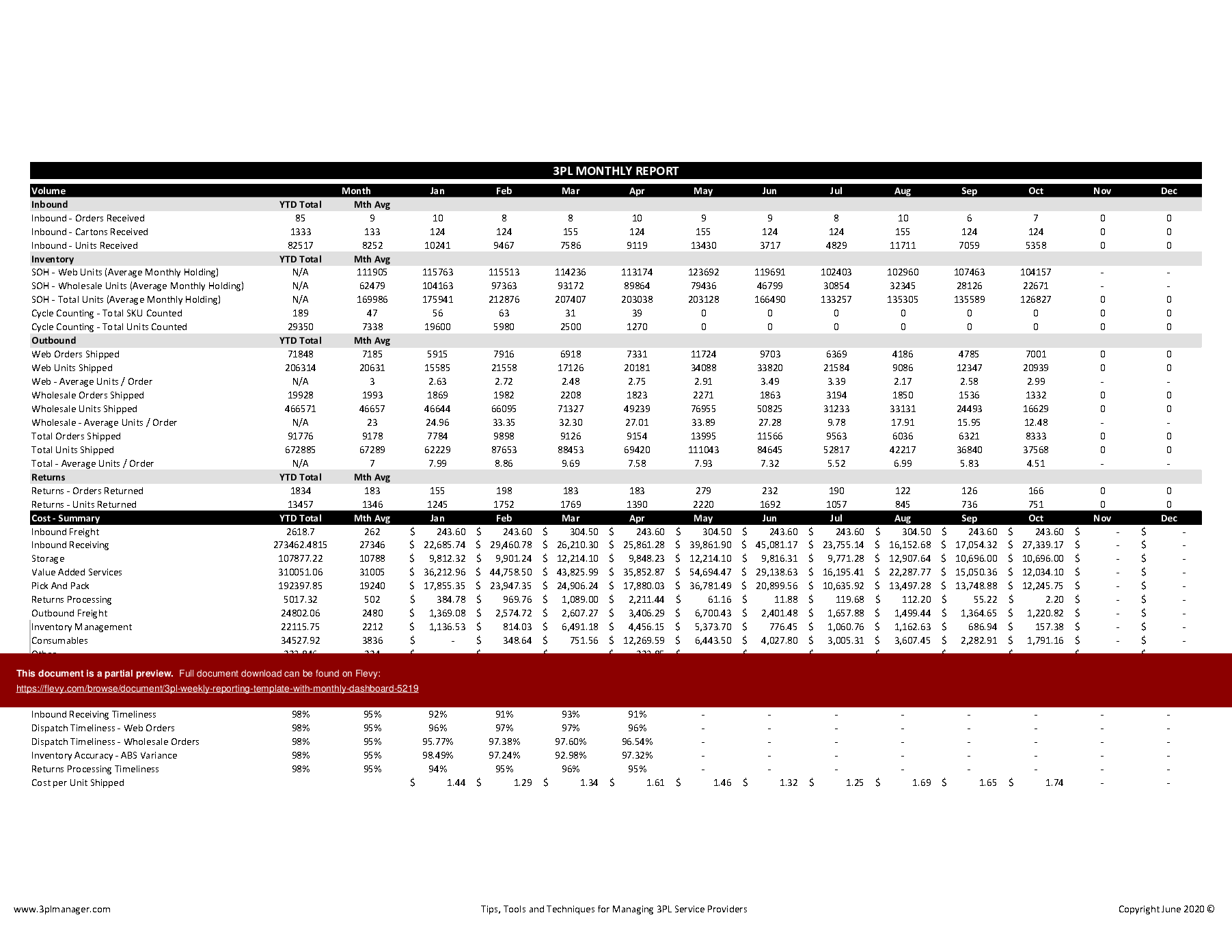

 Click main image to view in full screen. Unlock all 10 preview images:
3PL Weekly Reporting Template with Monthly Dashboard – Excel XLSX
Excel (XLSX) + supplemental PDF


BENEFITS OF THIS DOWNLOADABLE EXCEL DOCUMENT
- Tested process and content
- Delivered unlocked and easily customisable to suit your specific needs
- No installation, no macros, no VBA and no hidden formulas or worksheets
LOGISTICS EXCEL DESCRIPTION
The Weekly 3PL Reporting Template with Monthly Summary and Dashboard is an advanced Microsoft Excel spreadsheet that is designed to provide a template for the input of weekly activity and cost data for a 3PL operated warehouse.
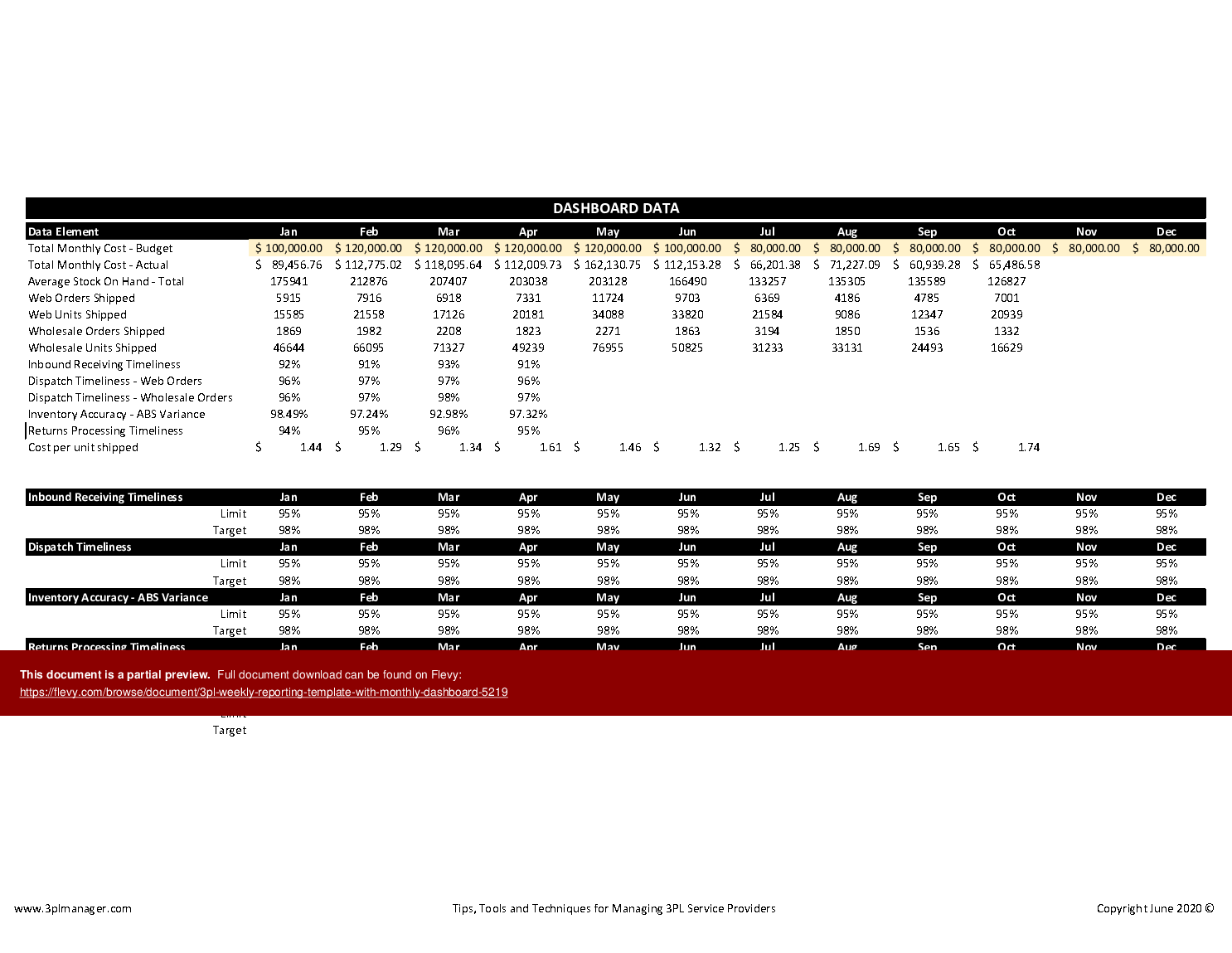
The weekly data automatically creates a printable consolidated monthly report and a set of charts that provide a printable visual dashboard of the monthly volume , cost and operational performance against a predefined set of key performance indicators.
The report can be used to monitor 3PL volume, cost and operational performance and to facilitate a weekly or monthly 3PL review.
This spreadsheet has the following benefits:
• No need to waste time and money reinventing the wheel this spreadsheet has evolved from many years of practical use and ongoing development by a logistics industry expert
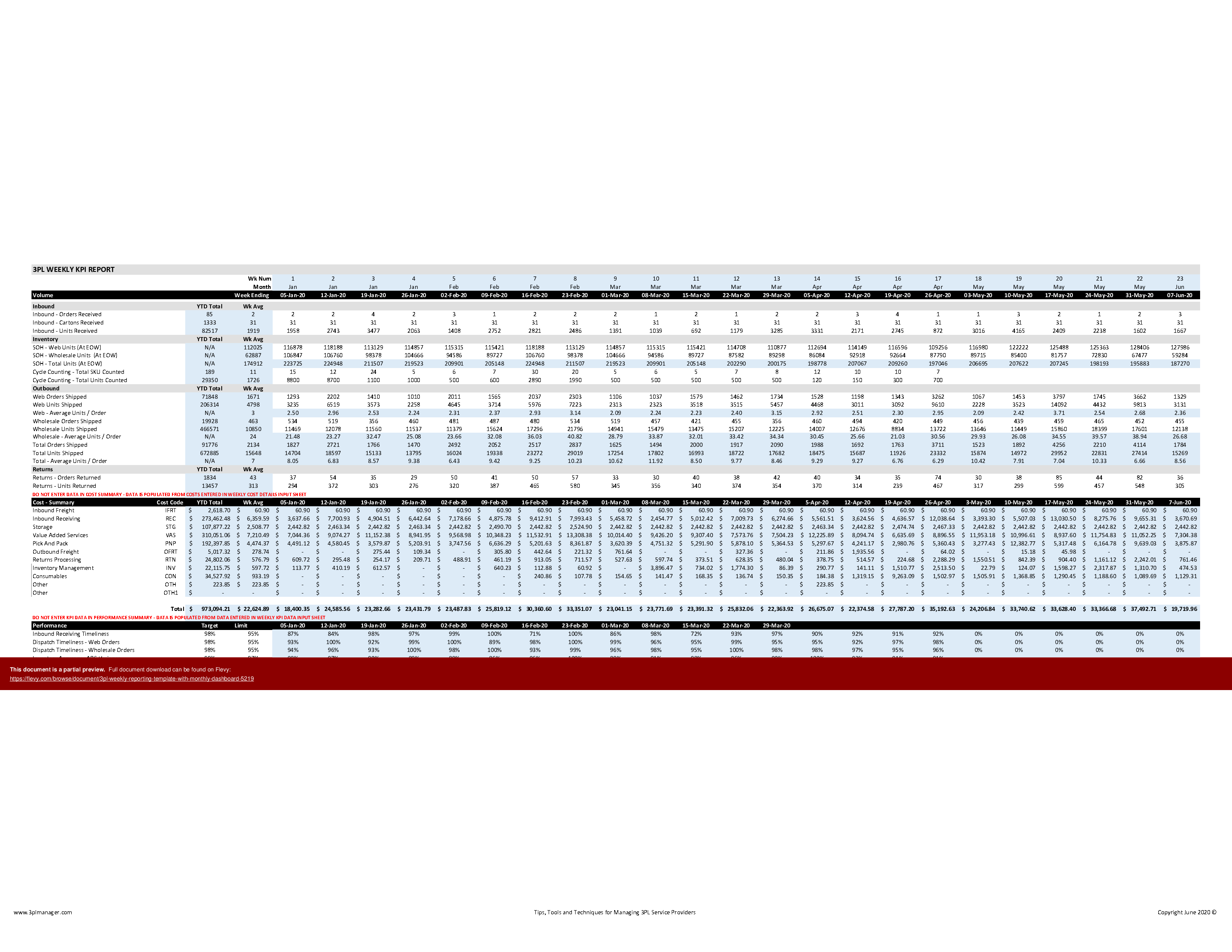
• Dynamically updates weekly and monthly totals and year to date total and averages for activity , cost and KPI performance
• Automatically creates printable monthly report and dashboard
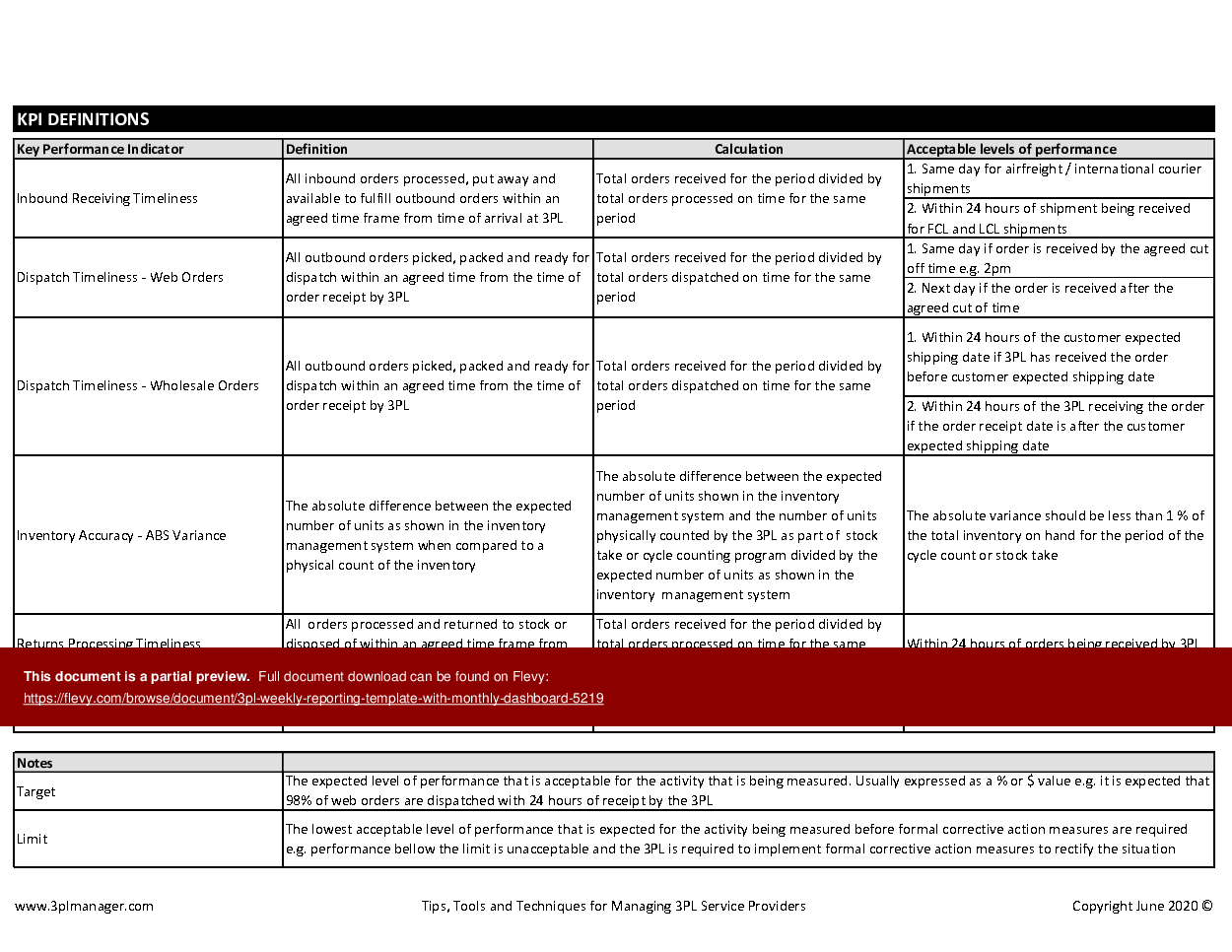
• Includes KPI definitions, calculation methodology and suggestions for acceptable levels of performance
• Delivered unlocked and easily customisable to suit your specific needs
• No installation, no macros, no VBA and no hidden formulas or worksheets
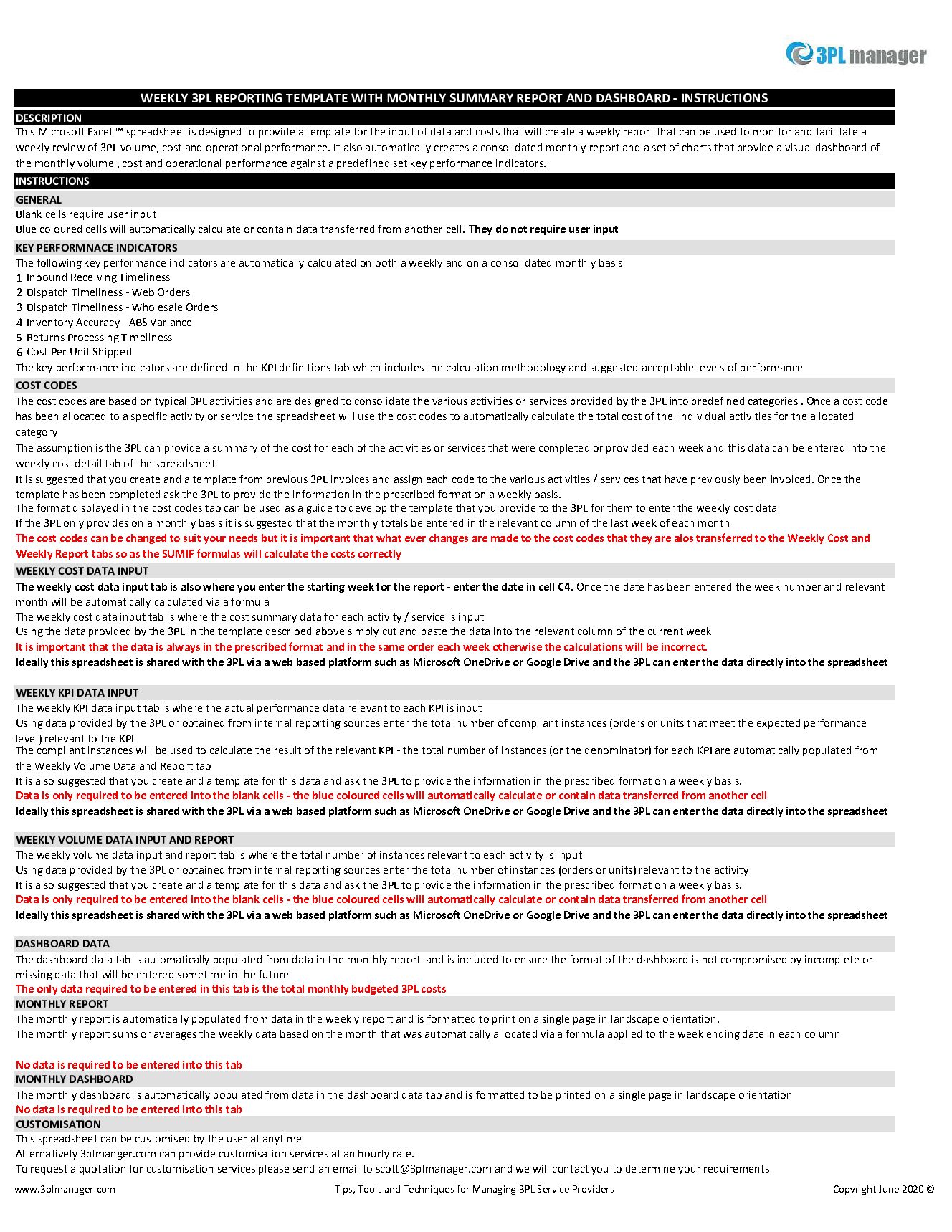
• Comes with separate printable instructions sheet
The Weekly 3PL Reporting Template with Monthly Summary and Dashboard spreadsheet comes with the following features:
CLEAR INSTRUCTIONS
An instructions tab that provides clear and concise guidelines on how to use The Weekly 3PL.
FLEXIBLE USER ENTRY
The Weekly 3PL Reporting Template with Monthly Summary and Dashboard allows for easy user entry of:
• Summary transaction data for inbound orders, cartons and units received
• Summary inventory data for stock on hand and cycle counting activity for multiple channels
• Summary transaction data for outbound orders and units shipped for multiple channels
• Summary transaction data for orders and units returned
• Defined summary cost categories for 3PL activities and services
• Allocation of 3PL activities and services to summary cost categories
• Detailed cost data for all activities and services provided by your 3PL service provider
• Summary KPI data for for monitoring 3PL operations – inbound receiving timeliness, dispatch timeliness , inventory accuracy and returns processing timeliness
• Forecast data for the expected monthly total cost budget
AUTOMATIC CALCULATIONS
The Weekly 3PL Reporting Template with Monthly Summary and Dashboard automatically calculates:
• Combined weekly and monthly totals for multiple channels
• Average weekly and monthly units and orders shipped
• Year to date totals and averages for each line
• Weekly and monthly summary of costs by category
• Weekly and monthly KPI performance
• Printable monthly report based on consolidated weekly data
• Printable monthly dashboard based on consolidated weekly data
The template includes comprehensive KPI definitions and cost codes, ensuring clarity in performance metrics and expense tracking. The dashboard visualizations provide an at-a-glance view of key operational metrics, facilitating quick decision-making.
Got a question about the product? Email us at support@flevy.com or ask the author directly by using the "Ask the Author a Question" form. If you cannot view the preview above this document description, go here to view the large preview instead.
TOPIC FAQ
What metrics should I track to monitor a 3PL-operated warehouse effectively?
Focus on volume (orders, cartons, units), cost by activity, and operational KPIs such as inbound receiving timeliness, dispatch timeliness, inventory accuracy, and returns processing timeliness. Tracking these alongside year-to-date totals and averages provides a complete operational view, including the 4 named KPIs.How can I consolidate weekly 3PL activity into a monthly report without manual aggregation?
Use a template that accepts weekly transaction, inventory, KPI and cost inputs and automatically creates consolidated monthly totals, printable reports, and dashboard charts. Flevy's Weekly 3PL Reporting Template with Monthly Summary and Dashboard performs these automatic consolidations into a printable monthly report and dashboard.What cost tracking approach works for 3PL reporting across multiple channels?
Define summary cost categories, allocate 3PL activities and services to those categories, and capture detailed cost lines for each service. This supports weekly and monthly summaries and a forecast comparison against expected monthly total cost budgets, using defined summary cost categories and detailed cost data.How should I define and document KPIs for consistent 3PL performance reviews?
Use clear KPI definitions, documented calculation methodology, and suggested acceptable performance levels so all parties measure identically. A template that includes these elements ensures consistency in reporting and review, including KPI definitions and suggested acceptable levels of performance.What features should I prioritize if my team has limited Excel skills?
Prioritize a template with a clear instructions tab, unlocked and easily customizable sheets, and no macros or VBA so users can adjust without advanced skills. These features reduce setup barriers and provide an instructions sheet, unlocked workbook, and no-macro operation.How does a ready-made 3PL reporting spreadsheet reduce development time compared to building one from scratch?
Ready templates remove the need to design formulas, dashboards, and KPI calculations by providing built-in automatic calculations for combined weekly/monthly totals, year-to-date averages, and printable visuals. The time saved is realized through automatic calculations for weekly and monthly totals and KPI performance.For a weekly 3PL review, which specific data points should I collect from the provider each week?
Collect summary inbound orders, cartons and units received; stock-on-hand and cycle count results; outbound orders and units shipped; returns transaction data; detailed cost lines; and KPI metrics such as timeliness and accuracy. These inputs feed into summary transaction, inventory, cost, and KPI data.How can I use weekly inputs to forecast and monitor monthly 3PL costs?
Enter weekly detailed cost data and forecast figures into the template so it dynamically aggregates weekly costs into monthly totals and compares them to the expected monthly total cost budget. This enables month-to-date and forecast monitoring using the forecast data for monthly budget comparison.Source: Best Practices in Logistics, 3PL Excel: 3PL Weekly Reporting Template with Monthly Dashboard Excel (XLSX) Spreadsheet, 3PL Manager